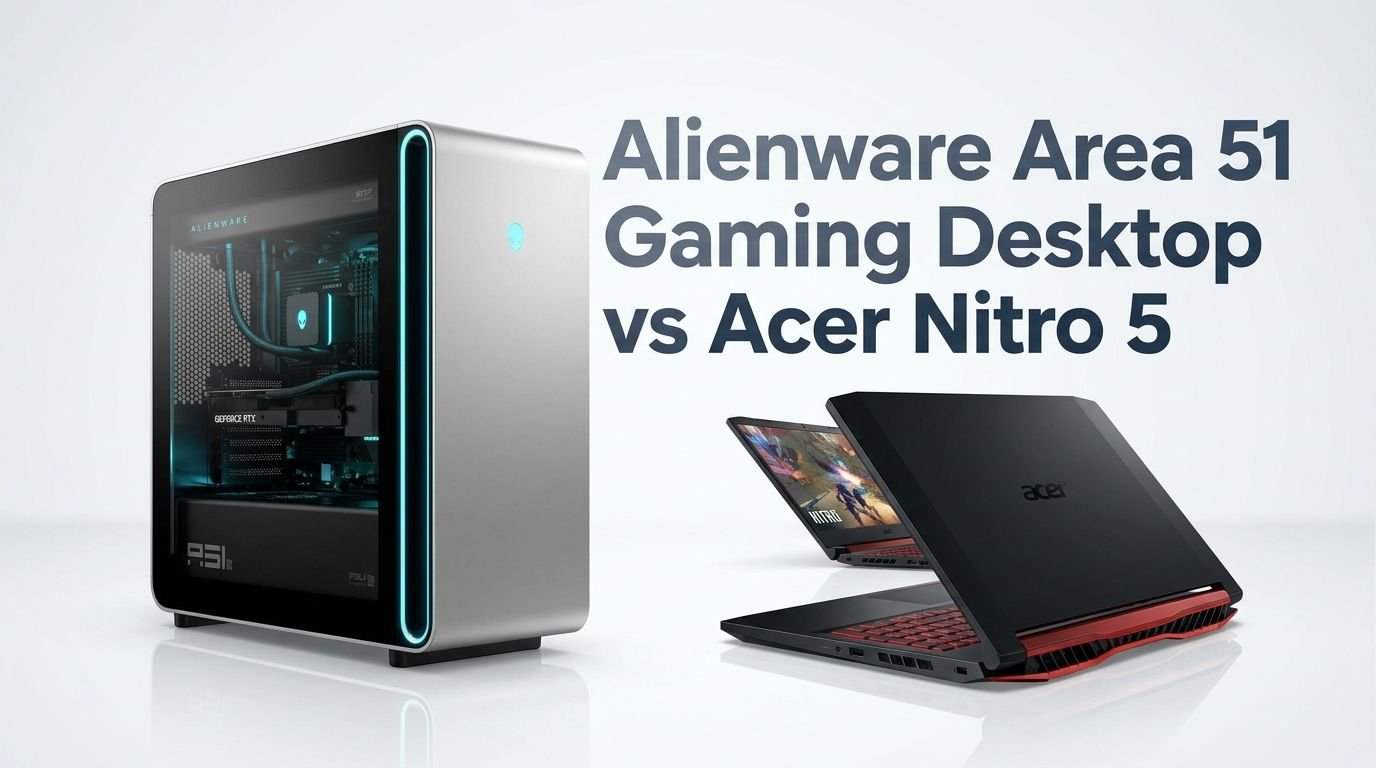
Alienware Area 51 Gaming Desktop vs Acer Nitro 5
Choosing between a high end gaming desktop and a budget gaming laptop can feel like comparing a sports car to a reliable sedan. Both get the job done, but they do it very differently.
The Alienware Area 51 gaming desktop and the Acer Nitro 5 gaming laptop sit at opposite ends of the gaming spectrum. One is a massive powerhouse built for extreme 4K performance. The other is a portable, wallet friendly machine that handles 1080p gaming with ease.
So which one should you actually buy? The answer depends on your budget, your gaming goals, and whether you need portability or pure raw power.
Key Takeaways
- The Alienware Area 51 is a premium gaming desktop that starts around $3,400 and can exceed $5,000. It features an Intel Core Ultra 9 285K processor, up to an NVIDIA RTX 5090 GPU, 32GB DDR5 RAM, and a 2TB NVMe SSD. This machine targets gamers who want the absolute best frame rates at 4K resolution.
- The Acer Nitro 5 is a budget gaming laptop priced under $800. It packs an Intel Core i5 12500H, NVIDIA RTX 3050 Ti, 16GB DDR4 RAM, and a 512GB SSD. It delivers solid 1080p gaming at medium to high settings for casual and mid tier gamers.
- Portability is a major differentiator. The Acer Nitro 5 weighs about 5.5 pounds and goes anywhere with you. The Alienware Area 51 weighs nearly 80 pounds and stays on your desk.
- The price gap between these two machines is enormous. You could buy four or five Acer Nitro 5 laptops for the price of one fully loaded Alienware Area 51 desktop.
- Upgradeability favors the Alienware Area 51. It uses standard ATX parts, so you can swap out the GPU, CPU, RAM, and storage over time. The Acer Nitro 5 allows RAM and SSD upgrades but nothing else.
- Both machines serve different audiences. Pick the Alienware if you want top tier desktop performance. Pick the Acer Nitro 5 if you want affordable, portable gaming on the go.
Alienware Area 51 Gaming Desktop Overview

The Alienware Area 51 is Dell’s flagship gaming desktop for 2025 and 2026. It received a complete redesign with a new 80 liter chassis that looks absolutely stunning. The tower features a tempered glass side panel, customizable RGB lighting, and a sleek dark exterior that screams premium quality.
Under the hood, this desktop packs serious power. The base configuration starts with an Intel Core Ultra 9 285K processor with 24 cores and 76MB of total cache. It pairs this with an NVIDIA GeForce RTX 5080 16GB GDDR7 graphics card. You also get 32GB of DDR5 6400 MHz RAM and a 2TB NVMe SSD right out of the box.
Alienware also offers AMD Ryzen configurations with the Ryzen 7 9800X3D or the newer Ryzen 7 9850X3D processor. These AMD versions start at $4,349. The highest end configurations with an RTX 5090 can push past $5,500, making this a serious investment.
Pros:
- Extreme gaming performance at 4K and beyond
- 360mm liquid cooling keeps temperatures low and noise minimal
- Standard ATX components allow easy upgrades
- Stunning design with premium build quality
- WiFi 7 and full modern connectivity
Cons:
- Very expensive starting price of $3,400+
- Weighs nearly 80 pounds and takes up a lot of space
- No monitor, keyboard, or mouse included
- Overkill for casual gamers
- Some users report quality control issues at launch
Acer Nitro 5 Gaming Laptop Overview

The Acer Nitro 5 AN515 58 is one of the most popular budget gaming laptops on the market. It has earned a strong reputation for delivering decent gaming performance at a price that most people can afford. This laptop targets students, casual gamers, and anyone who wants portable gaming without breaking the bank.
The AN515 58 57Y8 model features an Intel Core i5 12500H processor with 12 cores and 18MB of cache. It pairs this with an NVIDIA GeForce RTX 3050 Ti laptop GPU. You get 16GB of DDR4 RAM and a 512GB Gen 4 SSD for storage.
The laptop features a 15.6 inch FHD IPS display with a 144Hz refresh rate. This display handles fast paced games well and offers decent color accuracy for its price range. The backlit keyboard with a dedicated number pad also adds extra value for productivity tasks.
Pros:
- Very affordable price under $800
- Portable at 5.5 pounds with a 15.6 inch screen
- 144Hz display is great for competitive gaming at 1080p
- Decent multitasking with 12 core CPU
- Good connectivity with USB C, HDMI, and Ethernet
Cons:
- Battery life is short at around 4 to 5 hours
- RTX 3050 Ti struggles with AAA games at high settings
- Only 512GB storage may fill up fast
- DDR4 RAM instead of newer DDR5
- Fan noise can get loud under heavy loads
Processor Performance Comparison
The processor gap between these two machines is massive. The Alienware Area 51 uses the Intel Core Ultra 9 285K. This chip has 24 cores, runs at up to 5.7GHz boost clock, and carries 76MB of total cache. It dominates multi threaded workloads like video editing, 3D rendering, and game streaming.
The Acer Nitro 5 uses the Intel Core i5 12500H. This is a 12 core chip with 4 performance cores and 8 efficiency cores. It runs at up to 4.5GHz boost clock with 18MB of cache. It handles gaming and everyday tasks well but cannot match the raw output of the Ultra 9 285K.
In single threaded gaming performance, the Core Ultra 9 285K offers roughly 40 to 50% higher scores in benchmarks like Cinebench. In multi threaded tasks, the gap widens even more because the desktop chip has twice the core count and much higher power limits. The desktop CPU runs at 125W base power while the laptop chip operates at 45W.
Graphics Card Comparison
This is where the difference becomes dramatic. The Alienware Area 51 ships with an NVIDIA RTX 5080 16GB GDDR7 in its standard configuration. This desktop GPU delivers exceptional frame rates at 4K resolution. It supports DLSS 4, ray tracing, and frame generation for buttery smooth gameplay.
The Acer Nitro 5 features an NVIDIA RTX 3050 Ti with 4GB GDDR6. This is a capable entry level GPU for 1080p gaming. It supports ray tracing and DLSS, but the limited 4GB VRAM holds it back in modern AAA titles. You will need to lower settings to medium or sometimes low in demanding games.
In real world gaming, the RTX 5080 desktop card can push 150+ FPS at 4K in many titles. The RTX 3050 Ti laptop GPU manages about 50 to 70 FPS at 1080p on medium settings. The performance gap is roughly 4 to 5 times in favor of the Alienware. This makes sense given the price difference, but it is worth understanding just how large the gap is.
RAM and Memory Performance
The Alienware Area 51 comes with 32GB of DDR5 6400 MHz RAM in a dual channel configuration. DDR5 memory offers significantly higher bandwidth compared to DDR4. This extra bandwidth helps in content creation, multitasking, and certain games that benefit from faster memory speeds.
The Acer Nitro 5 ships with 16GB of DDR4 3200 MHz RAM. This is still adequate for most games in 2026, but it falls behind DDR5 in raw speed. Some newer games and applications will benefit from the higher bandwidth that DDR5 provides.
Both machines allow RAM upgrades. The Alienware supports up to 64GB of DDR5 through its standard DIMM slots. The Acer Nitro 5 supports up to 32GB of DDR4 through its two SO DIMM slots. If you plan to keep your machine for several years, the DDR5 platform in the Alienware gives you more headroom for future needs.
Storage Options and Expandability
The Alienware Area 51 includes a 2TB NVMe SSD as standard. This gives you plenty of room for a large game library. Modern AAA games often require 100GB or more per title. The desktop chassis has multiple M.2 slots and room for additional 2.5 inch or 3.5 inch drives. You can add several terabytes of extra storage without much effort.
The Acer Nitro 5 ships with a 512GB Gen 4 SSD. This fills up fast if you install several large games. The laptop does have an extra M.2 slot for a second SSD. You can also replace the primary drive with a larger one. However, your total expansion options are limited compared to the desktop.
For gamers who keep many titles installed, the Alienware has a clear advantage. The Acer Nitro 5 will require more active storage management or an external SSD to compensate for its smaller internal capacity.
Display and Visual Experience
The Acer Nitro 5 includes a built in 15.6 inch FHD IPS panel with a 144Hz refresh rate. This display works well for competitive shooters and fast paced action games. Colors are reasonably accurate, and viewing angles are decent for an IPS panel. However, the 1080p resolution looks slightly soft compared to higher resolution displays.
The Alienware Area 51 does not include a monitor. You need to buy one separately. This is both a disadvantage and an advantage. You lose the convenience of an included screen. But you gain the freedom to choose any display you want, whether that is a 4K 144Hz gaming monitor, a 1440p ultrawide, or even an OLED panel.
If you pair the Alienware with a high refresh rate 4K monitor, the visual experience will be dramatically better than the Acer Nitro 5. But that monitor adds $500 to $1,500 to your total cost. The Acer Nitro 5 is ready to game right out of the box with zero additional purchases.
Build Quality and Design
The Alienware Area 51 features a premium chassis made of steel and aluminum. It has a tempered glass side panel, integrated cable management, and customizable AlienFX RGB lighting across multiple zones. The 80 liter case is enormous but well built. Reviewers praise its clean interior layout and quiet operation thanks to the 360mm AIO liquid cooler.
The Acer Nitro 5 has a plastic chassis with a matte black finish. It looks like a budget gaming laptop, which it is. The build quality is acceptable but not impressive. The lid flexes slightly under pressure, and the overall feel is functional rather than premium. The red accent lighting on the keyboard adds a subtle gaming touch.
Design is subjective, but the Alienware clearly wins on materials, fit, and finish. The Acer Nitro 5 prioritizes affordability over aesthetics. Both approaches make sense for their target audiences.
Thermal Performance and Cooling
The Alienware Area 51 uses a 360mm closed loop liquid cooler for the CPU. The large case also has excellent airflow with multiple intake and exhaust fans. Users report very low CPU temperatures even under full load. GPU temperatures also stay well managed inside the spacious chassis. The machine runs remarkably quiet during gaming sessions.
The Acer Nitro 5 uses a dual fan cooling system with dedicated heat pipes. It keeps temperatures manageable during gaming, but the CPU can reach 85 to 95 degrees Celsius under sustained heavy loads. Fan noise also increases significantly during intense gaming. Acer’s NitroSense software lets you adjust fan curves, which helps somewhat.
Thermal performance matters a lot for long term reliability. The Alienware’s superior cooling means components will likely last longer and maintain peak performance. The Acer Nitro 5’s thermals are typical for budget gaming laptops and should not cause concern for normal use.
Connectivity and Ports
The Alienware Area 51 offers a full range of ports. You get multiple USB A 3.2 ports, USB C ports, a 2.5 Gigabit Ethernet port, audio jacks, and display outputs from the GPU. It also includes WiFi 7 and Bluetooth 5.4. This is a future proof connectivity package that handles everything from VR headsets to high speed networking.
The Acer Nitro 5 includes USB C, USB A 3.2, HDMI 2.1, a Gigabit Ethernet port, and a headphone jack. It supports WiFi 6 and Bluetooth 5.1. These specs are solid for a laptop but lack the WiFi 7 support and higher speed Ethernet found in the Alienware.
For most users, both machines have enough ports for daily use. The Alienware desktop simply offers more expansion options and faster wireless standards.
Upgradeability and Future Proofing
This is one of the biggest advantages of the Alienware Area 51. Alienware made this desktop with standard ATX components. You can swap the GPU, CPU, RAM, motherboard, PSU, and storage. This means you can upgrade to future hardware without buying a whole new system. A GPU upgrade in two or three years could extend this machine’s life significantly.
The Acer Nitro 5 has limited upgradeability. You can replace the RAM and add a second SSD. But the CPU and GPU are soldered to the motherboard. Once these components become outdated, your only option is to buy a new laptop. This is standard for laptops but worth considering if long term value matters to you.
If you want a machine that grows with you over five or more years, the Alienware Area 51 is the better investment. The Acer Nitro 5 is a great short to medium term option that you may need to replace sooner.
Price and Value for Money
The Alienware Area 51 starts at $3,399.99 for the base Intel configuration. A typical mid range setup with the RTX 5080 and Core Ultra 9 285K costs around $4,899 on Amazon. Top end configurations with RTX 5090 and extra storage can reach $6,000 or more. You also need to add the cost of a monitor, keyboard, and mouse.
The Acer Nitro 5 AN515 58 57Y8 sells for around $700 to $800 on Amazon. This price includes the laptop with a built in display, keyboard, and trackpad. You are ready to game immediately without any additional purchases.
The value proposition depends on your priorities. The Acer Nitro 5 delivers the most gaming per dollar for budget conscious buyers. The Alienware Area 51 delivers the best absolute performance for gamers who want no compromises. Neither machine is a bad deal; they just serve different budgets and expectations.
Who Should Buy the Alienware Area 51?
The Alienware Area 51 is perfect for serious gamers, content creators, and tech enthusiasts who demand the best performance. If you play games at 4K resolution, stream your gameplay, or edit videos, this desktop handles it all without breaking a sweat.
It also makes sense for people who prefer to build and upgrade over time. The standard ATX design means you can keep this machine relevant for many years with periodic part swaps. If your budget allows a $4,000 to $6,000 investment in a gaming PC, the Alienware Area 51 is one of the best prebuilt options available.
However, this machine is not a good fit if you need portability. It stays at your desk permanently. It also requires a separate monitor purchase, which adds to the overall cost.
Who Should Buy the Acer Nitro 5?
The Acer Nitro 5 is ideal for students, casual gamers, and anyone on a tight budget who still wants a dedicated gaming machine. It handles popular esports titles like Valorant, Fortnite, and League of Legends at high frame rates. It also works well as a general purpose laptop for school, work, and entertainment.
Its portability is a huge advantage. You can take it to class, a coffee shop, or a friend’s house. The 15.6 inch 144Hz display makes it a great all rounder for both gaming and productivity.
If you have a budget under $1,000 and want a reliable gaming laptop, the Acer Nitro 5 is hard to beat. Just keep in mind that it will not run the latest AAA titles at ultra settings, and you may need to upgrade in a few years as game requirements increase.
Final Verdict: Alienware Area 51 vs Acer Nitro 5
These two machines target completely different gamers. The Alienware Area 51 is a premium gaming desktop with top tier specs, amazing build quality, and excellent upgradeability. It costs several times more than the Acer Nitro 5 but delivers performance that no laptop can match.
The Acer Nitro 5 is a budget friendly gaming laptop that punches above its weight. It provides good 1080p gaming, easy portability, and a low price of entry. It will not wow you with raw power, but it gets the job done for everyday gaming needs.
Choose the Alienware Area 51 if performance and longevity are your top priorities. Choose the Acer Nitro 5 if budget and portability come first. Both are solid products in their respective categories.
FAQs
How does the Alienware Area 51 handle 4K gaming?
The Alienware Area 51 handles 4K gaming exceptionally well. With the RTX 5080 or RTX 5090, it delivers 100+ FPS in most AAA games at 4K with high settings. DLSS 4 and frame generation push those numbers even higher. Games like Cyberpunk 2077 and Hogwarts Legacy run smoothly at 4K resolution. This desktop is built specifically for high resolution gaming without compromise.
Can the Acer Nitro 5 run modern AAA games?
Yes, the Acer Nitro 5 can run modern AAA games. However, you will need to lower the settings to medium or sometimes low for smooth gameplay at 1080p. The RTX 3050 Ti handles older and less demanding titles at high settings. For the latest releases, expect to make graphical compromises. Esports titles and indie games run very well on this laptop.
Is the Alienware Area 51 worth the high price?
The Alienware Area 51 is worth it for gamers who want a premium prebuilt desktop with standard upgradeable parts. Its build quality, cooling, and performance are top notch. However, PC builders can often get similar specs for less money by assembling their own system. The premium you pay covers the design, warranty, and convenience of a prebuilt machine.
How long will the Acer Nitro 5 last for gaming?
The Acer Nitro 5 with its RTX 3050 Ti should remain capable for 1080p gaming for another one to two years on newer titles. Esports and older games will remain playable for even longer. Since the GPU and CPU cannot be upgraded, the laptop’s gaming lifespan is tied to those components. A RAM upgrade and SSD expansion can help extend its useful life.
Can I upgrade the Alienware Area 51 with my own parts?
Yes, the Alienware Area 51 uses standard ATX components. You can upgrade the GPU, CPU, RAM, storage, and even the power supply. This is a major advantage over previous Alienware desktops that used proprietary parts. The open design and large chassis make component swaps straightforward. This makes the Area 51 a good long term investment for gamers who plan to upgrade over time.