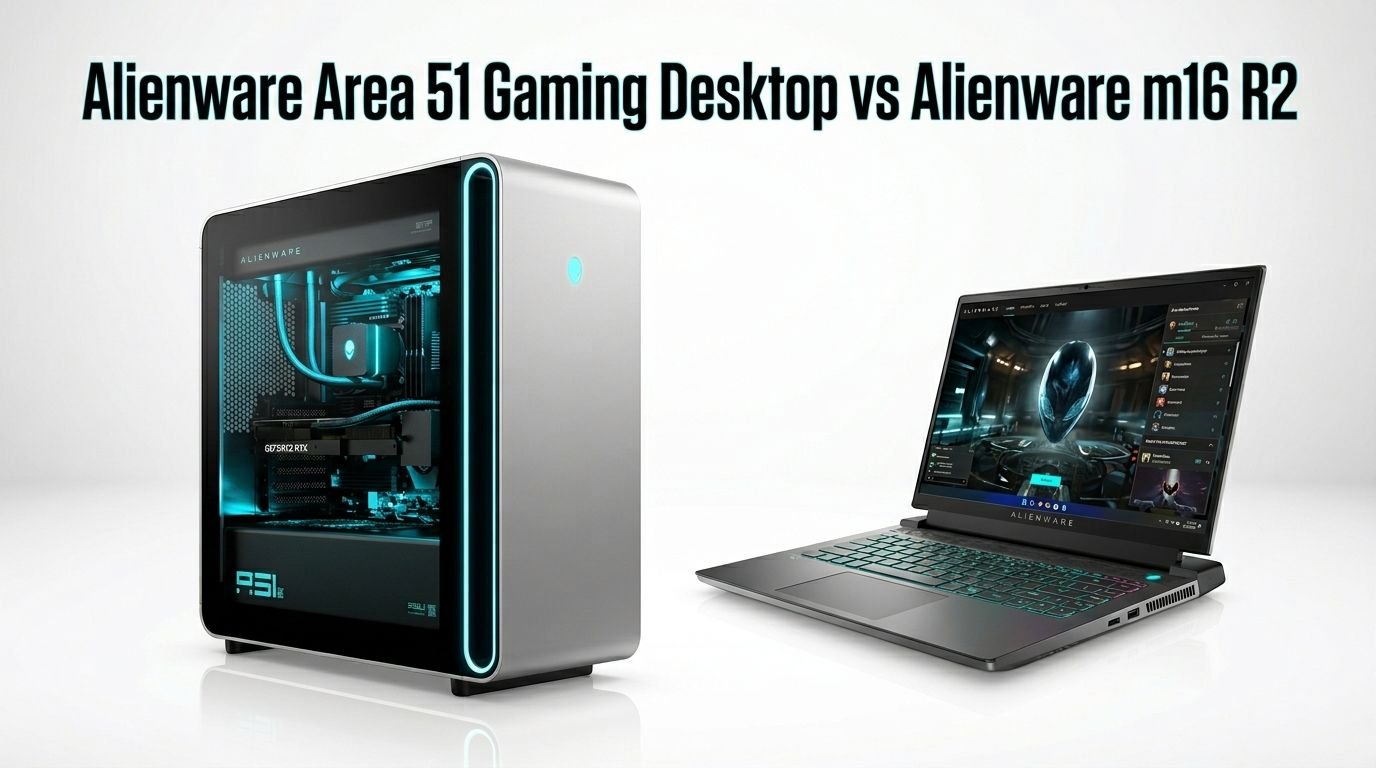
Alienware Area 51 Gaming Desktop vs Alienware m16 R2
Are you stuck choosing between a full gaming desktop and a portable gaming laptop from Alienware? You are not alone. The Alienware Area 51 gaming desktop and the Alienware m16 R2 gaming laptop sit at two very different ends of the gaming spectrum.
One delivers raw desktop power with the latest RTX 50 series graphics. The other gives you a slim, portable machine that can still run AAA titles at high settings.
Both systems carry the iconic Alienware brand. Both pack premium hardware. But they serve different gamers with different priorities.
Key Takeaways
- The Alienware Area 51 desktop uses an Intel Core Ultra 9 285K processor with 24 cores and an NVIDIA RTX 5080 or RTX 5090 GPU. This gives it a clear lead in raw gaming and multitasking performance over any gaming laptop.
- The Alienware m16 R2 features an Intel Core Ultra 7 155H processor and an NVIDIA RTX 4070 laptop GPU. It handles 1440p gaming very well but cannot match a full desktop GPU in frame output.
- Portability is the biggest advantage of the m16 R2. It weighs around 5.8 lbs and fits into a backpack. The Area 51 desktop weighs nearly 80 lbs and stays on your desk.
- The Area 51 desktop starts at around $3,399 and can exceed $7,000 in top configurations. The m16 R2 starts closer to $1,649 and maxes out around $2,200. Budget plays a huge role in this decision.
- Cooling performance favors the desktop by a wide margin. The Area 51 uses a 360mm liquid cooling system and positive pressure airflow that keeps noise below 39 dB under load. The m16 R2 uses a redesigned dual fan system that works well for a laptop but gets louder during heavy gaming sessions.
- Upgradeability belongs to the Area 51 desktop. You can swap the GPU, RAM, storage, and even the CPU. The m16 R2 lets you upgrade RAM and storage only.
Alienware Area 51 Gaming Desktop Overview

The Alienware Area 51 returned in 2025 with a complete redesign. Dell moved away from proprietary parts and built this system inside a massive 80 liter chassis that supports standard ATX components. This was a huge shift for Alienware and won praise from reviewers across the board.
The base model ships with an Intel Core Ultra 9 285K processor, 32GB of DDR5 6400 RAM, a 2TB NVMe SSD, and an NVIDIA GeForce RTX 5080 16GB GDDR7 graphics card. Higher configurations swap in the RTX 5090 and bump the RAM to 64GB. An AMD version with the Ryzen 7 9800X3D or 9850X3D is also available.
The desktop sits in a tower that measures roughly 22.4 x 24 inches. It weighs close to 80 pounds. A tempered glass side panel shows off the interior, and AlienFX RGB lighting wraps around the exterior. The build quality feels premium and solid. This is a machine built to dominate your desk for years.
Pros:
- Extreme gaming performance with desktop grade RTX 5080 or 5090
- Uses standard ATX parts for easy upgrades
- 360mm liquid cooling keeps the system very quiet under load
- Stunning design with tempered glass panel and AlienFX lighting
- WiFi 7 and full Ethernet support
Cons:
- Very large and heavy at nearly 80 lbs
- Base price starts at $3,399 and climbs fast with upgrades
- Some users report BIOS limitations on RAM overclocking
- No monitor, keyboard, or mouse included
Alienware m16 R2 Gaming Laptop Overview

The Alienware m16 R2 launched in 2024 as a major redesign of the m16 line. Dell removed the rear thermal shelf from the previous generation. This made the laptop 15% smaller and much easier to carry. The result is a clean, modern design that still looks distinctly Alienware.
Inside, you get an Intel Core Ultra 7 155H processor with 16 cores, up to 64GB of DDR5 RAM, and up to 4TB of PCIe SSD storage. The GPU is an NVIDIA GeForce RTX 4070 with 8GB GDDR6. The 16 inch display runs at QHD+ resolution (2560×1600) with a 240Hz refresh rate.
The laptop weighs around 5.8 pounds. It fits comfortably in most laptop bags. Battery life delivers several hours for productivity tasks, though gaming drains the battery much faster. The backlit keyboard and per key AlienFX lighting add a premium feel to every session.
Pros:
- Portable at 5.8 lbs with a slim form factor
- 16 inch QHD+ 240Hz display is sharp and smooth
- Intel Core Ultra 7 155H handles both gaming and productivity
- RTX 4070 laptop GPU runs most AAA games at high settings in 1440p
- Affordable starting price compared to the Area 51 desktop
Cons:
- RTX 4070 laptop GPU trails desktop GPUs in raw performance
- Fan noise gets noticeable during heavy gaming
- Battery life drops fast during gaming sessions
- Limited upgrade options compared to a desktop
Processor Performance Comparison
The processor gap between these two systems is significant. The Area 51 desktop uses the Intel Core Ultra 9 285K. This chip has 24 cores and reaches boost speeds up to 5.7 GHz. It handles video editing, 3D rendering, streaming, and heavy multitasking without breaking a sweat.
The m16 R2 uses the Intel Core Ultra 7 155H. This mobile processor has 16 cores and boosts up to 4.8 GHz. It performs very well for a laptop chip. You can game, stream, and run background applications at the same time. But it cannot match the desktop 285K in sustained workloads.
The desktop chip also benefits from better power delivery and cooling. The 285K runs at full TDP inside the Area 51 case. The 155H in the m16 R2 must manage its power budget more carefully to stay within thermal limits. This means the desktop CPU maintains higher clock speeds for longer periods during intense tasks.
Graphics Card Performance
This is where the desktop pulls far ahead. The Area 51 packs a full desktop NVIDIA RTX 5080 (or RTX 5090) with 16GB (or 32GB) of GDDR7 memory. These cards deliver exceptional frame rates at 4K resolution with ray tracing enabled.
The m16 R2 uses an RTX 4070 laptop GPU with 8GB of GDDR6 memory. This is still a strong mobile GPU. It handles 1440p gaming at high to ultra settings in most titles. But it belongs to the previous generation of NVIDIA cards and runs at lower wattage than its desktop counterpart.
In real world testing, the RTX 5080 desktop card can push 50 to 80% more frames than the RTX 4070 laptop card in demanding titles. Games like Cyberpunk 2077, Alan Wake 2, and Hogwarts Legacy show a clear gap. If you want the highest possible frame rates with all visual effects turned on, the Area 51 desktop is the clear winner.
Cooling System and Noise Levels
The Alienware Area 51 uses a 360mm liquid cooling system for the CPU. The case design creates a positive pressure airflow system. Cool air enters from the front and bottom. Warm air exits through the rear and top. This setup keeps CPU temperatures low and noise levels below 39 dB under load. Multiple reviewers called this one of the quietest gaming desktops they tested.
The m16 R2 uses a redesigned dual fan cooling system with multiple heat pipes. Dell improved the airflow by removing the rear thermal shelf and redirecting exhaust to the sides and back. Under light loads, the laptop stays quiet. But during intense gaming sessions, the fans ramp up and produce noticeable noise.
Thermal throttling is rare on both systems. The Area 51 desktop has the clear advantage because of its large chassis and liquid cooler. The m16 R2 performs admirably for a laptop of its size, but physics limits how cool you can keep components in a thin chassis.
Display Quality
The m16 R2 comes with its own built in display. It features a 16 inch IPS panel with QHD+ resolution (2560×1600) and a 240Hz refresh rate. Colors look accurate. Motion clarity is excellent. The 16:10 aspect ratio gives you extra vertical space for productivity tasks and web browsing.
The Area 51 desktop does not include a monitor. You must buy one separately. This adds cost but also gives you freedom. You can pair the Area 51 with an Alienware QD OLED ultrawide monitor, a 4K 144Hz panel, or even a multi monitor setup. The desktop GPU has the power to drive any display you connect.
If you value an all in one solution with a beautiful screen right out of the box, the m16 R2 wins here. If you want the flexibility to choose your own display, the desktop gives you that option.
Design and Build Quality
The Area 51 desktop has a bold, futuristic design. The 80 liter tower features a tempered glass side panel, clean cable management, and a Lunar Silver finish. AlienFX lighting wraps around the chassis and glows through the front vents. The case feels heavy and solid. It makes a strong visual statement on any desk.
The m16 R2 takes a more restrained approach. The Dark Metallic Moon color looks professional. The chassis uses metal construction that feels sturdy and well built. It is slim enough to carry daily. The keyboard features per key RGB backlighting, and the hinge design is smooth. Dell reduced the overall footprint by 15% compared to the previous m16 R1.
Both machines carry unmistakable Alienware DNA. The desktop leans into dramatic sci fi aesthetics. The laptop blends gaming style with professional subtlety. Your preference depends on whether you want a show piece or a portable tool.
Upgradeability and Future Proofing
The Area 51 desktop offers excellent upgradeability. It uses standard ATX motherboard form factors, standard power supply connectors, and standard GPU slots. You can replace the graphics card, CPU, RAM, storage, and cooling system. This means the desktop can evolve with new hardware releases over the next several years.
The m16 R2 has limited upgrade options. You can swap the RAM and add more storage through its M.2 slots. But the CPU and GPU are soldered to the motherboard. You cannot replace them. This limits the laptop’s lifespan compared to a desktop.
For gamers who want a long term investment, the Area 51 desktop makes more sense. You can drop in a new GPU in two or three years and extend the system’s relevance. The m16 R2 locks you into its current specs for the life of the machine.
Portability and Lifestyle Fit
This is the m16 R2’s biggest strength. At 5.8 pounds, it fits in a backpack and travels with you anywhere. You can game at a friend’s house, work from a coffee shop, or set up in a hotel room. The built in display, keyboard, trackpad, and speakers give you a complete system in one device.
The Area 51 desktop weighs nearly 80 pounds and measures over 22 inches tall. It stays put once you place it. Moving it requires serious effort. It needs a dedicated desk, an external monitor, a keyboard, a mouse, and a power strip. This is a machine for a permanent gaming station.
If your life demands mobility, the m16 R2 is the right pick. If you have a dedicated room for gaming and never plan to move your PC, the Area 51 desktop gives you more power per dollar.
Pricing and Value for Money
The Alienware Area 51 desktop starts at $3,399 for the base configuration with an RTX 5080. A fully loaded model with RTX 5090, 64GB RAM, and 4TB SSD can exceed $7,000. You also need to budget for a monitor, keyboard, and mouse. Total setup cost can easily cross $8,000.
The Alienware m16 R2 starts around $1,649. A well configured model with an RTX 4070, 64GB RAM, and 4TB SSD sells for around $2,000 to $2,200 on Amazon. This includes the display, keyboard, and speakers. It is the more budget friendly option by a wide margin.
Dollar for dollar, the m16 R2 offers strong value for portable gaming. The Area 51 costs more but delivers a higher performance ceiling and longer upgrade path. Your budget and use case determine which one gives you the best return.
Gaming Performance Benchmarks
In AAA gaming benchmarks, the Area 51 desktop dominates. With its RTX 5080 at 4K resolution, it pushes over 100 FPS in most modern titles at ultra settings. The RTX 5090 version goes even higher. Frame rates stay smooth and consistent because of the desktop grade power delivery and cooling.
The m16 R2 with its RTX 4070 delivers strong 1440p performance. Expect 60 to 90 FPS at high settings in games like Cyberpunk 2077 and Starfield. Lighter titles like Fortnite and Valorant run at well over 100 FPS. The 240Hz display takes full advantage of those high frame rates in competitive games.
For esports and competitive gaming at 1440p, the m16 R2 holds its own. For 4K gaming with ray tracing, the Area 51 desktop is the only real choice between these two.
Connectivity and Ports
The Area 51 desktop offers a full suite of ports. You get multiple USB A and USB C ports, Thunderbolt 4, a 2.5G Ethernet jack, audio jacks, and multiple display outputs from the GPU. WiFi 7 comes standard. You can connect every peripheral you own without needing a hub or dock.
The m16 R2 provides solid connectivity for a laptop. It includes USB C with Thunderbolt 4, USB A ports, an HDMI 2.1 output, a headphone jack, and an SD card reader. WiFi 6E keeps wireless connections fast. You can connect an external monitor and use the laptop as a dual screen setup.
The desktop naturally wins on total port count and flexibility. But the m16 R2 covers the essentials well and supports external monitor setups for a desktop like experience at home.
Who Should Buy the Alienware Area 51 Desktop?
The Area 51 desktop is for serious gamers who want the best performance possible. If you play at 4K resolution, run VR games, or stream your gameplay, this machine handles it all. Content creators who need fast rendering and encoding will also love the raw horsepower.
It suits gamers who have a dedicated gaming space and do not need to move their PC. If you enjoy building and upgrading your system over time, the standard ATX design makes that easy. It is also a great choice if you want a quiet gaming experience without loud fan noise.
You should pick this desktop if your budget allows for the higher price and you value long term upgradeability.
Who Should Buy the Alienware m16 R2?
The m16 R2 is perfect for gamers who need portability. If you travel for work, study at college, or move between rooms often, this laptop gives you strong gaming performance on the go. It also doubles as a productivity machine for office work, video calls, and creative tasks.
It fits gamers on a tighter budget who still want a premium Alienware experience. The RTX 4070 handles modern games well at 1440p. The built in QHD+ 240Hz display means you do not need to buy a separate monitor.
Choose the m16 R2 if you need one device that does everything and you cannot commit to a stationary desktop setup.
Final Verdict: Alienware Area 51 Desktop vs Alienware m16 R2
Both machines are excellent at what they do. The Alienware Area 51 desktop wins on raw performance, cooling, noise levels, and upgradeability. It costs more and demands a permanent spot on your desk. The Alienware m16 R2 wins on portability, value, and convenience. It gives you solid gaming power in a package you can carry anywhere.
Pick the Area 51 if performance is your top priority and budget is less of a concern. Pick the m16 R2 if you need a portable gaming solution that still delivers a premium experience. There is no wrong choice here. It comes down to how you game and where you game.
FAQs
Is the Alienware Area 51 desktop worth the high price?
Yes, for gamers who want top tier 4K performance, quiet operation, and the ability to upgrade components over time. The RTX 5080 and 5090 GPU options deliver frame rates that no gaming laptop can match. The standard ATX design also means you can swap parts for years to come.
Can the Alienware m16 R2 handle AAA games in 2026?
The m16 R2 with its RTX 4070 still handles most AAA games at 1440p with high settings. You may need to lower a few settings in the most demanding titles to maintain smooth frame rates. For competitive and esports titles, it runs at well over 100 FPS without issues.
How loud is the Alienware Area 51 desktop during gaming?
The Area 51 desktop is very quiet. Reviewers measured peak noise levels around 38 to 39 dB during heavy gaming. The 360mm liquid cooler and positive pressure airflow system keep fan noise low even during extended gaming sessions.
Can I upgrade the GPU in the Alienware m16 R2?
No. The GPU in the m16 R2 is soldered to the motherboard. You cannot replace or upgrade it. You can upgrade the RAM and add more SSD storage, but the CPU and GPU remain fixed for the life of the laptop.
Does the Alienware Area 51 desktop come with a monitor?
No. The Area 51 desktop ships as a tower only. You need to purchase a monitor, keyboard, and mouse separately. This adds to the total cost but gives you the freedom to choose the exact peripherals you want.
Which system is better for streaming and content creation?
The Alienware Area 51 desktop is the better choice. Its 24 core Intel Core Ultra 9 285K processor and desktop grade GPU handle streaming, video editing, 3D rendering, and gaming at the same time. The m16 R2 can manage light streaming and editing but struggles with heavy multitasking compared to the desktop.