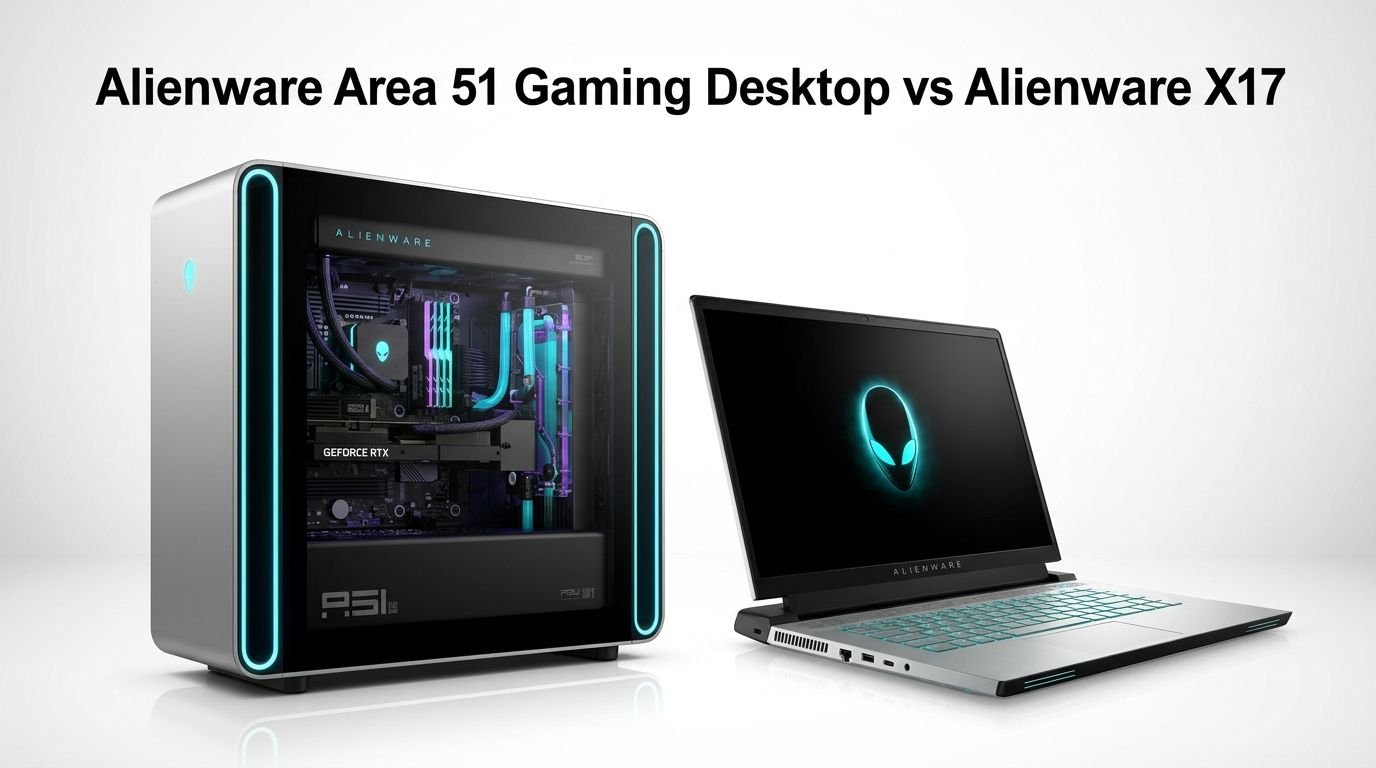
Alienware Area 51 Gaming Desktop vs Alienware X17
Choosing between a powerhouse gaming desktop and a premium gaming laptop is one of the toughest decisions a gamer can face. The Alienware Area 51 Gaming Desktop and the Alienware X17 both carry the iconic Alienware brand. They both deliver high end performance. But they serve very different types of gamers.
One stays planted on your desk. The other travels with you. One packs full size desktop grade components. The other squeezes impressive power into a slim 17.3 inch body.
If you are trying to figure out which machine deserves your money, you are in the right place. This post breaks down every important detail.
Key Takeaways
- The Alienware Area 51 uses full desktop processors and GPUs. This gives it a clear advantage in raw gaming performance, multitasking, and future upgrades. Desktop components always outperform their laptop counterparts.
- The Alienware X17 offers portability without sacrificing too much power. It packs a 17.3 inch display, up to an Intel Core i9, and up to an NVIDIA RTX 3080 Ti mobile GPU. It is a strong choice for gamers who move around.
- Upgradeability is a big win for the Area 51. You can swap out the GPU, RAM, storage, and more. The X17 has limited upgrade paths since most components are soldered in.
- Cooling systems differ greatly between the two. The Area 51 uses a 360mm liquid cooling solution. The X17 relies on Alienware’s Cryo Tech cooling with quad fans and Element 31 thermal interface material.
- Price is a major factor. The Area 51 desktop starts around $3,300 and can climb past $6,000. The X17 R2 starts around $1,800 to $2,500 depending on the configuration. Your budget will play a big role in this decision.
- Your lifestyle matters most. If you game at one desk and want maximum power, the Area 51 wins. If you need a portable gaming solution, the X17 is the better pick.
Alienware Area 51 Gaming Desktop Overview

The Alienware Area 51 is a flagship gaming desktop from Dell’s Alienware division. It was relaunched in 2025 with a fresh design and modern components. The latest model (AAT2250) features the Intel Core Ultra 9 285K processor with 24 cores and up to 5.7 GHz boost speed.
This desktop also supports NVIDIA GeForce RTX 5080 and RTX 5090 graphics cards. These are full size desktop GPUs with no power or thermal compromises. You get the complete performance that the GPU maker intended.
The Area 51 uses a 1500W Platinum rated power supply. It supports up to 64 GB of DDR5 RAM at 6400 MT/s. Storage options include up to 4 TB NVMe SSD. The case itself is an 80 liter enclosure that weighs nearly 76 pounds.
Pros:
- Extreme processing power with 24 core desktop CPU
- Full size desktop GPU delivers maximum gaming frames
- 360mm liquid cooling keeps temperatures low
- Supports up to 64 GB DDR5 RAM
- Easy to upgrade with standard components
Cons:
- Extremely heavy at nearly 76 pounds
- High starting price around $3,300 or more
- Requires a dedicated desk space
- No portability at all
Alienware X17 Gaming Laptop Overview

The Alienware X17 is a premium 17.3 inch gaming laptop. It was available in two main versions: the X17 R1 and the X17 R2. The R2 model packs an Intel Core i9 12900H processor with 14 cores and up to 5.0 GHz boost speed.
The GPU options go up to the NVIDIA GeForce RTX 3080 Ti with 16 GB GDDR6. This is a mobile variant, so it runs at lower wattage than a desktop GPU. But it still delivers impressive frame rates at 1080p and even 1440p.
The X17 R2 weighs about 6.76 pounds and is just 0.58 inches thick at its thinnest point. It supports up to 32 GB DDR5 RAM and comes with a 1 TB SSD. The display options include a 480Hz FHD panel or a 4K 120Hz panel.
Pros:
- Portable with a 17.3 inch display
- Up to RTX 3080 Ti mobile GPU
- Multiple display options including 480Hz FHD
- Sleek and thin design for a 17 inch laptop
- Built in keyboard and trackpad
Cons:
- Limited upgrade options after purchase
- Mobile GPU cannot match desktop GPU performance
- Battery life is short under heavy gaming
- Can get expensive in higher configurations
Processor Performance Comparison
The processor gap between these two machines is significant. The Area 51 uses a desktop class Intel Core Ultra 9 285K. This chip has 24 cores, 76 MB of cache, and a boost clock of 5.7 GHz. It handles heavy multitasking, game streaming, video editing, and AAA gaming with ease.
The X17 R2 uses the Intel Core i9 12900H. This mobile chip has 14 cores, 24 MB of cache, and a boost clock of 5.0 GHz. It is a strong mobile processor. But it cannot match the desktop chip in sustained workloads.
Desktop processors have higher power limits. The Core Ultra 9 285K can draw over 250 watts under load. The i9 12900H is limited to around 115 watts. This power difference translates directly into faster render times, higher minimum frame rates, and smoother multitasking on the Area 51.
If you run CPU heavy games like strategy titles or flight simulators, the Area 51 has a clear edge. The X17 still handles most games well. But it will fall behind in demanding scenarios.
Graphics Card Performance
This is where the desktop truly shines. The Alienware Area 51 supports the NVIDIA GeForce RTX 5080 or RTX 5090. These are full power desktop cards with no wattage restrictions. The RTX 5080 has 16 GB of GDDR7 memory and delivers outstanding 4K gaming performance.
The Alienware X17 R2 tops out with the NVIDIA GeForce RTX 3080 Ti laptop GPU. This card has 16 GB of GDDR6 memory. It performs well at 1080p and 1440p. But it loses ground at 4K and in ray tracing heavy titles.
A full desktop RTX 5080 can be 40 to 60 percent faster than a mobile RTX 3080 Ti in many titles. The generation gap plus the desktop vs mobile difference creates a large performance spread.
If you want to play games at 4K with ray tracing enabled, the Area 51 is the clear winner. The X17 is better suited for 1080p high refresh rate gaming on its built in display.
Design and Build Quality
The Alienware Area 51 has a massive tower design. It measures 22.4 inches tall, 9.1 inches wide, and 24 inches deep. The case features a tempered glass side panel, AlienFX RGB lighting, and a clean interior layout. The Lunar Silver finish gives it a modern look.
The build quality is solid. The chassis uses standard ATX component sizes. This means you can open it up and work on it like a regular PC. Alienware moved away from proprietary parts in this generation. That is a big improvement.
The Alienware X17 has a slim and aggressive design. It is just 0.58 inches thin at its thinnest. The laptop uses Alienware’s Legend 2.0 industrial design language. It features a high endurance paint finish and customizable AlienFX lighting zones.
Both machines look premium. The Area 51 commands attention on a desk. The X17 turns heads at a coffee shop or a LAN party. Your preference depends on whether you value desktop presence or portable style.
Cooling Solutions
Cooling is critical for sustained gaming performance. The Area 51 uses a 360mm AIO liquid cooler for the CPU. The case also supports excellent airflow with multiple intake and exhaust fans. Desktop GPUs have their own dual or triple fan cooling solutions. Temperatures stay low even during extended gaming sessions.
The X17 uses Alienware Cryo Tech cooling. This system includes four fans and Element 31 thermal interface material. Element 31 is a gallium silicone compound. It conducts heat better than traditional thermal paste.
Despite the advanced cooling, the X17 still runs hotter than the desktop under full load. Laptop components operate in a much tighter space. Fan noise also increases significantly during intense gaming. The Area 51 runs cooler and quieter in comparison.
If you care about low temperatures and quiet operation, the Area 51 delivers a better experience. The X17 does a good job for a laptop, but physics limits how much heat a thin chassis can remove.
Display Options
The Alienware X17 has a built in 17.3 inch display. You can choose from several panel options. The most popular choices include a 360Hz FHD panel (R1) or a 480Hz FHD panel (R2). There is also a 4K 120Hz option for sharper visuals. These displays support NVIDIA G SYNC and offer excellent color accuracy.
The Area 51 does not include a display. You must buy a monitor separately. This is both a drawback and an advantage. The drawback is the added cost. The advantage is that you can pick any monitor you want. A 27 inch 4K 144Hz monitor or an ultrawide 34 inch display will pair perfectly with the Area 51.
If you want a ready to use system with a great screen, the X17 is convenient. If you want the freedom to choose the perfect display for your setup, the Area 51 gives you that flexibility.
Memory and Storage
The Alienware Area 51 supports up to 64 GB of DDR5 6400 MT/s RAM. It has four DIMM slots. This means you can start with 32 GB and upgrade later. Storage options include multiple NVMe SSD slots. You can install up to 4 TB or more of fast SSD storage.
The Alienware X17 R2 supports up to 32 GB of DDR5 RAM. The memory is typically soldered onto the motherboard. This limits your upgrade options. Storage comes as a 1 TB NVMe SSD in most configurations. You can find models with larger drives, but options are more limited than the desktop.
For gamers who also do content creation or run virtual machines, the Area 51’s higher RAM ceiling is a big advantage. The X17’s 32 GB is enough for gaming. But it may feel restrictive for heavy productivity work.
Upgradeability and Future Proofing
This is one of the biggest differences between a desktop and a laptop. The Area 51 uses standard ATX components. You can replace the CPU, GPU, RAM, storage, power supply, and cooling. Alienware specifically designed this generation to be DIY friendly.
The X17 has very limited upgrade options. You can replace the SSD in most models. But the RAM is often soldered. The GPU is permanently attached to the motherboard. You cannot swap it for a newer model. The CPU is also fixed.
If you buy an Area 51, you can upgrade the GPU in two or three years and extend its life. With the X17, you get what you buy. Five years from now, the Area 51 can still be relevant with a GPU swap. The X17 will be stuck with its original specs.
Pros of Area 51 Upgradeability:
- Swap GPU to latest generation anytime
- Add more RAM as needed
- Install additional storage drives
- Replace cooling solutions
Cons of X17 Upgradeability:
- RAM is often soldered
- GPU cannot be replaced
- CPU is fixed to the motherboard
- Limited to SSD swaps in most cases
Portability and Convenience
The X17 wins this category without question. It weighs 6.76 pounds. You can carry it in a backpack. You can game at a friend’s house, at a hotel, or at a LAN event. The built in display, keyboard, and trackpad mean you only need one device.
The Area 51 weighs nearly 76 pounds. Moving it requires planning. It needs a desk, a monitor, a keyboard, a mouse, and a power outlet. It is not a machine you carry around.
If your life involves travel or you lack a dedicated gaming space, the X17 is the practical choice. If you have a permanent setup at home, the Area 51’s weight is irrelevant.
The X17 also has a built in battery. You can use it unplugged for light tasks. Gaming on battery power drains it quickly. But for browsing, email, or light work, you get a few hours of usage. The Area 51 has zero battery backup.
Connectivity and Ports
The Alienware Area 51 offers a generous port selection. It includes multiple USB A 3.2 ports, USB C ports, Thunderbolt 4, HDMI 2.1, DisplayPort, ethernet, and audio jacks. There is also space for WiFi 7 connectivity. The back panel has room for clean cable management.
The Alienware X17 R2 also has strong connectivity. It includes USB A, USB C, Thunderbolt 4, HDMI 2.1, Mini DisplayPort, ethernet, and a headphone jack. Killer WiFi 6E handles wireless connections. The port layout is spread across both sides and the back of the laptop.
Both machines offer great connectivity. The Area 51 simply has more ports and easier access because of its larger size. The X17 has enough ports for most users. But if you connect many peripherals at once, the desktop is more accommodating.
Pricing and Value
The Alienware Area 51 starts at around $3,300 for a base configuration. Higher end models with an RTX 5090 and more RAM can exceed $6,000. Remember that you also need a monitor, keyboard, and mouse. Total setup cost can reach $7,000 or more.
The Alienware X17 R2 started at around $1,800 to $2,500 depending on configuration. It is now available at various prices on Amazon since it has been discontinued in favor of newer models. You get a complete system with display, keyboard, and speakers included.
Dollar for dollar, the Area 51 delivers more raw performance. But the total cost of ownership is higher. The X17 offers great value as a complete package. You pay one price and you are ready to game.
Budget minded gamers should consider the X17 or look for deals on the Area 51 base model. Performance chasers who want the absolute best should invest in the Area 51.
Alienware X17 R1: A Budget Friendly Alternative

The Alienware X17 R1 is the first generation model. It features an Intel Core i7 11800H processor and up to an NVIDIA RTX 3080 GPU. The 17.3 inch display offers a 360Hz FHD option. It comes with 16 GB DDR4 RAM and 1 TB SSD.
This model is now significantly cheaper than the R2. You can find it on Amazon for much less than its original launch price. It still delivers solid 1080p gaming. The build quality matches the R2 version.
Pros:
- Lower price point than the R2 model
- Still delivers strong 1080p gaming
- Same premium Alienware build quality
- 360Hz display for competitive gaming
Cons:
- Older 11th gen Intel processor
- DDR4 RAM instead of DDR5
- RTX 3000 series mobile GPU is aging
- Battery life is short during gaming
Who Should Buy the Alienware Area 51?
The Area 51 is for serious gamers who want the best performance. If you play AAA titles at 4K, stream your gameplay, or do video editing alongside gaming, this is your machine. It is also ideal for anyone who wants a system that can be upgraded over many years.
Gamers who play competitive titles like CS2, Valorant, or Fortnite at high refresh rates will appreciate the raw power. Content creators who need fast render times will love the 24 core processor. The Area 51 is a long term investment.
You should also have a dedicated gaming space. This machine is large and heavy. It needs a sturdy desk and good ventilation. If you can give it a permanent home, it will reward you with years of top tier performance.
Who Should Buy the Alienware X17?
The X17 is for gamers who need portability. College students, traveling professionals, and gamers without a fixed setup will appreciate the all in one form factor. You get a great display, a comfortable keyboard, and solid performance in one package.
It also suits gamers who play at 1080p. The 360Hz and 480Hz display options are perfect for competitive games. You will get smooth, tear free visuals without needing an external monitor.
If your budget is tighter, the X17 offers a complete gaming experience at a lower total cost. You do not need to buy a monitor, keyboard, or mouse. Everything is built in. The X17 R1 is an especially good deal now that prices have dropped.
Final Verdict: Area 51 or X17?
The answer depends on your priorities. Choose the Alienware Area 51 if you want maximum performance, easy upgrades, and you game at a fixed location. It is the better machine for pure gaming power and longevity.
Choose the Alienware X17 if you value portability, convenience, and a lower total cost. It delivers strong performance in a package you can carry with you. The built in display options are excellent for competitive and casual gaming alike.
Both machines carry the Alienware brand promise of quality and style. Neither is a bad choice. Your lifestyle and gaming habits should guide your decision. Think about where you game, how often you travel, and how much you want to spend.
Frequently Asked Questions
Is the Alienware Area 51 worth the high price?
Yes, if you want top tier gaming performance and long term upgradeability. The Area 51 uses full desktop components that outperform laptop hardware. You can also upgrade the GPU and RAM in the future. This extends the life of your investment. The high price reflects the premium parts and build quality inside the machine.
Can the Alienware X17 handle 4K gaming?
The X17 with an RTX 3080 Ti can run some games at 4K. But you will need to lower settings in demanding titles to maintain smooth frame rates. It is best suited for 1080p high refresh rate gaming. The 480Hz FHD display is where the X17 truly shines.
How loud is the Alienware X17 during gaming?
The X17 can get noticeably loud during intense gaming sessions. The quad fan system works hard to cool the mobile components in a thin chassis. Using headphones during gaming helps. In quieter tasks like browsing, the fans stay calm and nearly silent.
Can I upgrade the GPU in the Alienware Area 51?
Yes. The Area 51 uses a standard PCIe slot for the graphics card. You can remove the current GPU and install a newer one. This is one of the biggest advantages of the desktop form factor. Alienware designed this generation with DIY upgrades in mind.
Does the Alienware X17 have good battery life?
Battery life is average for a gaming laptop. You can expect around 3 to 5 hours for light tasks like web browsing. Gaming on battery drains it in about 1 to 2 hours. For the best experience, keep the X17 plugged in during gaming sessions.
Which Alienware is better for streaming games on Twitch?
The Alienware Area 51 is better for streaming. Its desktop CPU handles encoding much more efficiently. The extra cores and higher power limit allow smooth gameplay and streaming at the same time. The X17 can stream too, but you may notice frame drops in heavy games while broadcasting.