ASUS AirVision M1 Smart AR Glasses Review: Worth Your Money?
Get ready to step into the future of personal computing. The ASUS AirVision M1 Smart AR Glasses promise to transform your smartphone or laptop into a massive 100-inch virtual screen that you wear on your face.
These aren’t just regular glasses. They’re a portable entertainment center, a productivity powerhouse, and a glimpse into how we might interact with technology tomorrow.
But do they actually deliver on these bold promises? Let’s find out if these smart glasses deserve a spot in your tech collection or if they’re just expensive eyewear with a screen attached.
Key Takeaways
- Display Quality: The AirVision M1 features impressive Micro-OLED displays with 1,100 nits of brightness and 95% DCI-P3 color gamut, making colors pop with incredible vibrancy even in bright environments.
- Lightweight Design: Weighing just 87 grams, these glasses are lighter than most smartphones, which means you can wear them for extended periods without neck strain or discomfort.
- Universal Compatibility: Connect to virtually any device with USB-C support, including ROG Ally, Steam Deck, iPhone 15/16 series, Android phones, MacBooks, and Windows PCs.
- Multi-Screen Functionality: The dedicated AirVision app allows you to create multiple virtual screens simultaneously, perfect for multitasking professionals and productivity enthusiasts.
- Premium Price Point: At $399 to $699 depending on the retailer, these glasses sit in the premium category, competing directly with established brands like XREAL and Rokid.
- Room for Improvement: Some reviewers note issues with screen stability and value proposition, suggesting the technology still has room to mature before becoming mainstream.

What Are the ASUS AirVision M1 Smart AR Glasses
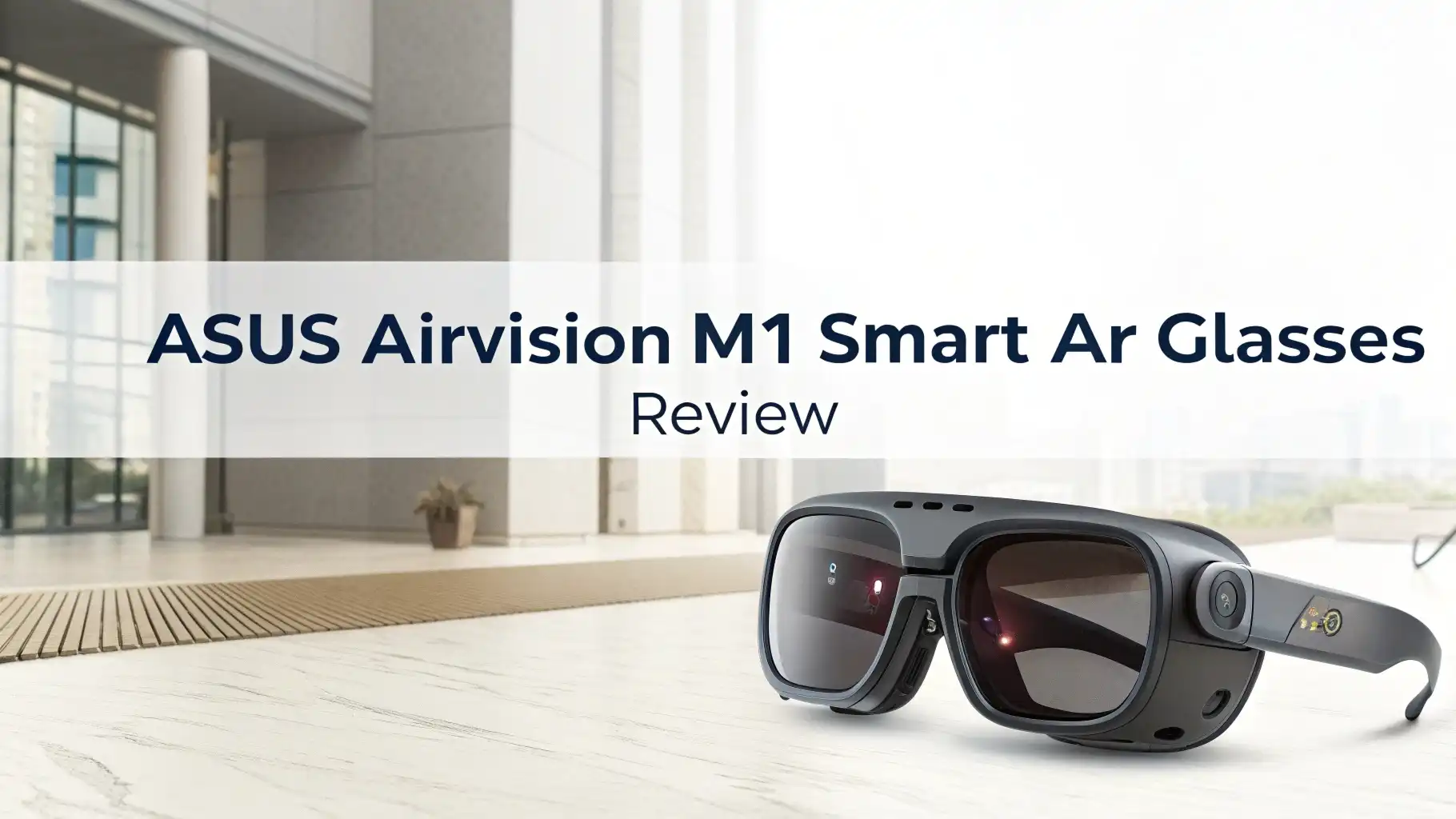
The ASUS AirVision M1 represents the company’s bold entry into the wearable display market. These smart AR glasses create a virtual screen that appears to float in your field of vision. Think of them as a personal movie theater or workspace that travels with you. The glasses use advanced Micro-OLED technology to project images directly into your eyes. This creates the illusion of watching a massive screen from several feet away.
Unlike bulky VR headsets, the AirVision M1 maintains transparency. You can still see the real world around you through the lenses. This makes them safer for use in public spaces and less isolating than fully immersive devices. The glasses connect to your devices via a single USB-C cable that handles both video transmission and power delivery. No batteries to charge, no complex setup required. Just plug in and start viewing.
Stunning Micro-OLED Display Technology
The heart of the AirVision M1 lies in its exceptional display technology. ASUS equipped these glasses with Micro-OLED panels that deliver Full HD resolution to each eye. The 1,100 nits peak brightness stands out as a major advantage. Most competing AR glasses struggle to reach even 600 nits. This extra brightness means you can use the AirVision M1 outdoors or in brightly lit rooms without the image washing out completely.
The 95% DCI-P3 color gamut coverage ensures that movies, games, and photos display with accurate, vibrant colors. This color space is the same standard used in digital cinema production. The virtual screen size can scale up to an equivalent 100-inch display viewed from approximately 4 meters away. The actual viewing experience feels more intimate than staring at a wall-sized TV, but still significantly larger than any portable screen.
Lightweight Comfort for All-Day Wear
At just 87 grams, the AirVision M1 feels remarkably light on your face. That’s lighter than most sunglasses cases. ASUS designed these glasses with extended wear sessions in mind. The weight distribution balances across your nose and ears, preventing the front-heavy feeling that plagues many AR devices. The frame uses simple black materials that won’t draw unwanted attention in public.
The package includes two different nose pad options to accommodate various face shapes. A magnetic light shield attaches to the front of the glasses when you want to block external light for a more immersive viewing experience. This accessory proves particularly useful when watching movies or playing games in bright environments. The glasses also earned TUV Rheinland certification for eye safety, meaning they meet international standards for reducing eye strain during prolonged use.
Top 3 Alternatives for ASUS AirVision M1


Universal Device Compatibility
One of the strongest selling points of the AirVision M1 is its broad device compatibility. The glasses work with any device that outputs video and power through USB-C. This includes the ROG Ally handheld gaming PC, which ASUS naturally promotes alongside these glasses. Steam Deck owners can also plug in for gaming on the go. The latest iPhone 15 and iPhone 16 series with USB-C ports work seamlessly with the AirVision M1.
Android smartphone users with USB-C ports can enjoy mobile gaming or streaming on a large virtual screen. MacBook and iPad users get full compatibility too. Windows laptops and desktop PCs round out the supported devices. This universal approach means you won’t need different glasses for different devices. The single USB-C cable solution keeps things simple. However, your source device must support DisplayPort Alt Mode over USB-C to transmit video signals properly.
Multi-Screen Productivity Features
ASUS developed a dedicated AirVision app for Windows that unlocks advanced productivity features. This software allows you to create multiple virtual screens floating in your workspace. Imagine having three monitors arranged in front of you, except they’re all virtual and you’re sitting in a coffee shop with just your laptop. The app provides controls for adjusting screen distance, size, and positioning.
You can customize the interpupillary distance settings to match your eyes for the clearest image quality. The software also includes preset modes for different use cases like movie watching, document reading, or gaming. Unfortunately, the multi-screen functionality works primarily with Windows devices. Mobile phone users and Mac users get a simpler mirroring experience without the advanced window management features. This limitation may disappoint productivity enthusiasts who use Apple devices as their primary computers.
Gaming Performance with Handheld Devices
Gaming represents a key target market for the AirVision M1. ASUS clearly designed these glasses with its ROG Ally gaming handheld in mind. Connecting the glasses transforms the small handheld screen into a massive virtual display. This makes games more immersive and easier to see in detail. The 72Hz refresh rate handles most gaming content smoothly, though competitive gamers might notice the difference from 120Hz or 144Hz displays.
The Steam Deck pairs naturally with the AirVision M1 for gaming sessions on planes, trains, or hotel rooms. The private screen means nobody can see what you’re playing. The built-in speakers deliver audio directly to your ears without requiring separate headphones. However, some reviewers noted occasional image stability issues during fast-paced gaming. The virtual screen can appear to shift or wobble slightly with head movements. This problem affects gaming immersion and may cause discomfort for sensitive users.
Built-In Audio Experience
The AirVision M1 includes integrated speakers built into the temple arms of the glasses. These speakers use directional audio technology to project sound toward your ears without completely blocking external sounds. This open-ear design keeps you aware of your surroundings while providing decent audio quality for casual listening. The sound quality works fine for dialogue-heavy content like podcasts or video calls.
Music and action movie soundtracks reveal the limitations of the small speaker drivers. Don’t expect deep bass or room-filling sound. The speakers serve primarily as a convenience feature so you don’t need to carry separate headphones. If audio quality matters greatly to you, the USB-C port can connect to your device, and you’ll need separate Bluetooth headphones or wired USB-C earbuds connected to your source device for better sound. The speaker placement does cause some sound leakage, so people sitting very close to you might hear faint audio from your glasses.
Design and Build Quality
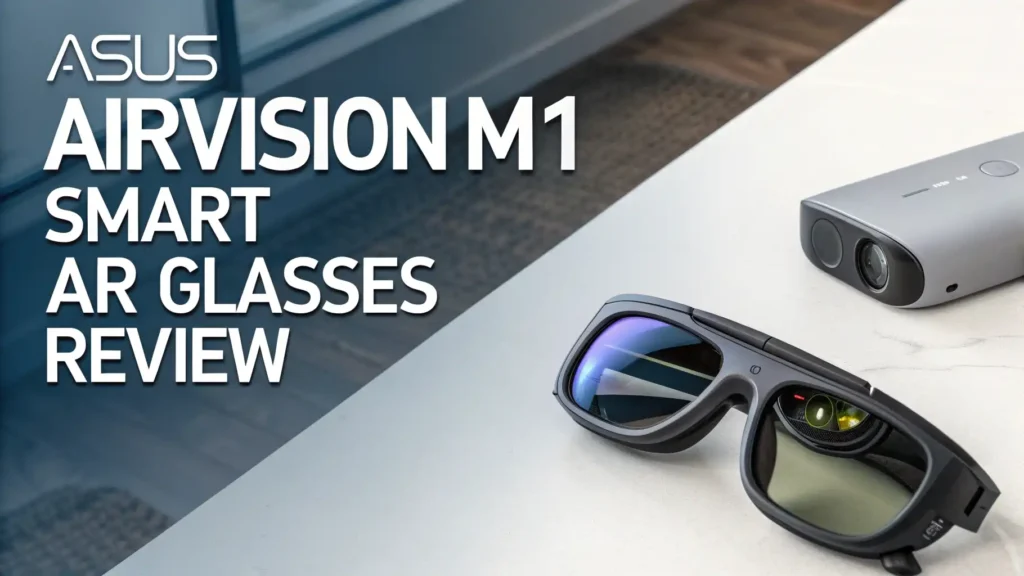
The AirVision M1 sports a simple black frame design that resembles oversized regular glasses. The round lens shapes give the glasses a retro aesthetic rather than a futuristic sci-fi appearance. This understated styling helps the glasses blend in better in public spaces. The build quality feels solid with no obvious creaking or flexing. The USB-C cable attaches to the right temple arm with a secure connector.
The included carrying case protects the glasses during travel and storage. It provides enough padding to prevent scratches and minor impacts. The magnetic light shield clicks onto the front of the glasses with satisfying precision. It stays in place during use but removes easily when you want to see your surroundings. The lenses themselves use prescription lens-compatible frames. Users who wear corrective lenses can install custom prescription inserts, though these require separate purchase from optical providers.
Screen Stability and Tracking Issues
Several reviews highlighted screen stability problems with the AirVision M1. Unlike more advanced AR glasses with built-in sensors, the AirVision M1 lacks 3DoF tracking. This means the virtual screen doesn’t stay locked in space as you move your head. Instead, the screen moves with your head movements. For stationary viewing, this works fine. When you turn your head quickly or adjust your position, the screen can appear to lag or judder.
Some users report the image wobbling during normal head movements while walking or adjusting posture. This instability can trigger motion sickness in sensitive individuals. The lack of spatial tracking represents a cost-cutting measure compared to premium competitors like the XREAL One Pro with its X1 chip. Whether this limitation bothers you depends on your use case. Sitting still while working or watching movies minimizes the problem. Active use while moving around highlights the tracking deficiency.
Eye Safety and Comfort Certifications
ASUS emphasizes the TUV Rheinland eye comfort certification for the AirVision M1. This independent testing confirms the glasses meet standards for reducing eye strain and fatigue. The certification covers factors like flicker-free operation, blue light levels, and brightness consistency. These elements contribute to comfortable extended viewing sessions. The Micro-OLED technology inherently produces less blue light than LCD screens.
The adjustable nose pads accommodate different face shapes and help position the displays at the optimal distance from your eyes. Proper positioning ensures the clearest image and reduces eye strain. Users with larger or smaller interpupillary distances may need to adjust settings in the AirVision app for the best experience. The transparent lenses allow your eyes to focus on both the virtual screen and real-world objects, reducing the fatigue that comes from fully enclosed VR headsets.
Pricing and Value Proposition
The ASUS AirVision M1 carries a retail price around $399 to $699 depending on the retailer and region. This positions the glasses in the premium segment of the AR glasses market. Competitors like the XREAL Air 2 typically sell for $399, while the more advanced XREAL One Pro commands $599. The Rokid Max falls in a similar price range around $309 to $379.
Several reviewers questioned whether the AirVision M1 delivers sufficient value at this price point. The lack of 3DoF tracking, combined with reported stability issues, makes the glasses feel overpriced compared to competitors. Tom’s Hardware suggested these glasses would be $400 too expensive given their current feature set and performance issues. If ASUS addressed the stability problems and added spatial tracking, the price would feel more justified. Budget-conscious buyers should compare features carefully against alternatives before committing to the AirVision M1.
Real World Use Cases and Scenarios
The AirVision M1 shines brightest in specific scenarios. Air travel represents an ideal use case. The glasses replace the need to stare at tiny airplane entertainment screens. Connect them to your phone or tablet for hours of comfortable movie watching. The private screen prevents other passengers from seeing your content. Hotel room entertainment similarly benefits from the portable big-screen experience without relying on hotel TVs with confusing remotes.
Work travel professionals can maintain productivity with a multi-screen setup using just a laptop and the glasses. This eliminates the need to find coffee shops with good table space or carry external monitors. Gaming on the go with devices like the ROG Ally or Steam Deck becomes more enjoyable with the larger virtual display. However, regular home use may feel less compelling when you already have large TVs and monitors. The glasses make the most sense when your space or situation restricts access to traditional displays.
Who Should Buy the ASUS AirVision M1
The AirVision M1 appeals most to specific user groups. Frequent travelers who want entertainment without relying on venue-provided screens should consider these glasses. The lightweight design and universal compatibility make them excellent travel companions. Handheld gaming PC owners, especially those with an ROG Ally or Steam Deck, get a purpose-built accessory that enhances their gaming experience on flights, trains, or anywhere without a TV.
Early adopters interested in AR technology might enjoy experimenting with the AirVision M1 despite its limitations. Remote workers who frequently work from various locations could benefit from the portable multi-screen setup. However, price-sensitive buyers should probably wait for price drops or consider more affordable alternatives. Users sensitive to motion should test the glasses before buying if possible, as the stability issues may cause discomfort. Anyone looking for cutting-edge AR features like hand tracking or spatial computing should look at more advanced options.
Frequently Asked Questions
Do the ASUS AirVision M1 glasses work with iPhones?
Yes, the AirVision M1 works with iPhone 15 and iPhone 16 models that feature USB-C ports. Older iPhones with Lightning ports are not compatible. You simply connect the glasses via the included USB-C cable. The glasses mirror your iPhone screen as a large virtual display. However, the advanced multi-screen features available on Windows PCs do not work with iPhones. You get a simple screen mirroring experience instead.
Can you wear prescription glasses with the AirVision M1?
The AirVision M1 frame design accommodates prescription lens inserts. ASUS does not include prescription lenses in the box. You need to order custom prescription inserts separately from optical providers that support the AirVision M1 frame specifications. The inserts clip into the glasses frame between the Micro-OLED displays and your eyes. This allows glasses wearers to use the AirVision M1 without wearing their regular prescription glasses underneath.
How long can you comfortably wear these AR glasses?
Comfort duration varies by individual, but the 87-gram weight and TUV Rheinland certification support extended wear. Many users report wearing the glasses for 2 to 3 hours continuously without significant discomfort. The included nose pad options help customize the fit. Some users experience eye fatigue or neck tension after longer sessions. Taking regular breaks every 30 to 60 minutes helps reduce strain. The transparent lens design causes less fatigue than fully enclosed VR headsets.
Do you need batteries or charging for the AirVision M1?
No, the AirVision M1 does not require batteries or charging. The glasses draw power directly from your connected device through the USB-C cable. This simplifies usage since you never need to remember to charge the glasses separately. However, the glasses will drain your source device’s battery faster than normal. A laptop or phone powering the displays will deplete its battery more quickly. Consider having a power bank available for extended mobile use.
What devices are compatible with the AirVision M1?
The AirVision M1 works with any device that supports USB-C DisplayPort Alt Mode. Compatible devices include ROG Ally, Steam Deck, Nintendo Switch (with video output), iPhone 15/16 series, most Android phones with USB-C, MacBooks, iPads with USB-C, Windows laptops, and desktop PCs with USB-C ports. The device must output both video and power through the USB-C connection. Some budget devices may not support DisplayPort Alt Mode even if they have USB-C ports.
Can you use the AirVision M1 for productivity work?
Yes, especially with Windows devices where the AirVision app enables multi-screen setups. You can arrange multiple virtual monitors to view documents, spreadsheets, and applications simultaneously. The Full HD resolution displays text clearly enough for reading documents and emails. The experience works best when sitting still at a desk or table. Mac and mobile users get a simpler experience without advanced window management features. The lack of 3DoF tracking may cause the screen to shift if you move around frequently.
Are there any privacy benefits to using these glasses?
Yes, the AirVision M1 provides excellent screen privacy. Only you can see the virtual display content. People around you cannot see what you’re viewing on the glasses. This makes them ideal for working with sensitive information in public spaces like coffee shops or airports. The glasses also prevent shoulder surfing where others try to read your screen. This privacy benefit appeals to business travelers and anyone concerned about visual eavesdropping.
What comes included in the AirVision M1 package?
The box includes the AirVision M1 glasses, USB-C cable, magnetic light shield, carrying case, cleaning cloth, and two sets of nose pads. The light shield blocks external light for more immersive viewing. The carrying case protects the glasses during travel. ASUS does not include prescription lens inserts, additional cables, or external power banks. The package provides everything needed to start using the glasses with your compatible devices immediately.