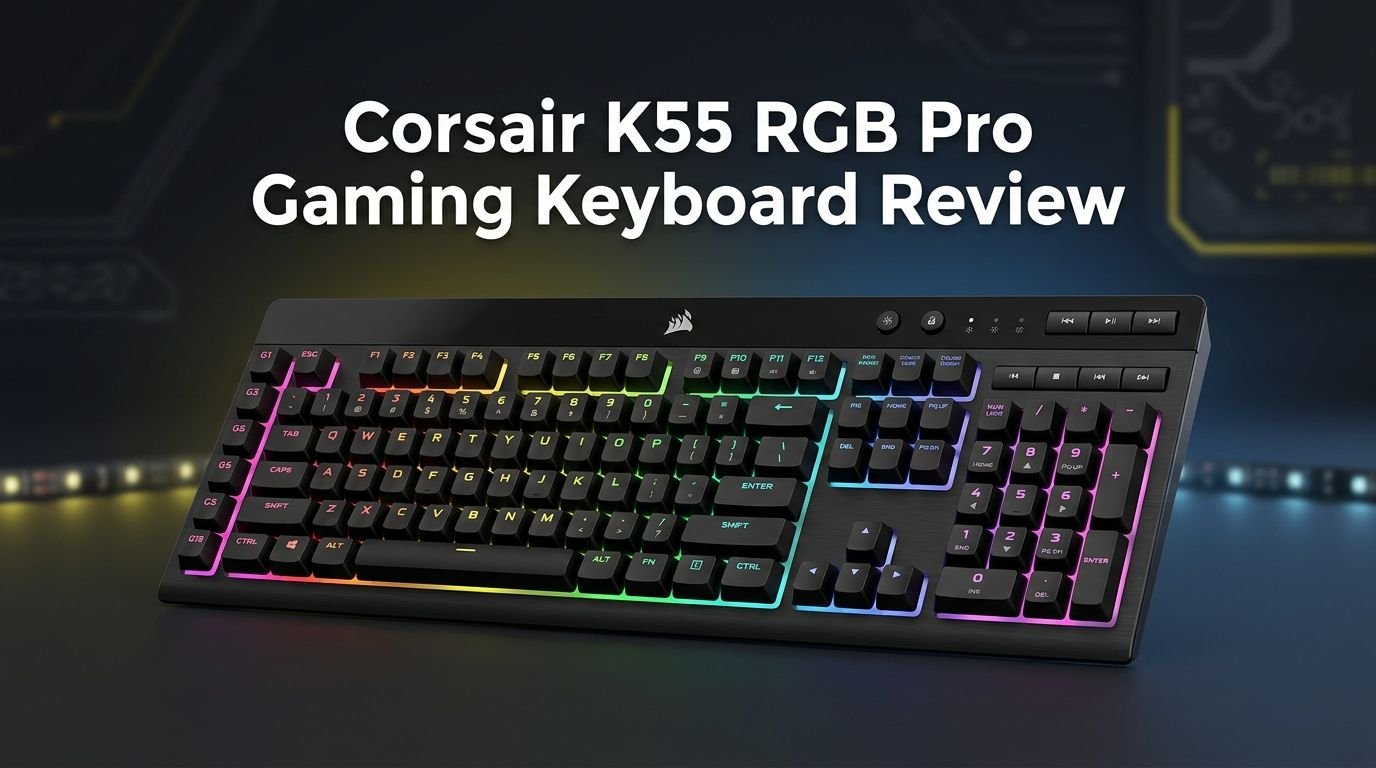
Corsair K55 RGB Pro Gaming Keyboard Review 2026
If you are looking for a solid gaming keyboard that does not burn a hole in your wallet, the Corsair K55 RGB Pro has likely crossed your radar.
This membrane keyboard has been one of Corsair’s best sellers in the budget segment for years. It delivers five-zone dynamic RGB lighting, six macro keys, and IP42 spill resistance at a price point that makes it hard to ignore.
But here is the real question. In 2026, with so many new options on the market, does the K55 RGB Pro still deserve your attention?
Key Takeaways:
- The Corsair K55 RGB Pro is a full-size membrane gaming keyboard that retails for around $49 to $59. It offers solid value for gamers on a tight budget who still want premium features like RGB lighting and dedicated macro keys.
- IP42 dust and spill resistance sets this keyboard apart from most competitors in its price range. You can game and snack at the same time without worrying about accidental drink spills ruining your board.
- Six dedicated macro keys sit along the left side of the keyboard. You can record macros directly on the keyboard or program more advanced commands through Corsair’s iCUE software. This is a rare feature at this price point.
- The five-zone dynamic RGB backlighting is bright and vivid. It does not offer per-key lighting like the Pro XT version, but the zones still look great in a dark room and sync with other Corsair peripherals through iCUE.
- Low input latency makes this keyboard a reliable choice for fast-paced gaming. Tests from review sites confirm the K55 RGB Pro performs well in terms of response time, even compared to some mechanical options.
- The detachable palm rest adds comfort during long gaming or work sessions. Build quality is solid for the price, though the membrane switches will not satisfy users who prefer a mechanical typing feel.

Corsair K55 RGB Pro Gaming Keyboard: Overview and First Impressions
The Corsair K55 RGB Pro arrives in clean Corsair packaging with the keyboard, a detachable palm rest, and a quick start guide inside the box. The first thing you notice is the size. This is a full-size keyboard with 120 keys, including six dedicated macro keys on the left side.
The keyboard measures 19 x 6.58 x 1.42 inches and weighs about 1.79 pounds. It feels sturdy when placed on a desk. There is minimal flex in the chassis, which is impressive for a keyboard at this price. The matte black finish resists fingerprints well and gives the board a sleek, understated look.
Plug it in via the USB connection and the RGB lighting comes alive right away. The five zones pulse and shift through colors, and the effect is immediately eye-catching. Overall, the first impression is positive. It looks and feels like a keyboard that costs more than it actually does.
The feet on the bottom offer one incline setting. This is enough for most users, though some may wish for a second angle option. The detachable palm rest snaps on securely and adds a nice layer of comfort right out of the box.
Build Quality and Design: How Well Is It Made?
Build quality is a common concern with budget keyboards. The K55 RGB Pro handles this well. The plastic chassis feels thick and durable, and the keyboard does not creak or flex during normal use. You can press down firmly on the center of the board without feeling any give.
The keycaps are standard ABS plastic. They do the job but will develop a shine over time with heavy use. This is typical for keyboards at this price. The legends on the keycaps are clear and well-defined, and the RGB light shines through them nicely.
Corsair used a simple but effective design language here. There are no flashy gamer aesthetics or sharp angles. The board looks clean and professional. It fits well in a gaming setup or an office environment. The black matte surface resists dust and grime better than glossy alternatives.
The USB cable is not detachable, which is a minor downside for users who like to swap cables. However, the cable itself is thick and feels well-made. It should last through years of normal use. The overall design prioritizes function over flash, and that is a smart choice for a budget board.
Top 3 Alternatives for Corsair K55 RGB Pro Gaming Keyboard
SteelSeries Apex 3 RGB Gaming Keyboard

Razer Cynosa V2 Gaming Keyboard

Logitech G213 Prodigy Gaming Keyboard

Five-Zone RGB Backlighting: Bright, Bold, and Customizable
The RGB lighting on the K55 RGB Pro uses a five-zone system. This means you cannot control the color of each individual key. Instead, the keyboard is divided into five sections, and you can assign a different color or effect to each zone.
For many budget gamers, this is more than enough. The zones cover the left macro area, the main typing area, the arrow keys region, the numpad, and the function row area. You can create color combinations that match your setup or your favorite game’s theme.
Corsair’s iCUE software gives you full control over the lighting. You can choose from preset effects like rainbow wave, rain, and color pulse. You can also create custom profiles with your own color choices. The software syncs the K55’s lighting with other Corsair devices like mice, headsets, and fans.
The brightness is solid. In a dark room, the K55 RGB Pro lights up your desk beautifully. The colors are vivid and even across the keycaps. While per-key RGB would be ideal, the five-zone setup still delivers an impressive visual experience at this price.
Membrane Switches: How Does Typing and Gaming Feel?
The K55 RGB Pro uses rubber dome membrane switches. These are softer and quieter than mechanical switches. If you prefer a silent typing experience, this keyboard delivers that well.
The keys have a moderate actuation force. They feel responsive without being too stiff or too mushy. Typing long documents or emails is comfortable. The keys bottom out smoothly, and there is enough feedback to keep your fingers aware of each press.
For gaming, the membrane switches perform adequately. They do not offer the crisp, tactile feedback of a Cherry MX switch or a Razer optical switch. However, they get the job done for casual to mid-level gaming. Fast-paced FPS games and MOBAs feel fine, though competitive players may miss the precision of mechanical switches.
The key travel distance is standard for a membrane board. You will not experience the short travel of a laptop keyboard or the deep press of a mechanical one. It sits right in the middle. The quiet operation is a real bonus for late-night gaming sessions or shared living spaces. Your roommates and family members will thank you.
Six Dedicated Macro Keys: A Budget Keyboard Powerhouse
One of the standout features of the K55 RGB Pro is its six dedicated macro keys. These sit on the left side of the keyboard, labeled G1 through G6. This is a feature you usually see on keyboards that cost twice as much.
You can record macros directly on the keyboard without opening any software. Press the MR button at the top, hit the macro key you want to assign, type your sequence, and press MR again. It is fast and simple.
For more advanced macros, you can use Corsair iCUE software. iCUE lets you create complex multi-step macros with custom delays, key combinations, and even mouse clicks. You can also assign streaming commands through Elgato Stream Deck software integration, which is a huge plus for content creators.
Gamers can assign ability rotations, build sequences, or chat commands to these keys. Productivity users can set up shortcuts for copy-paste workflows, email templates, or app launchers. The flexibility of these six keys adds genuine value to the K55 RGB Pro. Very few membrane keyboards in this price range offer this kind of programmability.
IP42 Dust and Spill Resistance: Built to Survive Your Desk
Accidents happen. Coffee spills, soda tips over, and crumbs fall between keys. The K55 RGB Pro is certified IP42 for dust and spill resistance. This means it can handle minor liquid spills and keeps dust particles from getting into the internals.
This is not the same as being waterproof. You cannot submerge the keyboard in water. But a knocked-over glass of water or a coffee splash will not kill this board. You just need to unplug it, drain the liquid, and let it dry. Many users have reported surviving multiple spills without any issues.
The dust resistance is a nice bonus for anyone who eats at their desk. Crumbs and small debris are less likely to get lodged under the keys and cause problems. This extends the lifespan of the keyboard compared to non-resistant models.
In 2026, spill resistance is becoming a standard feature on gaming keyboards. But many competitors at this price point still lack this certification. The IP42 rating gives the K55 RGB Pro an edge over keyboards like the standard Razer Cynosa or older Logitech G213 models.
Corsair iCUE Software: Full Control at Your Fingertips
The Corsair K55 RGB Pro works with Corsair iCUE, one of the best peripheral software suites available. iCUE gives you control over RGB lighting, macro programming, and device synchronization from a single dashboard.
Setting up the keyboard in iCUE takes just a few minutes. The software detects the K55 automatically and presents you with an intuitive visual interface. You can click on each lighting zone and assign colors, effects, and brightness levels. The preview updates in real-time so you can see your changes instantly.
Macro creation in iCUE is straightforward. You select a macro key, choose the type of macro (toggle, hold, or repeat), and record your inputs. You can also edit timings and add delays manually for precise control.
One of the best features of iCUE is ecosystem synchronization. If you own a Corsair mouse, headset, or RGB fan controller, you can sync all of their lighting effects together. This creates a unified look across your entire setup. The software does use some system resources, but it runs well on most modern systems without noticeable performance impact.
Detachable Palm Rest and Ergonomics: Comfort for Long Sessions
Long gaming or work sessions demand good ergonomics. The K55 RGB Pro ships with a detachable palm rest that snaps onto the bottom edge of the keyboard. It provides a soft, cushioned surface for your wrists.
The palm rest is made of textured plastic with a slightly rubberized feel. It is not the plushest rest you will ever use, but it reduces wrist strain during extended use. Removing it is easy if you prefer a compact footprint on your desk.
The keyboard itself has a single incline setting through its flip-out feet. This raises the back of the board by a few degrees. Most users find this angle comfortable, though a second incline option would be welcome. The default flat position also works well for people who prefer a low-profile typing angle.
The full-size layout means you get a numpad, arrow keys, and all function keys. This is great for productivity and certain games that use the numpad. However, the wide footprint may not suit users with limited desk space. The overall typing position feels natural and comfortable, especially with the palm rest attached.
Gaming Performance and Latency: Can It Keep Up?
For a membrane keyboard at this price, the K55 RGB Pro delivers surprisingly good gaming performance. Input latency tests show that this keyboard responds quickly. The delay between pressing a key and the action registering on screen is minimal.
The keyboard supports anti-ghosting with up to 12-key rollover. This means you can press multiple keys at the same time, and the keyboard will register all of them. This is important for games that require simultaneous inputs, like pressing WASD for movement while hitting ability keys.
In fast-paced games like first-person shooters, the K55 RGB Pro holds its own. Key presses feel responsive, and there is no noticeable input lag during gameplay. You will not lose a gunfight because your keyboard failed to register a key press.
However, competitive esports players will likely prefer a mechanical keyboard for the sharper tactile feedback and faster actuation. The membrane switches on the K55 RGB Pro are good but not great for the highest levels of competitive play. For casual gaming, ranked matches, and everything in between, this keyboard performs well above its price point.
Windows Key Lock and Media Controls: Handy Extra Features
The K55 RGB Pro includes a dedicated Windows key lock button. This is a small but important feature for gamers. One accidental press of the Windows key during an intense match can minimize your game and cost you the round. The lock button prevents that entirely.
Dedicated volume and media control keys sit at the top right of the keyboard. You get volume up, volume down, mute, and media playback controls. These buttons respond instantly and save you from alt-tabbing out of games to adjust your audio.
A brightness control button lets you cycle through the RGB lighting brightness levels quickly. You can dim the lights for a movie or crank them up to show off your setup. This is a convenient shortcut that avoids the need to open iCUE for simple brightness changes.
The profile switch button lets you cycle through saved profiles on the fly. You can set up different lighting and macro configurations for different games or tasks. Switching between them takes a single button press. These extra controls add genuine everyday convenience to the K55 RGB Pro.
Who Should Buy the Corsair K55 RGB Pro in 2026?
The K55 RGB Pro is an excellent choice for several types of users. Budget gamers who want RGB lighting, macro keys, and solid build quality without spending over $60 will find great value here. It punches above its weight in terms of features.
Streamers and content creators benefit from the Elgato Stream Deck integration. The six macro keys can trigger scene changes, sound effects, and other streaming commands. This turns the K55 into a budget streaming controller alongside a gaming keyboard.
Office workers who game on the side will appreciate the quiet membrane switches and professional appearance. The keyboard does not scream “gamer” with aggressive aesthetics. It blends into a work setup just as well as a gaming den.
However, hardcore competitive gamers should consider a mechanical keyboard instead. The membrane switches lack the speed and precision that esports-level play demands. Similarly, users who value per-key RGB lighting should look at the K55 RGB Pro XT or other options with individual key lighting.
Corsair K55 RGB Pro: Pros and Cons Summary
Every product has strengths and weaknesses. The K55 RGB Pro is no exception. Here is a clear breakdown to help you decide.
On the positive side, the keyboard offers outstanding value. Six macro keys, iCUE software support, IP42 spill resistance, and five-zone RGB lighting are rare at this price. The detachable palm rest adds comfort, and the low latency ensures solid gaming performance.
The build quality exceeds expectations for a sub-$60 keyboard. The chassis feels firm, the keycaps are clean, and the overall fit and finish are impressive. The quiet membrane switches are a bonus for noise-sensitive environments.
On the negative side, the membrane switches lack the satisfying click and speed of mechanical alternatives. The five-zone RGB, while nice, does not match the visual impact of per-key lighting. The non-detachable USB cable limits portability and customization. The single incline setting could use more options for ergonomic flexibility.
These drawbacks are minor given the price. The K55 RGB Pro delivers more than you would expect for its cost, and its cons are typical trade-offs at this budget level.
Final Verdict: Is the Corsair K55 RGB Pro Worth It in 2026?
Yes, the Corsair K55 RGB Pro remains a strong buy in 2026. It is not the newest keyboard on the market, and it does not have cutting-edge features like hall effect switches or wireless connectivity. But that is not the point.
This keyboard delivers reliable performance, useful features, and solid build quality at a price that most people can afford. The combination of macro keys, spill resistance, iCUE integration, and vibrant RGB lighting makes it one of the best value propositions in budget gaming keyboards.
If your budget sits between $40 and $60, the K55 RGB Pro should be at the top of your list. It serves gamers, streamers, and everyday typists equally well. Corsair’s continued software support through iCUE ensures the keyboard stays relevant with new features and lighting profiles.
For users who want more, the K55 RGB Pro XT offers per-key lighting at a slightly higher price. But for most people, the standard K55 RGB Pro delivers everything you need without anything you don’t. It earns a solid recommendation in 2026.
Frequently Asked Questions
Is the Corsair K55 RGB Pro a mechanical keyboard?
No, the Corsair K55 RGB Pro uses rubber dome membrane switches. These switches are softer and quieter than mechanical switches. They offer a comfortable typing experience but lack the tactile click and fast actuation that mechanical keyboards provide. If you want a mechanical Corsair keyboard at a budget price, look at the Corsair K65 series instead.
Can you change the RGB colors on the Corsair K55 RGB Pro without software?
Yes, the K55 RGB Pro includes onboard lighting controls. You can cycle through preset lighting effects and adjust brightness directly from the keyboard. However, for full customization with specific colors and advanced effects, you will need to install Corsair iCUE software on your PC. The software is free to download from Corsair’s website.
Does the Corsair K55 RGB Pro work with Mac computers?
The K55 RGB Pro connects via USB and works as a basic keyboard on Mac systems. However, iCUE software is primarily designed for Windows. Some features like macro programming and advanced RGB customization may not be available on macOS. The standard typing and gaming functions will work fine on a Mac.
How long does the Corsair K55 RGB Pro last?
The membrane switches on the K55 RGB Pro are rated for millions of keystrokes. With normal use, you can expect this keyboard to last several years. The IP42 spill resistance also helps extend its lifespan by protecting the internals from dust and liquid damage. Many users report using their K55 boards for three to five years without significant issues.
Is the Corsair K55 RGB Pro good for typing and office work?
Yes, the K55 RGB Pro is a solid choice for typing and office tasks. The quiet membrane switches make it suitable for shared workspaces. The full-size layout with a numpad is great for data entry. The detachable palm rest improves comfort during long typing sessions, and the macro keys can be programmed with productivity shortcuts.