FIFINE AmpliGame USB Microphone Review 2026: Worth It?
Are you searching for a USB microphone that delivers clear audio without burning a hole in your wallet? The FIFINE AmpliGame USB microphone has been a top pick among gamers, streamers, and content creators for years. But does it still hold up in 2026?
This microphone continues to impress with its combination of solid build quality, crisp sound, and an attractive price point that undercuts most competitors.
Whether you use it for gaming sessions, podcast recording, or Zoom meetings, the FIFINE AmpliGame line promises a lot.
Key Takeaways:
- The FIFINE AmpliGame USB microphone offers studio-like audio clarity at a fraction of the cost of premium microphones. Its cardioid polar pattern captures your voice with precision and blocks out most background noise from keyboards, fans, and room echo.
- Setup is effortless with true plug and play support. You simply connect the USB cable to your PC, Mac, PS4, or PS5 and start recording. There are no extra drivers or software downloads required.
- Customizable RGB lighting adds a stylish gamer aesthetic to your desk setup. You can cycle through colors or turn the lights off entirely based on your preference.
- The built in gain control knob and tap to mute button give you real time adjustments without opening any software. This makes it incredibly practical during live streams and gaming sessions.
- Sound quality competes with microphones priced two to three times higher. The frequency response range of 50Hz to 20kHz produces warm, natural vocals with minimal distortion.
- The included shock mount and anti vibration stand reduce handling noise and desk vibrations. This means cleaner recordings without the need for extra accessories right out of the box.

FIFINE AmpliGame USB Microphone Overview
The FIFINE AmpliGame USB microphone is a condenser microphone built for PC gaming, streaming, podcasting, and general voice recording. FIFINE designed this mic as a budget friendly option that does not sacrifice audio performance.
It uses a cardioid polar pattern. This means the microphone captures sound from the front and rejects noise from the sides and back. The result is focused vocal pickup with reduced ambient noise.
The mic connects through USB Type C and works with PC, Mac, PS4, and PS5 out of the box. You do not need any additional adapters or audio interfaces. This makes it one of the easiest microphones to set up on the market.
FIFINE positions this microphone for gamers and streamers who want quality audio at a price under $50. The AmpliGame A8 variant, in particular, has become a bestseller on Amazon with thousands of positive reviews. Its combination of RGB lighting, onboard controls, and solid audio makes it a compelling package.
Build Quality and Design
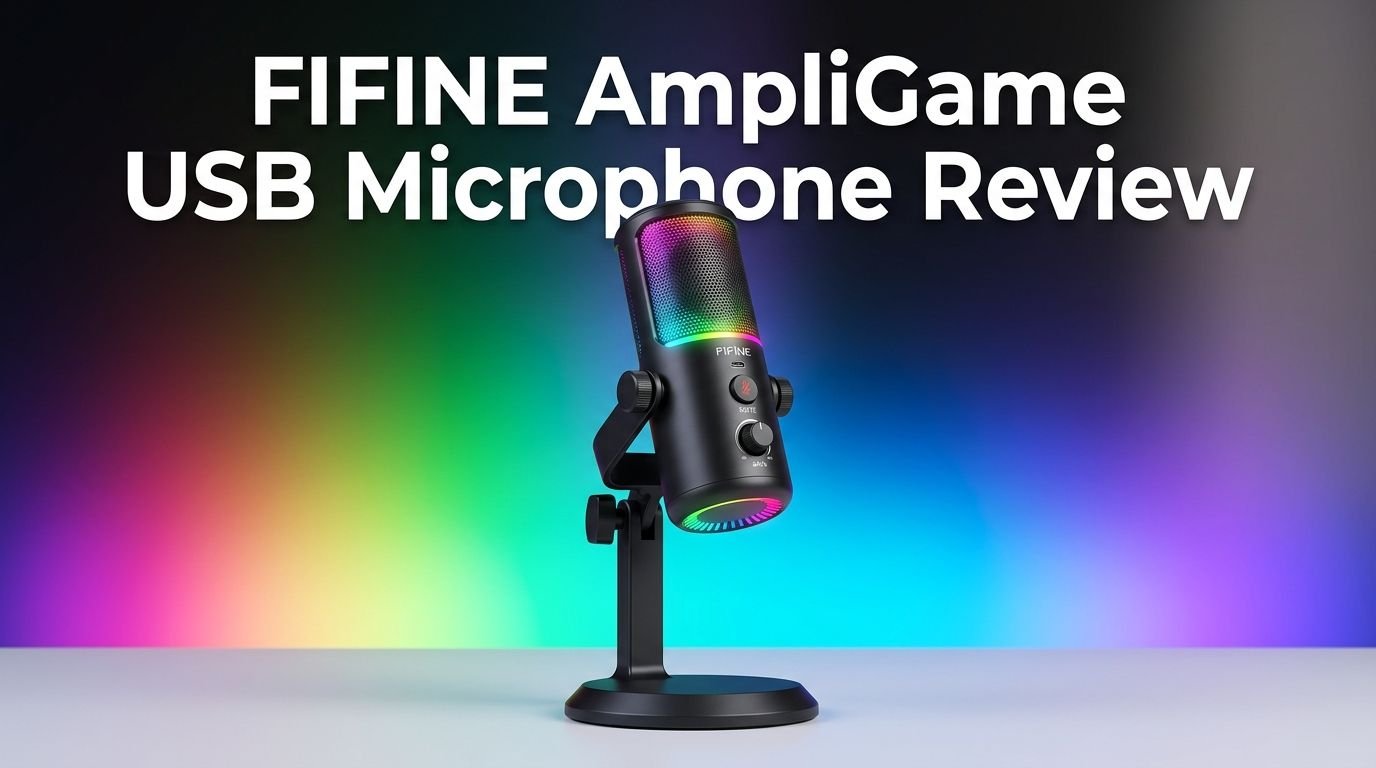
The FIFINE AmpliGame USB microphone has a premium feel that defies its budget price. The main body uses a metal casing that adds durability and a satisfying weight to the unit. It does not feel cheap or flimsy.
The microphone sits on its own integrated shock mount attached to a sturdy desk stand. This shock mount absorbs vibrations from your desk, such as typing or accidental bumps. The stand allows you to tilt and adjust the mic angle to position it directly in front of your mouth.
Overall dimensions are compact. The mic does not take up much desk space. Its sleek cylindrical design with glowing RGB accents looks great next to any gaming setup. It comes in black and white color options to match your preferences.
The USB C cable feels well built and long enough to reach most desktop setups without an extension. Every component, from the base to the cable connector, feels solid and well assembled.
Sound Quality and Audio Performance
Sound quality is where the FIFINE AmpliGame USB microphone truly shines. It captures clear, detailed vocals with a natural tone that works well for speaking, singing, and gaming chat.
The frequency response ranges from 50Hz to 20kHz. This wide range means the mic picks up deep bass tones and high frequency details alike. Voices sound full and present without harsh peaks or muddy lows.
The sensitivity rating sits at negative 40 plus or minus 3 dBV. This level works perfectly for close range vocal recording. You get strong signal without excessive noise floor when the mic is positioned about 6 to 12 inches from your mouth.
Background noise rejection is excellent for a budget condenser mic. The cardioid pattern does a good job of ignoring keyboard clicks, fan noise, and room echo. However, like all condenser microphones, it will pick up very loud sounds from any direction.
Compared to dynamic microphones in the same price range, the FIFINE AmpliGame delivers a brighter and more detailed sound signature. This makes it ideal for streaming and podcast use where vocal clarity matters most.
Top 3 Alternatives for FIFINE AmpliGame USB Microphone
If you want to explore other options before making your decision, here are three popular alternatives that compete with the FIFINE AmpliGame in the budget USB microphone space.
1. HyperX SoloCast USB Condenser Microphone

2. Logitech Blue Yeti Nano USB Microphone

3. Razer Seiren Mini USB Condenser Microphone

Each of these microphones offers a similar price range and feature set. The HyperX SoloCast focuses on simplicity and plug and play ease. The Blue Yeti Nano provides dual pickup patterns for more recording flexibility. The Razer Seiren Mini packs a supercardioid pattern into an ultra compact form factor. Your best choice depends on your priorities for size, features, and audio character.
RGB Lighting and Aesthetics
One standout feature of the FIFINE AmpliGame USB microphone is its customizable RGB lighting. The bottom ring of the microphone glows with vibrant colors that cycle through a spectrum of hues.
You can control the RGB effects using the touch button on the microphone body. A simple tap lets you switch between lighting modes. Another tap turns the lights off completely for a clean, professional look during daytime recordings.
The RGB lighting does not affect audio quality in any way. It serves purely as a visual accent for your gaming or streaming setup. The glow looks especially striking in low light environments and on camera during live streams.
Many competing budget microphones in 2026 still skip RGB lighting. The FIFINE AmpliGame includes it at no extra cost. This gives it a visual edge that appeals to gamers and content creators who care about desk aesthetics.
Plug and Play Setup
Setting up the FIFINE AmpliGame USB microphone takes less than 30 seconds. You plug the USB C cable into your computer or console and the device recognizes the mic instantly.
There are no drivers to install. There is no companion software required. The microphone works with Windows, macOS, PS4, and PS5 without any configuration. You simply select it as your input device in your system’s audio settings.
This simplicity makes the FIFINE AmpliGame a perfect choice for beginners. If you have never used an external microphone before, you will not face any technical hurdles. The mic also works with all major recording and streaming software including OBS, Streamlabs, Discord, Zoom, Audacity, and GarageBand.
For PS4 and PS5 users, the microphone connects directly to the console’s USB port. Game chat and party chat both work seamlessly. This cross platform compatibility adds real value to the purchase.
Onboard Controls and Mute Function
The FIFINE AmpliGame USB microphone gives you hands on control without needing to open any software. A physical gain knob sits at the bottom of the microphone. You twist it to raise or lower the input volume in real time.
This gain control is essential during live streams and gaming. If your voice is too loud or too quiet, a quick turn of the knob fixes the issue instantly. There is no delay or lag in the adjustment.
The tap to mute function is another highlight. You touch the top of the microphone to mute or unmute your audio. A visual LED indicator changes to confirm the mute status. This is incredibly useful during streams when you need to cough, sneeze, or have a private conversation.
These controls make the FIFINE AmpliGame feel like a professional grade tool despite its low price. Many microphones at this price point lack onboard controls entirely and force you to use software adjustments.
Shock Mount and Anti Vibration Stand
The included shock mount is a welcome bonus at this price range. It suspends the microphone capsule with elastic bands that absorb physical vibrations. This reduces thumps and rumbles caused by desk movement, typing, or accidental contact.
The anti vibration stand is built directly into the base. It provides a stable foundation and keeps the mic secure during use. The stand allows you to tilt the microphone forward or backward to aim it at your mouth.
Without a shock mount, condenser microphones tend to pick up every bump and vibration on your desk. The FIFINE AmpliGame solves this problem out of the box. You do not need to purchase a separate shock mount or boom arm to get clean audio.
That said, if you prefer a boom arm setup, the microphone’s standard thread mount makes it easy to attach to most third party boom arms. This gives you more flexibility in positioning the mic closer to your face for even better audio pickup.
Compatibility with Gaming Consoles
The FIFINE AmpliGame USB microphone works with PS4 and PS5 without any extra setup. You plug it in and the console detects it automatically. Game chat, party chat, and voice recording all function smoothly.
For PS5 users, the mic handles 3D audio chat well and integrates into the console’s audio settings. You can adjust input levels directly from the PS5 system menu. This direct compatibility makes it a strong choice for console gamers.
Xbox compatibility is more limited. Xbox consoles generally require microphones to connect through their controller or use specific certified accessories. The FIFINE AmpliGame may work with Xbox through a PC adapter, but direct USB support is not guaranteed.
For Nintendo Switch, the microphone works in docked mode with games that support USB audio input. However, Switch support is minimal and game dependent.
PC and Mac remain the primary platforms where this microphone performs best. Full feature access, including gain control and mute functionality, works perfectly on desktop and laptop systems.
Performance for Streaming and Podcasting
Streamers and podcasters will find the FIFINE AmpliGame USB microphone more than capable for their needs. The clear vocal reproduction and background noise rejection create a polished audio experience for audiences.
For Twitch and YouTube streaming, the mic pairs perfectly with OBS and Streamlabs. You can apply additional noise suppression filters within these apps, but the raw audio from the FIFINE AmpliGame is already quite clean for most environments.
Podcast recording benefits from the warm, natural tone of the condenser capsule. Spoken word content sounds professional. The frequency response captures subtle vocal nuances that keep listeners engaged.
For Discord and voice chat, the microphone delivers crisp communication. Teammates will notice a significant upgrade from built in laptop microphones or cheap headset mics. Your voice cuts through game audio clearly.
The only limitation for serious podcasters is the lack of multiple polar patterns. The mic only offers cardioid mode. If you need to record two people face to face, you will need a different microphone or a second unit.
Headphone Monitoring and Latency
The FIFINE AmpliGame USB microphone includes a 3.5mm headphone jack on the bottom of the unit. This allows you to monitor your audio in real time while recording or streaming.
Zero latency monitoring means you hear your voice instantly through connected headphones. There is no delay or echo. This feature helps you maintain proper mic technique and volume levels during live sessions.
You can use any standard wired headphones or earbuds with the 3.5mm port. The audio output is clean and loud enough for comfortable monitoring. A dedicated volume dial (separate from the gain knob) lets you adjust headphone levels independently.
This real time monitoring feature is especially valuable for podcasters and voice over artists. It allows you to catch audio issues like plosives, distortion, or room noise as they happen. Many budget microphones skip headphone monitoring entirely, so this is a significant advantage.
FIFINE AmpliGame vs the Competition in 2026
In the budget USB microphone market of 2026, the FIFINE AmpliGame holds its own against strong competitors. Let’s see how it stacks up.
Against the HyperX SoloCast, the FIFINE offers more features. RGB lighting, a gain knob, and headphone monitoring are all extras the SoloCast lacks. However, the SoloCast has a slightly tighter sound profile that some users prefer.
Compared to the Razer Seiren Mini, the FIFINE AmpliGame wins on features and versatility. The Seiren Mini is more compact and portable, but it offers fewer controls and no headphone output.
The Blue Yeti Nano offers dual polar patterns (cardioid and omni) which give it an edge for versatile recording. But the Yeti Nano costs more and lacks RGB lighting. For pure gaming and streaming use, the FIFINE provides better value.
Overall, the FIFINE AmpliGame USB microphone delivers the best feature to price ratio in its category. If you want the most functionality per dollar spent, this mic is hard to beat.
Who Should Buy the FIFINE AmpliGame USB Microphone?
The FIFINE AmpliGame USB microphone fits several types of users perfectly. Gamers who want clear voice chat without spending on an expensive setup will love this mic. It plugs in and works immediately.
New streamers and content creators on a budget will find everything they need in one package. The mic, stand, shock mount, and USB cable all come included. You can start producing content the moment it arrives.
Remote workers and students who attend Zoom meetings, online classes, or virtual interviews will appreciate the audio upgrade. The FIFINE AmpliGame makes you sound noticeably more professional compared to built in laptop microphones.
Podcasters recording solo episodes can rely on the cardioid pattern for clean vocal capture. The headphone monitoring port adds a professional workflow feature at no extra cost.
However, if you are a professional voice over artist or musician, you may want to invest in a higher end microphone with XLR connectivity and a broader feature set. The FIFINE AmpliGame AM8, which includes both USB and XLR outputs, might be a better fit for advanced users.
Pros and Cons of the FIFINE AmpliGame USB Microphone
Every product has strengths and weaknesses. Here is an honest look at where the FIFINE AmpliGame excels and where it could improve.
The pros are significant. The sound quality punches well above its price class. The plug and play setup eliminates all friction for new users. Onboard controls like gain adjustment and tap to mute add real convenience. The included shock mount and stand save you money on accessories. RGB lighting is a fun bonus for gamers.
The cons are minor but worth noting. The microphone only offers a single cardioid polar pattern. Users who need omni or bidirectional modes will need to look elsewhere. The plastic components of the stand, while functional, feel less premium than the metal mic body.
Some users report a slight hiss noise at very high gain settings. This is common among condenser microphones in this price range and can be reduced with software noise gates. The mic also lacks a built in pop filter, though a separate one can be purchased cheaply.
Overall, the pros far outweigh the cons for the target audience. At this price, the FIFINE AmpliGame offers exceptional value.
Final Verdict: Is the FIFINE AmpliGame USB Microphone Worth It in 2026?
Yes, the FIFINE AmpliGame USB microphone is absolutely worth it in 2026. It remains one of the best budget USB microphones you can buy. The audio quality is clear and detailed. The build feels solid. The features outclass most competitors at this price.
If you need a reliable, easy to use microphone for gaming, streaming, podcasting, or video calls, the FIFINE AmpliGame delivers on every front. You get professional level features like headphone monitoring, gain control, and mute functionality without the professional level price tag.
For under $50, this microphone gives you everything you need to sound great. It proves that you do not need to spend hundreds of dollars to get quality audio for your content or communication needs. The FIFINE AmpliGame earns a strong recommendation from us.
Frequently Asked Questions
Is the FIFINE AmpliGame USB microphone good for gaming?
Yes, the FIFINE AmpliGame USB microphone is an excellent choice for gaming. Its cardioid polar pattern captures your voice clearly while rejecting background noise from keyboards and fans. The tap to mute feature is perfect for quick muting during game sessions. It works with PC, PS4, and PS5 directly through USB.
Does the FIFINE AmpliGame work with PS5?
The FIFINE AmpliGame USB microphone works with PS5 through a simple USB connection. You plug it in and the console recognizes it automatically. Party chat, game chat, and streaming audio all function without any additional setup or adapters.
Can I use the FIFINE AmpliGame for singing and music recording?
The FIFINE AmpliGame can handle basic vocal recording and singing. Its 50Hz to 20kHz frequency response captures a wide range of vocal tones. However, for professional music production, you may want a microphone with an XLR connection and a dedicated audio interface for better control and quality.
Does the FIFINE AmpliGame need drivers or software?
No, the FIFINE AmpliGame USB microphone is completely plug and play. It does not require any drivers or companion software. You connect the USB cable to your device and it works immediately with Windows, macOS, PS4, and PS5.
How do I reduce background noise with the FIFINE AmpliGame?
Position the microphone 6 to 12 inches from your mouth and speak directly into the front of the mic. Keep the gain at a moderate level. You can also use noise suppression filters in software like OBS or Audacity. The cardioid pattern naturally reduces noise from the sides and back of the microphone.
Can I connect the FIFINE AmpliGame to a boom arm?
Yes, the FIFINE AmpliGame USB microphone has a standard thread mount that fits most third party boom arms and mic stands. You simply unscrew the mic from its included stand and attach it to the boom arm. This gives you more flexible positioning and frees up desk space.