IZI IRIS Pocket 4K Vlogging Camera Review 2026: Scam or Legit?
If you are a content creator searching for a pocket camera that records smooth 4K video without breaking the bank, the IZI IRIS Pocket 4K Vlogging Camera probably caught your eye.
This compact device packs a 3-axis gimbal stabilizer, AI tracking, and a detachable design into a body lighter than your smartphone. But does it actually deliver in real-world use?
I spent weeks testing this camera for vlogging, travel, and casual shooting. The results surprised me in some areas and left me wanting more in others.
Key Takeaways:
- The IZI IRIS records 4K video at 60fps and uses a 1/1.3″ CMOS sensor, which puts it ahead of many budget pocket cameras in terms of raw specs. The sensor size helps capture better detail in good lighting.
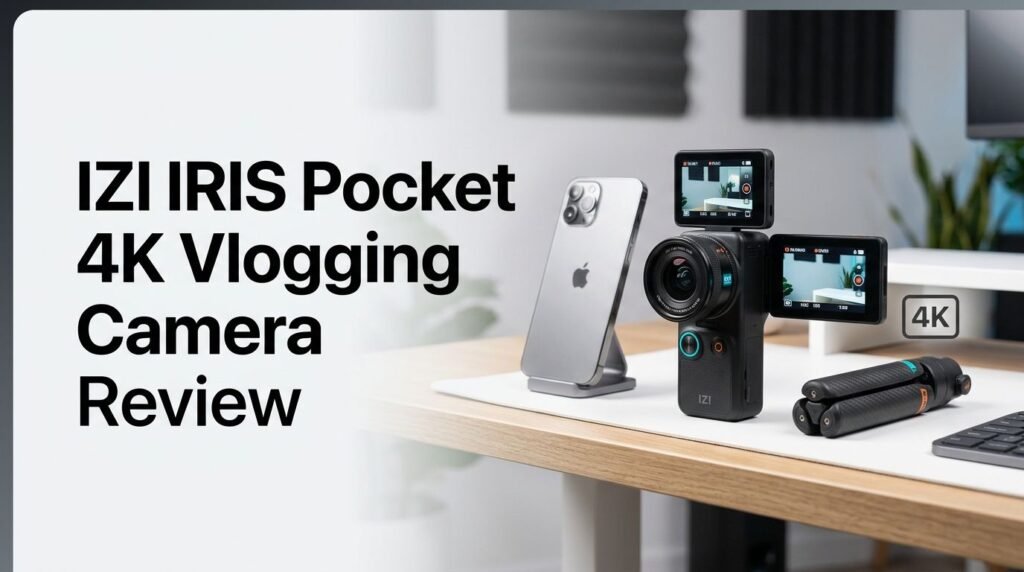
- Its detachable design is a standout feature. The camera module separates from the grip via a magnetic connection. You can mount the camera on metal surfaces for creative angles. This is a feature you won’t find on most competitors at this price.
- Battery life is impressive at 160 minutes. That’s roughly 2.5 hours of continuous recording. For travel vlogging, this means fewer interruptions and less anxiety about running out of power mid-shoot.
- The 3-axis gimbal stabilizer produces smooth footage. Walking shots, handheld pans, and quick movements all looked steady in testing. This is the camera’s strongest selling point.
- Low-light performance is a weak spot. Videos shot in overcast or dim environments showed visible grain and darker tones. Daylight footage looks solid, but indoor and evening content can disappoint.
- The price undercuts the DJI Osmo Pocket 3 significantly. If budget matters to you, the IZI IRIS offers a lot of hardware for its asking price, making it a strong entry point for new creators.

IZI IRIS Pocket 4K Vlogging Camera: Overview and First Impressions
The IZI IRIS Pocket 4K comes from an Indian brand called IZI. It launched as India’s first detachable pocket gimbal camera, and the concept is straightforward. You get a tiny camera with a built-in 3-axis gimbal that records 4K video at 60 frames per second.
Right out of the box, the camera feels surprisingly light. It weighs just about 159 grams (5.6 ounces), which makes it easy to slip into a jeans pocket or a small bag. The build has a plastic body that feels acceptable for the price, though it does need careful handling.
The retail box is generous. Inside, you get the camera module, a remote control grip, a mini tripod, two USB-C cables, carry pouches, wrist bands, a wrist strap, and a magnetic clamp. This all-in-one kit means you don’t need to buy accessories separately. For someone just starting out with content creation, this is a real bonus.
My first impression was positive. The form factor felt intuitive, and I could start shooting within minutes of opening the box. The camera powers on quickly and the interface is simple enough to figure out without reading a manual.
Build Quality and Detachable Design
The build quality of the IZI IRIS sits in the “good for its price” category. The body uses plastic materials that keep the weight low. However, this means you need to treat it gently. Tossing it into a bag with other gear is risky without the included pouch.
The standout design element is the magnetic detachable system. The camera module separates from the handle grip with a simple pull. Once detached, the camera can stick to any metal surface thanks to the built-in magnet. This opens up creative shooting angles that most pocket cameras can’t achieve.
You can mount it on a car dashboard, a metal railing, or even a lamp post. The magnetic hold feels secure enough for static shots, though I wouldn’t trust it on moving vehicles without extra support.
The handle grip connects via USB-C and doubles as a remote control. It has physical buttons for zoom, a joystick for navigation, and a 1.5-inch AMOLED touchscreen for previewing your shots. The grip also extends to work as a selfie stick, which makes solo vlogging easier.
One minor complaint is that the touchscreen can occasionally miss inputs. It’s not a dealbreaker, but it does slow down menu navigation at times.
Video Quality: 4K at 60fps Tested
Video quality is where the IZI IRIS delivers a mixed bag. On the positive side, 4K footage at 60fps in good daylight looks crisp and detailed. Colors appear natural, and the 1/1.3″ CMOS sensor captures a decent dynamic range.
The camera also supports 2.7K and 1080p recording. Full HD at 120fps is available for slow-motion content. This is a useful option for sports vloggers or anyone who wants cinematic slow-motion effects without a separate editing tool.
However, the results drop off in lower resolutions. 1080p and 2.7K footage looked average in my tests. Grain became visible, and the overall sharpness didn’t match what modern smartphones produce at those resolutions.
The biggest weakness is low-light performance. Overcast days, indoor settings, and evening shoots all produced darker, noisier footage. If most of your content is shot outdoors in daylight, this won’t be a problem. But if you record a lot of indoor content, keep your expectations in check.
Slow-motion recording at 8X speed in 720p is a fun addition. Time-lapse mode also works well for capturing sunsets, cityscapes, or traffic flow.
3-Axis Gimbal Stabilization Performance
Stabilization is the IZI IRIS’s biggest strength. The 3-axis gimbal keeps footage smooth during walks, jogs, and handheld pans. Shaky footage is almost eliminated, even at a brisk walking pace.
I tested the stabilizer on cobblestone streets, stairs, and while turning corners quickly. The gimbal handled all these movements with minimal jitter. For travel vloggers and street-style creators, this kind of stabilization saves hours of post-production work.
The camera supports multiple gimbal modes. Follow mode tracks your movement direction. Lock mode keeps the camera pointed in a fixed direction. FPV mode gives you full freedom of movement. Each mode serves a different creative purpose, and switching between them is quick.
Cinematic 24fps recording at all resolutions pairs well with the gimbal. The combination produces footage that looks professional and polished. For a budget camera, this level of stabilization is genuinely impressive and competitive with more expensive options.
The gimbal does produce a faint motor hum during operation. This sound is barely audible in playback but worth noting if you record in very quiet environments.
Top 3 Alternatives for IZI IRIS Pocket 4K Vlogging Camera
If the IZI IRIS doesn’t fully match your needs, here are three strong alternatives to consider. Each offers a different balance of features, quality, and price.
1. DJI Osmo Pocket 3 Creator Combo

The DJI Osmo Pocket 3 is the industry leader in pocket gimbal cameras. It features a 1-inch CMOS sensor, 4K at 120fps, and a 2-inch rotatable touchscreen. Video quality, low-light performance, and overall polish are a clear step above the IZI IRIS. However, it costs significantly more.
2. FeiyuTech Pocket 3 Kit

The FeiyuTech Pocket 3 also offers a detachable design with a wireless camera module. It records 4K at 60fps and features a 130-degree wide-angle lens. It sits in a similar price bracket to the IZI IRIS and offers comparable features with a different lens perspective.
3. Insta360 GO 3S

The Insta360 GO 3S is an ultra-compact action camera that records 4K and weighs almost nothing. It’s a different form factor than a gimbal camera but perfect for hands-free POV content. It’s waterproof and incredibly portable, making it ideal for action-oriented creators.
AI Tracking and Smart Features
The IZI IRIS includes AI-powered subject tracking, which automatically follows a person or object as they move across the frame. I tested this during walking vlogs and found it reliable for moderate-paced movement.
The tracking locks on to a face or body and keeps it centered while the gimbal adjusts. It works best with a single subject in frame. Multiple subjects or fast lateral movement can confuse the system. Still, for solo vlogging and talking-head content, the AI tracking saves you from constantly adjusting the camera angle.
The camera also offers panoramic photography mode. You press the shutter button once, and the gimbal rotates automatically to capture a wide 180-degree image. The stitching quality is decent for social media posts, though it won’t match dedicated panoramic cameras.
Other smart features include time-lapse, hyperlapse, and a slow-motion mode. Each of these modes is easy to access through the touch interface. The camera keeps its menu system clean and simple, which is a welcome choice for beginners.
Dual AMOLED Display Quality
The IZI IRIS has two AMOLED displays. The camera module itself has a small screen, and the detachable grip features a larger 1.5-inch touchscreen. Both screens show a live preview of what the camera sees.
The grip screen is the one you’ll use most often. It shows the viewfinder, recording status, battery level, and mode information. Colors on the AMOLED panel look vibrant, and text is easy to read in indoor lighting.
Outdoor visibility is acceptable but not perfect. Under direct sunlight, the small screen can become difficult to read. This is a common issue with budget pocket cameras, and the IZI IRIS handles it about as well as others in its class.
Touch responsiveness is hit or miss. Most swipes and taps register correctly, but the screen occasionally requires a second tap. This can be frustrating during fast mode changes or while framing a time-sensitive shot.
The front-facing screen on the camera module is useful for selfie-style vlogging. It lets you confirm framing without flipping the camera around. For solo creators, this dual-display setup adds genuine convenience.
Battery Life and Charging
Battery performance is one of the IZI IRIS’s strongest selling points. The camera delivers up to 160 minutes of continuous recording on a single charge. That’s roughly 2 hours and 40 minutes, which comfortably covers a full vlogging session.
During my testing, I consistently got over 2 hours of mixed shooting. This included 4K recording, some slow-motion clips, and time-lapse segments. The battery held up well even with frequent mode switching and screen use.
Charging happens through USB-C, which means you can top up the camera with the same cable you use for your phone. A full charge takes approximately 90 minutes. If you carry a power bank, you can recharge between sessions without any trouble.
This battery life is especially valuable for travel creators. You can save your phone battery for navigation and communication while the IZI IRIS handles all your content capture. Think of it as a dedicated shooting companion that extends your total recording capacity.
The grip handle has its own battery as well, which powers the screen and remote features independently. This modular power setup ensures that the camera module stays light and efficient.
12MP Photo Quality
Beyond video, the IZI IRIS captures 12-megapixel still photos. In well-lit conditions, the photos are sharp with accurate colors and good contrast. Daylight landscapes and outdoor portraits come out looking clean and social-media-ready.
Indoor and low-light photos, however, show the sensor’s limits. Noise creeps in, details soften, and colors can look slightly muted. This mirrors the video performance pattern. The camera performs best under bright, natural light.
The panoramic photo mode uses the gimbal to sweep a 180-degree image. The result is a wide-angle shot that works well for Instagram stories or Facebook posts. Stitching is handled internally, so no extra software is needed.
One useful feature is the ability to shoot stills while recording video. This dual-capture option saves time for creators who need both photos and footage from the same scene. The photo resolution is sufficient for social media, blog posts, and thumbnails, though it won’t replace a dedicated photography camera.
IZI IRIS App and Connectivity
The IZI IRIS connects to your smartphone through the IRIS companion app. The app allows you to use your phone screen as a larger viewfinder. You can also transfer files, adjust settings, and preview recorded content.
WiFi connectivity handles the link between camera and phone. Pairing is straightforward, and the connection stays stable within close range. File transfers are not blazing fast, but they’re reliable enough for moving clips to your phone for quick edits.
The app interface is simple. It shows a live feed from the camera, shooting mode options, resolution settings, and a media gallery. You won’t find advanced professional controls here, but that’s consistent with the camera’s target audience.
One honest note: I found the app useful but not essential. The grip screen handled most tasks well enough during shooting. I used the app mainly for file transfers and occasional viewfinder use when the camera was mounted at a distance.
Firmware updates also come through the app. IZI has released several updates that improved stabilization and tracking performance since launch. Keeping the camera updated is easy and recommended.
Who Should Buy the IZI IRIS Pocket 4K?
The IZI IRIS fits a specific type of creator. If you are a beginner vlogger or a casual travel content creator on a budget, this camera offers excellent value. The gimbal stabilization alone makes it worth considering.
It’s a great companion camera for creators who already own a DSLR or mirrorless setup. Use your main camera for primary footage and let the IZI IRIS handle B-roll, behind-the-scenes clips, and quick social media content.
Students, hobbyists, and social media creators who post primarily on Instagram, TikTok, or YouTube Shorts will find this camera more than capable. Its lightweight design and pocket-friendly size make it easy to carry everywhere.
However, if you need top-tier low-light performance or professional-grade video quality, this camera won’t satisfy you. Creators who shoot primarily indoors or in dim environments should look at the DJI Osmo Pocket 3 instead.
The IZI IRIS is also a solid gift idea for someone interested in starting a vlog. The complete kit in the box means they can start creating right away without buying extra gear.
Pros and Cons of the IZI IRIS Pocket 4K
Pros:
The 3-axis gimbal produces remarkably smooth footage for a camera in this price range. The detachable magnetic design adds creative flexibility that competitors don’t offer. Battery life at 160 minutes is generous and dependable. The complete accessory kit in the box adds real value. AI tracking works well for solo vlogging. The camera is incredibly lightweight and portable.
Cons:
Low-light video quality is below average. Visible grain and dark tones hurt footage shot in challenging lighting. The touchscreen can miss inputs occasionally. Build quality feels fragile and needs careful handling. Photo and video quality at resolutions below 4K is noticeably weaker. The companion app works but offers limited advanced features.
Final Verdict: Is the IZI IRIS Pocket 4K Worth It in 2026?
The IZI IRIS Pocket 4K Vlogging Camera is a solid budget option for new and casual content creators. It delivers excellent gimbal stabilization, a unique detachable design, and strong battery life. For outdoor vlogging in good light, it produces footage that looks professional and steady.
Its weaknesses are real but expected at this price point. Low-light performance falls short. Build quality demands gentle treatment. Video below 4K resolution lacks the sharpness you might expect.
If you compare it to the DJI Osmo Pocket 3, the IZI IRIS clearly falls behind in image quality and polish. But it also costs a fraction of the price. For creators who want to start making content without a big upfront investment, the IZI IRIS makes a smart entry point.
My recommendation: buy the IZI IRIS if you shoot mostly outdoors, need a lightweight travel companion, and want a camera with built-in stabilization at an affordable price. Skip it if low-light indoor shooting is your primary use case.
Frequently Asked Questions
Does the IZI IRIS Pocket 4K support external microphones?
The IZI IRIS does not have a dedicated external microphone port. It relies on its built-in microphone for audio capture. For better audio, you may need to record sound separately and sync it in post-production.
What is the maximum storage capacity of the IZI IRIS?
The camera supports microSD cards up to 512GB. This gives you plenty of storage for extended shooting sessions. A high-speed card (Class 10 or above) is recommended for smooth 4K recording.
Can the IZI IRIS Pocket 4K livestream directly?
The camera does not support direct livestreaming to platforms like YouTube or Instagram. You can connect it to your phone through the IRIS app for a live preview, but native streaming is not available.
Is the IZI IRIS better than the DJI Osmo Pocket 3?
The DJI Osmo Pocket 3 outperforms the IZI IRIS in video quality, low-light performance, and overall build. However, the IZI IRIS costs significantly less and offers a unique detachable magnetic design. Your choice depends on your budget and priorities.
How long does the IZI IRIS take to fully charge?
A full charge takes approximately 90 minutes via USB-C. The camera is compatible with standard phone chargers and power banks, making on-the-go charging easy.
Is the IZI IRIS Pocket 4K waterproof?
No, the IZI IRIS is not waterproof or water-resistant. You should avoid using it in rain or near water. If you need a waterproof pocket camera, consider the Insta360 GO 3S as an alternative.