Keychron Q1 Review 2026: Is It Worth Your Money?
Are you searching for a mechanical keyboard that looks premium, feels amazing, and performs like a beast? The Keychron Q1 lineup has been one of the most popular choices for keyboard fans since its original launch.
Now in 2026, Keychron has expanded the Q1 family with models like the Q1 Ultra 8K, Q1 HE, and the Q1 Max. Each version brings something new to the table.
But with so many options out there, does the Keychron Q1 still hold its crown? In this in-depth Keychron Q1 review for 2026, we break down every detail you need to know.
Key Takeaways:
- The Keychron Q1 lineup in 2026 includes the Q1 (V2), Q1 Pro, Q1 Max, Q1 HE, and the newest Q1 Ultra 8K. Each model targets a different user, from wired purists to wireless gamers who need the fastest polling rates.
- Build quality is outstanding across all versions. Every Q1 model uses a CNC machined full aluminum body. The keyboard feels heavy, solid, and premium the moment you pick it up.
- The Q1 Ultra 8K runs on ZMK firmware and delivers an 8000 Hz polling rate wirelessly. It also boasts up to 660 hours of battery life with the backlight off, which is one of the longest in its class.
- All Q1 models support hot-swappable switches and full RGB backlighting. You can swap switches without soldering and customize every key through QMK or VIA software.
- The 75% layout is compact yet functional. It keeps the function row and arrow keys, so you don’t lose essential keys like you would on a 60% board.
- Pricing starts around $169 for the base Q1 V2 and goes up to $229.99 for the Q1 Ultra 8K. This makes it competitive against other premium 75% keyboards on the market.

Keychron Q1 Overview: What Makes It Special
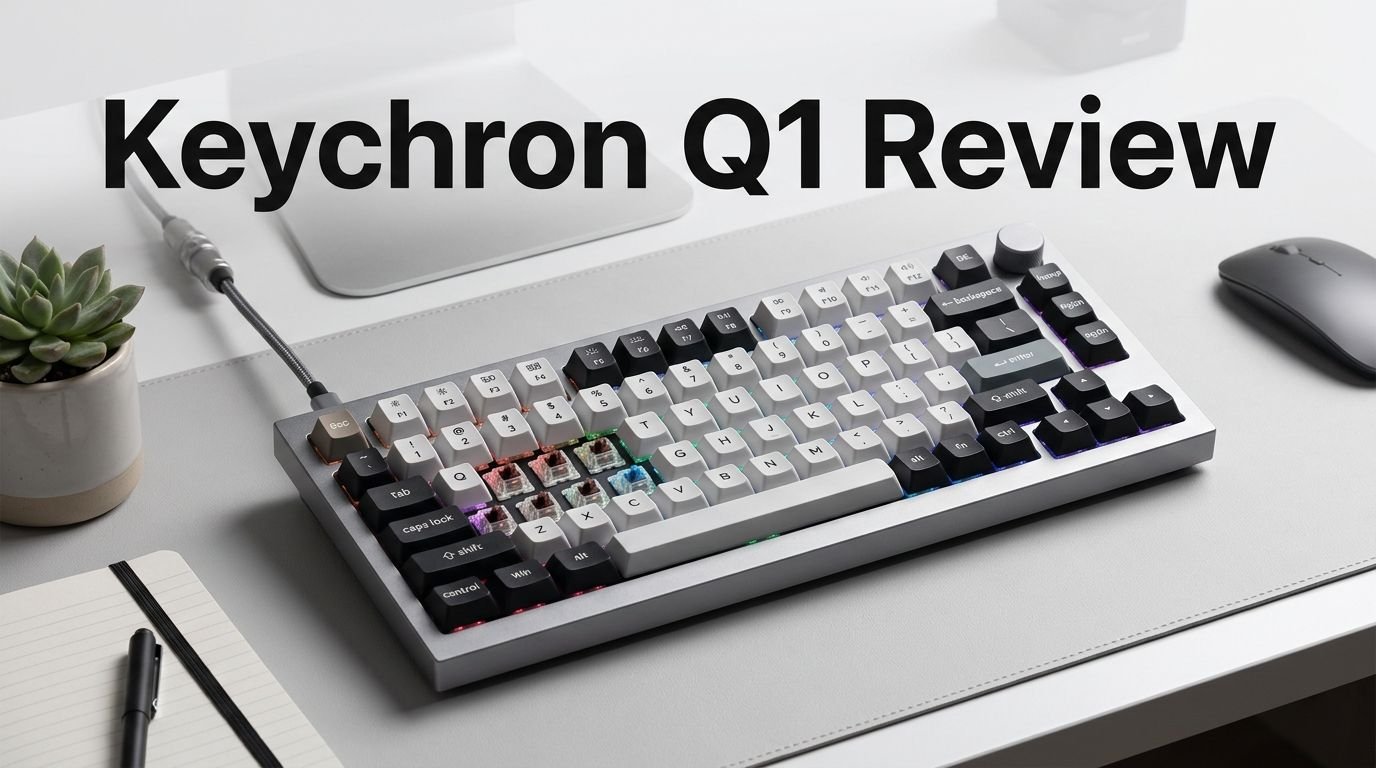
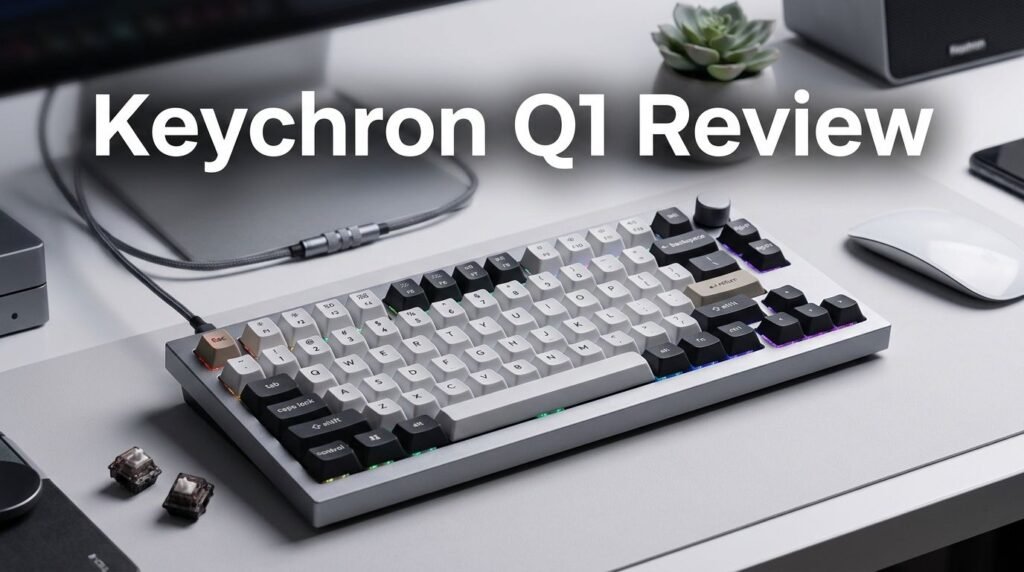
The Keychron Q1 is a 75% layout mechanical keyboard made for people who want a premium typing experience. It holds 82 to 84 keys depending on the version. This layout is compact enough to save desk space but large enough to keep the function row, arrow keys, and a few navigation keys.
Keychron positions the Q1 as its flagship customizable keyboard line. The original Q1 launched back in 2021 and quickly became a fan favorite. Over the years, Keychron has released updated versions with better gasket mounting, wireless connectivity, and faster polling rates.
The 2026 lineup includes five main versions. The Q1 V2 is the classic wired model. The Q1 Pro adds Bluetooth and 2.4 GHz wireless. The Q1 Max brings wireless QMK/VIA support. The Q1 HE uses Hall Effect magnetic switches. And the Q1 Ultra 8K is the newest model with ZMK firmware and an 8000 Hz polling rate.
Every Q1 model shares a few core traits. They all have a full aluminum body, a double gasket mount design, hot-swappable switches, and south-facing RGB LEDs. These features put the Q1 in direct competition with keyboards that cost much more.
Build Quality and Design
The first thing you notice about the Keychron Q1 is its weight. This keyboard is heavy. The full CNC machined aluminum body gives it a solid, anchored feel on your desk. It does not slide around during fast typing sessions or intense gaming moments.
The fit and finish are excellent. The anodized aluminum surface resists fingerprints and scratches well. Keychron offers the Q1 in several colors, including carbon black, shell white, and navy blue, depending on the version you pick.
The knob version adds a rotary encoder in the top right corner. You can use it to control volume, scroll through pages, or assign custom functions. The knob feels smooth and precise, with a satisfying click when pressed.
The keyboard sits at a comfortable typing angle. Keychron includes adjustable feet on the bottom so you can change the tilt. The overall dimensions keep the board compact without feeling cramped. The bezels around the keys are narrow, which gives the Q1 a modern and clean look.
Typing Experience and Switch Options
The Keychron Q1 offers a fantastic typing experience right out of the box. The double gasket mount design adds a slight flex to each keystroke. This creates a softer, bouncier feel compared to rigid tray mount keyboards.
You can choose from several switch options depending on the model. The standard Q1 V2 comes with Gateron G Pro switches in red, brown, or blue. The Q1 Max and Q1 Pro offer Gateron Jupiter switches. The Q1 HE uses Hall Effect Gateron 2.0 magnetic switches, which allow adjustable actuation points and rapid trigger functionality.
Every Q1 model supports 5-pin hot-swapping. This means you can pull out the included switches and replace them with your favorite MX-style switches. You do not need any soldering. This makes the Q1 a great platform for switch testing and customization.
The keycaps are OSA or KSA profile double-shot PBT. They feel smooth and resist shine over time. The legends are crisp and will not fade with extended use. PBT keycaps are a big upgrade over the cheaper ABS keycaps found on many competitors.
Top 3 Alternatives for Keychron Q1
If you want to explore other options before committing, here are three strong alternatives to the Keychron Q1.
1. Glorious GMMK Pro

The GMMK Pro is a gasket-mounted 75% aluminum keyboard with a rotary knob. It supports QMK/VIA and hot-swappable switches. It is a solid choice if you want a similar premium build at a competitive price.
2. NuPhy Halo75 V2

The NuPhy Halo75 V2 offers Bluetooth, 2.4 GHz, and USB-C connectivity. It features hot-swappable switches and a 1000 Hz polling rate. The Halo75 V2 is great for people who want wireless freedom with a colorful design.
3. Epomaker TH80 Pro

The Epomaker TH80 Pro is a budget-friendly 75% keyboard with triple-mode connectivity. It has hot-swappable switches and RGB backlighting. This is an excellent option if you want a quality mechanical keyboard without spending over $100.
Keychron Q1 Ultra 8K: The 2026 Flagship

The Keychron Q1 Ultra 8K is the newest and most advanced model in the Q1 family. It launched in early 2026 and runs on ZMK open-source firmware. This is a major shift from the QMK firmware used in earlier models.
ZMK firmware enables the Q1 Ultra 8K to deliver an 8000 Hz polling rate in both wired and 2.4 GHz wireless modes. This means the keyboard sends input data to your computer 8000 times per second. The result is near-zero input lag, which is critical for competitive gaming and fast typists.
The battery life is one of the headline features. Keychron claims up to 660 hours with the backlight off. Even with moderate backlight use, you can expect weeks of use on a single charge. The 4000 mAh battery also supports charging while you use the keyboard.
The Q1 Ultra 8K comes with pre-lubed Keychron K Pro switches that deliver a smooth, quiet typing experience. It supports triple-mode connectivity with 2.4 GHz, Bluetooth 5.2, and USB-C. The price sits at $229.99, making it a premium but fair offering.
Sound Profile and Acoustics
The Keychron Q1 sounds deep, full, and satisfying thanks to its multi-layer sound dampening system. Keychron uses a combination of case foam, switch pad foam, and the double gasket mount to reduce hollow sounds and pinging.
The Q1 Ultra 8K adds extra sound-dampening layers compared to earlier models. Users report a thocky yet controlled sound signature. The aluminum case contributes warmth, while the foam layers absorb high-pitched resonance.
You can further customize the sound by swapping switches and keycaps. Linear switches like Gateron Reds produce a smooth, quiet sound. Tactile switches like Browns add a subtle bump. Clicky switches like Blues give a loud, sharp click with each press.
The spacebar sound is an area some users have noted could use tuning. A few early reviews mentioned the spacebar sounds different from the rest of the keys. Adding a thin layer of tape or foam inside the spacebar keycap can fix this easily.
Wireless Performance and Connectivity
The wireless Q1 models (Pro, Max, HE, and Ultra 8K) support multiple connection modes. You get 2.4 GHz dongle-based wireless, Bluetooth 5.2, and wired USB-C. You can switch between three Bluetooth devices using keyboard shortcuts.
The 2.4 GHz mode delivers the lowest latency. On the Q1 Ultra 8K, this mode runs at 8000 Hz, which matches the wired polling rate. This is a major achievement for a wireless keyboard. Most competitors top out at 1000 Hz wirelessly.
Bluetooth performance is reliable for everyday use. It connects quickly and maintains a stable signal within a typical desk range. Bluetooth mode is ideal for connecting to tablets, phones, or secondary computers.
The USB-C wired mode is always available as a fallback. It also charges the battery simultaneously. The included USB-C cable is braided and feels durable.
QMK, VIA, and ZMK Firmware Support
One of the biggest selling points of the Keychron Q1 is its firmware support. The wired models (Q1 V2) use QMK and VIA. The wireless models (Q1 Pro, Max, HE) use QMK/VIA with limited wireless key remapping. The Q1 Ultra 8K uses ZMK firmware.
QMK and VIA allow you to remap every key on the keyboard. You can create custom layers, macros, and shortcuts. VIA offers a user-friendly graphical interface that works in a web browser. Changes happen in real time without flashing firmware.
ZMK is an open-source firmware built for wireless keyboards. It is highly efficient, which is why the Q1 Ultra 8K achieves such long battery life. ZMK uses a web-based configuration tool that lets you create custom keymaps and flash them to your keyboard.
The firmware support makes the Q1 highly future-proof. The open-source nature means the community can create new features and improvements over time. You can customize your keyboard experience far beyond what stock software allows.
Gaming Performance
The Keychron Q1 is not just a productivity keyboard. It is also a capable gaming keyboard, especially the HE and Ultra 8K models. The Q1 HE features rapid trigger and adjustable actuation points thanks to its Hall Effect switches.
Rapid trigger means the key resets the moment you start lifting your finger. There is no fixed reset point. This allows for faster repeated key presses, which is a huge advantage in FPS and rhythm games.
The Q1 Ultra 8K’s 8000 Hz polling rate reduces input delay to a fraction of a millisecond. This gives competitive gamers a real edge. Combined with the low-latency 2.4 GHz wireless, you get wired-level responsiveness without the cable.
The full N-key rollover ensures that every keypress registers, even during the most intense gaming sessions. RGB backlighting lets you assign colors to specific keys or create game-specific lighting profiles.
Mac and Windows Compatibility
The Keychron Q1 works great with both Mac and Windows. It includes keycaps for both operating systems in the box. A physical switch on the side lets you toggle between Mac and Windows layouts.
Mac users will appreciate the native macOS keycap legends for Command, Option, and other Mac-specific keys. The keyboard integrates smoothly with macOS shortcuts and functions.
Windows users get the standard Windows key layout. The keyboard supports all Windows shortcuts and gaming-related functions without extra drivers. Plug it in, and it works immediately.
Linux users also benefit from the QMK and ZMK firmware. Both are well-supported on Linux, and you can remap keys and layers just like on other operating systems. The Q1 is truly a cross-platform keyboard.
Customization and Modding Potential
The Keychron Q1 is a modder’s dream. Its design allows for easy disassembly. You can access the PCB, plate, foam layers, and stabilizers by removing a few screws from the bottom case.
Popular mods include tape modding, PE foam modding, and stabilizer lubing. The tape mod involves placing strips of masking tape on the back of the PCB. This changes the sound profile by adding a poppy, clacky tone. The PE foam mod places a thin sheet between the PCB and switches for a similar effect.
Stabilizer tuning is important for the best spacebar and shift key feel. The stock stabilizers on the Q1 are decent, but lubing them with Krytox 205g0 or Permatex dielectric grease makes them smoother and quieter.
You can also swap the plate material. Some third-party manufacturers sell FR4, polycarbonate, and brass plates for the Q1. Each plate material changes the flex, sound, and overall typing feel of the keyboard.
Battery Life and Charging
Battery life is a standout feature of the wireless Q1 models. The Q1 Ultra 8K leads the pack with up to 660 hours of use on a single charge when the backlight is off. This is possible thanks to the efficient ZMK firmware and a large 4000 mAh battery.
With RGB backlighting set to a moderate level, you can still expect around 100 to 200 hours of use. This is far above most wireless mechanical keyboards, which typically last 40 to 80 hours.
The Q1 Max and Q1 Pro offer solid battery life too, though not as extreme as the Ultra 8K. They use QMK firmware, which is less power-efficient than ZMK for wireless operation.
Charging happens through USB-C. A full charge takes about 3 to 4 hours. You can use the keyboard while it charges, so you never have to wait for it to power up before getting back to work.
Keychron Q1 Pricing and Value
The Keychron Q1 lineup offers strong value at every price point. The base Q1 V2 starts at around $169 for the fully assembled version. The knob version costs slightly more. The Q1 Pro sits at about $199, while the Q1 Max is priced similarly.
The Q1 HE retails for around $219 to $239 depending on the variant. The Q1 Ultra 8K comes in at $229.99. For a full aluminum, gasket-mounted keyboard with premium switches and advanced firmware, these prices are competitive.
Comparable keyboards from brands like Mode, Zoom, and Meletrix often cost $300 or more. The Keychron Q1 delivers 90% of the experience at a fraction of the price. You get hot-swappable switches, QMK/VIA/ZMK support, and top-tier build quality.
The Q1 is one of the best value propositions in the premium mechanical keyboard market in 2026. It hits a sweet spot between enthusiast-grade features and accessible pricing.
Who Should Buy the Keychron Q1?
The Keychron Q1 is perfect for a wide range of users. If you are a programmer who types for hours every day, the comfortable gasket mount and PBT keycaps will treat your fingers well. If you are a gamer, the Q1 HE and Ultra 8K models offer rapid trigger and 8000 Hz polling.
Content creators and writers will love the clean design, quiet sound profile, and the handy knob for volume control. If you work on both Mac and Windows, the dual-OS support saves you from buying two keyboards.
Keyboard enthusiasts and modders will appreciate the easy-to-open design and the endless customization possibilities. You can tune this keyboard to sound and feel exactly the way you want.
The only people who might want to look elsewhere are those who need a full-size layout with a number pad. The Q1 is a 75% board, so there is no dedicated number pad. For a full-size option, check out the Keychron Q6.
Pros and Cons of the Keychron Q1
Pros: The full aluminum body feels incredible. The gasket mount provides a soft, pleasant typing feel. The hot-swappable switches give you total freedom. QMK, VIA, and ZMK firmware support ensure deep customization. The Q1 Ultra 8K delivers record-breaking battery life and wireless polling rates.
Cons: The keyboard is heavy, which makes it less portable. The spacebar sound may need tuning on some units. The ZMK firmware on the Ultra 8K does not yet support VIA’s real-time remapping. Some users find the stock stabilizers could be smoother out of the box.
Overall, the pros far outweigh the cons. The Keychron Q1 is a refined, well-built keyboard that delivers exceptional performance for its price.
Final Verdict: Should You Buy the Keychron Q1 in 2026?
Yes. The Keychron Q1 remains one of the best 75% mechanical keyboards you can buy in 2026. Whether you pick the affordable Q1 V2, the versatile Q1 Max, or the cutting-edge Q1 Ultra 8K, you get a premium keyboard that performs beyond its price tag.
The build quality is among the best in its class. The typing experience is smooth and satisfying. The firmware support gives you total control over your keyboard. And the wireless models now offer battery life and polling rates that were unheard of just a year ago.
If you want a single keyboard that works for gaming, typing, and creative work, the Keychron Q1 family has a model for you. It is one of the smartest keyboard investments you can make this year.
Frequently Asked Questions
Is the Keychron Q1 good for gaming?
Yes, the Keychron Q1 is great for gaming. The Q1 HE and Q1 Ultra 8K models are especially strong for gamers. The Q1 HE supports rapid trigger and adjustable actuation points. The Q1 Ultra 8K delivers an 8000 Hz polling rate in wireless mode, which reduces input lag to near zero.
Does the Keychron Q1 work with Mac?
The Keychron Q1 works with Mac, Windows, and Linux. It includes keycaps for both Mac and Windows layouts. A physical toggle switch on the side lets you switch between operating systems instantly.
How long does the Keychron Q1 Ultra 8K battery last?
The Keychron Q1 Ultra 8K can last up to 660 hours on a single charge with the backlight turned off. With moderate RGB backlight use, you can expect around 100 to 200 hours. The 4000 mAh battery charges through USB-C.
Can I change the switches on the Keychron Q1?
All Keychron Q1 models support hot-swappable switches. You can remove the stock switches and install any MX-compatible 5-pin switches without soldering. This includes popular options like Cherry MX, Gateron, Kailh, and more.
What is the difference between Keychron Q1 Max and Q1 Ultra 8K?
The Q1 Max uses QMK/VIA firmware and supports a 1000 Hz polling rate wirelessly. The Q1 Ultra 8K uses ZMK firmware and supports an 8000 Hz polling rate wirelessly. The Ultra 8K also delivers much longer battery life at up to 660 hours compared to the Max.
Is the Keychron Q1 worth it in 2026?
The Keychron Q1 offers excellent value in 2026. You get a full aluminum body, gasket mount, hot-swappable switches, and advanced firmware support at a price that undercuts most premium competitors. It is one of the best keyboard purchases you can make this year.