Lenovo V15 G4 AMD Ryzen 5 7520U Laptop Review 2026
Are you searching for a reliable, affordable laptop that handles everyday tasks without breaking the bank? The Lenovo V15 G4 AMD Ryzen 5 7520U has been one of the most talked about budget laptops since its release.
It promises solid performance, a clean 15.6-inch Full HD display, and business-grade features at a price that students, remote workers, and small business owners can actually afford.
But does it truly deliver on those promises in 2026? In this detailed review, we break down every single aspect of this laptop. We cover its performance, display quality, battery life, build, keyboard experience, and much more.
Key Takeaways:
- The AMD Ryzen 5 7520U processor offers 4 cores and 8 threads with boost speeds up to 4.3GHz. It handles multitasking, office applications, web browsing, and light content creation with ease. This chip is built on the Zen 2 architecture and focuses heavily on power efficiency.
- The 15.6-inch Full HD (1920 x 1080) display provides a sharp and clear viewing experience for documents, spreadsheets, and media consumption. However, the TN panel option has limited viewing angles, so you should aim for the IPS version if possible.
- Memory and storage configurations include up to 16GB DDR5 RAM and 512GB NVMe SSD options. The DDR5 RAM at 5500MHz keeps application loading snappy, and the SSD ensures fast boot times.
- Battery life sits around 6 to 8 hours under typical usage. The 38Wh battery is adequate for light office work and web browsing through a workday, though heavy multitasking will drain it faster.
- The build is entirely plastic but feels sturdy for the price. At just 1.65 kg (3.6 lbs), it is easy to carry around campus or between meetings.
- Connectivity is generous with Wi-Fi 6, Bluetooth 5.1, USB Type-C with Power Delivery, two USB Type-A ports, HDMI 1.4b, an Ethernet port, and a 3.5mm audio jack. Few budget laptops offer this many ports.

Lenovo V15 G4 AMD Ryzen 5 7520U Laptop Overview
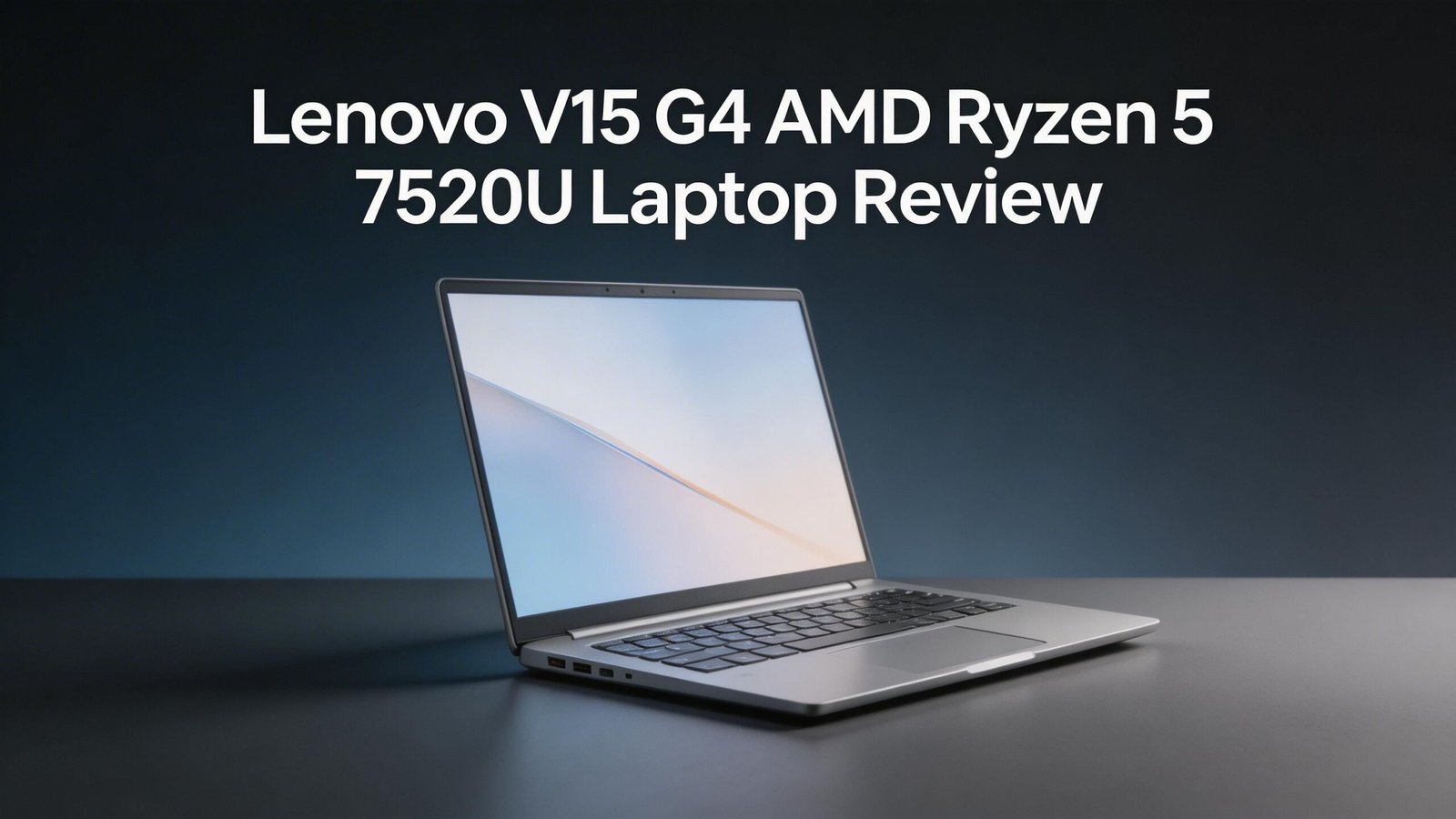
The Lenovo V15 G4 AMN sits in the budget to mid-range segment of the laptop market. Lenovo designed this machine for students, home users, and business professionals who need a dependable daily driver. It runs the AMD Ryzen 5 7520U processor paired with integrated AMD Radeon 610M graphics.
You can find this laptop in multiple configurations. The most common setup includes 8GB or 16GB of LPDDR5 RAM and a 256GB or 512GB NVMe SSD. It ships with either Windows 11 Home or Windows 11 Pro depending on the variant you choose.
The overall design follows a minimalist and professional aesthetic. The Arctic Grey color gives it a clean, office-friendly look. Lenovo also includes Dolby Audio support through its dual 1.5W stereo speakers, a privacy shutter on the HD webcam, and an optional fingerprint reader.
This laptop does not try to be a gaming machine or a creative powerhouse. It focuses on doing the basics really well. If you need a laptop for writing, email, video calls, spreadsheets, and web browsing, this model covers all of those needs comfortably.
AMD Ryzen 5 7520U Processor Performance
The heart of this laptop is the AMD Ryzen 5 7520U chip. This is a quad-core, eight-thread processor based on AMD’s Zen 2 architecture. It has a base clock of 2.8GHz and can boost up to 4.3GHz on single-core workloads.
In day-to-day use, the 7520U handles office suites, multiple browser tabs, video streaming, and light photo editing without issues. You can run Microsoft Office, Google Chrome with 15+ tabs, Zoom calls, and Spotify all at once without noticeable lag.
The Zen 2 architecture is not the latest from AMD. Newer Ryzen processors use Zen 3 or Zen 4 cores that offer better per-core performance. However, for the price of this laptop, the 7520U strikes a solid balance between performance and power efficiency.
Benchmark scores place the Ryzen 5 7520U close to Intel’s Core i5-1235U in multi-threaded workloads. It falls slightly behind in single-core tasks. For a budget laptop, these results are impressive and more than enough for everyday computing.
Display Quality and Viewing Experience
The Lenovo V15 G4 features a 15.6-inch Full HD (1920 x 1080) display with an anti-glare coating. This screen size is ideal for productivity work since it gives you plenty of room for side-by-side windows and spreadsheets.
There are two panel options available. The TN panel offers faster response times but suffers from poor viewing angles and washed-out colors. The IPS panel provides much better color accuracy and wider viewing angles. If you can choose, always pick the IPS variant.
The anti-glare finish helps reduce reflections in bright environments. This makes it a decent option for working near windows or in coffee shops. However, the maximum brightness sits around 250 nits, which may feel dim in direct sunlight.
Color accuracy on the IPS version measures around 56% sRGB coverage. This is not ideal for photo or video editing. But for document work, web browsing, and casual media consumption, the display performs just fine. Keep your expectations realistic for this price range.
Top 3 Alternatives for Lenovo V15 G4 AMD Ryzen 5 7520U
1. HP 15.6-inch Full HD AMD Ryzen 5 7520U Laptop

2. ASUS Vivobook Go 15.6″ AMD Ryzen 5 7520U Laptop

3. Acer Aspire 5 15.6-inch Intel Core i5 Laptop

Build Quality and Design
The Lenovo V15 G4 uses a full polycarbonate (plastic) body. This is expected at the budget price point. Despite being plastic, the chassis feels relatively solid and does not flex much around the keyboard area.
The laptop measures 359.2 x 235.8 x 19.9 mm and weighs just 1.65 kg (3.6 lbs). This makes it one of the lighter 15.6-inch laptops in this category. You can slip it into a backpack and carry it all day without shoulder fatigue.
The hinge opens smoothly with one hand on most units. It holds the screen firmly at your chosen angle. The Arctic Grey color resists fingerprints better than glossy alternatives. Overall, the design is clean, simple, and professional.
Lenovo did not include any premium materials like aluminum here. If you want a more premium feel, you will need to step up to the IdeaPad or ThinkPad lines. For the price, though, the V15 G4 offers acceptable build quality that should last through years of normal use.
Keyboard and Trackpad Experience
The keyboard on the Lenovo V15 G4 is a full-sized layout with a numeric keypad. This is a big plus for data entry, accounting, and anyone who works with numbers daily. Key travel feels adequate, and the typing experience is comfortable for long sessions.
An optional backlit keyboard is available on some configurations. If you often work in dim environments, check whether your chosen variant includes this feature. It makes a noticeable difference during late-night work sessions.
The trackpad is responsive and accurate. It supports Windows precision drivers, which means multi-finger gestures like pinch-to-zoom, three-finger swipe, and two-finger scroll work smoothly. The surface has a good texture that lets your finger glide without sticking.
One small complaint is that the trackpad could be slightly larger. Budget laptops often have smaller trackpads compared to premium models. However, it gets the job done without frustration. If you prefer a mouse, the laptop has plenty of USB ports for that.
Memory, Storage, and Upgrade Options
The Lenovo V15 G4 ships with configurations ranging from 8GB to 16GB of LPDDR5 RAM running at 5500MHz. DDR5 memory provides faster data transfer speeds compared to DDR4. This helps with application loading and general system responsiveness.
Storage options include a 256GB or 512GB NVMe SSD in a 2242 M.2 slot. The SSD uses a PCIe 3.0 x2 interface. This is not the fastest NVMe connection available, but it still delivers much better speeds than a traditional SATA SSD or hard drive.
Boot times hover around 15 to 20 seconds from power button to desktop. Applications launch quickly, and file transfers feel snappy. If 512GB is not enough, you can add an external drive through the USB ports.
The RAM on some configurations is soldered to the motherboard, which limits upgrade options. Before buying, check whether your specific variant has a SODIMM slot available. The M.2 slot allows SSD replacement or upgrade, which is a helpful option for future expansion.
Battery Life and Charging
The Lenovo V15 G4 comes with a 38Wh battery in most configurations. A larger 47Wh option exists in select variants. With the 38Wh battery, expect around 6 to 8 hours of battery life during light productivity work like document editing and web browsing.
Video playback at moderate brightness drains the battery in roughly 5 to 6 hours. Heavy multitasking with many browser tabs and video calls will push the battery life closer to 4 hours. These numbers are average for a budget 15.6-inch laptop.
The included 65W charger fills the battery from zero to full in about 2 hours. USB Type-C Power Delivery support means you can also charge the laptop through compatible USB-C chargers. This adds flexibility for travelers who want to carry fewer adapters.
If you need all-day battery life, this laptop may fall short. However, for users who spend most of their time near a power outlet, the battery lasts long enough for meetings, classes, or quick work sessions away from the desk.
Connectivity and Port Selection
One of the standout features of the Lenovo V15 G4 is its port selection. Budget laptops often cut corners on ports, but this model delivers a solid range of connectivity options.
You get two USB 3.2 Gen 1 Type-A ports, one USB 3.2 Gen 1 Type-C port (with DisplayPort and Power Delivery), an HDMI 1.4b output, a full-sized Ethernet (RJ-45) port, an SD card reader, and a 3.5mm combo audio jack. This covers nearly every common peripheral you might need.
Wireless connectivity includes Wi-Fi 6 (802.11ax) and Bluetooth 5.1. Wi-Fi 6 ensures fast and stable internet connections, even in crowded network environments. Bluetooth 5.1 provides reliable connections to wireless mice, keyboards, headphones, and speakers.
The Ethernet port is a rare find on thin modern laptops. It gives you a wired internet option for the most stable connection during video calls, file downloads, or online exams. This makes the V15 G4 especially appealing for business and student use.
Webcam, Microphone, and Speaker Quality
The Lenovo V15 G4 includes an HD (720p) webcam with a physical privacy shutter. The privacy shutter is a simple but effective feature that lets you physically block the camera lens when it is not in use. This provides peace of mind for security-conscious users.
Webcam quality is adequate for video calls and online meetings. The image appears clear enough in well-lit rooms. In low light, the image gets grainy and noisy, which is typical for HD webcams in this price range. An external webcam would be a better choice for professional streaming or recording.
The dual microphone array picks up voice clearly during calls. Background noise suppression works reasonably well. Your colleagues and classmates should be able to hear you without issues during Zoom, Teams, or Google Meet sessions.
The two 1.5W stereo speakers with Dolby Audio support produce sound that is acceptable for casual listening. They lack bass and volume compared to premium laptops. For music, movies, or long listening sessions, a pair of headphones or external speakers will improve the experience significantly.
Thermal Performance and Fan Noise
The AMD Ryzen 5 7520U is a 15W TDP processor that runs cool and efficient. The Lenovo V15 G4 manages its thermals well during normal workloads. You can browse the web, work in Word, and stream video without the fans spinning up noticeably.
Under heavier loads like extended video rendering or benchmark tests, the fans do become audible. However, they stay at a moderate noise level and do not reach the jet-engine sound that some gaming laptops produce. The laptop surface stays cool to the touch under the keyboard during light tasks.
The bottom of the chassis can get warm during prolonged heavy use. This is normal for a laptop with a plastic body. Using the laptop on a flat, hard surface helps maintain good airflow through the ventilation openings.
Overall, thermal management is solid for this class of laptop. The Ryzen 5 7520U does not generate excessive heat, and Lenovo’s cooling solution keeps everything in check. You will not experience thermal throttling during typical day-to-day activities.
Who Should Buy the Lenovo V15 G4 AMD Ryzen 5 7520U?
This laptop is ideal for students who need a reliable machine for taking notes, writing papers, researching online, and attending virtual classes. The lightweight design and decent battery life make it a good campus companion.
Remote workers and small business professionals will appreciate the full port selection, Ethernet connectivity, Windows 11 Pro availability, and the comfortable keyboard with a numeric keypad. The privacy shutter on the webcam adds a useful layer of security for home offices.
Casual home users who want a laptop for web browsing, email, social media, video streaming, and light photo management will find this machine more than capable. It handles all of these tasks smoothly without slowdowns.
This laptop is not ideal for gamers, video editors, 3D designers, or anyone who needs high GPU performance. The integrated AMD Radeon 610M graphics handle basic display tasks but struggle with demanding games or professional creative software.
Pros and Cons of the Lenovo V15 G4
Every laptop has strengths and weaknesses. Here is a clear summary of what the Lenovo V15 G4 gets right and where it falls short.
On the positive side, the Ryzen 5 7520U processor delivers reliable daily performance. The DDR5 RAM and NVMe SSD keep the system feeling fast. The port selection is excellent for a budget laptop. Wi-Fi 6 and Bluetooth 5.1 provide modern wireless standards. The lightweight build at 1.65 kg makes it portable. The privacy shutter on the webcam is a thoughtful touch.
On the negative side, the TN display option has poor viewing angles and weak color reproduction. The 38Wh battery provides only average battery life. The RAM may be soldered on some configurations, limiting upgrades. The webcam is only 720p, which feels outdated in 2026. Speaker quality is underwhelming. The NVMe SSD uses PCIe 3.0 x2, which is slower than PCIe 4.0 options found in competitors.
These trade-offs are expected at this price point. No budget laptop is perfect. The key question is whether the strengths align with your personal needs.
Final Verdict: Should You Buy This Laptop in 2026?
The Lenovo V15 G4 AMD Ryzen 5 7520U remains a solid budget laptop choice in 2026. It covers the essentials well. The processor is fast enough for everyday tasks. The display is clear at Full HD resolution. The port selection beats many competitors. The build is light and portable.
If your primary needs are office work, web browsing, video calls, and student tasks, this laptop earns a confident recommendation. It does exactly what a budget workhorse should do. It gets out of your way and lets you focus on your work.
However, if you need a better display, longer battery life, or stronger GPU performance, consider stepping up to a slightly higher-priced model. The alternatives listed earlier in this post offer some of those improvements.
For the money, the Lenovo V15 G4 delivers honest, dependable value. It is not flashy. It is not exciting. But it gets the job done every single day, and that is what matters most in a budget laptop.
Frequently Asked Questions
Is the Lenovo V15 G4 AMD Ryzen 5 7520U good for students?
Yes, this laptop works well for students. It handles note-taking, paper writing, research, video calls, and streaming with ease. The lightweight design at 1.65 kg makes it easy to carry between classes. Wi-Fi 6 ensures stable connections on crowded campus networks. The full-sized keyboard with a numeric keypad is a bonus for students in accounting or data-heavy courses.
Can the Lenovo V15 G4 handle video editing?
The Lenovo V15 G4 can handle very basic video editing in apps like Clipchamp or simple cuts in DaVinci Resolve. However, it is not built for professional video editing. The integrated Radeon 610M graphics and quad-core processor will struggle with high-resolution timelines, effects, and rendering. If video editing is a priority, consider a laptop with a dedicated GPU.
How much RAM does the Lenovo V15 G4 support?
The Lenovo V15 G4 supports up to 64GB of RAM according to Lenovo’s specifications. However, some configurations ship with soldered RAM that cannot be upgraded. Check your specific variant before purchasing if RAM upgradability is important to you.
Does the Lenovo V15 G4 have a backlit keyboard?
A backlit keyboard is optional on the Lenovo V15 G4. Not every configuration includes it. If you need backlighting for working in dim environments, verify that your chosen model has this feature before ordering.
What is the battery life of the Lenovo V15 G4?
Battery life ranges from approximately 6 to 8 hours during light productivity tasks with the 38Wh battery. Video playback lasts around 5 to 6 hours. Heavy usage drops it to about 4 hours. A 47Wh battery option is available in select variants and offers slightly longer endurance.
Is the Lenovo V15 G4 good for gaming?
This laptop is not designed for gaming. The AMD Radeon 610M integrated graphics can run very light games and older titles at low settings. Modern AAA games will not run well on this hardware. If gaming matters to you, look for a laptop with a dedicated NVIDIA or AMD discrete GPU.