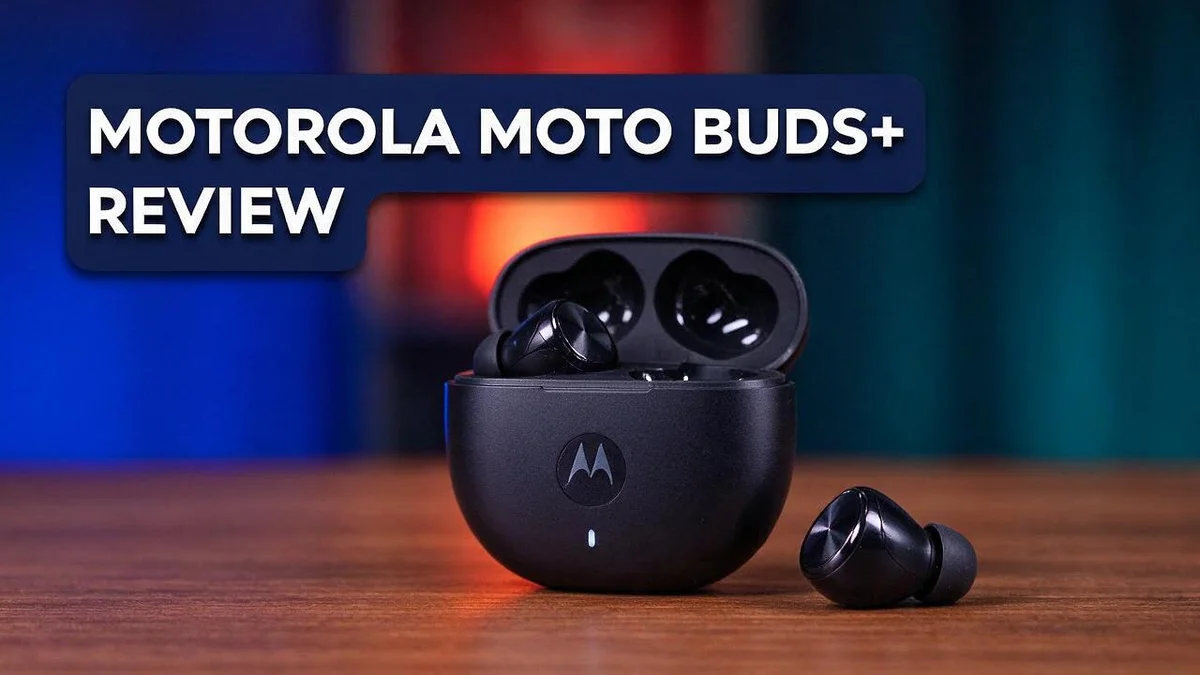
Motorola Moto Buds+ Review 2026: Overpriced or Justified?
Looking for earbuds that sound great without losing your attention? The Motorola Moto Buds+ might be the pair you need. It packs a lot into a small case.
Each earbud has its own battery, microphone, and smart touch controls. You also get active noise cancellation and voice assistant support. Place them in the open case, and they pair with your phone on their own.
The sound feels rich right out of the box. Tuned by Bose, these earbuds deliver a solid listening experience for daily music, calls, and podcasts. Battery life reaches around 40 hours, so you can skip the constant charging.
Still, the audio is not perfect for everyone. Some reviewers call the sound a mixed bag, and vocals lose clarity above about 80% volume. Keep reading to see if these earbuds fit your listening habits.
In a Nutshell
-
Long battery life: The earbuds offer around 40 hours of total listening time. You can enjoy music on long trips, busy workdays, and weekend plans without searching for a charger.
-
Solid noise cancellation: Active noise cancellation helps block out background noise on buses, planes, and busy streets. You can adjust noise control, transparency, and sound settings in the companion app.
-
Bose tuned audio: The sound profile reflects Bose tuning and supports high resolution codecs. Listeners who care about detail may notice a fuller and more balanced listening experience.
-
Quick pairing: Place the earbuds in the open case, and they enter Bluetooth pairing mode on their own. You spend less time fiddling with settings and more time listening.
-
Voice assistant access: A built in voice assistant lets you control music, calls, and reminders without touching your phone. Voice commands feel especially handy when your hands are busy.
-
Clear sound up to a point: Audio stays strong at about 80 percent volume. Above that level, vocals can fade, so keep the volume moderate for the best clarity.
Sound Quality

Last update on 2026-11-03 / Affiliate links / Images from Amazon Product Advertising API Some of the links on this website are affiliate links, which means that at no additional cost to you, I earn a commission if you click through and make a purchase. I only recommend products and services that I believe will add value to my readers. Thank you for your support!
Good sound starts with a snug fit. A proper seal lets the bass reach your ears clearly. Try different ear tips if your set includes them, since small changes matter.
The companion app gives you control over the sound. You can shape the balance between low and high tones. This helps when your music feels too bright or too muddy.
Each style needs different tuning. Podcasts need clear voices, while pop and hip hop often benefit from stronger bass. Adjust the settings for each habit, and you will hear the difference.
Keep the volume moderate. Vocals can lose their crispness when you push the level higher during long sessions. A gentle level protects your hearing and keeps voices easy to follow.
Your source matters too. High resolution audio only shines when your phone and music app support it. Stream from a service that offers high quality files for the best result.
Reviews show mixed opinions. One listener called the audio a mixed bag, so your own ears will decide. Play a few songs you know well before you settle in.
Treble and bass need balance. Bright tones can sound sharp, while heavy bass can hide details in busy tracks. Small changes in the app often make a big difference.
Call quality is a separate test. Sound on calls depends on the microphone and your surroundings, rather than just the speakers. Try a quiet room first, then a busier place.
Long listening needs comfort. Good sound loses its charm when the earbuds feel tight. Take short breaks to rest your ears during a full album.
Sound tells only part of the story. Still, the audio gives you a solid base for everyday listening. Pair the earbuds with the right settings, and they can feel like a fresh experience every day.
Test before you commit. The Moto Buds+ can sound excellent to many people. Spend a little time with the app, and you can shape the audio to fit your taste.
Active Noise Cancellation
Active noise cancellation works in a simple way. The earbuds listen to outside sounds through their microphones. Then they create an opposite sound wave that cancels the noise.
The result feels calm when you need to focus. Low, steady sounds like engines and fans fade fast.
Transparency mode is a helpful partner. Open the companion app and switch modes with ease. You can hear announcements and nearby voices without removing the earbuds.
Noise cancellation works best on constant background sounds. Sudden noises, like a slamming door, may still break through. Keep that in mind when you judge the results.
A good seal helps the system perform well. Gaps let outside sound slip in. Take a moment to check the fit in your ears.
Calls can also benefit from less background noise. Your voice may sound clearer to the other person on the line.
Test the feature in real places. Try it on a train, in an office, and at home. Compare how voices and hums change in each spot.
Long trips feel less tiring when outside noise fades. Your mind can rest instead of straining to hear over engines and crowds.
Try the feature before a long trip. A short test shows whether the seal and quiet level suit you. Then you can relax on your journey.
Open offices often have chatter and keyboard clicks. This feature can soften those sounds, so your focus stays on your task.
The short answer is simple. The Moto Buds+ handles everyday noise well. Extreme or sudden sounds may still reach your ears, and that balance makes it useful for daily life.
Expect good results, not perfect silence. Active noise cancellation reduces noise, but it does not erase every sound. Set your expectations first, then decide if it fits your routine.
Battery Life and Auto-Pairing
Battery life matters most on long days. The Moto Buds+ is rated for about 40 hours of total playback, according to one review. That runtime can cover many commutes, workouts, and study sessions between charges.
Real results depend on your habits. Heavy volume and long calls use more power, so your mileage may vary. Keep the case nearby. Drop the earbuds back in when you finish a session so they stay ready.
Build a simple charging routine. Place the earbuds in the case during lunch breaks or while you cook dinner. Short top ups add up over a busy week. Even a short break in the case helps during a busy day.
Auto pairing works best when your phone is close. Stay within arm’s reach of your phone during the first connection.
Remove old pairings first. Delete the earbuds from any phone, tablet, or laptop you no longer use. This step stops your earbuds from linking to the wrong device by accident.
Check Bluetooth if nothing happens. Open the Bluetooth menu on your phone and confirm the Moto Buds+ appears in the list. If the earbuds still do not show up, restart your phone and try again. Your phone may also display battery levels for each earbud in its Bluetooth settings.
Pair with care on shared devices. If someone else uses your phone, check which device the earbuds link to first. Auto pairing feels smooth when you keep the list tidy. Fewer old entries mean faster and cleaner connections.
Test before a long trip. Charge the earbuds fully, then play a long playlist to see how the battery holds up. Note the time it lasts. This simple check shows whether the battery suits your daily routine.
Reliable connections make daily listening easier. Good battery habits and clean pairing settings help the Moto Buds+ feel dependable from morning commutes to evening calls. Small routines save time and stress. Give these steps a week, and you will see the difference.
Top 3 Alternatives
Looking for a different pair of earbuds? These three options offer strong sound and a comfortable fit. Each one makes a great alternative to the Motorola Moto Buds+.
Sony WF-1000XM5


Last update on 2026-06-09 / Affiliate links / Images from Amazon Product Advertising API Some of the links on this website are affiliate links, which means that at no additional cost to you, I earn a commission if you click through and make a purchase. I only recommend products and services that I believe will add value to my readers. Thank you for your support!
The Sony WF-1000XM5 delivers excellent noise canceling for busy commutes.
Its sound feels rich and clear across most music types. The compact design sits comfortably in your ear.
Calls also sound clean. The built-in microphones pick up your voice well, even on windy days.
Anker Soundcore Liberty 4

Last update on 2026-10-05 / Affiliate links / Images from Amazon Product Advertising API Some of the links on this website are affiliate links, which means that at no additional cost to you, I earn a commission if you click through and make a purchase. I only recommend products and services that I believe will add value to my readers. Thank you for your support!
The Anker Soundcore Liberty 4 offers smart features for everyday listening.
Its adaptive noise canceling adjusts to your surroundings. That means less distraction on trains and in busy offices.
The companion app lets you tweak the equalizer. You can shape the sound to match your taste.
Battery life lasts a full day when you use the charging case.
Jabra Elite 7 Pro

Last update on 2026-11-03 / Affiliate links / Images from Amazon Product Advertising API Some of the links on this website are affiliate links, which means that at no additional cost to you, I earn a commission if you click through and make a purchase. I only recommend products and services that I believe will add value to my readers. Thank you for your support!
The Jabra Elite 7 Pro focuses on clear calls and a secure fit.
Multiple microphones help filter out background noise. Your voice comes through clearly during video meetings.
The earbuds feel light, and the ear tips come in several sizes. This helps you find a snug fit for long workouts.
Companion App and Sound Control
The companion app acts as your control center for the Moto Buds+. Spend a few minutes there before your first real listen. Most of the key tools live in one place.
Sound control lets you shape how music feels. Think of the app as a tuning tool rather than a fixed setting. Small changes often make a big difference.
Start with the default sound first. Listen to three songs you know well. Your ears learn the baseline before you change anything.
Then make one change at a time. Adjust a single setting, play the same track, and compare. This method keeps your choices clear and easy to reverse.
Keep a short list of favorite settings. Note what works for podcasts, calls, and workouts. Each use case may need a different mix.
Test each setting with different music genres. A rock track, a podcast, and an acoustic song reveal different strengths. One profile rarely fits every genre. Mix your tests so you learn the full picture.
Check for updates in the app too. Firmware updates can improve performance over time. Updates may also bring new sound options.
Check how the smart touch controls respond. Clear gestures help you pause music without pulling out your phone.
Finally, keep the app open during a test session. Watch how each mode changes the sound in real time. Notes you make now help you choose the right profile later.
Keep your phone nearby while you adjust settings. Some changes may need a moment to apply. Give the earbuds a second before you judge the result.
Write down your results in a notes app. You can review them later. Clear notes make your final choice much easier.
Be patient with the process. Your ears adjust over several days. Give each setting a fair trial before you decide it is wrong.
A simple routine keeps things fresh. Check the app once a month for new options. Small habits build a sound you enjoy.
Pros and Cons
Pros
- Delivers rich sound right out of the box
- Offers solid noise cancellation for daily commutes
- Keeps sound clear up to about 80 percent volume
- Auto pairs when the earbuds sit in the open case
- Lasts up to 40 hours on a full charge
Cons
- Audio quality can feel like a mixed bag
- Vocal clarity fades above about 80 percent volume
- Some specs may not match every Moto Buds model
- Rivals like the Moto Buds 2 may sound different
Who Should Buy It
The Moto Buds+ suits people who want a clean everyday listening setup. It fits casual listeners who rarely turn the volume all the way up.
Commuters are a strong match. The active noise cancellation helps block out buses, trains, and busy streets. Many daily riders will find that calm enough for long rides.
Podcast and audiobook fans also do well here. Speech sounds natural at moderate levels, so talk shows come through clearly. Keep the volume in a comfortable range for the best results.
Voice assistant users will enjoy the built in support. A quick touch on an earbud can start your assistant. This keeps your hands free during errands, walks, or chores.
People who enjoy tinkering should take a close look. The companion app gives you control over noise cancellation, transparency, and sound. Those who like fine tuning will find plenty to explore.
Setup feels easy for first time wireless buyers. You can move from the box to your music quickly.
Heavy bass fans may feel mixed about it. Reviews describe the audio quality as a mixed bag. Listening in person first can help you decide.
Shoppers who want more choices should compare models. Rivals include the Creative Outlier Free Mini, the Moto Buds 150, the Moto Buds 2, and the CMF Buds Pro 2. Each one may suit a different listening style.
Skip this pair if you need studio level accuracy or strong vocals at top volume. Other models may serve those needs better. Also note that some specs may vary across Moto Buds models, so check the exact product details before you buy.
In short, the Moto Buds+ fits people who want steady everyday sound. Match it with your listening habits, and you will know if it is right for you.
Final Verdict
The Motorola Moto Buds+ earns a strong spot on the shortlist for wireless earbuds. It covers the basics well and adds helpful extras for daily listening.
Most people will find these earbuds a dependable everyday pick. They handle music, podcasts, calls, and voice assistant tasks with ease.
Sound is where this model stands out most. Its Bose tuned profile gives music a balanced and engaging feel for most listening styles.
Check the exact model name before you buy. Some listings mix up the Moto Buds S ANC and Moto Buds 2 Plus with this model. Confirm the name on the box so you know exactly what you get.
How does it compare with rivals? The Creative Outlier Free Mini is a direct alternative worth a look. The Motorola Moto Buds 150 and Moto Buds 2 sit in the same brand family. Users also mention the CMF Buds Pro 2 as a strong competitor.
Compare them side by side before you decide. Look at the sound profile, app features, and noise cancellation needs. A short listening test in a store can also help a lot.
Your daily habits matter most. Pick the earbuds that fit your device and the way you listen. A good match beats a long spec list every time.
Think about how you plan to use the earbuds each day. Gym sessions, office calls, and train rides place different demands on a pair.
Keep in mind that sound preferences vary from person to person. Some listeners will love the tuning, while others may want more control at high volume. That is why a quick test matters.
The Motorola Moto Buds+ suits people who want a simple, feature packed setup. It blends solid sound, active noise cancellation, and smart controls in one pair.
Overall, the Motorola Moto Buds+ gives most shoppers a dependable base to build on. Its clear strengths outweigh its small drawbacks for everyday listeners.
Trust your own ears in the end.
Frequently Asked Questions
Can I change the sound to my taste?
Yes, the companion app lets you adjust sound control. You can also switch noise cancellation and transparency modes. Try a few settings and keep the one that feels natural to you.
Do they support high resolution audio?
They support high resolution codec playback. Your phone and music app must also support it. Otherwise, the extra detail may not reach your ears.
Why won’t my phone find the earbuds?
Place both earbuds in the open case, and they should enter pairing mode on their own. If your phone still misses them, remove old entries from your Bluetooth list. Then try again.
Is the fit good for workouts?
The research does not cover sweat resistance or secure fit. Test them with a short walk or jog before you rely on them for training. This helps you judge comfort and stability for your own routine.

Hello everyone my name is Alenya and i am a gadget discovering Enthusiast 🐻🐻