OBSBOT Meet 2 4K Webcam Review 2026: Worth Your Money?
Are you tired of looking grainy and washed out on Zoom calls? Do you want a webcam that fits in the palm of your hand but still delivers stunning 4K video?
The OBSBOT Meet 2 4K might be exactly what you need. This pocket-sized webcam has taken the market by storm with its AI-powered features, crisp image quality, and an incredibly small form factor that weighs less than seven quarters.
In this full review, we break down everything about the OBSBOT Meet 2 4K. We cover its design, video quality, software, microphone performance, and much more.
Key Takeaways:
- The OBSBOT Meet 2 4K records at 4K resolution at 30 FPS and 1080p at 60 FPS, giving you sharp and smooth video output for calls, streams, and recordings. The 1/2-inch CMOS sensor with a 48MP capacity and f/1.8 aperture produces clear images even in dim lighting conditions.
- This webcam weighs only 40.5 grams and measures just 1.78 x 1.4 x 0.87 inches. It is one of the smallest 4K webcams available today. You can slip it into a pocket or laptop bag with zero hassle.
- AI-powered features set this camera apart from the competition. It includes smart framing for individuals and groups, gesture control, Phase Detection Auto Focus (PDAF), and beauty mode filters. These features work well right out of the box.
- The magnetic mounting system lets you switch between horizontal and vertical orientations instantly. A magnetic privacy cover snaps on for quick physical protection. The USB-C cable and included USB-A adapter make it compatible with most computers.
- At a retail price of around $129.99, the OBSBOT Meet 2 4K undercuts many competitors like the Razer Kiyo Pro Ultra ($299) and HyperX Vision S ($199) while delivering comparable or superior video quality and smarter AI features.
- The OBSBOT Center software gives you deep control over ISO, shutter speed, white balance, HDR, beauty modes, and background blur. All settings save directly to the webcam and persist after reboots.

OBSBOT Meet 2 4K Webcam Overview
The OBSBOT Meet 2 4K is a compact AI-powered webcam made by OBSBOT, a Shenzhen-based company founded in 2016. This webcam sits in the mid-range price category at around $129.99. It targets remote workers, streamers, and content creators who want excellent video quality without a bulky setup.
The camera packs a 1/2-inch CMOS sensor capable of capturing 48-megapixel stills and video up to 4K at 30 FPS. It also supports 1080p at 60 FPS for those who prefer smoother motion over raw resolution. The f/1.8 aperture pulls in plenty of light, which helps the camera perform well in low-light environments.
OBSBOT positions this webcam as a step below their flagship Tiny 2 Lite. The main difference is the absence of a motorized gimbal. However, the Meet 2 compensates with digital pan, tilt, and zoom through clever AI reframing. This makes it a strong value option for users who want premium features without the premium price tag.
Design and Build Quality
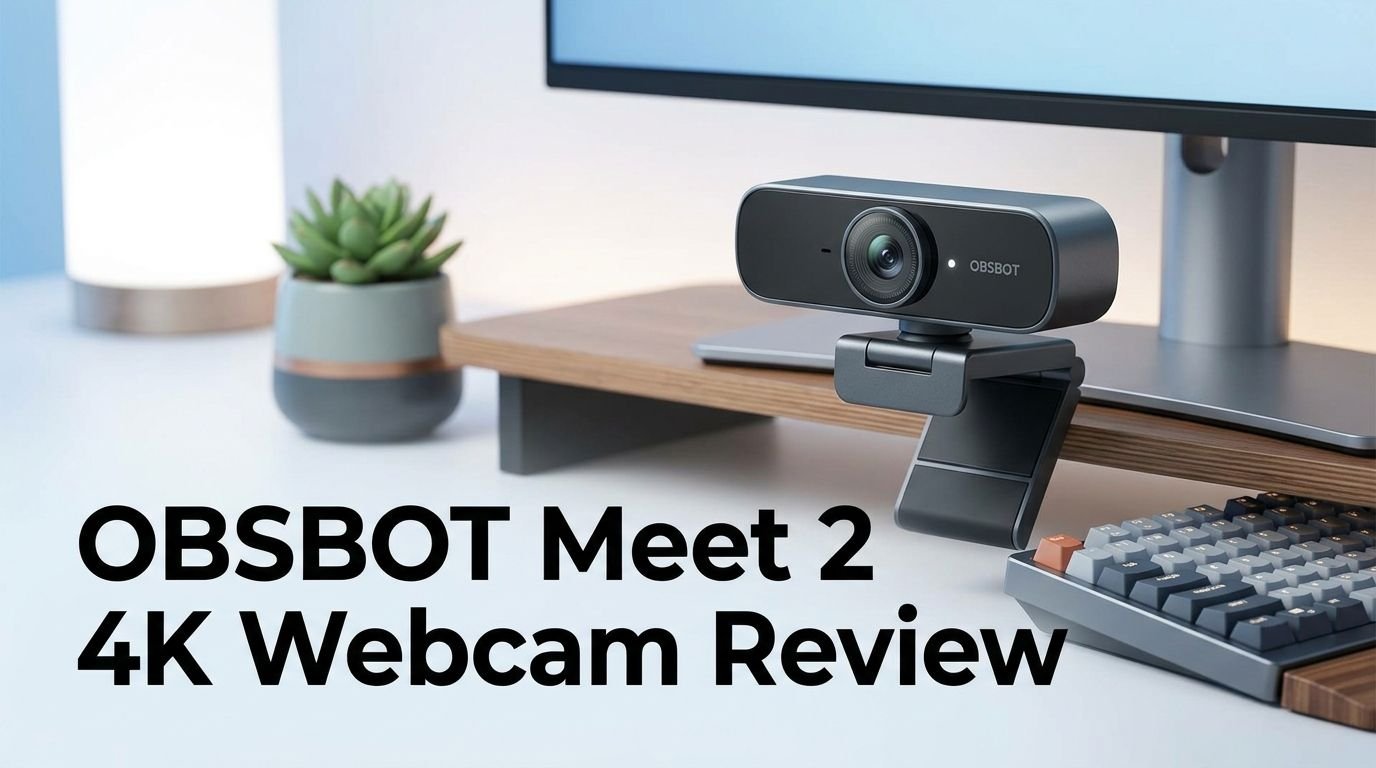
The first thing you notice about the OBSBOT Meet 2 4K is how incredibly small it is. At 1.78 x 1.4 x 0.87 inches, it is roughly the size of a large earbuds charging case. The body uses a mix of brushed aluminum and plastic that feels solid despite the tiny size.
The front features a large sensor eye flanked by two pinhole microphones. The back has a single USB-C port. The bottom includes a 1/4-20 UNC threaded mount, which works with standard tripods and camera accessories. This is a nice touch that many competing webcams at this price point skip.
The color options include Aurora Green, Cloud White, and Space Grey. Each option looks clean and modern. The camera does not stick out awkwardly on your monitor or laptop. Instead, it blends in nicely with most setups. The included magnetic mount is flexible enough to work on thin laptop bezels and thicker desktop monitors alike.
Magnetic Mount and Privacy Cover
One of the standout design choices is the magnetic mounting system. The webcam attaches to its included mount with magnets. You can snap it on horizontally for standard 16:9 video. You can also rotate it vertically for 9:16 content on platforms like TikTok and Instagram.
The camera automatically detects its orientation and switches the aspect ratio. This works even during a live recording. You do not need to change any settings in software. Just pick up the camera, rotate it, and the image adjusts instantly.
The magnetic privacy cover is a small metal disc that snaps onto the lens ring. It provides physical privacy protection. Unlike sliding plastic covers found on many webcams, this approach feels secure and looks elegant. You can pop it on in less than a second. Physical privacy covers are the only type you can fully trust, and OBSBOT has implemented this feature thoughtfully.
Top 3 Alternatives for OBSBOT Meet 2 4K
1. Logitech Brio 4K Webcam

2. Elgato Facecam Pro 4K Webcam

3. Razer Kiyo Pro Ultra 4K Webcam

Video Quality and Image Performance
The video quality on the OBSBOT Meet 2 4K is impressive for its price and size. The 4K footage at 30 FPS looks sharp with good color reproduction. Skin tones appear natural under most lighting conditions. The camera handles daylight extremely well with fully automatic settings.
The f/1.8 aperture allows the sensor to gather more light. This results in cleaner footage in dimly lit rooms compared to webcams with smaller apertures. There is some visible grain in low-light situations, but it remains manageable and does not distract from the overall image.
HDR mode can be toggled on through the OBSBOT Center software. It does help balance exposure in scenes with mixed lighting. However, it cannot fully rescue a situation where you are backlit by a window. The best results come from having your primary light source in front of you. Auto-exposure performs reliably, and color accuracy is strong across different environments.
Autofocus and AI Framing Features
The Phase Detection Auto Focus (PDAF) on the OBSBOT Meet 2 4K is fast and accurate. It locks onto your face quickly without the annoying “hunting” or pulsing that plagues many webcams. You can set it to global focus or face-priority focus through the software.
A unique PDAF trick lets you show the camera a specific object by placing it in your hand. The camera will focus on that object and blur the background. Move the object away, and the focus snaps back to your face. This works well about nine out of ten times.
The AI framing modes include Upper Body, Close-Up, and Group. Upper Body keeps you framed from the chest up. Close-Up zooms in on your face. Group mode is the most impressive. It detects multiple people and adjusts the frame automatically. When a third person enters the shot, the camera zooms out to fit everyone. This is a genuinely useful feature for small team calls or family video chats.
Gesture Control and Smart Tracking
OBSBOT has included gesture control in the Meet 2 4K. You can raise your hand in a specific pose to recapture the camera’s attention. This is useful if the AI tracking loses focus temporarily or if you want to quickly re-center the frame.
The camera does not have a motorized gimbal like the OBSBOT Tiny 2. However, it still manages digital pan, tilt, and zoom through software reframing. The AI adjusts the crop area within the sensor to follow your movement. The effect is subtle but effective. You get enough range to nudge the frame left, right, up, or down.
Smart tracking works best in well-lit environments. In dim rooms with bright screens, the camera occasionally wanders. Fast movements or clothing that blends with the background can also cause brief tracking hiccups. Overall, the tracking is reliable for typical webcam use cases like desk-based video calls and seated streams.
Microphone Performance
The OBSBOT Meet 2 4K has dual omnidirectional noise-canceling microphones. They pick up your voice clearly from a reasonable distance. The sound quality is passable for video calls and casual recordings.
The OBSBOT Center software lets you choose between multiple noise reduction modes. You can also adjust gain control and select whether the microphone treats you as close, mid-range, or far. These options give you more flexibility than most built-in webcam microphones offer.
That said, the microphone quality is not a replacement for a dedicated USB microphone or headset. If you do a lot of streaming or podcast recording, you will still want a separate audio solution. For quick Zoom calls or Teams meetings, though, the built-in mics are perfectly adequate. They reduce background noise effectively and keep your voice clear.
OBSBOT Center Software
The OBSBOT Center software is one of the best companion apps in the webcam market. It goes far beyond the basic brightness and contrast sliders you find in standard Windows camera settings. The software organizes its features into clear tabs for image quality, console controls, beauty settings, and more.
Under the image quality tab, you can adjust ISO, shutter speed, white balance, HDR, contrast, saturation, sharpness, and hue. You can set these manually or let the camera handle them automatically. There is also a flicker reduction setting for 50Hz and 60Hz environments, which prevents LED light flicker in your video.
The console tab houses the AI tracking controls. You can switch between Group, Upper Body, and Close-Up framing modes here. The beauty tab offers background blur (bokeh), skin retouching, facial tone adjustments, and face slimming. Filter options include Nature, Fresh, Crystal, Film, B&W, and others. All settings save directly to the webcam and persist after unplugging and rebooting. You can also adjust settings while the webcam is active in another application like OBS Studio.
Plug and Play Experience
One of the biggest strengths of the OBSBOT Meet 2 4K is its plug-and-play functionality. You do not need to install any software to start using this webcam. Connect the USB-C cable to your computer, and the camera appears as a video input device immediately.
This makes it ideal for corporate environments where installing third-party software may require IT approval. You can plug the Meet 2 into a conference room laptop and start a video call within seconds. The camera works with Zoom, Microsoft Teams, Google Meet, OBS Studio, and all major video platforms without drivers.
The included USB-C to USB-C cable is 60 inches long. OBSBOT also includes a USB-A adapter for older computers. The cable length can be limiting if your computer is far from your monitor. Some users may want to invest in a longer USB-C cable. Other than that, the setup experience is smooth and frustration-free.
OBSBOT Meet 2 4K for Streaming
Streamers will appreciate the 4K resolution and 60 FPS at 1080p options. Most streaming platforms compress video heavily, so the extra resolution helps maintain sharpness after encoding. The fast autofocus keeps you in sharp focus during active streams where you might lean forward or gesture.
The vertical orientation mode is a big plus for streamers on TikTok, Instagram Live, and YouTube Shorts. You can switch between landscape and portrait instantly by rotating the camera. This flexibility removes the need for a separate vertical camera setup.
Integration with OBS Studio is seamless. The camera shows up as a standard video capture device and works with scenes, transitions, and overlays. If you own other OBSBOT cameras, the OBSBOT Center software lets you manage multiple devices at once. You can control audio routing, AI tracking, and multi-camera switching from one interface.
OBSBOT Meet 2 4K for Remote Work
Remote workers may benefit the most from this webcam. The compact size means it travels easily in a laptop bag. The plug-and-play nature means you can set up at a coworking space, hotel room, or home office in seconds.
The AI framing features keep you centered during calls even if you shift in your chair or lean back. The beauty mode offers subtle retouching that can smooth skin, adjust facial tone, and add slight background blur. These features make you look polished without appearing artificial.
Group mode is great for shared workstations or small conference rooms. The camera detects multiple participants and adjusts the frame to fit everyone. This removes the need for a wide-angle conference camera in many situations. For a $129.99 webcam, this level of smart framing is hard to find elsewhere.
Pros and Cons of the OBSBOT Meet 2 4K
The OBSBOT Meet 2 4K gets a lot right. The 4K video quality is excellent for its price range. The AI features like smart framing, gesture control, and PDAF add real value. The ultra-compact design at 40.5 grams makes it the most portable 4K webcam available. The OBSBOT Center software is feature-rich and well-organized.
The magnetic mount and privacy cover are thoughtful additions. The ability to switch between horizontal and vertical recording is a genuine advantage. The plug-and-play compatibility removes setup friction. The price of $129.99 undercuts most 4K competitors by a wide margin.
On the downside, the 60-inch cable is short for some desk setups. The microphone quality is acceptable but not exceptional. The AI tracking can occasionally lose focus in poorly lit rooms or with fast movements. There is no motorized gimbal, so the digital pan and tilt range is limited compared to the OBSBOT Tiny 2 series.
Who Should Buy the OBSBOT Meet 2 4K?
This webcam is a strong fit for remote workers who want to look professional on video calls without spending $200 or more. The compact size and plug-and-play design make it perfect for people who work from multiple locations.
Content creators who record tutorials, unboxing videos, or talking-head content will appreciate the 4K quality and AI framing. The vertical recording mode adds flexibility for short-form content. The OBSBOT Center software gives you studio-level controls over image quality and beauty settings.
Casual streamers who want a step up from a basic 1080p webcam will find good value here. The 4K resolution provides a sharper facecam overlay, and the 1080p at 60 FPS mode delivers smooth motion. If you already own other OBSBOT devices, the multi-camera integration through OBSBOT Center is a compelling bonus.
Final Verdict: Is the OBSBOT Meet 2 4K Worth It in 2026?
The OBSBOT Meet 2 4K delivers an outstanding combination of size, features, and value. It packs 4K video, AI framing, gesture control, PDAF, beauty modes, and a magnetic mounting system into a body that weighs 40.5 grams. The OBSBOT Center software gives you professional-level control over every aspect of the image.
At $129.99, it is significantly cheaper than the Razer Kiyo Pro Ultra at $299 and the HyperX Vision S at $199. It offers better AI features than both. The Logitech Brio 4K and Elgato Facecam Pro are strong alternatives, but neither matches the Meet 2’s combination of portability, smart features, and price.
If you want a reliable 4K webcam that looks great, travels easily, and works right out of the box, the OBSBOT Meet 2 4K earns a strong recommendation. It is one of the best mid-range webcams you can buy in 2026.
Frequently Asked Questions
Does the OBSBOT Meet 2 4K work without installing software?
Yes. The OBSBOT Meet 2 4K is a plug-and-play device. Connect it via USB-C, and it appears as a webcam in Zoom, Teams, Google Meet, OBS, and other applications. You do not need to install OBSBOT Center to use the camera. However, the software unlocks advanced features like AI framing, beauty modes, and manual image controls.
Can the OBSBOT Meet 2 4K record vertical video?
Yes. The camera has a magnetic mounting system that lets you rotate it from horizontal to vertical. The camera automatically detects the change and switches the aspect ratio. This works even during a live recording or video call.
Is the OBSBOT Meet 2 4K good for low-light conditions?
The f/1.8 aperture and 1/2-inch sensor help the camera perform well in moderate low-light conditions. HDR mode improves exposure balance. However, very dark rooms will produce visible grain. For the best results, place a light source in front of you rather than behind you.
How does the OBSBOT Meet 2 4K compare to the Logitech Brio 4K?
The OBSBOT Meet 2 4K is smaller, lighter, and comes with more AI features than the Logitech Brio 4K. It offers smart framing, gesture control, and PDAF, which the Brio 4K lacks. The Brio 4K has a wider field of view and more established brand recognition. Both deliver solid 4K video quality.
Does the OBSBOT Meet 2 4K have a privacy cover?
Yes. It includes a magnetic metal disc that snaps onto the lens ring. This physical privacy cover blocks the camera lens completely. It is easy to attach and remove in under a second.
What is the warranty on the OBSBOT Meet 2 4K?
The OBSBOT Meet 2 4K comes with a standard one-year manufacturer warranty. This covers defects in materials and workmanship under normal use conditions.