Dell Pro Stereo Soundbar AE515M Review 2026
Are you tired of the tinny, hollow audio from your monitor’s built-in speakers? Do you want a compact soundbar that can handle both video calls and music playback without cluttering your desk? The Dell Pro Stereo Soundbar AE515M might be exactly what you need.
This soundbar sits right below or on the stand of your Dell monitor. It plugs in through USB and works straight out of the box.
It even carries Microsoft Skype for Business certification, which makes it a strong contender for remote workers and hybrid office setups. But does it deliver enough punch for daily use in 2026?
Key Takeaways
- The Dell AE515M delivers 5W RMS of audio power through dual front-firing speakers. This provides clear and audible sound for small to medium rooms, office desks, and personal workspaces.
- It is certified for Microsoft Skype for Business. This means it meets Microsoft’s standards for call quality, echo cancellation, and microphone clarity. Professionals who rely on video conferencing will appreciate this feature.
- Setup is plug and play. You connect the soundbar via USB to your monitor or PC. No additional drivers or software are required. This keeps your desk clean and your workflow fast.
- The built-in dual microphones reduce background noise. They use noise cancellation and echo reduction to make your voice sound clear on the other end of a call.
- Compatible with many Dell monitors. The AE515M mounts on the stand of supported Dell monitors using an included bracket. Check Dell’s compatibility list before purchasing.
- The 3.5mm audio jack lets you stream music from your phone. This adds extra flexibility if you want to play audio from a device other than your PC.

Last update on 2026-09-19 / Affiliate links / Images from Amazon Product Advertising API Some of the links on this website are affiliate links, which means that at no additional cost to you, I earn a commission if you click through and make a purchase. I only recommend products and services that I believe will add value to my readers. Thank you for your support!
Dell Pro Stereo Soundbar AE515M Overview
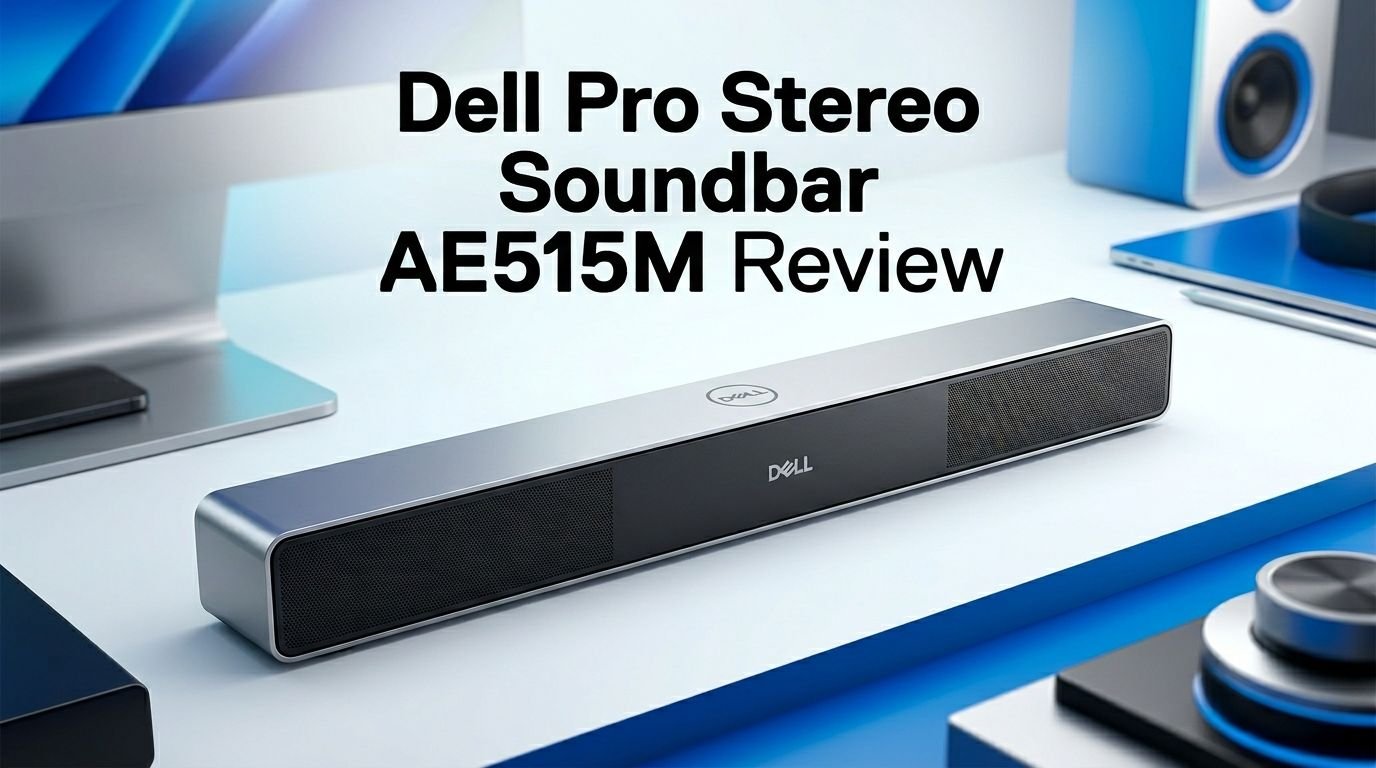
The Dell Pro Stereo Soundbar AE515M is a compact USB-powered soundbar built for desktop monitors. It measures just 17.5 inches wide, 2.4 inches deep, and 1.4 inches tall. This slim form factor means it fits perfectly under a Dell monitor or on the monitor stand.
Dell designed this soundbar with office professionals in mind. It combines audio playback and conferencing features into a single device. You get stereo speakers, dual microphones, call controls, and an LED indicator panel. All of this runs through a single USB connection.
The AE515M delivers 5W RMS of output power. This is not going to shake your walls. But for voice calls, YouTube videos, podcasts, and background music, it does a solid job. The frequency response ranges from 90 Hz to 20 kHz, which covers most of the audio spectrum you would need at a desk.
This soundbar has been around for a few years now. But it remains a strong option in 2026 for people who value simplicity, clean desk setups, and reliable call quality over booming bass or surround sound.
Sound Quality and Performance
The Dell AE515M uses front-firing stereo speakers to push sound directly at you. This speaker orientation matters. It means you hear the audio clearly even at lower volumes without straining.
At mid-range volumes, the AE515M handles dialogue and vocals really well. Voices in conference calls come through crisp and clear. Music sounds acceptable for casual listening. You can hear instruments and melodies, but do not expect deep bass or thumping low-end.
The 90 Hz to 20 kHz frequency range gives the AE515M a wide enough bandwidth for most desk tasks. Podcast hosts sound natural. Video narration is easy to follow. YouTube content plays back cleanly.
Where the AE515M falls short is at high volumes. Push it past 80% and you start to hear some distortion, especially with bass-heavy content. This is expected from a 5W soundbar. For a quiet office or a home workspace, this soundbar performs admirably within its limits.
Overall, the sound quality sits right where you would expect for a USB-powered monitor soundbar. It is not a replacement for dedicated bookshelf speakers. But for its intended use, it delivers.
Top 3 Alternatives for Dell Pro Stereo Soundbar AE515M
1. Dell Slim Conferencing Soundbar SB522A

Last update on 2026-09-19 / Affiliate links / Images from Amazon Product Advertising API Some of the links on this website are affiliate links, which means that at no additional cost to you, I earn a commission if you click through and make a purchase. I only recommend products and services that I believe will add value to my readers. Thank you for your support!
2. Dell Stereo SoundBar AC511M

Last update on 2026-09-19 / Affiliate links / Images from Amazon Product Advertising API Some of the links on this website are affiliate links, which means that at no additional cost to you, I earn a commission if you click through and make a purchase. I only recommend products and services that I believe will add value to my readers. Thank you for your support!
3. Lenovo ThinkVision MS30 Monitor Soundbar

Last update on 2026-09-19 / Affiliate links / Images from Amazon Product Advertising API Some of the links on this website are affiliate links, which means that at no additional cost to you, I earn a commission if you click through and make a purchase. I only recommend products and services that I believe will add value to my readers. Thank you for your support!
Built-in Microphone and Conference Call Quality
One of the biggest selling points of the AE515M is its dual built-in microphones. These microphones capture your voice clearly and reduce ambient noise at the same time. Dell engineered them for professional use, and the Skype for Business certification confirms their quality.
During conference calls, the microphones pick up speech from a comfortable distance. You do not need to lean in or shout. Background sounds like keyboard clicks, fan noise, and distant chatter get filtered out by the noise cancellation system.
The soundbar also features echo cancellation. This prevents the common feedback loop that happens when your speakers pick up audio and feed it back through the mic. Callers on the other end hear your voice, not an echo of their own.
Front-facing call control buttons give you quick access to answer, hang up, mute, and adjust volume. An LED indicator shows your call status. This means you can manage meetings directly from the soundbar without clicking through software menus on your screen.
For anyone who spends hours on Zoom, Teams, or Skype calls, the AE515M acts like a mini speakerphone and speaker system in one device. It removes the need for a separate headset if you prefer open-audio calls.
Design and Build Quality
The Dell AE515M features a sleek, matte black finish that blends naturally with Dell monitors. The plastic body feels sturdy but lightweight. It does not look cheap or flimsy on your desk.
All the buttons sit on the front face of the soundbar. You get volume up, volume down, mute, call answer, call reject, and an audio mode switch. Each button provides a firm click response. The white LED indicators above the buttons give you visual feedback for power, mute status, and active calls.
The overall build quality is professional and understated. Dell did not try to add flashy RGB lighting or aggressive design lines. This soundbar looks like it belongs in a corporate office, a home study, or a minimalist desk setup.
At 17.5 inches wide, it matches the width of most 22 to 27 inch Dell monitors perfectly. The slim 1.4-inch height means it does not block your view or raise your monitor awkwardly.
Setup and Installation Process
Setting up the Dell AE515M takes less than two minutes. You slide the soundbar into the mounting bracket, attach it to the monitor stand, and plug in the USB cable. That is the entire process.
Dell includes a mounting bracket in the box for monitors that support stand-mounted accessories. If your monitor has a bottom slot instead, the original AE515 model might be a better fit. The AE515M is specifically built for stand mounting.
Once you plug the USB cable into your PC or monitor’s USB port, the soundbar powers on automatically. Your operating system recognizes it as an audio device. There are no drivers to install. There is no companion app to download.
Windows, macOS, and Linux all detect the AE515M without issues. You simply select it as your default audio output and input device in your system settings. This makes it ideal for shared workspaces where multiple users rotate through the same desk.
The 3.5mm auxiliary jack on the soundbar gives you one more connectivity option. You can plug in your smartphone or tablet to play music or audio directly through the speakers.
Compatibility with Dell Monitors
The Dell AE515M works with a specific list of Dell monitors. Not every Dell screen supports this soundbar, so it is important to check before buying.
Some of the confirmed compatible models include the Dell P2217, P2217H, P2219H, P2219HC, P2319H, P2419H, P2419HC, P2719H, P2719HC, U2414H, U2415, U2417HJ, U2419H, and U2419HC. Many of these are popular business and productivity monitors.
For stand-mounted installation, your monitor needs the correct bracket slot. Dell provides an included bracket that clips to the monitor stand. Some monitors support direct bottom mounting, but the AE515M uses the stand-mount approach specifically.
If your monitor is not on the supported list, you can still use the AE515M. Just place it on your desk and run the USB cable to your PC. You will lose the clean mounted look, but the audio features work the same way.
Always verify compatibility on Dell’s official support page before purchasing. Dell updates the list periodically as new monitors launch.
Audio Modes Explained
The AE515M includes an audio mode button that lets you switch between two playback modes. This is a small but useful feature that many competing soundbars lack at this price point.
Mode one is optimized for voice calls. It prioritizes mid-range frequencies where human speech sits. This makes dialogue clearer during conference calls and reduces the emphasis on bass and treble that can muddy voice audio.
Mode two is tuned for multimedia playback. It opens up the frequency range to deliver fuller sound for music, videos, and other media. Bass gets a slight boost. Treble sounds a bit brighter.
Switching between these two modes takes a single button press. There is no software configuration needed. The front LED indicator changes to show which mode is currently active.
This dual-mode feature adds real flexibility for users who jump between meetings and personal media throughout the day. You press one button before a call and press it again when you want to listen to a playlist.
Power Consumption and Efficiency
The Dell AE515M runs entirely on USB power. It draws all its energy from the USB port on your monitor or computer. There is no external power adapter and no battery to charge.
This USB-only power design keeps your desk free from extra cables and wall plugs. One cable handles both audio data and power delivery. This simplicity is a major advantage for people who dislike cluttered workspaces.
The 5W RMS power output represents the maximum continuous power the speakers can handle. In everyday use, the soundbar draws less than this. It is gentle on your USB power budget, which matters if you have many peripherals connected.
Because the AE515M does not need its own power supply, it also becomes very portable within an office. Unplug the USB, move to another desk, plug it back in, and it works. No hunting for a power outlet near the new desk.
For users concerned about energy consumption, this soundbar adds minimal load to your overall system. It is one of the most efficient ways to add quality audio to a desktop setup.
Pros and Cons of the Dell AE515M
Every product has strengths and weaknesses. The AE515M is no exception. Here is an honest breakdown.
On the positive side, this soundbar offers excellent voice clarity for conferencing. The Skype for Business certification is not just marketing. It reflects genuine quality standards for microphone input and speaker output. The plug-and-play setup saves time. The dual audio modes add flexibility.
The build quality feels professional. It matches Dell monitors aesthetically and physically. The front-facing controls and LED indicators are convenient during calls.
On the downside, the 5W power output is limited. Audiophiles and bass lovers will find it underwhelming for music. The volume ceiling is modest. Distortion creeps in at the highest settings.
The compatibility list is somewhat restrictive. If you do not own a supported Dell monitor, you miss out on the clean mounted design. And at its current price point, some buyers may prefer alternatives that offer more wattage or wireless features.
The AE515M also lacks Bluetooth connectivity. In 2026, many users expect wireless audio streaming from their soundbar. The 3.5mm jack helps, but a Bluetooth option would have made this product significantly more appealing.
Who Should Buy This Soundbar?
The Dell AE515M is built for a specific audience. If you match this profile, it could be the perfect addition to your desk.
Remote workers and hybrid professionals who spend significant time on video calls will benefit the most. The built-in microphones, echo cancellation, and call controls eliminate the need for a separate headset or speakerphone.
Office administrators setting up shared desks or conference areas will appreciate the plug-and-play simplicity. There is nothing to configure. Anyone can walk up, plug in, and start a call.
Dell monitor owners who want a clean and integrated look will love how the AE515M mounts directly to compatible stands. It looks like it was always part of the monitor rather than an afterthought.
This soundbar is not ideal for gamers, music producers, or anyone who demands high-fidelity audio. It is also not the best choice if you primarily use a non-Dell monitor, since you lose the mounting benefit.
If your main need is clear calls and decent desktop audio in a compact form, the AE515M delivers on that promise.
Dell AE515M vs Dell AE515: What Is the Difference?
Dell sells two versions of this soundbar. The AE515 and the AE515M look similar but mount differently. Understanding this difference can save you from ordering the wrong one.
The Dell AE515 attaches to the bottom of the monitor. It slides into a slot on the lower bezel. This design works with monitors that have a built-in soundbar channel along the bottom edge.
The Dell AE515M attaches to the monitor stand using an included bracket. This makes it compatible with a different set of monitors. If your monitor does not have a bottom slot but has a compatible stand, the AE515M is the correct choice.
Both models share the same audio specs. They deliver 5W RMS, have dual microphones, support Skype for Business, and feature identical call controls. The internal hardware is essentially the same.
The key difference is purely mechanical. It comes down to how and where the soundbar mounts. Check your monitor model on Dell’s support site. It will tell you which version fits your screen.
How It Compares to External Speakers
Some users consider standalone desktop speakers instead of a monitor-mounted soundbar. Each option has trade-offs worth considering.
External desktop speakers like the Audioengine A2+ or Bose Companion series deliver superior audio quality. They offer more power, wider stereo separation, and deeper bass. But they also take up more desk space and require additional cables.
The Dell AE515M wins on convenience and space efficiency. It mounts to your monitor or sits flat on your desk. One USB cable handles everything. You get built-in microphones that external speakers rarely include.
For pure sound quality, external speakers beat the AE515M. For a clean, all-in-one solution that covers both audio playback and conferencing, the AE515M holds its own.
If desk real estate is at a premium and you need conferencing features, the AE515M makes more sense. If audio fidelity is your top priority and you already have a dedicated microphone, standalone speakers will serve you better.
The right choice depends on what matters most for your daily workflow.
Pricing and Value for Money
Last update on 2026-09-19 / Affiliate links / Images from Amazon Product Advertising API Some of the links on this website are affiliate links, which means that at no additional cost to you, I earn a commission if you click through and make a purchase. I only recommend products and services that I believe will add value to my readers. Thank you for your support!
The Dell Pro Stereo Soundbar AE515M typically sells in the $40 to $70 range depending on the retailer and condition. New units from authorized sellers sit closer to the higher end. Renewed or refurbished options bring the price down.
For what you get, this represents solid value. You receive a stereo soundbar with dual microphones, call controls, noise cancellation, echo reduction, two audio modes, and a mounting bracket. Buying a separate microphone and speaker setup would cost more.
Compared to the Dell SB522A (its newer sibling), the AE515M offers more output power at 5W versus 3.6W. However, the SB522A features a slimmer magnetic mount design and Microsoft Teams certification. Your choice depends on which features you prioritize.
In 2026, the AE515M remains a cost-effective option for anyone who values reliable conference audio from a trusted brand. It may not be the newest model in Dell’s lineup, but it still performs its core job well.
Final Verdict
The Dell Pro Stereo Soundbar AE515M does what it promises and does it well. It delivers clear stereo audio, reliable conferencing features, and hassle-free setup. The Skype for Business certification, built-in microphones, and dual audio modes make it a practical choice for work-from-home setups and office desks.
It will not replace a proper speaker system for music lovers. The 5W output has limits. The lack of Bluetooth is a drawback in 2026. But for its target audience of professionals and remote workers, these limitations barely matter.
If you own a compatible Dell monitor and spend your days on calls, the AE515M is a smart, affordable upgrade to your desk audio. It mounts cleanly, sounds clear, and makes every meeting a little bit easier.
Frequently Asked Questions
Does the Dell AE515M work with non-Dell monitors?
Yes, the Dell AE515M works with any computer that has a USB port. You will not get the mounted look without a compatible Dell monitor, but you can place it on your desk and use it normally with any brand of monitor or laptop.
Does the Dell AE515M need drivers or software to work?
No. The AE515M is a plug-and-play device. Connect the USB cable to your PC or monitor, and your operating system will detect it automatically. No drivers, no software, no configuration files needed.
Can I use the Dell AE515M for gaming?
You can, but it is not ideal for gaming. The 5W output and limited bass response make it better for voice calls and casual media. Gamers who want immersive audio should consider dedicated gaming speakers or a headset.
Is the Dell AE515M the same as the AE515?
No. The AE515 mounts to the bottom of the monitor. The AE515M mounts to the monitor stand using a bracket. They have the same audio specs but different physical mounting systems. Check your monitor model to pick the right one.
Does the Dell AE515M have Bluetooth?
No. The AE515M connects via USB for audio and power. It also has a 3.5mm auxiliary input jack for wired connections from phones or tablets. There is no Bluetooth or wireless streaming feature.
What is the warranty on the Dell AE515M?
Dell typically offers a one-year limited hardware warranty on the AE515M soundbar. Warranty terms may vary by region and retailer. Check Dell’s warranty page or your purchase documentation for specific details.

Hello everyone my name is Alenya and i am a gadget discovering Enthusiast 🐻🐻