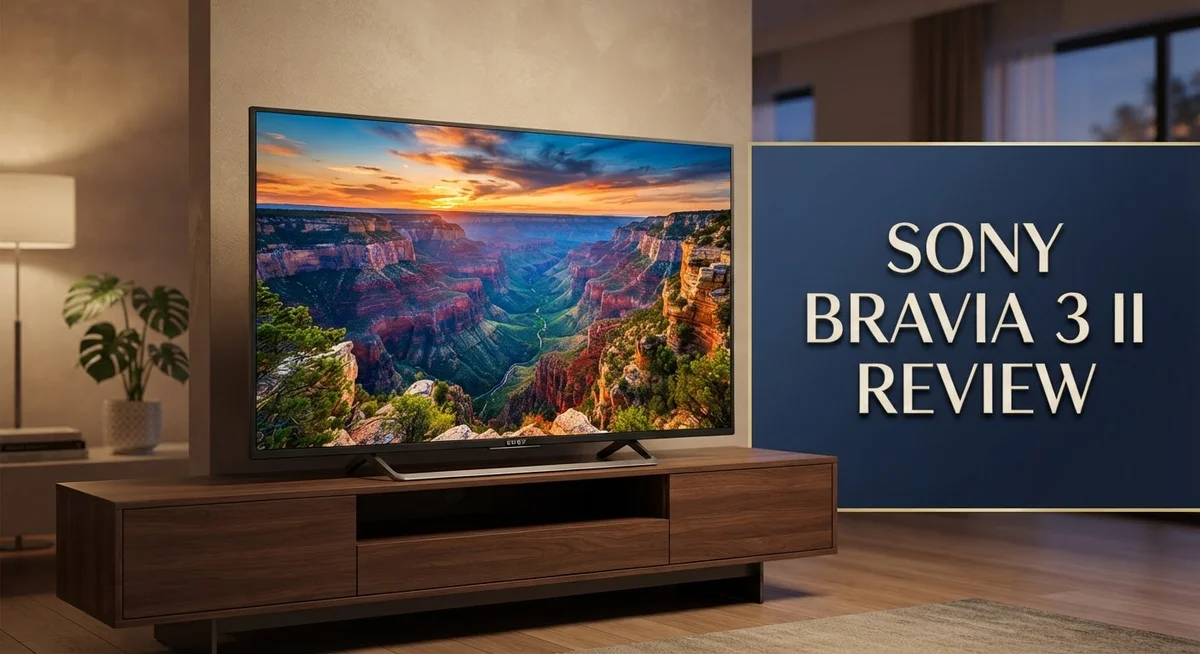
Sony Bravia 3 II Review: Google TV and Gaming Features
The Sony Bravia 3 II brings a fresh option to the mid-range TV market in 2026. It packs a 65 inch 4K HDR panel with Google TV built in. Sony also adds its trusted XR Processor for smarter image handling.
This TV promises a lot on paper. You get native 120Hz refresh rates and four HDMI 2.1 ports. Gamers will notice support for 4K/120fps, VRR, and ALLM right away.
But does it perform as well as it sounds? Our review digs into real world results. We tested upscaling, contrast, and gaming performance to see how this TV holds up.
In a Nutshell
Panel type: This TV uses an IPS panel with direct lit backlighting. It skips local dimming, which affects deep black scenes.
Processing power: The Sony XR Processor handles native 120Hz refresh rates. It also powers smart upscaling for older content.
Gaming ready: Four HDMI 2.1 ports support 4K at 120fps. Gamers get VRR and ALLM for smooth, responsive play.
Screen quality: The anti-glare coating helps in bright rooms. Sunlight and lamps cause less distraction on screen.
Weak spot: Black levels fall short here. Dark scenes often look gray instead of true black.
Uniformity concerns: Some panels show patchy backlighting. This can be noticeable during dark or solid color scenes.
Key Features and Specifications
The Sony Bravia 3 II packs several technical features that matter for different viewing situations. Let’s break down what actually makes this TV tick.
Processing and Refresh Rates
The Sony XR Processor sits at the heart of this TV. This chip handles native 120Hz refresh rates, which means smooth motion without extra tricks. You get real frame-by-frame processing rather than interpolation. For fast action scenes and sports, this matters quite a bit.
Connectivity for Gaming
Four HDMI 2.1 inputs give you flexibility. Each port supports 4K resolution at 120fps, which unlocks PS5 and Xbox Series X capabilities fully. Variable Refresh Rate (VRR) and Auto Low Latency Mode (ALLM) both work here, so your games stay responsive without stuttering.
Smart Features and Picture Modes
Auto HDR Tone Mapping adjusts bright and dark areas automatically. Auto Genre Picture Mode detects what you’re watching and switches settings accordingly. Google TV comes built in, so you get apps and streaming services without extra devices.
Screen Technology Details
The IPS panel type means colors stay accurate from wider angles compared to VA panels. Direct lit backlighting sits behind the entire screen. However, this TV lacks local dimming zones, which limits contrast control in specific areas.
Anti Glare Advantage
The anti glare coating reduces reflections from windows and lights. This helps in bright rooms where other TVs wash out. The coating doesn’t create a grainy look either, so text stays sharp.
What Sets It Apart
This TV excels at upscaling lower resolution content through smart processing. The image processing stays natural without overdoing effects. Casual viewers and gamers find these features useful for everyday content.
The combination of these specs positions the Bravia 3 II as a solid mid range option. It handles modern gaming standards well. The processing power keeps motion smooth. Yet the panel limitations mean this TV works best outside dark room scenarios.


Last update on 2026-10-14 / Affiliate links / Images from Amazon Product Advertising API Some of the links on this website are affiliate links, which means that at no additional cost to you, I earn a commission if you click through and make a purchase. I only recommend products and services that I believe will add value to my readers. Thank you for your support!
Picture Quality and Image Processing
The Sony XR Processor forms the core of this TV’s image handling. It works hard to enhance every frame you watch, whether you’re streaming movies or playing games. This processor runs at native 120Hz, which means it refreshes the picture 120 times per second without adding artificial frames.
Upscaling stands out as a real strength here. When you watch content that isn’t in 4K, the TV intelligently fills in missing details. Lower resolution streams look sharper and more detailed than they should. This matters because most streaming services still deliver content below 4K quality.
The Auto HDR Tone Mapping feature deserves attention. It automatically adjusts bright highlights and dark shadows based on what’s on screen. Different content types get different treatment, so a bright outdoor scene won’t look washed out. A dark thriller won’t lose detail in the shadows.
However, black levels present a significant problem. Blacks appear gray rather than truly black. This happens because the TV uses direct lit backlighting without local dimming zones. The backlight stays on across the entire screen, which lifts the black level. For dark scenes, this creates a washed out appearance that hurts contrast.
Contrast overall falls short of what you’d expect in this category. The raised blacks mean dark and light areas don’t separate as much as they should. This affects movies and shows with dramatic lighting.
The IPS panel keeps colors consistent when you view from the side, which helps in rooms where people sit at angles. The anti glare coating reduces reflections from windows and overhead lights, making the screen easier to watch in bright spaces.
Auto Genre Picture Mode adjusts settings based on what you’re watching. Sports get one treatment, movies get another. This automation removes the need to fiddle with settings constantly.
Image processing overall stays clean without pushing too hard. The TV doesn’t over sharpen or create artificial looking enhancement. This natural approach appeals to viewers who prefer authentic picture quality over exaggerated pop.
Gaming Performance and Connectivity
The Sony Bravia 3 II brings solid gaming capabilities to your living room. The four HDMI 2.1 ports stand out as the primary advantage here. Each port supports 4K resolution at 120 frames per second, which matters if you own a PS5 or PC gaming setup.
Variable Refresh Rate (VRR) support eliminates screen tearing during fast action scenes. Your games display smoother motion when frame rates fluctuate. The Auto Low Latency Mode (ALLM) kicks in automatically when you start gaming, reducing input lag without manual adjustments.
The native 120Hz refresh rate of the Sony XR Processor keeps up with demanding games. You get a responsive experience whether you’re playing action titles or sports simulations. The processor handles frame interpolation smoothly, avoiding the soap opera effect that ruins immersion.
Connectivity options extend beyond gaming. You have multiple HDMI 2.1 ports to connect your console, streaming device, and soundbar simultaneously. This eliminates constant cable swapping between different inputs. The arrangement lets you keep everything plugged in for instant access.
The anti-glare screen becomes relevant in bright gaming spaces. Afternoon sunlight won’t create harsh reflections that wash out your image. This coating helps maintain visibility during daytime gaming sessions when other TVs struggle.
One limitation emerges with the IPS panel design. The raised black levels affect gaming atmospheres in darker games. Scenes in horror or noir titles won’t feel as immersive as they would on a TV with superior black performance. The contrast stays flat compared to premium gaming displays.
The direct lit backlight provides consistent brightness across the screen during gameplay. You won’t experience the blooming effect where bright objects bleed into dark areas. This consistency matters when precision matters in competitive gaming.
For casual and mainstream gaming, the Bravia 3 II delivers the essentials. The 120fps capability and VRR support satisfy modern console requirements. The quick response times and ALLM feature create a responsive gaming environment that works well for most players.
Top 3 Alternatives
LG OLED TV

Last update on 2026-10-14 / Affiliate links / Images from Amazon Product Advertising API Some of the links on this website are affiliate links, which means that at no additional cost to you, I earn a commission if you click through and make a purchase. I only recommend products and services that I believe will add value to my readers. Thank you for your support!
Samsung QN90C QLED

Last update on 2026-10-14 / Affiliate links / Images from Amazon Product Advertising API Some of the links on this website are affiliate links, which means that at no additional cost to you, I earn a commission if you click through and make a purchase. I only recommend products and services that I believe will add value to my readers. Thank you for your support!
TCL QM8 Mini-LED

Last update on 2026-10-14 / Affiliate links / Images from Amazon Product Advertising API Some of the links on this website are affiliate links, which means that at no additional cost to you, I earn a commission if you click through and make a purchase. I only recommend products and services that I believe will add value to my readers. Thank you for your support!
Design, Build Quality, and Screen Technology
The Sony Bravia 3 II features a direct-lit backlight system paired with an IPS panel. This combination delivers consistent brightness across the entire screen. You get uniform light distribution during everyday viewing and gaming sessions.
The screen technology uses a direct-lit approach rather than full array local dimming. This means the backlight operates as one zone instead of many smaller zones. The trade-off here is straightforward: you gain simplicity but sacrifice contrast control in specific areas of the screen.
One standout feature is the anti-glare coating on the display surface. This coating reduces reflections from windows, ceiling lights, and lamps in your room. Bright living rooms benefit significantly from this technology. The coating maintains clarity without sacrificing picture sharpness.
The IPS panel design keeps colors accurate when you watch from different angles. People sitting to the side of the TV still see vibrant, true-to-life colors. This matters in family rooms where viewers spread across the seating area.
However, the design comes with real limitations. Black levels fall short of expectations in this TV category. Blacks appear gray rather than deep and rich. This affects movies and shows with dark scenes. The contrast ratio suffers as a result. You’ll notice this most during nighttime viewing or in dark rooms.
The direct-lit backlight cannot create the deep blacks that local dimming zones provide. This is the core weakness of the Bravia 3 II’s design approach. Home theater enthusiasts who prioritize black levels should consider alternatives.
The build quality remains solid throughout. The frame feels sturdy. The stand sits stable on most surfaces. The overall construction suggests durability for long-term use.
The Sony XR Processor works alongside this hardware to manage the display output. It processes signals intelligently to maximize what the screen can show. The 120Hz native refresh rate keeps motion smooth during sports and gaming.
This TV suits bright rooms and casual viewing better than dark theater spaces. The design choices prioritize brightness and angle viewing over contrast performance.
Smart TV Experience and User Interface
The Google TV interface on the Sony Bravia 3 II keeps things straightforward and responsive. You navigate through apps and content without delays or stuttering. The menu system organizes your streaming services in a logical way that makes finding shows quick.
Voice control works well here. The remote’s microphone picks up your commands reliably, and Google Assistant responds to requests about weather, sports scores, and smart home control. You can search across multiple apps at once, which saves time when hunting for specific content.
The home screen adapts to your viewing habits. Google TV learns what you watch and suggests relevant shows and movies. Personalization happens automatically without you needing to configure complex settings. Your watchlist syncs across devices, so you can start watching on your phone and continue on the TV.
App performance stays smooth throughout daily use. Streaming apps like Netflix, Disney+, and YouTube load quickly. The interface doesn’t freeze or lag when switching between applications. However, older or less optimized apps may take a moment longer to launch compared to newer streaming services.
The settings menu gives you control without overwhelming you with options. Picture modes, sound adjustments, and connectivity settings sit in logical categories. Auto Genre Picture Mode automatically adjusts the display based on content type, but you can override these settings manually if you prefer specific adjustments.
Accessibility features matter here too. The TV includes options for closed captions, audio descriptions, and voice guidance. Text size can be enlarged for easier reading from your couch.
One practical advantage emerges with HDMI switching. The TV recognizes connected devices quickly and displays them in an easy-to-access input menu. Gaming consoles, cable boxes, and external players all appear clearly labeled.
The interface feels modern without being confusing. Updates arrive regularly through Google TV, keeping the system current with new features and security patches. This keeps your TV relevant without requiring manual intervention or complicated setup procedures.
Pros and Cons
Pros
- Upscaling engine handles low-resolution content with impressive clarity and detail
- Image processing stays natural without appearing artificial or over-processed
- PS5 gaming delivers 120fps, VRR, and ALLM support for smooth competitive play
- Anti-glare screen performs well in bright rooms and reduces reflections effectively
- Sony XR Processor maintains consistent color and brightness across the entire display
Cons
- Black levels appear gray instead of deep black, which limits contrast and cinematic impact
- Raised blacks affect all content types, from movies to streaming shows to games
- Screen uniformity shows visible patches and inconsistencies across the panel
- Direct-lit backlight cannot match the depth that full array local dimming provides
Who Should Buy It
The Sony Bravia 3 II works best for specific viewing situations and user types. Let’s break down who gets the most value from this TV.
Casual viewers and streaming enthusiasts should consider this model. You watch Netflix, Disney+, and YouTube regularly. The upscaling engine handles compressed streaming content exceptionally well. Your content appears sharper and clearer than the source quality suggests. The Google TV interface responds quickly to your commands and learns what you like to watch.
Gaming-focused buyers with PS5 consoles find real benefits here. The TV supports 120fps refresh rates, variable refresh rate (VRR), and automatic low latency mode (ALLM). Your competitive games run smooth without stuttering. Fast-paced shooters and racing games feel responsive under your control.
People in bright living rooms appreciate the anti-glare screen technology. Sunlight streaming through windows won’t wash out your picture. Reflections stay minimal even during daytime viewing. The IPS panel maintains accurate colors from different seating angles too.
Buyers who don’t prioritize cinematic experiences fit this TV’s strengths. You’re not watching dark movies in a dedicated home theater room. You enjoy varied content across multiple genres. The TV handles this diversity without struggling.
Avoid this model if you’re a movie enthusiast. The raised black levels and poor contrast create a washed out appearance for films. Dark scenes lose their impact. The direct-lit backlight cannot match the performance of local dimming systems.
Skip this TV if you sit in a dark room constantly. The screen uniformity issues become noticeable in dim lighting. Patches and inconsistencies appear across the panel. Your viewing experience suffers in these conditions.
Home theater builders should look elsewhere. This TV prioritizes brightness and upscaling over deep blacks and cinematic quality. The limitations become obvious when watching dramatic content or horror films.
The Sony Bravia 3 II shines for everyday viewers who watch mixed content in bright spaces. It excels with gaming and streaming. It disappoints those seeking theatrical black levels and contrast.
Final Verdict
The Sony Bravia 3 II shows a clear split between strengths and weaknesses. It handles smart features and everyday streaming with ease. But it struggles with the core task of showing deep, accurate blacks.
This TV suits a specific type of buyer. If you stream shows casually or game on a PS5, this screen delivers real value. The smooth interface and solid upscaling make daily use pleasant.
Movie lovers should look elsewhere. The gray blacks and flat contrast hurt any serious film watching session. A dark room only makes these flaws more visible.
Sony packed useful tech into this model. The XR Processor keeps colors steady. The anti-glare coating helps in sunny rooms. These small wins matter for many households.
Still, the panel technology holds this TV back. Without proper local dimming, dark scenes lose their punch. This is not a small flaw. It changes how every dark movie or nighttime show looks on screen.
Think about where you plan to place this TV. A bright living room hides most of its weaknesses. A dedicated home theater setup will expose them instantly.
Gamers get a strong deal here. The 120Hz support, VRR, and ALLM features work exactly as promised. Fast paced action stays smooth and responsive.
The Sony Bravia 3 II is not a flagship model. It targets buyers who want convenience over cinematic depth. That target audience will likely walk away satisfied.
If you compare it to the Bravia 7 II or Bravia 9 II, the picture quality gap becomes obvious. Those models handle contrast much better.
So who should buy the Bravia 3 II? Pick this TV if you want a smart, responsive screen for casual viewing and gaming. Skip it if picture depth and contrast matter most to you.
Your viewing habits should guide this decision. Match the TV to your room and your content, not just its feature list.
Frequently Asked Questions
Does the Sony Bravia 3 II support PS5 gaming at high frame rates?
Yes, it does. The TV includes four HDMI 2.1 inputs that handle 4K resolution at 120fps. You also get Variable Refresh Rate (VRR) and Auto Low Latency Mode (ALLM). These features work together to eliminate screen tearing and reduce input lag during competitive gameplay.
The Sony XR Processor keeps the image smooth and responsive. If you own a PS5, this TV delivers the gaming performance you need.
What causes the gray black levels on this model?
The Sony Bravia 3 II uses a direct-lit backlight with an IPS panel. It lacks local dimming capability. This design means the backlight cannot turn off independently in dark areas of the screen.
The result is raised blacks across all content. Dark scenes appear washed out rather than deep and rich. This limitation is inherent to the panel technology Sony chose for this model. It’s not a software issue you can fix with settings adjustments.
Is this TV good for watching movies?
Not really. The poor contrast and gray blacks hurt the cinematic experience. Movie enthusiasts will notice the flat picture quality immediately.
The raised blacks flatten the dramatic impact of dark scenes. If you watch films regularly or enjoy home theater, consider a different model. The Sony Bravia 7 II or Bravia 9 II offer significantly better black levels and contrast performance.
Can you fix the screen uniformity issues?
Unfortunately, no. The Bravia 3 II shows visible patches across the panel. Some areas appear brighter or darker than others, especially in uniform color scenes.
This is a hardware limitation. Calibration and picture settings cannot eliminate these inconsistencies. You’ll notice the problem most in dim rooms with solid colored content on screen.

Hello everyone my name is Alenya and i am a gadget discovering Enthusiast 🐻🐻