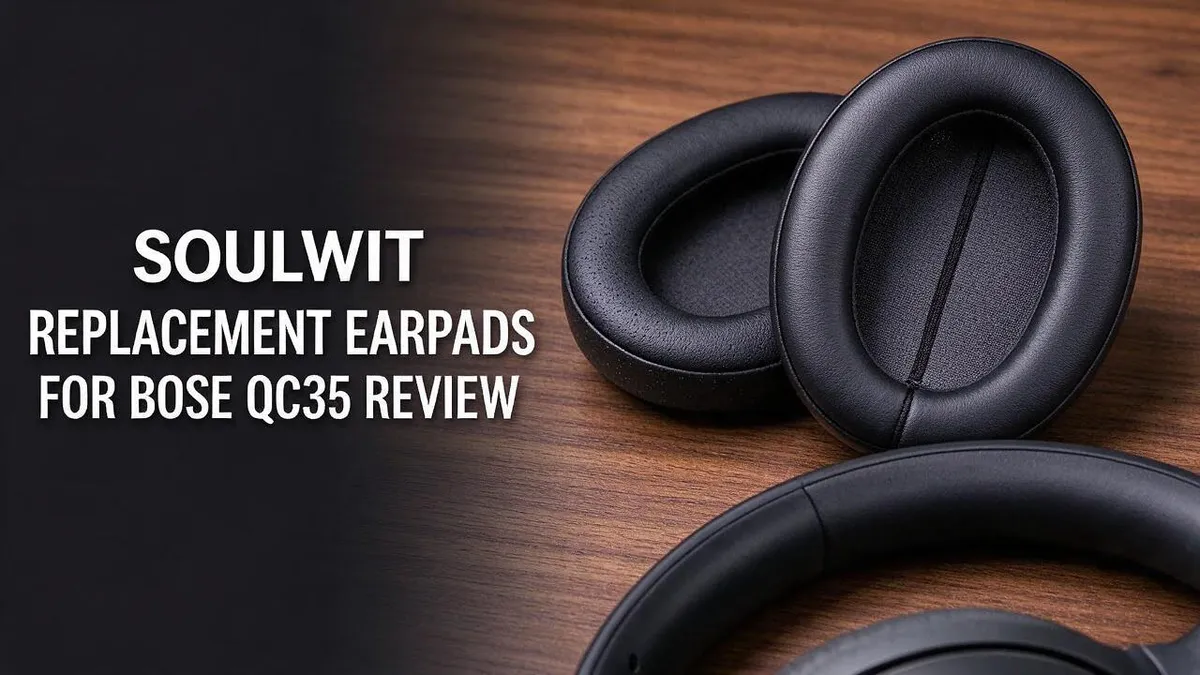
SoulWit Replacement Earpads for Bose QC35 Review 2026: The Ultimate Guide
Are your Bose QC35 ear cushions looking worn or feeling flat? You are not alone. Many owners want their headphones to feel comfortable again.
SoulWit replacement earpads offer a simple way to refresh your headset. They work with the Bose QC35 and QC35 II models.
The kit includes ear pads, silicone protective covers, a headband, scrims, and a plastic install stick. The install takes about 5 minutes.
Good noise isolation matters on busy commutes. The pads aim to create a snug seal around your ears. Reviewers on Amazon rate the Gray kit 4.5 out of 5 stars from more than 2,681 reviews.
Let’s see how these pads perform in daily use. Read on for the full breakdown.
In a Nutshell
Here is the quick take on SoulWit earpads for your Bose headset:
- Two material options: The kit version uses high density foam and protein leather. The dark green version uses cooling gel pads with ice silk fabric, so you can pick the feel you prefer.
- Fits several Bose models: The pads suit the Bose QC35 and QC35 II. Some listings also cover older and newer Bose headsets, so check your model before you buy.
- Fast setup at home: Most people finish the swap in about 5 minutes. You only need the plastic install stick included in the box, so no tools are required.
- Four color choices: You can pick black, gray, dark green, or purple black. This lets you match your headset style or your mood.
- Strong reviewer feedback: The gray kit holds a 4.5 out of 5 star rating from 2,681 reviews. Many owners say their worn headsets feel fresh again.
- Softness is the main trade off: One Reddit user notes that the original Bose pads feel softer. That same user still calls the SoulWit pads fine.
Compatibility with Bose QC35 Models

Last update on 2026-11-03 / Affiliate links / Images from Amazon Product Advertising API Some of the links on this website are affiliate links, which means that at no additional cost to you, I earn a commission if you click through and make a purchase. I only recommend products and services that I believe will add value to my readers. Thank you for your support!
Check your model before you order. The SoulWit pads list the Bose QC35 and QC35 II as compatible models. Both headsets share the same ear cup shape, so the pads fit the same way on either one.
Start by finding the model name on your headset. Look for the label inside the headband or on the original box. Many people skip this step, but it saves time and avoids a return.
The QC35 II adds a few extras. It has a dedicated button for voice assistants, and its controls sit in a slightly different layout. These features do not change the pad fit. You still need to remove the old pads and attach the new ones in the same way.
Some product listings also mention older or newer Bose models, such as the QC2, QC15, QC25, QC45, and QC SE. Do not assume these work with your headset. Always read the compatibility chart on the listing and match it to your exact model.
Next, compare the old pads with the new ones. Place the new cushions on a flat surface and check the shape. A good match means the pads sit flush against the ear cup. A poor match can leave gaps, which weakens the seal and lowers comfort.
If your headset has worn or cracked cushions, the replacement pads are a practical fix. Still, confirm the fit first. A quick check of your model number and the listing chart gives you confidence that the pads will work as expected.
Materials and Comfort Design
Comfort starts with the material you choose. Each surface feels different against your skin. Think about heat, softness, and how long you wear your headset each day.
The cooling gel pads use ice silk fabric on the dark green listing. This surface may feel cooler during long calls or warm afternoons. Check the product page to confirm which version you want.
The protein leather style offers a different feel. Many people find this smooth surface easy to wear. Choose it if you like a steady, familiar touch against your ears.
Breathable surfaces help during long listening sessions. Less heat can mean less sweat around the ears. Comfort often improves when your skin stays cool and dry.
A good seal supports comfort as well as sound. When the pads sit flat around your ears, pressure spreads more evenly. Take a moment during installation to line up each pad with care.
Fit matters just as much as fabric. Adjust the headband until each cup rests gently on your ears. Then wear the headset for a short session to test the feel before a long trip.
Remember that the cooling option uses a different texture than the kit style. Compare the photos on each listing so you know what to expect.
Your comfort needs decide the best choice. Warm climates often suit the cooling gel style. Those who want a classic touch may prefer the protein leather option.
A fresh pad feels different from a worn one. Many users notice that restored cushions bring back a snug feel. Give your new pads a few days, because your ears will adjust over time.
Noise Isolation and Sound Seal
Good sound isolation starts with a snug seal. When the pads press gently against your head, they block outside noise before it reaches your ears. The manufacturer says these SoulWit pads deliver good noise isolation. Test that claim yourself.
Worn cushions often cause the biggest problem. Flattened or cracked foam leaves small gaps. Those gaps let in engine hum and chatter, even when your headset still powers on. A fresh pair closes those gaps again. Replace them when you notice new leaks.
Think about where noise gets in. Low rumble from buses or planes is hard to stop with any pad. Higher sounds like voices and keyboard clicks are easier to reduce. Good seals help most with the mid and high sounds.
Try a simple home test. Play a steady track at a low volume. Then cover your ears with your hands and listen again. Next, put on the pads and repeat the test. Notice how much quieter the room sounds. Use a quiet room for the best results.
Glasses can break the seal. Thick frames push the cushion away from your skin. Many people find that a slight change in headband position fixes the leak. Hair under the pad can also cause gaps, so tuck it back.
Keep the seal clean. Wipe the pads with a dry cloth every week. Dust and skin oil make the surface slippery. Slippery surfaces sometimes shift during movement, which weakens the seal.
Noise isolation also helps you use less volume. When outside sound drops, you can listen at a lower level. Lower volume also protects your hearing over time. Your ears will thank you on long trips.
Top 3 Alternatives
Dekoni Audio Earpads

Last update on 2026-11-03 / Affiliate links / Images from Amazon Product Advertising API Some of the links on this website are affiliate links, which means that at no additional cost to you, I earn a commission if you click through and make a purchase. I only recommend products and services that I believe will add value to my readers. Thank you for your support!
Dekoni Audio Earpads feel soft and comfortable on your ears. They use protein leather covers that look sleek and modern.
Many listeners like the snug seal because it blocks more outside noise. This option suits people who listen for long hours at home or during travel. The pads also install in just a few minutes.
Geekria QC35 Earpads

Last update on 2026-11-03 / Affiliate links / Images from Amazon Product Advertising API Some of the links on this website are affiliate links, which means that at no additional cost to you, I earn a commission if you click through and make a purchase. I only recommend products and services that I believe will add value to my readers. Thank you for your support!
Geekria QC35 Earpads give your headphones a fresh look and feel. They often use a soft memory foam core that molds to your head.
Buyers often mention the simple swap process. This choice fits anyone who wants an easy upgrade with a friendly value. It keeps your listening experience cozy and familiar.
Bose QC35 Ear Cushions

Last update on 2026-11-03 / Affiliate links / Images from Amazon Product Advertising API Some of the links on this website are affiliate links, which means that at no additional cost to you, I earn a commission if you click through and make a purchase. I only recommend products and services that I believe will add value to my readers. Thank you for your support!
Bose QC35 Ear Cushions come from the original maker of your headphones. They match the exact shape and fit of your current pads.
You keep the sound profile that Bose engineers designed. This option works well if you want a worry-free match. It is a smart pick for anyone who values consistency and comfort.
Installation Process
Installing these pads is a simple task that you can finish in one sitting. Start by reading the user guide included in the kit. It gives you clear steps for your exact model.
Next, set your headset on a clean, flat surface. Keep the headband facing you so you can see each ear cup clearly.
Now find the plastic install stick in your kit. Slide the thin end under the edge of the old pad. Lift slowly and work around the full edge so you do not bend the plastic clips.
Once the old pad comes off, check the ear cup for dust or leftover foam. A quick wipe with a dry cloth gives the new pad a clean base. Clean surfaces help the new pad sit flat.
Line up the new pad with the clips on the ear cup. Press one point first, then move around the circle. You should feel each clip lock into place.
Repeat these same steps on the other side. Many people find it helpful to compare both ear cups side by side. Matching placement keeps the headset balanced on your head.
Look through the kit for the thin scrims and the headband cover. Use them as the guide shows, since each part has a specific role. Skipping a part can change how the pads fit.
Finally, keep the silicone protective covers nearby. Place them over the pads when you store the headset. Remove them before you put the headphones on, so the seal stays firm and comfortable.
Included Kit Accessories
Your kit holds more than new cushions. Take a moment to see what you have. Check the box before you start, so you never stop halfway through.
The ear pads do the heavy lifting. They replace worn foam and cracked surfaces. Pick the style that matches your comfort needs, such as the kit version or the cooling gel option.
The headband cover protects the top of your headset. It gives the band a clean, fresh look. Pair it with the new pads for a matched set.
Next, look for the thin scrims. These small pieces help the new pads sit neatly. Set them aside so you never lose them, and sort them by side as you work.
The silicone protective covers guard the pads from dust and scratches. Use them while you work on the headset. Store the spare covers in a dry place.
The plastic install stick makes removal gentle. It lifts the old pad without tearing the cup. It also helps you avoid scratching the ear cup. Your fingers stay cleaner too.
Finally, the user guide shows each step in order. Read it once before you begin. It helps you match every part to its place.
Sort the parts into two piles, one for the left ear cup and one for the right. This simple habit keeps the swap organized and prevents mix ups.
Keep the original box too. It holds the spare parts for a future swap. Count the parts against the list first. Missing pieces slow the job, and a quick check keeps your project on track.
Color and Style Options
Color changes how your headset looks every day. Your Bose QC35 can stand out or blend in.
Black is the safest pick. It fits almost any outfit and works well in an office or on a commute.
Gray offers a softer look. It pairs nicely with silver or light colored headsets and feels modern without drawing too much attention.
Dark green feels bold yet calm. It gives your headset a unique look that most people will notice. The dark green option comes with the cooling gel style, so color and texture arrive as one choice.
Purple black offers a subtle twist. It looks dark in normal light, yet a touch of purple shows in bright rooms.
Dark shades hide everyday wear. Scuffs, dust, and small marks blend in more easily on black or purple black pads. Lighter gray often shows dirt faster.
Think about your daily setting. Gym sessions, travel, and office days each call for a different look. Match the pads to where you wear your headset most.
Color also helps you tell headsets apart. If you own more than one pair, different shades make each one easy to spot at a glance.
Remember that photos can look different from real life. Lighting changes how each shade appears, so study the product images closely.
Pick the color that makes you smile every time you put on your headset. A shade you love keeps your listening sessions feeling personal and fun.
Still unsure? Start with black for a safe choice. Then try gray or dark green later if you want a fresh look.
Pros and Cons
Pros
- Gives a worn headset a fresh feel without buying a new one.
- Shoppers rate the gray kit 4.5 out of 5 stars from over 2,600 reviews.
- The dark green version adds a cooling feel during long listening sessions.
- Many owners say the new pads look and feel like new headset parts.
- Fits several Bose models, so one kit may work for more than one headset.
Cons
- The original Bose pads feel softer to some listeners.
- Few independent tests exist, so long term durability is still unclear.
- Some listings cover many models, so you must confirm your exact headset.
- Research shows few other documented drawbacks, so buyers have limited comparison data.
Who Should Buy It
If you own a Bose QC35 or QC35 II, this kit fits your needs. The listing names those exact models. Always confirm your headset before you order.
People who enjoy hands on projects will like this kit. No special tools are needed, and the plastic stick handles the tricky parts. Your headset can look and feel fresh in one short session.
Commuters who wear their headset every day may notice a real difference. Worn cushions can let sound escape. The maker claims a fresh seal blocks more outside noise on busy trains or flights.
Heat can build up during long listening sessions. Those who want a cooler feel should consider the dark green listing. Its cooling gel pads may suit podcast fans or gamers who wear their headset for hours.
Soft cushions can also ease pressure on the ears. Many people find that a comfortable fit makes marathon sessions easier to enjoy.
Buyers who want an official Bose part should look elsewhere. Bose sells its own replacement pads. Those shoppers may feel more certain about the exact fit and finish.
Fans of a softer feel may want to test the fit before committing. One reviewer noticed the original pads feel gentler. Think about which feel matters most to you.
In short, this kit suits owners who want a refresh. It works best for people who check compatibility first and enjoy a simple fix at home.
Final Verdict
The short answer is yes for most owners. This kit gives a worn headset a real second life. It works well for people who want better comfort without buying a new headset.
Think of the kit as a refresh, not a rebuild. The ear cups still hold the drivers and electronics. Only the soft parts that touch your head change.
Before you click buy, do a quick check. Look at your headset label and confirm the model name. Then compare that name with the listing title.
Ask yourself one simple question. Do your current pads feel flat, cracked, or sticky? If yes, this kit solves that problem. If your pads still feel fine, you may not need it yet.
Set realistic expectations. The kit improves seal and comfort for many people. It will not turn a standard headset into a flagship. Results depend on your ears, your head shape, and how you wear the headset.
Plan a short test period. Wear the new pads for a few days. Notice pressure, heat, and sound changes. Then decide whether to keep them. Trust your own ears.
Keep the extra parts after installation. The spare pieces help if you need a future swap. Store them in a dry box so they stay clean.
Wipe the pads with a dry cloth each week. This simple habit keeps the material fresh for longer.
Our final take is simple. SoulWit earpads make sense for Bose QC35 owners who want a practical fix. They are not a magic upgrade, but they can make a tired headset feel comfortable again. Your ears will tell you if it works.
Frequently Asked Questions
What material do the pads use?
The standard kit uses high density foam with protein leather. The dark green listing uses cooling gel pads with ice silk fabric. Pick the material that matches how you like your headset to feel on your ears.
How long does installation take?
Most people finish the swap in about 5 minutes. The kit includes a plastic install stick, which helps you remove the old pads and attach the new ones. You also get a user guide that walks you through each step.
What comes in the box?
You get ear pads, silicone protective covers, a headband, scrims, a plastic install stick, and a user guide. Check each item when the box arrives. Keep the packaging until you confirm that every part is included.
Does the kit block outside noise?
The seal around the ear cup helps isolate sound, according to the manufacturer. Results depend on how well the pads sit on your head. A snug fit usually gives the best noise isolation.
Which color should I choose?
Black, gray, dark green, and purple black are all available. Black and gray suit a classic look. Purple black stands out more if you want a bolder style. Choose the shade that fits your personal taste.

Hello everyone my name is Alenya and i am a gadget discovering Enthusiast 🐻🐻