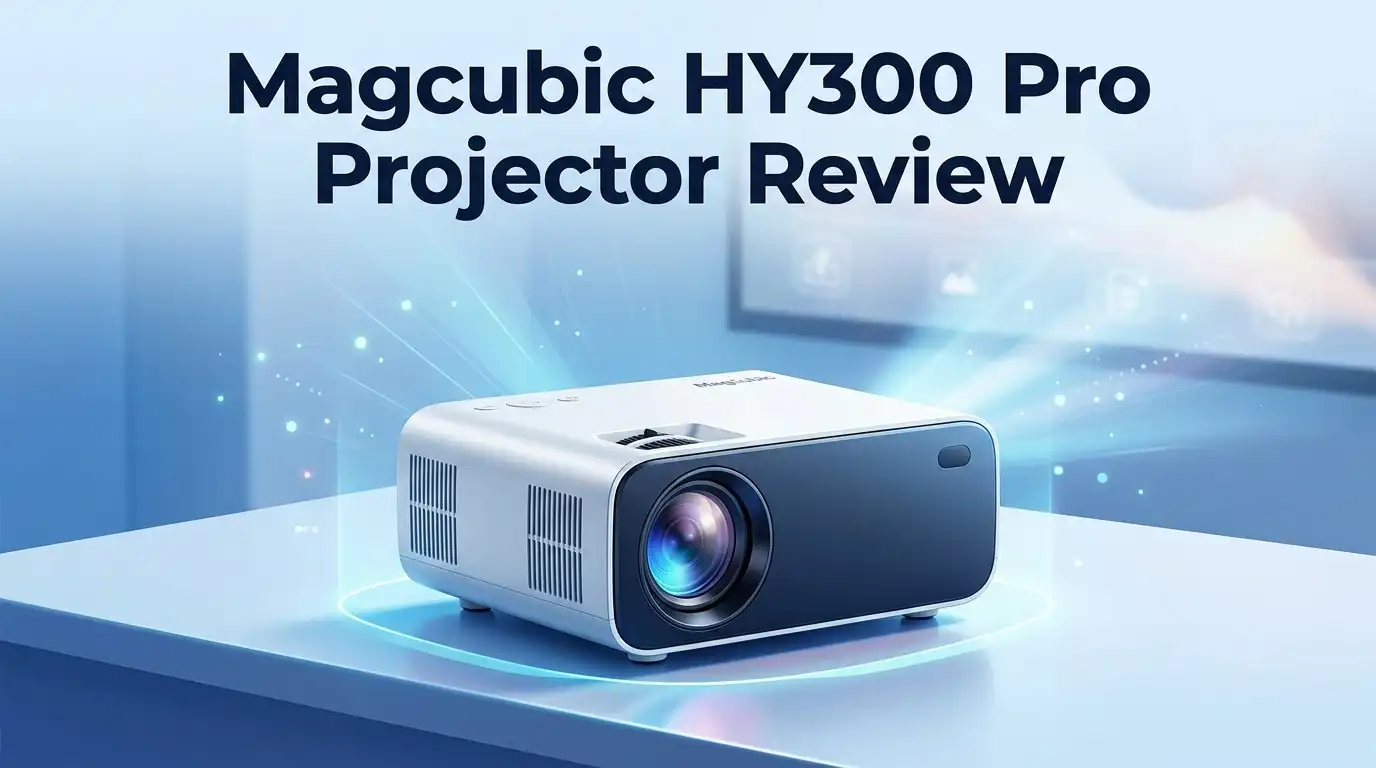
Magcubic HY300 Pro Projector Review: Is It a Real Upgrade?
Looking for a small projector that fits your lifestyle? The Magcubic HY300 Pro claims big things. It promises sharp visuals and smart features in a tiny body.
But does it actually deliver? Many brands use flashy marketing terms like “4K support.” This one does too. Yet the real specs tell a different story.
This review breaks down what the HY300 Pro truly offers. We look past the marketing claims. Instead, we focus on real performance and honest results.
In a Nutshell
- Resolution stays at 720p. The box may hint at 4K support. But the panel only shows HD content, not true 4K detail.
- Brightness is quite low. At 260 ANSI Lumens, this projector works best in dark rooms. Bright spaces will wash out the image.
- The display panel uses single LCD tech. This limits color depth and contrast when you compare it to pricier models.
- Portability is a strong point. You can carry the HY300 Pro anywhere. It fits easily in a bag or on a small shelf.
- Auto screen alignment saves time. You do not need to adjust angles manually. The projector corrects the image automatically.
- Connectivity feels modern. WiFi and Bluetooth let you stream content without messy cables getting in the way.
Key Specifications and Display Technology
The Magcubic HY300 Pro uses a TFT LCD display panel with a 27W LED light source. This combination keeps the projector compact and lightweight for travel.
Resolution sits at 1280×720 pixels in native HD format. The marketing mentions “4K support,” but this refers only to input compatibility, not actual output. Your content displays in 720p, which works fine for casual viewing but falls short of modern standards.
Brightness measures 260 ANSI lumens. This level suits dimly lit rooms and small spaces. In bright environments or larger projection areas, you will notice the image fades. Comparing this to mid range projectors that deliver 500+ lumens shows a clear gap.
The 16:9 aspect ratio matches most movies and presentations. You get standard widescreen viewing without black bars on typical content. The projector handles multiple input sources through HDMI, Bluetooth, and 3.5mm audio jack connections.
Auto screen alignment stands out as a practical feature. Instead of manual keystone correction, the projector adjusts itself automatically. This saves setup time and reduces frustration during quick deployments.
The 180 degree rotation capability adds flexibility. You can flip the image for ceiling mounting or creative placement options. This feature appeals to users who want non traditional installation methods.
Connectivity feels modern for the segment. WiFi and Bluetooth support wireless casting from phones and tablets. HDMI remains for direct device connections. The 3.5mm jack lets you add external speakers if needed.
Display technology uses a single LCD panel approach. This differs from DLP or 3LCD systems found in higher tier models. Single panel designs keep costs down but may show less color accuracy and contrast depth.
The overall package emphasizes portability over performance. The projector excels for casual movie nights, gaming sessions, and small group presentations in controlled lighting. Heavy-duty professional use or bright room applications demand better specifications. Understanding these technical boundaries helps match the HY300 Pro to realistic use cases rather than expecting premium performance.

Last update on 2026-09-21 / Affiliate links / Images from Amazon Product Advertising API Some of the links on this website are affiliate links, which means that at no additional cost to you, I earn a commission if you click through and make a purchase. I only recommend products and services that I believe will add value to my readers. Thank you for your support!
Brightness and Image Quality Performance
The Magcubic HY300 Pro delivers straightforward performance in the brightness and image quality department. You get 260 ANSI lumens from its 27W LED light source. This output works best in darker rooms or for small screen sizes.
Brightness matters for projector use. A brighter projector shows clearer images in lit spaces. The HY300 Pro sits on the lower end of the brightness spectrum. You will notice this limitation if you project during daytime or in bright living rooms. The image appears washed out compared to higher lumen models.
The native resolution stays at 1280×720 pixels. This is standard HD, not the 4K that marketing materials sometimes suggest. Real world viewing shows acceptable sharpness for casual movie watching. Text clarity depends on your screen size and seating distance. Larger screens reveal pixelation more easily.
The TFT LCD panel handles colors reasonably well. You get decent color saturation for the price segment. Blacks appear gray rather than deep, which is typical for LCD technology. Contrast ratios suffer compared to DLP or laser projectors. Movies still look entertaining on smaller screens up to 100 inches.
Image quality improves when you dim the room lights. The projector performs better in controlled lighting conditions. Presentations with slides and charts come across clearly. Video playback shows smooth motion without stuttering.
The 16:9 aspect ratio matches most content you watch. Movies, streaming shows, and presentations all fit naturally. You won’t see black bars or stretched images in normal use.
Auto screen alignment is genuinely helpful here. This feature adjusts the image automatically to fit your screen. Manual adjustment takes seconds if needed. The 180 degree rotation capability lets you flip the image for ceiling mounting.
Overall, the HY300 Pro suits casual users in controlled environments. Expect good performance in dark rooms with smaller screens. Bright spaces or large screen projections reveal its limitations. The image quality remains acceptable for entertainment rather than professional use.
Portability and Design
The Magcubic HY300 Pro stands out because it fits in your backpack. This projector weighs very little and measures just a few inches across. You can carry it to different rooms or take it on trips without strain.
The design feels solid despite the compact size. The casing uses materials that resist everyday bumps and drops. The projector sits stable on any flat surface. You won’t worry about it tipping over during use.
The 180 degree rotation feature changes how you set up your space. You can flip the projector upside down or sideways to match your room layout. This flexibility means you don’t need to rearrange furniture just to get the right projection angle.
The control layout keeps things simple. Buttons are easy to find and press. The remote works from a reasonable distance. You don’t need to stand right next to the device to adjust settings.
Connectivity options feel modern for a compact projector. HDMI ports let you plug in laptops or streaming devices directly. Bluetooth works smoothly for wireless connection from your phone. The 3.5mm jack gives you audio flexibility if you want external speakers.
The auto screen alignment feature saves real setup time. Instead of manually adjusting the image shape and position, the projector handles it automatically. This matters when you move between different rooms or wall surfaces.
Heat management stays reasonable during operation. The projector runs cool enough that you can touch the casing after hours of use. Ventilation slots prevent hot air from building up inside.
Portability truly defines this projector’s identity. Every design choice points toward moving it around easily. The compact frame, light weight, and simple controls all support this goal. If you value flexibility and movement over staying in one spot, this design approach works well.
The overall package makes sense for people who want a projector that goes where they go. You get genuine portability without sacrificing basic functionality.
Top 3 Alternatives
AAXA P7 Projector

Last update on 2026-09-19 / Affiliate links / Images from Amazon Product Advertising API Some of the links on this website are affiliate links, which means that at no additional cost to you, I earn a commission if you click through and make a purchase. I only recommend products and services that I believe will add value to my readers. Thank you for your support!
Anker Nebula Capsule

Last update on 2026-09-07 / Affiliate links / Images from Amazon Product Advertising API Some of the links on this website are affiliate links, which means that at no additional cost to you, I earn a commission if you click through and make a purchase. I only recommend products and services that I believe will add value to my readers. Thank you for your support!
ViewSonic PA148CTC Projector


Last update on 2026-09-19 / Affiliate links / Images from Amazon Product Advertising API Some of the links on this website are affiliate links, which means that at no additional cost to you, I earn a commission if you click through and make a purchase. I only recommend products and services that I believe will add value to my readers. Thank you for your support!
Connectivity and Smart Features
The Magcubic HY300 Pro connects to your devices through multiple pathways. You get HDMI ports for direct wired connections to laptops, streaming boxes, and gaming consoles. Bluetooth wireless connectivity lets you pair smartphones and tablets without cables cluttering your setup.
The 3.5mm audio jack gives you flexibility if you want to connect external speakers or headphones. This matters because the projector’s built in speaker works fine for small rooms. Larger spaces benefit from better audio equipment connected through this jack.
WiFi connectivity opens doors for wireless streaming. You can mirror content from compatible devices without hunting for cables. The wireless setup process feels straightforward on most modern phones and tablets.
Auto screen alignment stands out as a smart feature that simplifies your life. The projector automatically detects and adjusts the image to fit your screen perfectly. You skip the manual tweaking that older projectors demand. This saves real time during setup, especially if you move the projector around frequently.
The 180 degree rotation capability pairs nicely with these connectivity options. You can position the projector in creative ways without worrying about image orientation. Flip it upside down or sideways, and the display adjusts automatically. This flexibility matters when you have space constraints or unusual room layouts.
Bluetooth connectivity extends beyond just audio pairing. Some Magcubic features work through Bluetooth for remote control and device management. The wireless experience feels responsive without noticeable lag.
The overall connectivity package works well for casual users who want simplicity. You won’t find advanced networking features or professional streaming protocols. What you get is straightforward, practical connectivity that handles everyday tasks. The smart features focus on ease of use rather than technical complexity. This approach matches the projector’s portable nature and target audience perfectly.
The combination of wired and wireless options means you adapt to different situations. Whether you’re at home, in an office, or presenting outdoors, you have connection solutions ready.
Setup and Auto-Alignment Capabilities
The Magcubic HY300 Pro makes setup remarkably simple. You unbox it, connect your source device, and the projector handles the rest. Auto screen alignment technology adjusts your image automatically to match your screen dimensions.
This feature works by analyzing the projection area and correcting any skew or misalignment. You don’t need to manually fiddle with keystone settings or spend time calibrating angles. The system detects your screen borders and fits the image perfectly within seconds. This saves real time during setup, especially if you move the projector between rooms.
The 180 degree rotation capability adds flexibility to your placement options. You can flip the projector upside down if your ceiling mount or shelf position demands it. The image rotates automatically to display correctly. This means you install the projector wherever works best for your space, not where it’s convenient.
Connectivity setup stays straightforward throughout. HDMI ports accept direct connections from laptops, gaming consoles, or streaming devices. Bluetooth pairing with your phone happens quickly without diving into menus. WiFi connectivity lets you cast content wirelessly from compatible devices. The 3.5mm audio jack connects to external speakers if your room needs better sound.
The control interface keeps things intuitive. Buttons are clearly labeled. The remote feels responsive and doesn’t require memorizing complex sequences. First time users can navigate menus without consulting the manual repeatedly.
Heat management during operation stays reasonable. The projector doesn’t overheat during extended use. Ventilation works quietly, so you won’t hear loud fan noise interrupting your viewing. This matters when you’re watching movies or presentations.
The overall setup experience reflects smart engineering for portable use. The auto alignment feature genuinely simplifies your life. The rotation capability means you’re not locked into one specific installation method. Multiple connectivity options handle different scenarios you’ll encounter. Whether you’re setting up at home, in an office, or outdoors, the Magcubic HY300 Pro adapts to your needs without demanding technical expertise or complicated calibration steps.
Pros and Cons
Pros
- Compact design slips into a backpack for travel and outdoor movie nights
- Auto screen alignment adjusts your image automatically without manual tweaking
- 180 degree rotation lets you point the projector in any direction you need
- Multiple connectivity options include HDMI, Bluetooth, WiFi, and a 3.5mm audio jack
- Simple control layout and intuitive setup process get you projecting quickly
Cons
- Native resolution maxes out at 720p despite marketing claims about “4K support”
- Brightness reaches only 260 ANSI lumens, which limits use in bright rooms
- Single LCD panel technology delivers basic image quality compared to newer projection systems
- Low light output means you’ll need a dark space for the best viewing experience
Who Should Buy It
The Magcubic HY300 Pro works best for specific types of users. Let’s break down who gets real value from this projector.
Casual home users love this model. You want a projector for movie nights in your living room or bedroom. The 720p resolution handles streaming content from Netflix or YouTube just fine. You don’t need cinema-quality visuals for casual viewing. The auto screen alignment feature saves you setup time and frustration.
Travelers and outdoor enthusiasts find this projector perfect. The compact design fits easily into a bag. You can take it camping, to a friend’s house, or on road trips. The 180 degree rotation lets you project onto any surface you find. WiFi and Bluetooth connectivity mean you stream from your phone without cables cluttering your space.
Small space dwellers benefit from the portable nature. Your apartment or dorm room lacks dedicated theater space. This projector moves room to room as needed. Setup takes minutes, not hours. You don’t need permanent installation or professional calibration.
Budget conscious buyers appreciate the value proposition. You want projection capability without investing heavily. You’re willing to accept 720p native resolution. You understand that 260 ANSI lumens means darker rooms work better than bright sunlit spaces.
Content creators and presenters should pause here. If you need sharp text display or detailed graphics, the 720p resolution disappoints. Bright conference rooms will wash out your image. You’d struggle with spreadsheets or design work.
Serious movie enthusiasts should look elsewhere. The single LCD panel technology doesn’t match modern DLP or 3LCD systems. You want richer colors and deeper blacks. The brightness limitation bothers you in any room with ambient light.
Gaming enthusiasts face trade offs. The resolution handles casual games okay. Input lag might frustrate competitive players. The brightness won’t impress you during daytime sessions.
The HY300 Pro shines when expectations match its actual capabilities. Think portable entertainment device, not premium home theater. Think casual use, not professional applications. Think dark rooms, not bright spaces. Know what you’re getting, and this projector delivers solid performance for its category.
Final Verdict
The Magcubic HY300 Pro raises one big question. Does it truly upgrade your viewing experience? The answer depends on what you compare it to.
If you owned an older mini projector, this model feels like a step forward. It adds smart features that older units lack. But if you expect true 4K clarity, you will feel let down.
The marketing promises more than the hardware delivers. This gap creates confusion for first time buyers. Understanding this mismatch helps you set realistic expectations.
Think of the HY300 Pro as an entry point, not a final destination. It works well for simple tasks like watching shows in a dark room. It struggles when you push it beyond basic use.
Real upgrades usually mean better resolution, brighter output, or sharper images. This projector does not deliver dramatic gains in these core areas. Its improvements lie elsewhere, mostly in convenience and ease of use.
The smart features feel like the true selling point here. They make daily operation smoother than older models. But smart features alone do not define a major upgrade.
So is this projector worth considering? It depends entirely on your priorities. If convenience matters most to you, this model fits well.
If image quality tops your list, you may want to explore other options. The HY300 Pro cannot compete with projectors built around stronger optical engines.
Honesty matters when reviewing tech like this. The HY300 Pro is a decent tool for light, casual use. It is not a groundbreaking leap in projector technology.
Buyers who understand this distinction will likely feel satisfied. Buyers expecting a home theater experience may feel disappointed.
In the end, the HY300 Pro delivers modest gains wrapped in convenient packaging. It upgrades your setup experience more than your visual experience. Keep that balance in mind before you decide.
Frequently Asked Questions
Does the HY300 Pro really support 4K?
No. The native resolution is 1280×720 (HD). Magcubic markets “4K support,” but this means the projector can accept 4K input signals and downscale them to 720p. Your actual image displays in HD, not 4K. This is an important distinction for anyone expecting true 4K picture quality.
How bright is this projector for daytime use?
The HY300 Pro outputs 260 ANSI lumens. This brightness level works best in darker rooms or at night. Daytime viewing in bright spaces becomes difficult. You’ll see a washed out image if sunlight floods your room. For outdoor use, plan for evening or dusk when ambient light drops.
Is this a real upgrade from older mini projectors?
It depends on what you owned before. If your previous projector lacked auto screen alignment or wireless connectivity, the HY300 Pro feels like a meaningful step forward. The smart features shine here. However, the 720p resolution and 260 lumens don’t represent hardware improvements over mid range models from 2-3 years ago. You’re paying for portability and convenience, not raw performance.
What’s the difference between the HY300 Pro and HY300 Pro Plus?
The research doesn’t detail specific differences between these variants. Before purchasing, check the manufacturer’s specs for each model. Magcubic often releases similar products with minor tweaks. Contact their support team for a direct comparison.
Who should actually buy this projector?
Casual viewers in small spaces love it. Travelers and outdoor enthusiasts find real value here. Budget conscious buyers appreciate the offering. Skip this if you’re a serious movie fan, content creator, or gamer seeking premium image quality.

Hello everyone my name is Alenya and i am a gadget discovering Enthusiast 🐻🐻