DJI Neo 2 Motion Fly More Combo Review 2026
The DJI Neo 2 Motion Fly More Combo arrives with bold promises. It mixes selfie drone simplicity, FPV thrills, and real camera drone polish in one tiny package.
After flying it for weeks, I can share what works, what falls short, and who should buy it. This review covers every angle so you can decide before spending your money.
In A Nutshell:
- The DJI Neo 2 weighs just 151 grams, which keeps it under most regulatory limits and makes travel easy.
- The combo includes the RC Motion 3 controller and Goggles N3, giving you a full FPV setup right out of the box.
- A new 2 axis mechanical gimbal plus 4K 60fps video delivers a noticeable jump in footage quality over the original Neo.
- Omnidirectional obstacle sensing with LiDAR makes flying safer for total beginners and indoor pilots.
- You get 49GB internal storage, three batteries, a charging hub, and roughly 57 minutes of total flight time per session.
- The drone falls short for serious FPV freestyle flying and lacks an SD card slot, so plan accordingly.
What Is The DJI Neo 2 Motion Fly More Combo?

Last update on 2026-08-28 / Affiliate links / Images from Amazon Product Advertising API Some of the links on this website are affiliate links, which means that at no additional cost to you, I earn a commission if you click through and make a purchase. I only recommend products and services that I believe will add value to my readers. Thank you for your support!
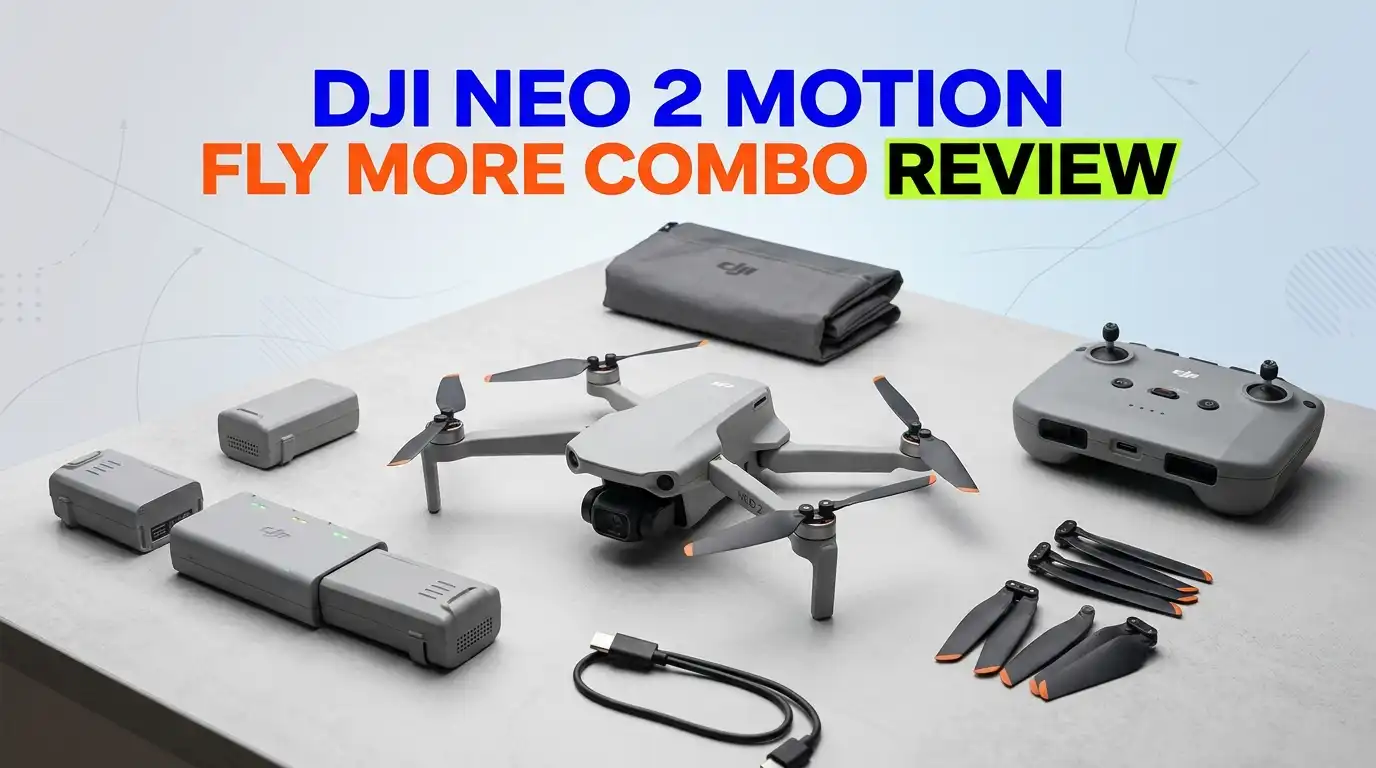
The DJI Neo 2 Motion Fly More Combo is the top tier bundle for DJI’s smallest 2026 drone. It pairs the Neo 2 aircraft with the RC Motion 3 controller and the Goggles N3 headset. You also get three batteries, a charging hub, propeller guards, and the O4 transceiver module.
This combo targets people who want first person view flying without the technical headache. The motion controller lets you point and fly. The goggles give you an immersive cockpit view. And the drone handles obstacle avoidance on its own.
The Neo 2 weighs only 151 grams and carries a C0 class certification in Europe. That keeps it legal in many countries without registration. It folds into a compact shape thanks to integrated propeller guards. The full enclosure also means you can launch it from your palm safely.
DJI built this drone for three jobs. It works as a selfie drone with gesture control. It flies as a standard camera drone with the RC controller. And it transforms into an FPV drone when paired with the goggles. That flexibility is rare at this price point. The Motion Fly More Combo gives you every tool needed for all three modes in a single box.
Unboxing Experience And What’s Inside The Box
The packaging feels premium and well organized. DJI uses a clean white box with foam inserts that hold each piece in place. Lift the lid and you see the Neo 2 drone sitting front and center with the gimbal cover already attached.
Underneath the drone tray you find the Goggles N3 in their own padded compartment. The RC Motion 3 controller sits beside them with a wrist strap pre attached. Three batteries rest in their own slot, each labeled with charge status indicators.
The accessories tray holds the charging hub, a USB C cable, a power adapter, and the O4 transceiver module. You also get a small screwdriver, spare propellers, and quick start guides. A microfiber cloth for the goggles lens is a nice touch.
Setup takes about ten minutes. You charge the batteries, install the DJI Fly app on your phone, and pair the goggles. The transceiver module attaches with two small screws on the back of the drone. DJI includes everything you need to fly right away. There are no hidden purchases required for the FPV experience. That makes the unboxing feel complete and rewarding compared to many drone combos that nickel and dime buyers.
Camera Quality And Video Performance
The Neo 2 uses a 1/2 inch CMOS sensor with 12 megapixels and an f/2.2 aperture. While the sensor size matches the original Neo, the image processing engine is brand new. The result is sharper footage with better color accuracy.
You can record 4K video at up to 60fps and slow motion 1080p at 100fps. The maximum bitrate hits 80Mbps in MP4 format. Footage looks great in good light. Skin tones appear natural and contrast holds up well against bright skies.
The biggest hardware upgrade is the 2 axis mechanical gimbal. The original Neo had only a single axis tilt, which led to shakiness. This new gimbal pairs with RockSteady electronic stabilization for footage that holds steady even in light wind.
Low light performance is the weak spot. The small sensor introduces visible noise once the sun goes down. You also lose detail in shadows. Serious creators will miss the lack of D Log M color profile and 10 bit recording. Color grading flexibility stays limited to 8 bit footage.
For social media clips, travel videos, and casual YouTube content, the Neo 2 delivers. It will not replace a Mini 5 Pro for professional work. But for the price and size, the camera punches well above its weight class.
Flight Performance And Handling
The Neo 2 hits a top speed of 12 meters per second in Sport mode, which is roughly 43 kilometers per hour. That feels fast enough for chase shots and dynamic following. It also handles Level 5 wind resistance, which means it stays stable in breezes up to 10.7 meters per second.
In Normal mode, the drone feels stable and forgiving. It hovers in place when you release the sticks. Obstacle sensors stay active and prevent most collisions. This mode suits beginners and selfie shots perfectly.
Sport mode turns off obstacle avoidance and unlocks full speed. The drone feels lively but still predictable. It corners well and recovers quickly from quick stick inputs. Wind handling is decent for such a light aircraft.
Manual mode is where the Neo 2 shows its limits. Power feels weak compared to a real FPV quad. Acceleration is sluggish, and the drone struggles in stronger wind. Hardcore FPV pilots will outgrow this mode in a few sessions. But for learning basic acro stick movements, it works well enough.
The flight feels controlled and intentional. The Neo 2 prioritizes safety and ease over raw thrills. That trade off works well for the audience DJI is targeting. Casual flyers and beginners will love the predictability. Experienced FPV pilots should temper their expectations.
Top 3 Alternative for DJI Neo 2 Motion Fly More Combo

Last update on 2026-08-28 / Affiliate links / Images from Amazon Product Advertising API Some of the links on this website are affiliate links, which means that at no additional cost to you, I earn a commission if you click through and make a purchase. I only recommend products and services that I believe will add value to my readers. Thank you for your support!
DJI Mini 4K Fly More Combo

Last update on 2026-07-03 / Affiliate links / Images from Amazon Product Advertising API Some of the links on this website are affiliate links, which means that at no additional cost to you, I earn a commission if you click through and make a purchase. I only recommend products and services that I believe will add value to my readers. Thank you for your support!
HOVERAir X1 Self Flying Camera Drone

Last update on 2026-08-28 / Affiliate links / Images from Amazon Product Advertising API Some of the links on this website are affiliate links, which means that at no additional cost to you, I earn a commission if you click through and make a purchase. I only recommend products and services that I believe will add value to my readers. Thank you for your support!
Potensic ATOM 2 Drone
Goggles N3 And Immersive FPV Experience
The Goggles N3 included in this combo are DJI’s beginner friendly FPV headset. They use a single LCD screen instead of dual OLED panels found in the Goggles 3. That keeps the price down while still giving a solid view.
The display offers a 1080p resolution with smooth refresh rates. The image looks crisp during flight. There is no diopter adjustment, so glasses wearers might need to adjust the head strap or use contacts for comfort.
Latency feels very low when using the O4 transmission system. You barely notice any delay between your head movements and the drone camera response. Head tracking works well for cinematic panning shots. You turn your head and the drone gimbal follows naturally.
Comfort is decent for sessions up to 30 minutes. The foam padding feels soft on your face. The strap distributes weight evenly. Longer sessions can cause some pressure on the nose bridge, which is common with most FPV goggles.
The N3 goggles connect to the drone via the included transceiver module. Range stretches up to 10 kilometers in ideal conditions, though battery life is the real limit. For new FPV pilots, these goggles offer one of the cheapest entries into immersive flying. They will not match the premium feel of the Goggles 3, but they get the job done well.
RC Motion 3 Controller Made Easy
The RC Motion 3 controller is the star of this combo for beginners. Instead of two joysticks, you hold a single handle that responds to wrist movements. You point where you want to fly, and the drone follows.
Forward speed is controlled by a trigger on the front. Pull harder for faster flight. A small joystick on top handles altitude and lateral movement. A button on the side activates emergency brake, which freezes the drone instantly.
Learning takes about five minutes. The motion control feels intuitive almost immediately. My grandmother could fly this drone within an hour, and I mean that genuinely. The combination of motion control and obstacle avoidance removes nearly all the stress from flying.
The controller includes one button tricks like flips, drifts, and 360 spins. These automated moves create cinematic shots without skill. They feel a bit gimmicky after the novelty wears off, but they are fun for sharing on social media.
The downside is the lack of fine control. You cannot perform precise FPV maneuvers like a real stick controller. The motion controller suits cinematic flying and basic FPV thrills. Once you outgrow it, you will want the DJI FPV Remote Controller 3 for full manual flight. For beginners, though, this is the easiest way to fly any drone in 2026.
Battery Life And Charging Hub
Each Neo 2 battery is rated for 19 minutes of flight time in ideal conditions. Real world testing shows closer to 13 to 15 minutes once you account for wind, the transceiver module weight, and aggressive flying. With three batteries in the Fly More Combo, you get roughly 45 to 57 minutes of total air time per outing.
The included charging hub holds all three batteries at once. It charges them sequentially, prioritizing the battery with the most charge first. Total charge time runs about 60 minutes for all three packs using the 65W USB C input.
The hub also features a power bank function. You can use it to charge your phone or controller in a pinch. That is genuinely useful when you are out in the field for hours.
Battery longevity is solid. DJI rates each pack for 200 charge cycles before significant capacity loss. The cells are Li ion rather than LiPo, which trades peak power for longer life and safer storage.
The bad news involves cost. Replacement batteries jumped to around 99 dollars each, up from 69 dollars on the original Neo. That stings if you crash hard or want to expand your flight time later. Plan to use the included batteries carefully, and consider DJI Care Refresh to protect against accidents.
Obstacle Avoidance And Safety Features
The Neo 2 brings serious safety upgrades over its predecessor. It includes omnidirectional obstacle sensing, which means cameras and sensors cover front, back, sides, top, and bottom. A new front facing LiDAR sensor adds depth perception, especially useful in low light.
In testing, the drone reliably detected obstacles like trees, walls, and railings. It slowed down and rerouted around them automatically. Yellow and red proximity alerts appear in the goggles or app when objects get close.
Indoor flying feels especially safe. The drone refuses to fly into walls and stops itself before contact. For new pilots filming in tight spaces, this technology is a game changer. You can focus on framing the shot rather than worrying about crashes.
Return to Home works in three triggers: low battery, lost signal, and manual command. The drone climbs to a preset altitude and flies back to its takeoff point. Obstacle avoidance stays active during return flight, which prevents tree strikes on the way home.
The system has limits. Thin objects like wires, twigs, and fishing line can slip past the sensors. Sport mode disables active avoidance, leaving only audio warnings. And the drone cannot detect glass or transparent surfaces reliably. Treat the avoidance system as a safety net, not a replacement for situational awareness. Used wisely, it makes the Neo 2 one of the safest small drones available right now.
Selfie Modes And Smart Tracking
Selfie features are where the Neo 2 truly shines. Palm launch and gesture control let you fly without a phone or controller. You hold the drone flat in your hand, double tap the power button, select a mode, and toss it into the air.
Available shot modes include Follow, Dronie, Circle, Rocket, Spotlight, and Helix. Each one creates a different cinematic clip automatically. The drone tracks you, frames the shot, and lands when finished. It feels like having a personal cinematographer in your pocket.
The new ActiveTrack 360 feature uses AI to keep subjects centered even when they move quickly or turn away. It handles obstacles between you and the drone better than the original Neo. SelfieShot mode automatically frames you in standard or vertical aspect ratio.
The MasterShot feature combines several moves into one edited sequence. You select a subject, press start, and the drone executes a series of pre programmed flights. It then exports a finished clip ready to share.
For runners, cyclists, skaters, and content creators, these modes are gold. Tracking speed handles up to 25 kilometers per hour reliably. The vertical shooting option suits Instagram Reels and TikTok perfectly. No other drone at this price offers such polished selfie features. That alone justifies the Neo 2 over many competitors.
Build Quality And Portability
The Neo 2 features a one piece plastic frame with integrated propeller guards. This design protects the props during crashes and makes the drone safe to launch from your palm. The whole aircraft measures roughly 150 by 170 millimeters.
Build quality feels solid for a sub 250 gram drone. The plastic feels durable without being heavy. Joints and seams fit tightly with no creaks or wobbles. The gimbal moves smoothly and locks in place when powered off.
The drone does not fold like the Mini series. That increases its packed size slightly. However, it still fits easily into a small backpack pocket or messenger bag. The included propeller guards add no extra setup time since they are part of the frame.
A small front display shows battery status, mode selection, and signal strength. You navigate it using two buttons on the top of the drone. This screen makes solo flying without a phone genuinely practical.
The transceiver module attaches to the back with two screws. Removing it for lighter selfie flights takes about two minutes. This modular approach is clever, but the screws feel fragile. Strip them once and replacement gets tricky. Overall, the build feels like a step up from the original Neo. It looks polished and feels ready for everyday adventures.
What The DJI Neo 2 Does Not Do Well
No review is complete without honest negatives. The Neo 2 has real shortcomings you should know before buying.
First, there is no SD card slot. You rely entirely on the 49GB internal storage. That holds about 100 minutes of 4K 60fps footage. Long shooting days require you to offload clips to your phone or laptop mid session.
Second, manual FPV flight feels underpowered. The motors lack the punch needed for true freestyle and racing. Hardcore FPV pilots will hit the performance ceiling within hours. This is a selfie drone with FPV bonuses, not a dedicated FPV machine.
Third, low light video quality is mediocre. The small 1/2 inch sensor introduces noise quickly once the sun drops. Indoor footage at low ISO settings looks soft and grainy. Night flying is not where this drone wants to be.
Fourth, replacement parts cost a lot more than before. Batteries jumped to nearly 99 dollars each. Replacement gimbals and shells require a DJI Care service ticket. Crashes get expensive fast.
Fifth, the 120 meter altitude limit is locked by firmware. The drone simply hovers when you try to climb higher. Mountain pilots and aerial mapping users will find this restrictive compared to a Mini 5 Pro.
Sixth, the transceiver module adds 10 grams and requires fiddly screws. Removing it for pure selfie flight takes effort. And without it, range drops to about 500 meters over WiFi.
Finally, no D Log M or 10 bit recording. Color grading flexibility stays limited. Professional creators will outgrow the camera quickly. Knowing these limits upfront helps you set the right expectations before you buy.
Who Should Buy The DJI Neo 2 Motion Fly More Combo
This combo suits specific buyers very well. Beginners who want their first drone will love the safety features and ease of use. The motion controller and obstacle avoidance make crashes nearly impossible during normal flight.
Content creators and influencers will appreciate the vertical shooting mode, ActiveTrack 360, and one button cinematic shots. Solo creators can capture professional looking clips without a film crew. The Neo 2 follows you, frames the shot, and lands itself.
Travelers benefit from the compact size and sub 250 gram weight. You can pack it in a daypack and carry it on flights without registration in many countries. The C0 certification helps with European travel laws.
Casual FPV curious flyers get a safe entry into immersive flight. The Goggles N3 and Motion Controller 3 deliver an FPV taste without the build complexity of a custom quad. You can crash and learn without destroying expensive parts.
People who already own a DJI Mini 5 Pro or Air 3 might find this redundant. The Neo 2 cannot match those drones for image quality or range. It works best as a primary drone for newcomers or as a fun secondary drone for experienced pilots who want easy selfie shots.
If you need professional grade footage, long range mapping, or aggressive FPV racing, look elsewhere. For everyone else, the Motion Fly More Combo offers the best all in one drone experience under 600 dollars in 2026.
Pricing And Value Verdict
The DJI Neo 2 Motion Fly More Combo retails for around 599 dollars in the United States. That price includes the drone, three batteries, the charging hub, the RC Motion 3 controller, the Goggles N3, and the O4 transceiver module.
Buying these pieces separately would cost over 800 dollars. The combo savings are real and meaningful. You essentially get the goggles and motion controller bundled at a discount compared to standalone purchases.
Compared to the original Neo Fly More Combo, this is a 50 percent price increase. The upgrades justify it for most buyers. You get a better camera, smarter sensors, longer flight time, and double the storage. Whether the jump is worth it depends on your needs.
Against direct rivals, the Neo 2 holds its ground. The HOVERAir X1 Pro matches the selfie focus but lacks FPV goggles support. The Potensic ATOM 2 offers similar specs at a lower price but misses DJI’s polish and ecosystem. The DJI Mini 4K costs less but skips smart features entirely.
Value rating sits at a strong 8.5 out of 10. The combo delivers serious bang for the buck if you want all three flying styles in one package. If you only need a selfie drone or only want FPV, cheaper options exist. But for the complete experience, this bundle is hard to beat in 2026.
Frequently Asked Questions
Is The DJI Neo 2 Worth The Upgrade From The Original Neo?
Yes, the upgrade makes sense for most users. The new 2 axis gimbal, 4K 60fps recording, and omnidirectional obstacle sensing are major improvements. Storage doubles to 49GB and flight time goes up by two minutes. If you fly often, the Neo 2 is worth the jump.
Can I Fly The DJI Neo 2 Indoors?
Yes, the Neo 2 flies indoors very well. The full propeller guards protect against wall strikes. Omnidirectional obstacle sensing prevents most collisions automatically. The compact size suits living rooms, gyms, and warehouses. Use Cine mode for the smoothest indoor footage.
Does The DJI Neo 2 Need FAA Registration?
In the United States, drones over 250 grams require FAA registration. The Neo 2 weighs only 151 grams, which falls under the limit for recreational flying. Commercial pilots still need Part 107 certification regardless of weight. Always check local rules in your country.
How Long Does The Battery Last Per Charge?
Each battery delivers about 19 minutes of flight time under ideal conditions. Real world flight time runs closer to 13 to 15 minutes with the transceiver module attached. The Fly More Combo includes three batteries for roughly 45 to 57 total minutes per session.
Can I Use The Neo 2 For Professional Video Work?
The Neo 2 suits casual and social media work very well. Professional projects requiring D Log M, 10 bit color, or larger sensors should use the DJI Mini 5 Pro or Air 3S instead. The Neo 2 lacks the color grading flexibility serious creators demand.
What Range Does The Goggles N3 Offer?
The Goggles N3 paired with the O4 transceiver module reaches up to 10 kilometers in ideal open conditions. Real flights hit closer to 2 to 4 kilometers due to obstacles and signal interference. Battery life limits practical range long before signal does.
Does The DJI Neo 2 Support SD Cards?
No, the Neo 2 does not have an SD card slot. You rely on the 49GB internal storage, which holds about 100 minutes of 4K 60fps footage. Offload clips regularly via USB C or the DJI Fly app to free up space.
Is The Motion Controller Easy To Learn?
Yes, the RC Motion 3 controller is the easiest drone control method available. You point your wrist where you want to fly. Most people learn it in five to ten minutes. It suits total beginners better than traditional joysticks.
Can The Neo 2 Follow Me While Running Or Cycling?
Yes, ActiveTrack 360 keeps up with subjects moving up to 25 kilometers per hour. The drone tracks you through turns, obstacles, and direction changes. Cycling, running, skating, and skiing all work well in good visibility conditions.
What Happens If The Drone Loses Signal?
The Neo 2 triggers automatic Return to Home when it loses signal. It climbs to a preset altitude and flies back to the takeoff point. Obstacle avoidance stays active during the return flight to prevent tree strikes and crashes.

Hello everyone my name is Alenya and i am a gadget discovering Enthusiast 🐻🐻