CyberPower CP1500PFCLCD PFC Sinewave UPS Battery Backup Review
If your home office setup or gaming PC has ever crashed due to a sudden power outage, you know exactly how frustrating that experience can be.
Losing unsaved work, risking data corruption, and potentially damaging expensive hardware is the last thing anyone wants to face.
The CyberPower CP1500PFCLCD PFC Sinewave UPS is designed to protect your electronics from exactly these scenarios by providing immediate backup power when your main utility line fails.
In a Nutshell
- Pure sine wave output ensures compatibility with sensitive electronics and systems featuring active power factor correction (PFC) technology, unlike cheaper simulated sine wave alternatives.
- The unit includes 12 power outlets (6 battery-backed, 6 surge-only), plus 2 USB charging ports for phones and tablets. Runtime ranges from approximately 10 minutes at half load to 2.5 minutes at full load, which is sufficient time to save work and shut down gracefully.
- The system uses two replaceable 12V/9.0Ah sealed lead-acid batteries that are user-accessible without technical expertise.
- An intuitive LCD display shows real-time power draw, input/output voltage, and estimated battery runtime. The 3-year manufacturer warranty covers defects, and the compact tower design measures just 14 x 3.9 x 11 inches, fitting most desktop environments.


Last update on 2026-07-29 / Affiliate links / Images from Amazon Product Advertising API Some of the links on this website are affiliate links, which means that at no additional cost to you, I earn a commission if you click through and make a purchase. I only recommend products and services that I believe will add value to my readers. Thank you for your support!
What This UPS Actually Does for Your Desk
Power protection matters more than you might think. Most people assume their expensive computers just need an outlet and maybe a power strip, but utility companies deal with voltage spikes, brownouts, and complete outages regularly.
This unit sits between your wall outlet and equipment, monitoring the incoming power quality constantly. When it detects problems—whether that’s a sudden surge, dangerous voltage drop, or complete blackout—the system automatically switches your devices to battery power within milliseconds.
The pure sine wave technology here is the critical difference separating this model from budget UPS units. Cheaper units produce stepped approximations of proper power, which can cause issues with modern power supplies containing active PFC circuits.
Your computer might restart randomly, peripheral devices might behave erratically, or sensitive components could eventually degrade. This unit outputs true sinusoidal power matching what utilities provide, meaning zero compatibility headaches.
Unboxing and Physical Setup
The packaging arrives with protective foam inserts and includes the UPS unit itself, a USB Type-B cable, coax cables, phone line cables, and documentation.
The unit itself weighs 24.9 pounds and feels solid without being excessively heavy—it’s designed as a tower that sits vertically beside your desk setup rather than under it.
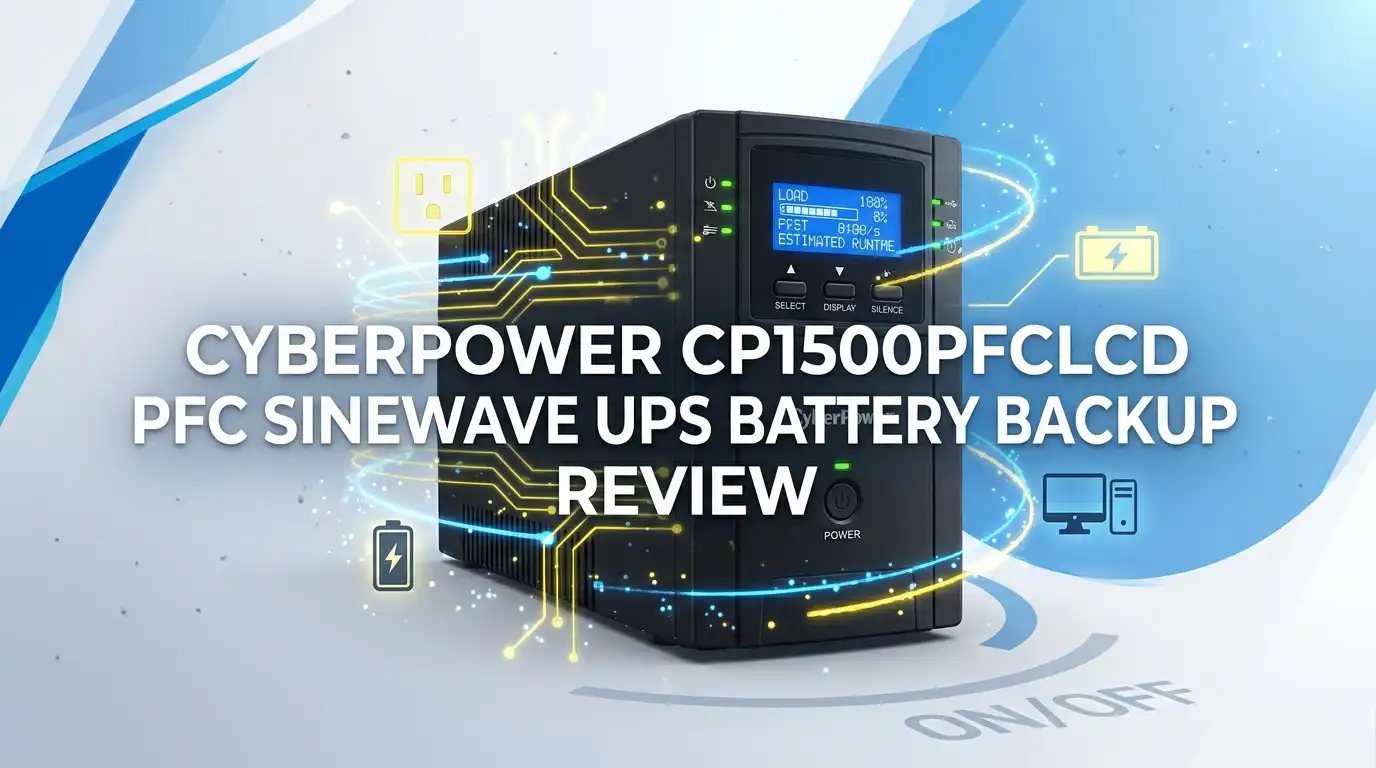
The front panel features four control buttons (power, display, silence alarms, and control), plus the LCD screen centered prominently. Two 1-amp USB charging ports sit on the front, perfect for topping off phones or tablets without consuming a precious AC outlet.
The back panel houses the real connections: 6 battery-backed outlets with surge protection, 6 surge-only outlets (for less critical devices), two phone/ethernet ports, two coax protection jacks, a USB Type-B port for monitoring software, and a serial port.
The overall build quality feels sturdy with a matte black plastic chassis that doesn’t attract fingerprints excessively.
Setup literally takes minutes. Plug it in, press the power button, and wait approximately 30 seconds for the LCD to display system info. That’s it. No configuration needed out of the box, though CyberPower’s PowerPanel Personal Edition software (free download) offers more detailed monitoring if you want it.
Key Performance: Battery Runtime in Real Conditions
Here’s what matters in actual power loss scenarios. Testing shows approximately 24 minutes at 200W load, which covers a typical home office setup with computer, monitors, and networking equipment. At half maximum load (500W), you’re looking at roughly 10 minutes of runtime. Full load sustained operation gives you about 2.5 minutes before battery depletes.
These numbers matter because they answer the real question: “Can I save my work?” Absolutely. You have sufficient time to close applications, save files, and perform a controlled shutdown.
For serious content creators or developers with larger workloads, you might want a higher-capacity unit, but for typical home offices and mid-range gaming setups, this provides genuine peace of mind.
The AVR (Automatic Voltage Regulation) technology deserves mention here because it intelligently handles common electrical problems.
When utilities fluctuate between 88-144V input, the AVR corrects these variations without draining batteries. This extends battery lifespan significantly since the system only switches to battery power during true emergencies, not minor voltage wobbles.
The Battery Situation: User-Replaceable but Worth Knowing About
Two maintenance-free sealed lead-acid batteries (12V, 9.0Ah each) power this system. These are user-replaceable without calling a technician or opening proprietary sealed components. Simply flip the unit around, remove a few terminals, swap the batteries, and you’re finished.
However, here’s the gotcha: replacement batteries listed for this unit are 12V/8.0Ah instead of the original 9.0Ah. Using lower-capacity replacements reduces your total battery runtime by approximately 10-15%.
CyberPower officially sells replacement kits (the RB1280X2A), but shopping elsewhere sometimes reveals compatible 9.0Ah batteries that maintain original performance. Battery replacement becomes necessary roughly every 3-5 years depending on usage patterns and local climate conditions.
Sealed lead-acid chemistry means these batteries deteriorate naturally over time regardless of usage, so don’t be surprised when runtime decreases after a few years.

Last update on 2026-07-29 / Affiliate links / Images from Amazon Product Advertising API Some of the links on this website are affiliate links, which means that at no additional cost to you, I earn a commission if you click through and make a purchase. I only recommend products and services that I believe will add value to my readers. Thank you for your support!
Top 3 Alternatives for CyberPower CP1500PFCLCD
No products found.
No products found.
No products found.
Waveform Quality: Why True Sine Wave Matters
The difference between simulated and pure sine wave deserves clear explanation. Imagine power as a smooth wave rolling across the ocean—that’s what utilities provide.
Budget UPS units output something closer to stacked blocks, approximating the wave but with sharp edges and discontinuities. Sensitive electronics don’t appreciate those harsh transitions.
This unit’s pure sine wave output traces a smooth mathematical curve identical to standard utility power. Testing with an oscilloscope confirms the CP1500PFCLCD produces genuinely clean power on battery mode.
Devices don’t “feel” the power loss occurring. This matters especially if you’re running professional AV equipment, high-end audio systems, or workstations with power supplies specifically designed around stable sine wave input.
The transfer time (switching from AC to battery power) measures approximately 4-8 milliseconds in real testing—fast enough that modern power supplies don’t even detect the transition.
Older equipment might require even faster switching, but virtually all computers manufactured in the last 10 years handle this timeframe without issues.
LCD Display and Monitoring Capabilities
The built-in LCD screen provides actual useful information rather than just showing battery percentage. You see real-time power consumption in watts, input voltage from the wall, output voltage going to equipment, line frequency (should be 60Hz in North America), and estimated runtime remaining at current load.
This real-time feedback helps identify power hogs consuming unnecessary electricity.
PowerPanel Personal Edition software adds another layer of monitoring capability. Once installed via the USB connection, it runs on your PC background, tracking power events (outages, voltage fluctuations), allowing you to schedule automatic shutdowns, and providing detailed logs of electrical incidents.
The software is straightforward without confusing menus, though frankly many users never install it and rely entirely on the LCD display, which provides sufficient information for most scenarios.
Outlet Configuration: Strategic Power Placement
Having 12 outlets might sound impressive, but the actual distribution matters more than the total count. Six outlets provide both surge protection AND battery backup—you’ll want to plug your computer tower, monitor, and critical networking gear here.
Six additional outlets offer surge protection only, perfect for printers, desk lamps, phone chargers, and peripherals. This dual-circuit design prevents you from accidentally overloading the battery during an outage.
The USB charging ports are a thoughtful addition for modern offices where everyone has multiple devices. They deliver a full amp per port, sufficient for charging phones or smaller tablets at reasonable speeds.
These USB ports operate independently from the battery system—they only work when the UPS has mains power, which is actually sensible design preventing battery drain from charging devices that don’t need backup power.
Noise and Operating Sounds
The unit produces minimal noise during normal operation—just a subtle cooling fan and occasional relay clicks when voltage regulation kicks in. During a power outage on battery mode, the fan continues quietly.
The actual alarm (if configured to alert you to outages) is moderately loud but not ear-splitting, designed to be noticeable without being startling. Users with home offices find the noise profile perfectly acceptable.
Who This Is Actually NOT For
Complete honesty requires addressing limitations. If you’re running a server room, small business with extensive equipment, or high-power graphics workstation with multiple GPUs, you need significantly more capacity. The 1000W rating might prove insufficient if your workload exceeds that threshold.
Users in regions with extremely unstable power grids experiencing multiple long outages daily might appreciate higher-capacity models with extended runtime.
While this unit handles surges, spikes, and brief outages excellently, it’s not designed for sustained hours of operation. Think of it as an emergency bridge to graceful shutdown, not an extended power extension.
If you have legacy equipment manufactured before 2010 or specialized electronics requiring online double-conversion UPS technology (near-zero transfer time), explore other options. Some industrial equipment absolutely requires online topology and produces errors when powered from line-interactive systems.
Longevity and What to Expect Long-Term
Owners report this unit functioning reliably for 5-7 years with basic maintenance (occasional dust removal, battery replacement around year 3-4).
The fan can become slightly louder as it ages—nothing unexpected with equipment that runs 24/7 in some environments. The battery degradation path is gradual; runtime doesn’t suddenly vanish but decreases incrementally across months, giving you fair warning before replacement becomes urgent.
The three-year warranty covers manufacturing defects. After that period, repair costs for internal component failures typically run $80-150 for professional service or replacement parts.
Most long-term users simply purchase a new unit rather than repair aging hardware, which is standard industry practice for consumer-grade power protection.
Price Positioning and Value Assessment
The current market pricing sits around $200-220 for this specific model. APC’s comparable Pure Sine Wave 1500VA systems cost $70-100 more, while cheaper Simulated Sine Wave alternatives from various manufacturers cost $40-60 less. You’re paying specifically for the pure sine wave output and CyberPower’s reputation for reliability.
The value calculation depends on your equipment investment. If your computer setup, networking hardware, and peripherals exceed $3000 total value, spending $200 on insurance against damage seems reasonable.
If you’re running a $500 budget build, the percentage hit feels larger proportionally but still justified given the risk of catastrophic failure. Most tech professionals recommend power protection as non-negotiable, making this investment standard practice in serious home offices.
FAQs
What’s the actual difference between this model and the CP1500AVRLCD?
The main distinction is waveform output. The AVR model produces simulated sine wave using stepped approximations, while this PFC model outputs true sine wave. The AVR costs $30-40 less but doesn’t work reliably with power supplies featuring active power factor correction. Choose this PFC model if you have modern equipment with active PFC power supplies (which most contemporary systems do).
Can I replace the batteries myself without voiding the warranty?
Yes, absolutely. These batteries are user-replaceable components, and CyberPower explicitly supports DIY replacement. The three-year warranty remains valid. Simply power down, disconnect mains, remove the battery terminals, swap units, and reconnect. Takes roughly 5 minutes with basic tools.
Will this prevent data loss if the power goes out while I’m working?
Completely depends on your software. The UPS provides power to save work, but you must actively save files. If you’re using applications with auto-save features or cloud-based documents, you’re protected. If you have unsaved work in traditional spreadsheets or documents, the outage gives you 10-25 minutes to save before battery depletes. Use this time for graceful shutdown, not continued work.
Does the LCD display show how much capacity remains as a percentage?
Yes, though it displays it differently than you’d expect. The LCD shows estimated runtime remaining (minutes), not percentage. This is actually more useful because you know exactly how much time you have to save work, rather than a vague percentage number that doesn’t indicate real time availability.
What should I plug into battery-backed outlets versus surge-only outlets?
Battery-backed outlets should receive your primary equipment: computer tower, monitor, networking equipment, and critical accessories. Surge-only outlets work fine for printers, fans, desk lamps, speakers, and other peripherals that don’t need uninterrupted power. This prevents overloading the limited battery capacity with non-essential devices during outages.
Is the PowerPanel software necessary or just optional?
Completely optional. The LCD display on the unit provides sufficient information for most users. Software adds convenience if you want automatic shutdown scheduling, detailed power event logging, or remote monitoring, but it’s not required for basic UPS functionality. Install it if those features appeal to you; skip it otherwise.
How often do I need to replace the batteries?
Realistically every 3-5 years depending on environmental factors. Hot climates accelerate degradation, while cooler locations extend lifespan. You’ll notice runtime decreasing before batteries completely fail, giving you advance warning. Budget approximately $40-60 for replacement battery kits, making it an affordable maintenance expense.
Will my PC shut down immediately if the power cuts while I’m gaming?
No, you’ll have approximately 2.5-10 minutes of runtime depending on your power draw. Modern games are power-hungry (often 400-600W), putting you on the lower runtime end. You can potentially continue playing for a minute or two, but best practice is immediate graceful shutdown to maximize battery capacity available for saving game data and properly powering down storage drives.
What’s the warranty coverage exactly?
Three years against manufacturing defects covering internal components, batteries, and the housing. This does NOT cover physical damage from accidents, power surges exceeding the unit’s rating, improper installation, or normal battery degradation. The warranty is repairs or replacement, not cash refunds, and CyberPower handles warranty claims directly or through authorized retailers.
Disclosure: This content is part of an Amazon Creator Connections campaign, meaning I earn a commission from qualifying purchases. Using these links costs you nothing extra but directly supports my blog and future content.

Hello everyone my name is Alenya and i am a gadget discovering Enthusiast 🐻🐻