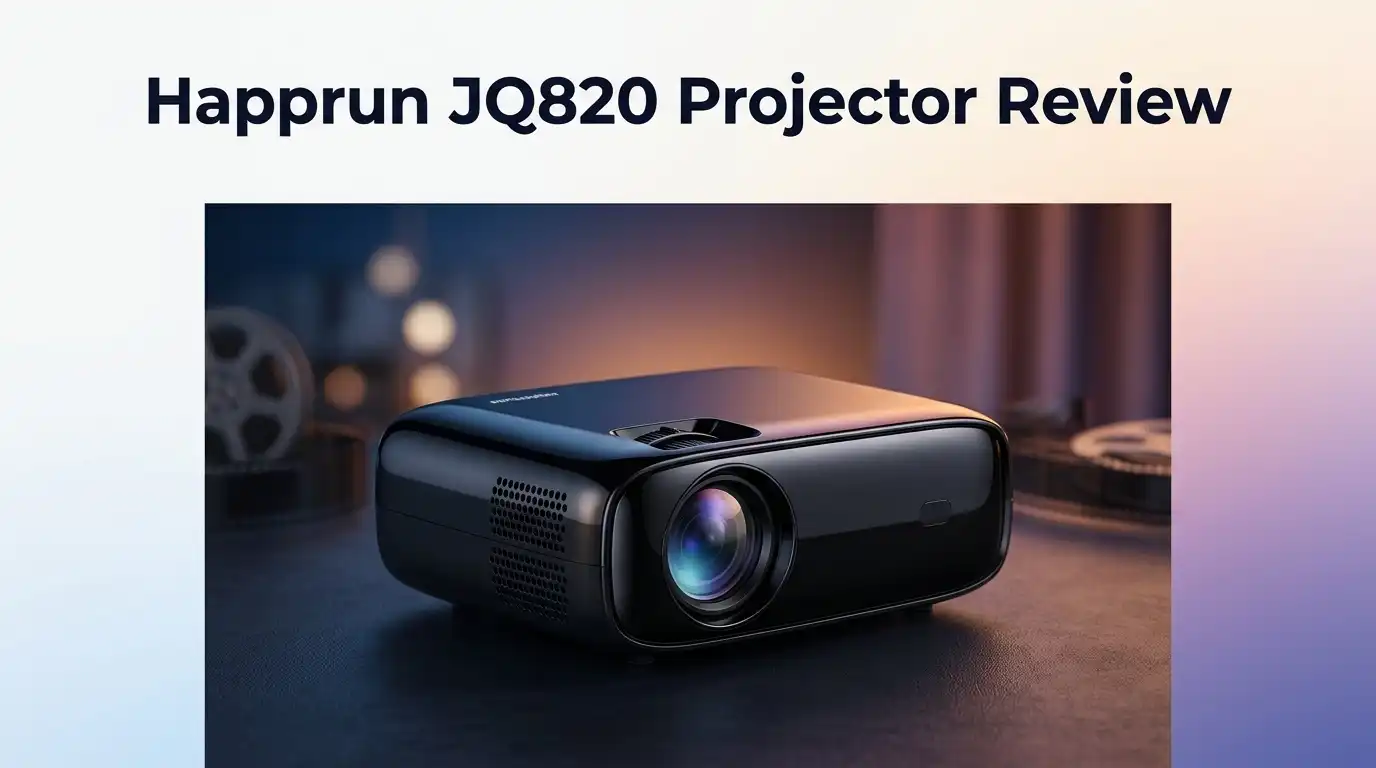
Happrun JQ820 Projector Review: Is It Worth Buying?
Looking for a projector that actually delivers on image quality? The Happrun JQ820 might catch your eye. It uses laser LCD technology and Google TV built in.
This projector brings 1000 to 1500 ANSI lumens to your screen. That means bright, clear pictures even in rooms with some light. Native 1080p resolution keeps every detail sharp.
But does it hold up against tougher competition? Brands like Elephas, Alvar, and Dangbei all compete in this same space. We put the JQ820 through its paces to find out.
In a Nutshell
- Sharp visuals: The projector uses laser LCD tech paired with true 1080p resolution. Images stay crisp and detailed on bigger screens.
- Deep contrast: A 20,000:1 contrast ratio helps dark scenes look rich. Colors pop without washing out.
- Google TV onboard: You get a familiar smart interface right out of the box. Navigation feels smooth for most users.
- App limitations: The built-in operating system lacks native streaming apps. You’ll likely need a Fire Stick or similar device for Netflix and other platforms.
- Audio needs help: Speakers inside this unit sound thin and weak. Plan on adding a soundbar for movie nights.
- Family lineup: Compared to its sibling, the Happrun H1, this model pushes sharper focus tech and smarter keystone tools. It edges ahead for setup ease.
Key Features and Specifications
The Happrun JQ820 packs a laser LCD engine that delivers crisp visuals without breaking a sweat. This technology choice matters because it keeps colors consistent and bright across different room conditions.
Your brightness sits between 1000 and 1500 ANSI lumens. That range works well for darker spaces and moderately lit rooms. You won’t need complete blackout conditions to enjoy a movie.
Native 1080p resolution means you get full HD sharpness. Every detail on screen comes through clean. The 20,000:1 contrast ratio adds punch to dark scenes. Black levels look deep and rich instead of washed out.
Auto-focus and keystone correction stand out as real strengths here. The projector adjusts its focus automatically when you move it. Keystone correction fixes image distortion if your mounting angle isn’t perfectly straight. These features save you from manual tweaking.
Google TV comes built into this unit. You access Netflix, YouTube, and other apps directly without extra devices. The interface feels familiar if you’ve used Android before.
Here’s where things get tricky. The operating system has limited app support. Some streaming services won’t install natively on this projector. You may need to connect external devices like Roku or Fire Stick to access certain apps.
Sound quality deserves honest mention. The speakers inside sound thin and weak. Dialogue gets muffled during action scenes. Most users pair this projector with an external speaker system for real audio performance.
The laser LCD approach gives you longer lamp life compared to traditional bulbs. Maintenance becomes simpler since you don’t replace components as often.
Connectivity options include HDMI ports for gaming consoles and streaming devices. USB inputs let you play media files directly from flash drives.
This projector handles fast motion well. Sports and action movies display smoothly without ghosting or blur.
The combination of sharp optics, automatic adjustments, and solid contrast makes the JQ820 a practical choice for home theater enthusiasts. You get reliable performance where it matters most: picture quality and ease of use.

Last update on 2026-09-19 / Affiliate links / Images from Amazon Product Advertising API Some of the links on this website are affiliate links, which means that at no additional cost to you, I earn a commission if you click through and make a purchase. I only recommend products and services that I believe will add value to my readers. Thank you for your support!
Image Quality and Brightness
The Happrun JQ820 shines when it comes to picture performance. You get laser LCD technology paired with native 1080p resolution. This combination delivers sharp, detailed images across movies, sports, and gaming.
Brightness matters in any projector. The JQ820 pushes between 1000 and 1500 ANSI lumens. This range works well in dimly lit rooms and handles moderate ambient light without washing out. You won’t need complete darkness to enjoy a movie, though darker spaces still look better.
The 20,000:1 contrast ratio gives you deep blacks and bright whites. Dark scenes reveal more detail instead of looking flat or muddy. This contrast level punches above what you’d expect at this performance tier.
One standout feature is the auto-focus system. It adjusts image sharpness automatically. You don’t waste time fiddling with manual focus rings. The keystone correction also works impressively. If your projector sits at an angle, the image still looks square and properly aligned on your screen.
Color accuracy holds up nicely with laser LCD technology. You get consistent colors without the color shift problems that plague some cheaper projectors. Reds stay red, blues stay blue, and skin tones look natural.
Motion handling deserves praise too. Fast action scenes in sports or action films stay clear without blurring. The refresh rate keeps up with quick cuts and pans.
One limitation to note: brightness drops when you use keystone correction heavily. If you need maximum lumens, keep the projector aimed straight at your screen. This is common across most projectors in this class.
The laser LCD engine also means longer operational life compared to traditional bulb projectors. You’ll enjoy thousands of hours before brightness noticeably fades.
Overall, image quality ranks as the JQ820’s strongest feature. The combination of brightness, contrast, resolution, and smart auto-focus creates a viewing experience that feels polished. Whether you’re watching movies, playing games, or streaming shows, the picture delivers clean, vibrant results that satisfy most users.
Design, Build, and Setup
The Happrun JQ820 feels solid in your hands. The build quality reflects careful attention to durability without unnecessary bulk. The projector sits stable on any flat surface, and the casing resists fingerprints well.
Setup takes minutes, not hours. You unbox the unit, connect power, and turn it on. The auto-focus feature kicks in automatically. You don’t need to manually adjust focus like older projectors demand.
Keystone correction works impressively here. Tilt the projector at an angle, and the image stays rectangular on your screen. The system corrects both horizontal and vertical distortion in real time. This flexibility means you can place the projector almost anywhere in your room.
The laser LCD engine runs cooler than traditional bulb-based projectors. You’ll notice quieter operation during use. Heat management stays efficient, so the unit doesn’t require aggressive cooling fans. The overall noise level remains low even during extended viewing sessions.
Physical ports sit on the rear panel. You get multiple HDMI inputs for connecting gaming consoles, streaming devices, or Blu-ray players. The layout feels intuitive, and cables stay organized easily.
Google TV integrates directly into the system. You access the interface immediately after power-on. Navigation happens through a simple remote control. The smart platform loads apps quickly without lag during normal use.
Cable management deserves mention too. The rear panel has cable clips that keep wires tidy. This prevents tangling and makes future adjustments simple.
The projector’s compact design works well for smaller rooms. It doesn’t dominate your space visually. Weight distribution feels balanced when mounting on a stand or ceiling bracket.
Connectivity extends beyond HDMI. USB ports allow direct file access from external drives. Audio output options let you connect external speakers easily, which proves useful since the internal audio needs supplementation.
The overall build screams reliability. Corners don’t feel cheap. The lens assembly appears robust. Everything suggests this unit will function well for years with basic care and regular cleaning of the lens.
Top 3 Alternatives
Anker Nebula Capsule

Last update on 2026-09-07 / Affiliate links / Images from Amazon Product Advertising API Some of the links on this website are affiliate links, which means that at no additional cost to you, I earn a commission if you click through and make a purchase. I only recommend products and services that I believe will add value to my readers. Thank you for your support!
ASUS ZenBeam Latte


Last update on 2026-09-19 / Affiliate links / Images from Amazon Product Advertising API Some of the links on this website are affiliate links, which means that at no additional cost to you, I earn a commission if you click through and make a purchase. I only recommend products and services that I believe will add value to my readers. Thank you for your support!
Epson EF-12 Projector

Last update on 2026-09-19 / Affiliate links / Images from Amazon Product Advertising API Some of the links on this website are affiliate links, which means that at no additional cost to you, I earn a commission if you click through and make a purchase. I only recommend products and services that I believe will add value to my readers. Thank you for your support!
Audio Performance and Connectivity
The Happrun JQ820 includes built-in speakers, but they fall short of what serious home theater fans expect. The audio output sounds thin and lacks depth for immersive movie watching. You’ll notice dialogue clarity suffers when watching films or streaming shows.
Google TV integration opens up a world of streaming possibilities. You can access Netflix, YouTube, Prime Video, and other apps directly from the projector. No external streaming device needed for basic content consumption. The operating system responds quickly to most commands and menu navigation feels smooth.
The real connectivity strength lies in the HDMI ports. You can connect gaming consoles, Blu-ray players, and streaming sticks without hassle. HDMI 2.0 support ensures compatibility with modern devices. The rear panel placement keeps cables organized and out of sight during setup.
However, the built-in app selection has limits. Some niche streaming services won’t appear in the Google TV store. This means you may still need an external device for certain apps. The operating system handles major platforms well, but don’t expect every streaming option available.
For audio enthusiasts, external speakers become essential. A simple Bluetooth speaker or soundbar dramatically improves the viewing experience. Many users pair this projector with a dedicated audio system for better results. The projector’s audio jack lets you connect traditional speaker setups too.
Wireless connectivity options include WiFi for streaming content. The connection stays stable during normal use. Bluetooth support lets you connect wireless headphones if you prefer private listening. This flexibility works well for late night viewing without disturbing others.
The USB port allows you to connect external storage devices. You can play videos directly from a flash drive or portable hard drive. This feature proves handy for presentations or personal media libraries.
Overall, the JQ820 handles basic connectivity needs admirably. The Google TV system works smoothly for mainstream streaming services. Just plan to upgrade your audio setup separately. External speakers will transform your experience from decent to genuinely enjoyable. The HDMI and wireless options keep everything connected without clutter.
Smart Features and Operating System
The Happrun JQ820 runs on Google TV built-in, which means you get access to streaming apps right out of the box. You don’t need external devices to start watching Netflix, YouTube, or other services. The operating system responds quickly to your commands and loads apps without major delays.
Google TV gives you a familiar interface if you’ve used Android devices before. Navigation feels intuitive, and you can customize your home screen to show your favorite apps. The search function helps you find content across multiple platforms at once.
One thing to know: the app selection has limitations compared to smart TVs. Not every app available on phones or tablets works on this projector. Some users report that certain streaming services run, but others don’t appear in the app store. You may need to sideload apps or use external devices for maximum flexibility.
The auto-focus and keystone correction features make setup remarkably simple. The projector adjusts focus automatically when you turn it on, so you don’t manually tweak focus rings. Keystone correction handles tilted projections, which means you can place the projector off-center and still get a square image on your wall.
These smart features save you time during installation. Setup takes minutes instead of hours. The system remembers your settings, so you don’t reconfigure everything each time you use it.
WiFi connectivity keeps the projector connected to your home network. You can stream content wirelessly without running cables across your room. The connection remains stable during normal use, though streaming quality depends on your internet speed.
For users wanting more apps or advanced operating system features, consider connecting an external streaming device via HDMI. A Roku stick, Apple TV, or Amazon Fire device expands your options significantly. This approach gives you the operating system flexibility you need without replacing the entire projector.
The Google TV experience works well for basic streaming, but power users may want additional devices for a complete smart home setup.
Pros and Cons
Pros
- Laser LCD technology delivers sharp, vibrant images with excellent color accuracy
- Auto focus and keystone correction work smoothly, making setup quick and hassle free
- Google TV built in gives you instant access to major streaming apps without extra devices
- 20,000:1 contrast ratio produces deep blacks and bright whites that pop on screen
- Compact design fits easily into smaller rooms and tight spaces
Cons
- Built in speakers sound thin and weak, so you’ll want to add an external soundbar or speaker
- App selection feels limited compared to full smart TV platforms
- Operating system lacks advanced features that power users might expect
- You cannot install custom apps directly without connecting an external streaming device
Who Should Buy It
The Happrun JQ820 works great for several types of people. If you watch movies and TV shows regularly, this projector delivers what you need. The 1080p resolution shows clear pictures, and the laser-LCD technology produces vibrant colors that look natural on your screen.
Casual streamers benefit most from this model. You get Google TV built in, so Netflix, YouTube, and other apps load instantly. No need to buy extra devices. Just plug in power and WiFi, then start watching.
Gamers will appreciate the smooth auto-focus and keystone correction. Setup takes minutes instead of hours. You can connect your gaming console through HDMI and jump right in. The 20,000:1 contrast ratio makes dark scenes pop, which helps during intense gameplay sessions.
Small room owners should seriously consider this projector. The compact design fits tight spaces easily. If your bedroom or apartment lacks room for a big entertainment system, this device solves that problem.
People who want simple, hassle-free setup love it too. The auto-focus feature adjusts the picture automatically. Keystone correction fixes angle issues without manual tweaking. You spend less time fiddling and more time enjoying content.
This projector is NOT ideal for audio lovers. The built-in speakers sound weak and thin. You must buy an external soundbar or speaker to get decent sound quality. Budget accordingly for that extra purchase.
Power users wanting advanced operating system features should look elsewhere. Google TV has limits compared to full smart TV platforms. If you need tons of apps or custom settings, consider connecting an external streaming device instead.
Home theater enthusiasts seeking cinema-level experiences might want something more powerful. The 1000-1500 ANSI lumens work fine in dark rooms but struggle in bright spaces. If your viewing area gets lots of natural light, this won’t perform well.
In summary, buy this projector if you stream casually, game occasionally, or need a compact solution for small spaces. Skip it if audio quality matters deeply to you or you demand advanced operating system features.
Final Verdict
The Happrun JQ820 earns its spot as a solid pick in the projector market. It combines sharp visuals with smart features that make daily use simple.
Best Buy shoppers rate this projector 4.5 out of 5 stars across 16 reviews. That score reflects real satisfaction from real buyers.
Compared to rivals like the Elephas W1K or Alvar F505, the JQ820 holds its own. Its image quality and setup ease often outshine similar models in this category.
The Dangbei and Happrun H1 also compete in this space. Yet the JQ820 balances picture quality and user friendly design better than most.
This projector shines brightest for people who want a straightforward viewing experience. Casual streamers, small room owners, and first time projector buyers will find it easy to love.
If you crave premium built-in sound or a full smart TV style app store, this model falls short. Its speakers and software limitations are real drawbacks worth noting.
Pairing the JQ820 with an external speaker and streaming device fixes most weak points. Once you add these extras, the experience feels complete.
We think the Happrun JQ820 delivers strong performance for its category. The laser LCD panel and smart auto adjustments make it stand out from typical entry level projectors.
Anyone hunting for a no fuss home projector should give this one a serious look. It checks the boxes that matter most for everyday viewing.
Image quality, ease of setup, and smart connectivity make the JQ820 a smart choice. Just plan for a soundbar and maybe a streaming stick.
In short, the Happrun JQ820 offers a well rounded package. It suits casual users and small spaces perfectly.
Power users and audio enthusiasts might want to explore other options. But for the average household, this projector checks nearly every box that matters.
Frequently Asked Questions
Does the Happrun JQ820 work well for gaming?
Yes, gamers will enjoy this projector. The auto-focus feature keeps images sharp during fast-moving scenes. Keystone correction adjusts the picture angle without losing quality. Response time feels smooth, so action games display without lag or blur.
The 1080p resolution handles most games nicely. You won’t get 4K sharpness, but the image quality stays strong for casual and competitive gaming alike.
Can I use this projector without Google TV?
You can, but Google TV makes things easier. The built-in Google TV gives you Netflix, YouTube, and other apps right away. No extra devices needed.
If you prefer different apps or platforms, you can connect external devices like streaming sticks or gaming consoles. The projector accepts HDMI input, so any device works fine.
What audio setup works best with the JQ820?
Skip the built-in speakers. They sound thin and weak for any serious viewing. Add an external soundbar or Bluetooth speaker instead.
A good soundbar sits in front of your screen and connects via HDMI or Bluetooth. This simple upgrade transforms your entire experience. Many owners pair the JQ820 with budget-friendly speakers and get excellent results.
Is this projector good for small rooms?
Absolutely. The compact design fits tight spaces easily. You don’t need a huge room to enjoy this projector.
The auto-focus adjusts quickly to any distance. Keystone correction handles angled mounting without image distortion. These features make setup simple in cramped areas where other projectors struggle.
How does the JQ820 compare to similar models?
The JQ820 holds up well against competitors like the Elephas W1K and Alvar F505. You get the same solid 1080p quality and strong contrast ratio. Google TV integration gives it an edge for streaming fans.
The main difference? Some rivals offer better audio or more advanced operating systems. The JQ820 keeps things simple and reliable instead.

Hello everyone my name is Alenya and i am a gadget discovering Enthusiast 🐻🐻