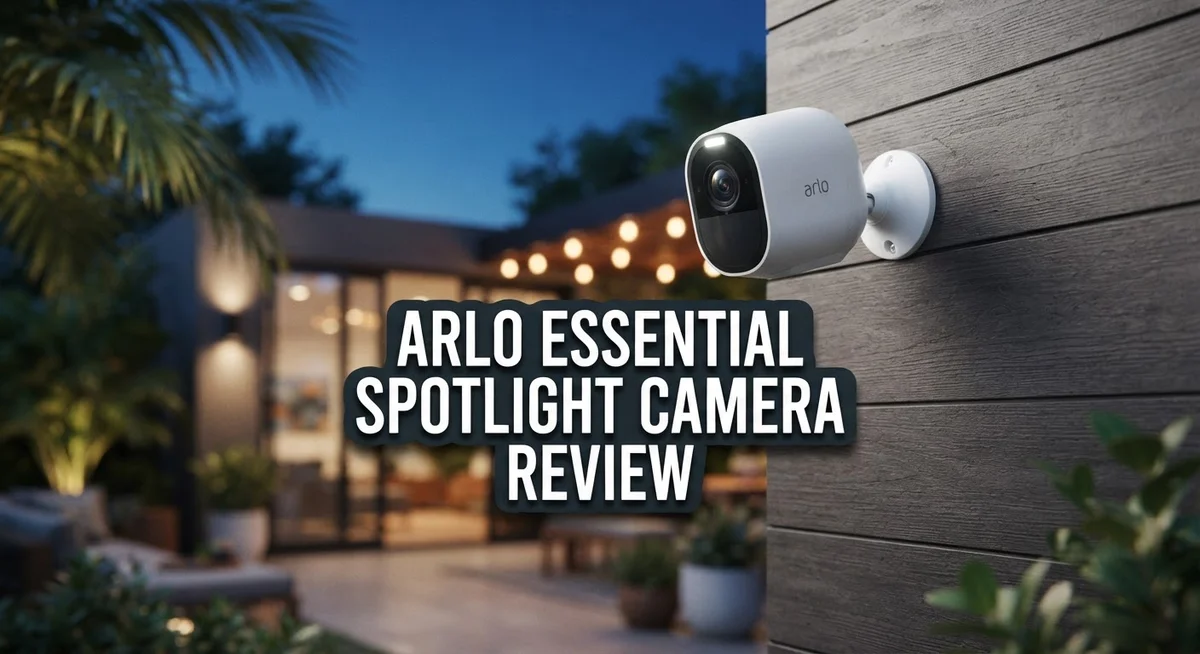
Arlo Essential Spotlight Camera Review 2026: Features, Performance & Reliability
Want a smart way to watch your home without wires or hassle? The Arlo Essential Spotlight Camera might be your answer. This little device packs a punch for anyone who wants peace of mind.
It records in 1080p HD, so you get clear footage day and night. A built in spotlight lights up dark areas and scares off unwanted visitors.
With a 130° viewing angle and 12x digital zoom, you miss nothing happening outside your door. The camera also detects motion from up to 300 feet away.
In a Nutshell
- Video Quality: You get sharp 1080p footage with wide 130° coverage. The 12x digital zoom helps you spot details from a distance.
- Smart Detection: Motion sensing works up to 300 ft. This range helps catch activity before it reaches your door.
- Light and Sound Alerts: The built in spotlight scares off unwanted guests at night. Two way audio lets you talk to visitors or warn intruders.
- Battery Performance: This camera runs up to six months on one charge. You spend less time worrying about power.
- Wireless Freedom: No hub is needed. You can place it almost anywhere without messy wiring.
- The Catch: Charging means removing the whole unit. Live feeds and alerts can lag at times. A subscription unlocks full features, and dry weather may mean extra lens cleaning.
Key Features and Specifications
The Arlo Essential Spotlight Camera packs several standout features that make it a solid choice for wireless home security. Let’s explore what makes this camera tick.
Video and Night Vision Performance shine as core strengths. The 1080p HD resolution delivers clear, sharp footage in both daylight and darkness. The 130° viewing angle captures a wide area around your entry points, so you see more of what matters. When you need to zoom in, the 12x digital zoom lets you examine details without losing image quality.
Motion detection operates at an impressive range of up to 300 feet. This means the camera catches activity far from your home before potential threats get close. The system responds quickly when movement triggers, sending alerts to your phone so you stay informed in real time.
The built-in spotlight sets this camera apart from basic models. When motion activates, the light turns on automatically, illuminating dark areas and deterring unwanted visitors. This active deterrence feature works especially well for nighttime security. Two-way audio lets you speak through the camera, adding another layer of communication with whoever approaches your property.
Battery life reaches up to six months per charge, which is impressive for a wireless camera. This extended performance means fewer trips outside to maintain your system. However, keep in mind that charging requires removing the entire camera from its mount—there’s no way to charge it in place.
Wireless operation is a major convenience factor. You don’t need a hub, complicated wiring, or professional installation. Mount it, connect to your WiFi, and you’re ready to monitor your home. This flexibility makes it ideal for renters or anyone who wants simple setup.
The camera does require a subscription to access cloud storage and certain features, so factor that into your ongoing commitment. Regular lens cleaning keeps performance sharp, especially in dry climates where dust accumulates quickly. Overall, this camera balances ease of use with solid security features for homeowners seeking wireless protection.

Last update on 2026-10-12 / Affiliate links / Images from Amazon Product Advertising API Some of the links on this website are affiliate links, which means that at no additional cost to you, I earn a commission if you click through and make a purchase. I only recommend products and services that I believe will add value to my readers. Thank you for your support!
Video Quality and Night Vision Performance
The Arlo Essential Spotlight Camera delivers clear 1080p footage that handles both daylight and evening conditions well. You get sharp details of visitors, packages, and activity around your property. The wide 130° viewing angle means you capture more of what matters without blind spots.
Night vision is where this camera shows real strength. The built-in spotlight automatically activates when motion triggers at night. This bright light does two things at once. First, it floods your camera’s view so you see color video instead of grainy black and white. Second, the sudden brightness acts as a powerful deterrent. Most intruders move on when a bright light suddenly turns on.
The spotlight works effectively up to around 300 feet for motion detection. You get alerts when movement happens, though some users report these alerts come slower than they’d like. The live feed can also take a moment to load when you check your phone.
Low light performance improves dramatically when the spotlight activates. Without it, the camera relies on infrared night vision, which produces adequate but standard quality footage. The spotlight makes the difference between seeing details and seeing shapes.
One practical note: dry, dusty conditions can affect lens clarity over time. You may need occasional cleaning to keep video sharp. This is a minor maintenance task but worth knowing about.
Battery life stays strong at up to six months per charge. This means fewer interruptions to your monitoring. However, when it’s time to recharge, you must remove the entire camera from its mount. You cannot charge it in place. Plan your charging schedule around this requirement.
The two-way audio lets you speak through the camera. Combined with the built-in siren, you have both communication and alarm options. These features add practical value to your security setup.
Overall, the video quality and night vision performance meet expectations for a wireless camera at this level. The spotlight feature genuinely improves nighttime visibility and acts as a real deterrent.
Battery Life and Charging Convenience
The Arlo Essential Spotlight Camera runs for up to six months on a single charge, which is genuinely impressive for a wireless security device. This extended battery life means you won’t constantly worry about power levels or frequent maintenance visits.
Charging requires full camera removal. Unlike some competitors, you cannot charge this camera while it stays mounted on your wall or ceiling. You must physically take the unit down, bring it inside, and connect it to a power adapter. This process takes a few extra minutes compared to cameras with built-in charging docks.
The charging time itself is reasonable. Once you remove the camera, it typically reaches a full charge within a few hours. The included USB power adapter works reliably, and the connection point is straightforward to locate on the camera’s base.
Battery performance stays consistent across seasons. The six month estimate holds up well in normal conditions. Users report that battery drain doesn’t spike dramatically during heavy motion detection periods, though constant spotlight activation in dark environments may reduce runtime slightly.
One practical consideration: you need to plan your charging schedule around your security needs. If your camera covers a critical entry point, you might want to charge it during times when you’re home or when activity is low. Some users set reminders to avoid forgetting about battery maintenance.
The removable battery design does offer a hidden advantage. If your battery eventually degrades, you can replace just the battery component rather than the entire camera unit. This approach saves money over the device’s lifetime.
Charging convenience depends on your setup. For homeowners with easy access to their camera locations, removal and charging feel simple. For those with cameras mounted high on second story walls or in difficult to reach spots, the process becomes more inconvenient.
Overall, the six month battery life balances well against the minor hassle of removal charging. Most users find this tradeoff acceptable, especially since they’re not tethered to a power outlet or constantly managing low battery warnings.
Top 3 Alternatives
Wyze Cam v3

Last update on 2026-09-19 / Affiliate links / Images from Amazon Product Advertising API Some of the links on this website are affiliate links, which means that at no additional cost to you, I earn a commission if you click through and make a purchase. I only recommend products and services that I believe will add value to my readers. Thank you for your support!
The Wyze Cam v3 offers clear night vision and works both indoors and outdoors. You get a 1080p video feed with color night vision. The camera connects to your Wi-Fi and sends alerts straight to your phone when motion happens.
Setup takes just minutes. The app lets you watch live video, talk through the speaker, and save clips. Battery life lasts several months before you need to recharge. This camera works with Alexa and Google Home for voice control.
Ring Stick Up Cam


Last update on 2026-09-19 / Affiliate links / Images from Amazon Product Advertising API Some of the links on this website are affiliate links, which means that at no additional cost to you, I earn a commission if you click through and make a purchase. I only recommend products and services that I believe will add value to my readers. Thank you for your support!
Ring’s Stick Up Cam brings professional monitoring to your home. It records in 1080p HD and sends instant notifications to your phone. The two-way talk feature lets you communicate with visitors from anywhere.
You can mount it on walls, shelves, or use it as a standalone option. The camera works with Alexa devices throughout your home. Night vision captures clear footage in the dark. You’ll need a Ring subscription to save video clips and access advanced features.
Reolink Argus 3 Pro

Last update on 2026-09-24 / Affiliate links / Images from Amazon Product Advertising API Some of the links on this website are affiliate links, which means that at no additional cost to you, I earn a commission if you click through and make a purchase. I only recommend products and services that I believe will add value to my readers. Thank you for your support!
The Reolink Argus 3 Pro combines wireless convenience with smart features. It records in 2K resolution, giving you sharper images than standard 1080p cameras. The camera runs on batteries or solar power for long-term outdoor use.
The spotlight turns on automatically when motion occurs, lighting up your property. Two-way audio lets you speak with people near your home. Local storage options mean your videos stay private without cloud subscriptions. The camera works with Alexa and Google Assistant for hands-free control.
Setup, Installation, and App Experience
Setting up the Arlo Essential Spotlight Camera is straightforward. The wireless design means you skip the hub installation step entirely. Most users get the camera mounted and running within 10 to 15 minutes.
The physical installation process involves choosing your mount location, attaching the bracket, and securing the camera. Arlo provides multiple mounting options including wall brackets and magnetic mounts. You’ll want to pick a spot with a clear view of your target area and good WiFi signal strength.
Connecting to WiFi happens through the Arlo app. You scan a QR code on the camera or its box, select your network, and enter your password. The app guides you through each step with clear prompts. Connection usually completes within a minute or two.
The mobile app experience is where things get interesting. The interface feels clean and organized. You can view live footage, adjust settings, and review recordings all from one place. Two-way audio works smoothly, letting you communicate through the camera without lag or echo issues.
However, some users report slow alert notifications. Motion detection triggers the app to send you an alert, but the delay can range from a few seconds to nearly a minute depending on your network. Live feed access also takes a few seconds to load sometimes rather than displaying instantly.
The app lets you customize motion detection zones, adjust spotlight sensitivity, and set activity schedules. You can arm or disarm the camera remotely, which adds flexibility for different situations. Push notifications keep you informed of motion events throughout the day.
One practical tip: position your camera away from direct sunlight and reflective surfaces during setup. These can interfere with motion detection accuracy. Also ensure your WiFi router sits reasonably close to your camera location for stable connectivity.
The subscription requirement unlocks cloud storage and certain recording features. Without it, you’re limited in how you access and store footage. Factor this into your planning before installation completes.
Motion Detection and Alert Response
The motion detection system on the Arlo Essential Spotlight Camera operates with impressive range. Your camera can detect movement up to 300 feet away, which covers most residential properties effectively.
The spotlight plays a crucial role in how the camera responds to motion. When movement triggers detection, the spotlight automatically illuminates the area. This dual response (detection plus light) creates a strong deterrent effect. Intruders see the light and often leave the property immediately.
Alert notifications are an important part of the experience. Some users report that alerts arrive slower than expected. You may notice a delay between when motion occurs and when your phone receives the notification. This lag matters if you want real-time awareness of activity around your home.
The app gives you control over motion sensitivity. You can adjust how easily the camera triggers alerts. You also get the option to create motion detection zones. This means you only receive alerts from specific areas of your camera’s view. Excluding zones (like a busy street) reduces false alarms significantly.
Customizing your alert preferences improves the camera’s usefulness. The app lets you set activity schedules. You can disable alerts during certain hours or days. This feature prevents notification fatigue when you’re home or sleeping.
The two-way audio adds another layer to your response capability. When motion triggers an alert, you can speak through the camera immediately. You can warn someone away or communicate with a delivery person without opening your door.
One consideration: the built-in siren activates when you trigger it manually through the app. The siren adds noise to your deterrent strategy. Combined with the spotlight, it creates a more convincing security presence.
The motion detection system works reliably in most conditions. Performance remains consistent during day and night operation. The camera adjusts its sensitivity based on lighting conditions automatically. This means fewer false triggers from shadows or weather changes.
Overall, the motion detection and alert response system delivers solid functionality for a wireless camera. The spotlight feature stands out as genuinely effective for low-light deterrence.
Pros and Cons
Pros
- 1080p video quality with clear audio makes monitoring your home straightforward and reliable
- 130 degree viewing angle captures most entry points without blind spots
- Spotlight feature deters intruders effectively in low light conditions
- Six month battery life means less frequent maintenance and charging interruptions
- Wireless setup requires no hub, making installation simple for any homeowner
Cons
- You must remove the camera from its mount to charge the battery, which is inconvenient for frequent charging cycles
- Alert notifications arrive slower than competing systems, delaying your response time
- Subscription is required to access cloud storage and advanced features
- Lens cleaning becomes necessary in dry conditions to maintain video clarity
- Some users report reliability issues and inconsistent performance over time
Who Should Buy It
The Arlo Essential Spotlight Camera works best for homeowners who want straightforward home security without complexity. You’ll love this camera if you prefer wireless installation and don’t want to deal with hub setups or professional mounting services.
This camera suits renters and temporary installations perfectly. Since it requires no permanent wiring, you can mount it today and remove it tomorrow without leaving holes or damage. The battery powered design gives you complete flexibility.
You should consider this camera if you have moderate security needs around entry points like doors, patios, or driveways. The 130 degree viewing angle covers most common areas where intruders approach. The spotlight feature makes it especially useful for properties with poor outdoor lighting.
This camera works well for people who value simplicity over advanced features. The setup process takes minutes, and the mobile app controls are intuitive. You don’t need technical skills to get started.
However, skip this camera if you need constant monitoring without delays. The slow alert notifications frustrate users who want instant updates. If rapid response times matter to you, look elsewhere.
You should also reconsider this option if charging convenience is important. Removing the entire camera from its mount to charge the battery feels tedious for many users. If you prefer cameras that charge in place, other options exist.
This camera isn’t ideal if you demand 4K video quality or professional grade footage. The 1080p recording serves basic identification purposes but won’t capture fine details like license plates from distance.
Skip this camera if you want zero subscription requirements. Arlo requires a subscription to access recordings and most features. If monthly subscriptions bother you, budget alternatives exist.
The Arlo Essential Spotlight Camera fits perfectly for budget conscious homeowners seeking reliable basics. You get solid video quality, good battery life, and effective low light deterrence. It handles standard home security tasks without unnecessary complications.
Choose this camera when you value ease of use and straightforward installation over cutting edge technology. It delivers practical security for typical homeowners managing their own systems.
Final Verdict
The Arlo Essential Spotlight Camera delivers solid home security performance. It balances clear video, smart motion detection, and a useful spotlight feature.
This camera fits well into a smart home setup. It connects easily with other Arlo products and popular voice assistants. That makes it a good addition if you already use smart devices at home.
Reliability remains a mixed point for some users. A few owners report occasional connectivity drops or missed alerts over time. This is worth noting before you commit to daily reliance on the camera.
The subscription requirement is another factor to weigh. Many core features, like cloud storage and advanced alerts, depend on a paid plan. Without it, the camera’s functionality becomes limited.
When compared to competitors like the Reolink Argus 3 Pro or Lorex, the Arlo falls slightly behind in video resolution. Those alternatives offer 2K clarity, while the Arlo sticks to 1080p. However, the Arlo still holds its own with audio quality and ease of use.
If you want a no fuss security camera for everyday monitoring, this model works well. It suits people who prioritize simple installation and dependable coverage over cutting edge specs.
For those wanting a complete ecosystem experience, Ring might serve better due to its wider range of compatible devices. Meanwhile, Wyze remains a strong pick for anyone who wants similar features with different pricing tiers.
In short, the Arlo Essential Spotlight Camera makes sense for everyday home security needs. It handles common monitoring tasks without complications.
If you need flawless alert speed or 4K resolution, you might want to explore other brands. But for most homeowners, this camera still offers a reliable way to keep an eye on your property with minimal effort.
Frequently Asked Questions
Does the Arlo Essential Spotlight Camera need a hub to work?
No, this camera operates wirelessly without a hub. You connect it directly to your WiFi network and control it through the Arlo app. This makes setup quick and simple for most homeowners.
How long does the battery actually last?
The battery provides around six months of use on a single charge. Your actual runtime depends on motion events and how often you access live feeds. Frequent use will drain the battery faster than occasional monitoring.
Can I use this camera if I rent my home?
Yes, this camera works great for renters. Since it requires no permanent installation or wiring, you can mount it temporarily and remove it when you move. The wireless design gives you complete flexibility.
What happens when the camera detects motion at night?
The built-in spotlight automatically turns on and illuminates the area. This bright light deters intruders effectively and helps you see exactly what triggered the alert. Two-way audio lets you communicate through the camera as well.
Is a subscription required to use this camera?
Yes, Arlo requires a subscription to store video clips and access advanced features. Without a subscription, you’ll get motion alerts but limited playback options. Check Arlo’s current plans to find what works for your needs.

Hello everyone my name is Alenya and i am a gadget discovering Enthusiast 🐻🐻