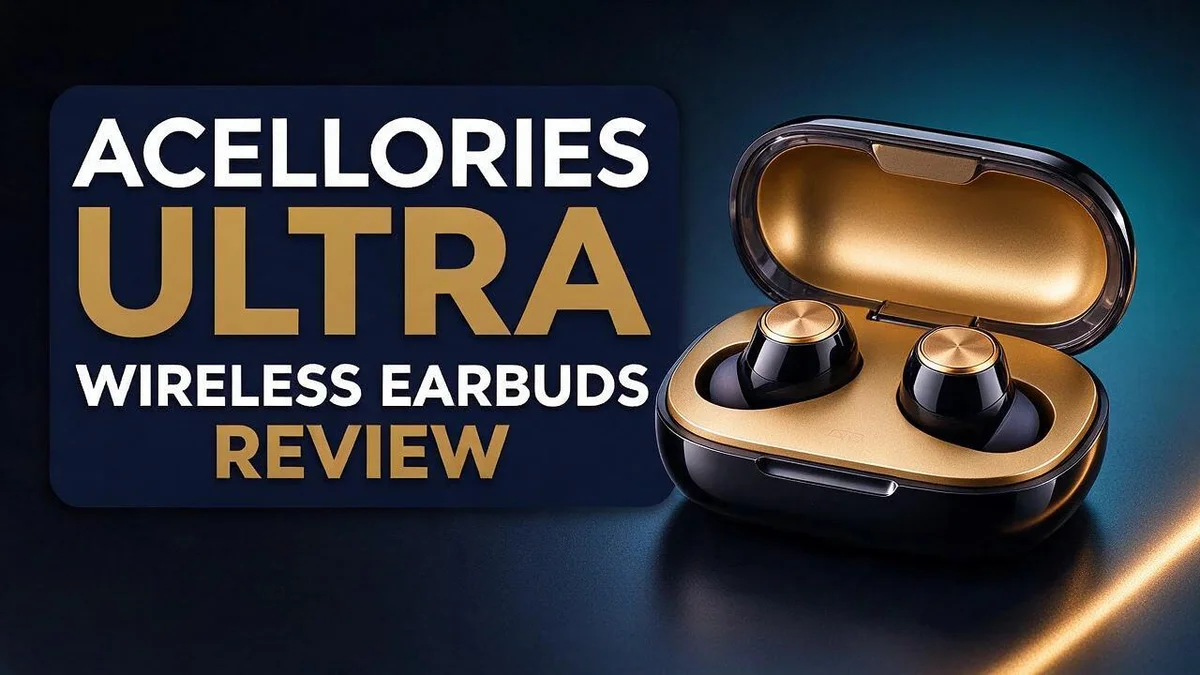
Acellories Ultra Wireless Earbuds Review 2026: Worth Buying?
Are you looking for a fresh pair of wireless earbuds? Acellories Ultra is getting a lot of attention online. Many people want to know if the sound lives up to the buzz.
This review takes a friendly look at what the earbuds offer. We cover the features people talk about most, like touchscreen controls, Bluetooth pairing, and voice assistant support. We also share what early listeners say about the sound.
Some listeners call the sound supreme, while others describe it as insane. These reactions come from video titles, so we treat them as early impressions. Some details, such as exact specs, still need confirmation. We also look at how the portable case fits into daily life.
In a Nutshell
- Voice assistant support: Sources point to Siri and Google Assistant support. You can ask your phone for help without touching the device. This makes everyday tasks feel quicker and more hands free.
- Bluetooth pairing: The earbuds connect wirelessly through Bluetooth. Pairing is listed as a core feature, so you can link them to your phone or other devices with ease.
- Portable case: A portable case comes with the earbuds. It helps you carry them in a bag or pocket, which is handy for commutes, gym visits, and travel.
- A name to watch: One related listing from December 2024 uses the name Soundspin. It is not confirmed as the same product, so check the seller details before you decide.
- Missing details: Our research did not find verified specs, a safety rating, or documented drawbacks. Check the official product page for the latest information.
- Alternatives to compare: Bose QuietComfort Ultra Earbuds, Soundcore Liberty 4, and EA Wireless Earbuds often come up in the same conversations. Comparing features side by side can help you choose the right fit.
Key Features

Last update on 2026-11-06 / Affiliate links / Images from Amazon Product Advertising API Some of the links on this website are affiliate links, which means that at no additional cost to you, I earn a commission if you click through and make a purchase. I only recommend products and services that I believe will add value to my readers. Thank you for your support!
Think about how you plan to use your earbuds each day. Most people wear them on commutes, at the gym, or during video calls. Ask yourself which moments matter most to you.
Fit is a feature too. Ear tips and shape decide whether earbuds stay put during a workout. Try them in your ears for several minutes before you decide.
Comfort during long listening sessions counts just as much. Wear the earbuds for an hour and notice any pressure or soreness. If your ears feel tired, the earbuds may not suit you.
Your sound preference is personal. Play songs you know well and listen for bass, vocals, and clarity. Your own ears matter more than any opinion online.
Background noise changes how you judge sound. Try the earbuds in a quiet room, then in a busy hallway. Notice whether voices stay easy to follow.
Call quality deserves a closer look. Record a short voice memo, then play it back. Check whether your voice sounds clear and natural.
Some people switch between a laptop and a phone during the day. Ask whether the earbuds can move between devices without hassle. Smooth switching makes daily life easier.
Charging habits also shape daily use. A case that recharges the earbuds keeps you listening longer. Drop them back in the case after each session so they stay ready.
Compatibility is worth checking early. Confirm that your phone supports the voice assistant you use most. Good compatibility saves time and frustration later.
Here is a simple checklist before you buy. Check how the earbuds fit your ears. Test call clarity with a voice memo. Review the charging habits you need. Read the return policy so you can act if something feels wrong.
Good features mean little without a good match for your routine. Keep your own habits at the center of your choice.
Sound Quality
Sound quality often shapes how much you enjoy a pair of earbuds. You hear it every time you play a song, watch a video, or join a call.
Start with music you already know well. Pick one track with deep bass, one vocal track, and one song with busy drums. Each one reveals a different side of the earbuds.
Listen for clear vocals first. Voices should sound natural and easy to follow, even when the music gets loud. Thin or muffled vocals can make talk shows and audiobooks tiring.
Next, check the bass. Strong bass feels fun, but too much can drown out other sounds. Look for low notes that feel tight and controlled rather than boomy.
Treble is the top end of the sound. Cymbals and high hats should sound crisp without feeling sharp. Harsh highs can cause listening fatigue after an hour or two.
Volume matters too. Many earbuds sound best at moderate levels, so avoid testing only at maximum. Listen at a normal level for ten minutes, then decide how it feels.
Spec sheets can help later, but your ears give the clearest answer first. Play a talk show and notice whether voices stay clear during quiet pauses. Clean speech often tells you more than a loud music track.
Finally, compare with alternatives you already know. Play the same song on the Bose QuietComfort Ultra Earbuds or Soundcore Liberty 4 if you can access them. Note which one feels more natural to you.
Trust your ears most. Sound quality is personal, and the right pick is the one that makes your favorite songs feel alive.
Design and Portability
Good design makes earbuds feel like a natural part of your day. Easy carrying matters just as much as sound.
The portable case is the first design detail to check. Sources mention that the Acellories Ultra comes with one. A solid case keeps the buds protected in a bag or coat pocket.
Look closely at the lid. A firm, snug closure keeps the buds in place. A loose lid can pop open in a crowded backpack.
Case size also counts. A slim case slides into a jeans pocket with ease. A bulky case may feel awkward on a short walk.
Our research did not verify exact measurements. If you can, hold the case in your hand before you commit. Check how it feels in your palm.
Carrying weight matters too. Light buds and a light case feel easy on a busy commute. Heavy gear can weigh down a bag after a long day.
Touch controls are part of the design as well. Try a few taps and see if they respond the way your fingers expect.
Think about where you use them most. Gym sessions bring sweat, and rainy walks bring moisture. Your daily routine will test the design more than any product photo.
Our sources list no water or sweat rating. Until you confirm one, keep the buds dry and wipe them after workouts. This simple habit helps them last longer.
Packing tip: store the case in a small zipped pouch. This keeps the lid closed and the case clean in your bag.
Here is a quick design checklist. Check the case size, lid closure, carrying weight, control placement, and moisture protection. Each point affects how often you reach for your earbuds.
Design should fit your routine. Pick the setup you will carry every day, not just the one that looks sharp in photos.
Top 3 Alternatives
Soundcore Liberty 4

Last update on 2026-09-19 / Affiliate links / Images from Amazon Product Advertising API Some of the links on this website are affiliate links, which means that at no additional cost to you, I earn a commission if you click through and make a purchase. I only recommend products and services that I believe will add value to my readers. Thank you for your support!
If you want a strong everyday pick, the Soundcore Liberty 4 works well. It offers clear sound with deep bass. Active noise cancelling helps your commute feel calmer.
Battery life is a highlight. You can enjoy long listening sessions before needing a charge. Setup takes only seconds.
The fit stays secure during workouts and gym visits. The companion app lets you adjust the sound to your taste.
Sony WF-1000XM5


Last update on 2026-06-09 / Affiliate links / Images from Amazon Product Advertising API Some of the links on this website are affiliate links, which means that at no additional cost to you, I earn a commission if you click through and make a purchase. I only recommend products and services that I believe will add value to my readers. Thank you for your support!
The Sony WF-1000XM5 suits people who want top noise cancelling. These earbuds block background sound very well. They feel small and light for long days.
Sound quality is detailed and balanced. Vocals stand out clearly in most tracks. Call quality is also solid for remote work.
Many travelers pick these earbuds for flights and busy train rides. Expect premium performance with a sleek design. Multipoint connection lets you switch between two devices easily.
Apple AirPods Pro

Last update on 2026-09-19 / Affiliate links / Images from Amazon Product Advertising API Some of the links on this website are affiliate links, which means that at no additional cost to you, I earn a commission if you click through and make a purchase. I only recommend products and services that I believe will add value to my readers. Thank you for your support!
The Apple AirPods Pro fit best if you use an iPhone, iPad, or Mac. They pair with one tap and connect smoothly across your gear. Setup feels simple.
Spatial audio makes movies and music feel immersive. Adaptive transparency keeps outside sounds natural when you need awareness.
The charging case offers extra charges on the go. Many people also like the easy controls. If you live in the Apple ecosystem, these earbuds feel like a natural fit.
Connectivity and Controls
Connectivity decides how well your earbuds fit into your day. Bluetooth pairing is the main link between the buds and your devices. Pairing should feel simple, so test it early.
Our research lists touchscreen controls on the Acellories pair. Touch controls let you manage playback without reaching for your phone. Still, we could not confirm which gestures trigger which actions. Check the manual or setup guide before you buy.
Voice assistant support is another point to check. Sources mention Siri and Google Assistant. However, those mentions come from a related listing, so the link to this exact model is not confirmed. If you rely on voice commands, ask the seller for written proof.
Think about your phone brand first. iPhone users often want Siri, while Android users often rely on Google Assistant. Make sure the buds support the assistant you use most.
Multipoint support is worth asking about. It lets the buds stay linked to two devices at once. Our sources do not confirm this for the Acellories pair, so test it yourself.
Controls need clear feedback. You should know when a tap registers. Quick response matters during calls, podcasts, and workouts. Practice a few taps in a quiet room so you learn the rhythm.
The portable case also plays a role in connection. Many users open the case and expect the buds to connect right away. Ask whether the case helps reset pairing if something goes wrong. Keep the manual nearby.
Our sources do not list connection range or latency numbers. So treat any claim about lag with care. Test a video or game in your normal setting. Your own results tell you more than a sales page.
Before you buy, run through four quick questions. Does pairing feel easy? Do the controls respond well? Does your voice assistant work? Can the buds handle the devices you use each day?
Price and Value
Worth comes from daily use, not from the box. Earbuds feel useful when they fit your routine every day. Think about your commute, your workouts, and your phone calls.
Our research did not find verified specs, so start with the facts you can check yourself. Look for the battery life, the charging time, and the warranty length. Read the return policy too. A clear return window gives you time to test the fit in your own ears.
Check the seller before you buy. Trusted sellers publish clear policies and honest product pages. Read recent reviews from people who use earbuds the way you do. Look for comments about battery drain, dropped connections, and comfort after an hour of wear.
Our sources name three competitors: the Bose QuietComfort Ultra Earbuds, the Soundcore Liberty 4, and the EA Wireless Earbuds. The sources do not confirm them as direct rivals. Still, they make useful reference points. Compare the features you need, such as noise control, battery life, or an LED display.
Set your must have features first. Write down three things the earbuds must do well. You might need clear call quality, a small case, or quick pairing. Any pair that misses those points is not the right pick, even if it offers extras.
Extra features can add appeal, but they should not drive the decision alone. A long feature list means little if you never use it. Keep your attention on the basics you rely on each day.
Watch for claims that sound too big. Our sources mention “supreme” and “insane” sound, but those phrases come from video titles, not from lab tests. Treat that praise as a starting point. Confirm it with your own listening session. The same goes for the fast delivery claim in one listing. Check shipping times at checkout before you commit.
Plan your next steps. Note your must have features, confirm the return policy, and read three recent reviews. Then make your choice with confidence. You will likely feel more sure about your pick, and that confidence is the real reward.
Pros and Cons
Pros
- Bluetooth pairing keeps the setup quick and simple.
- Siri and Google Assistant support may suit both iPhone and Android users.
- Early viewers describe the sound as strong.
- The feature list looks practical for everyday listening.
Cons
- Battery life figures are not verified yet.
- No safety rating turned up in our research.
- No documented complaints exist, so long-term durability stays unknown.
- The Soundspin listing may not match this exact model.
Who Should Buy It
These earbuds suit people who want a simple listening routine. They fit daily listeners who play music, podcasts, and calls on the go.
Commuters may find them useful on buses and trains. Short listening sessions feel easy when you can reach the controls without fuss.
Students who switch between lectures and video calls may appreciate one pair for both.
Gym goers should check how well earbuds stay put during workouts. Our research did not confirm fit or sweat resistance, so test the fit yourself first.
Frequent travelers often want earbuds for flights, hotel rooms, and busy airports. Long trips also test comfort, so wear them for a while before you decide.
Casual listeners who mostly stream music on a walk may enjoy the simple setup most.
Buyers who need hard numbers should wait for more test results before they commit.
Shoppers who want a long track record may compare the rivals named in our sources first.
Parents who need a pair for active kids should check durability reports first.
Remote workers may use these for video meetings and long focus blocks. Comfort matters most during long calls, so check how they feel after a long session.
Anyone who wants a quiet commute with noise control should look elsewhere. Our sources list no noise cancelling details, so verify this before buying.
Creators who record voice notes should test the microphone themselves, since our research did not cover it.
Fans of premium sound should wait for verified listening reviews.
In short, everyday listeners who want simple controls will likely find these earbuds practical. Test them in your own routine before you commit, and check the seller policy too. Your daily habits matter more than any single claim, so trust your own experience. Start small, use them often, and note what feels right.
Final Verdict
Our final verdict is simple. The Acellories Ultra Wireless Earbuds show promise, but the proof is still missing. Think of this model as a strong lead rather than a sure winner.
Use this review as a starting point. Let it shape your search, then test the earbuds with your own ears and habits.
Start with a short listening test at home. Play a song you know well and listen for clear vocals, deep bass, and steady volume.
Ask about the return window. A clear return period lets you try the earbuds in real life. Read the terms before you place an order.
Test call quality in a noisy place. Make a short call on a busy street and ask the other person how clear your voice sounds. This check shows whether the microphones handle wind and traffic noise.
Check the fit after a brisk walk. Shake your head, climb stairs, and move around for ten minutes. Loose earbuds will annoy you quickly, so this step matters a lot.
Look for fresh reviews from people who own the earbuds. Pay attention to comments about comfort after an hour and how the case feels in a pocket.
Keep a simple checklist. Note how the earbuds pair, connect, and hold a signal across a room. Small details often reveal more than big marketing claims.
Plan your purchase around your schedule. If you travel next month, decide before you leave. A calm decision beats a rushed one every time.
Set a clear deadline for yourself. Decide how long you will wait for more test results. Then make your choice based on facts you collected, not on hype.
Revisit this verdict once independent tests appear. Verified battery figures, a safety rating, and real use reports would change the picture quickly. Update your choice when new facts arrive.
Bottom line: the earbuds deserve a closer look. Buy only after you confirm the details that matter most to you.
Frequently Asked Questions
Do these earbuds need a companion app?
Our research does not confirm any app requirement. Read the setup steps on the packaging before you pair the earbuds. If the steps feel unclear, watch a short video from an owner to see the process in action.
Can I use them with a laptop?
Many Bluetooth earbuds work with laptops and tablets. Our sources do not confirm this model’s device list. Open your sound settings after pairing to check that the earbuds appear as an output option. Restart the device if they do not show up.
How should I clean the earbuds?
Wipe the ear tips and case with a dry, soft cloth. Avoid soaking them in water. Our sources include no cleaning guidance, so follow the maker’s instructions once you have them. Let the case air dry before you close the lid.
What should I check on delivery day?
Count every included part before you start. Make sure the case closes firmly. Keep your receipt and packaging for a few days. Test the fit and sound while the return window is still open.
Are these earbuds suitable for kids?
Our research does not cover age guidance or safe volume limits. Adults should guide younger listeners and keep the volume at a comfortable level. Take breaks during long listening sessions. Look for clear age notes from the maker before you decide.

Hello everyone my name is Alenya and i am a gadget discovering Enthusiast 🐻🐻