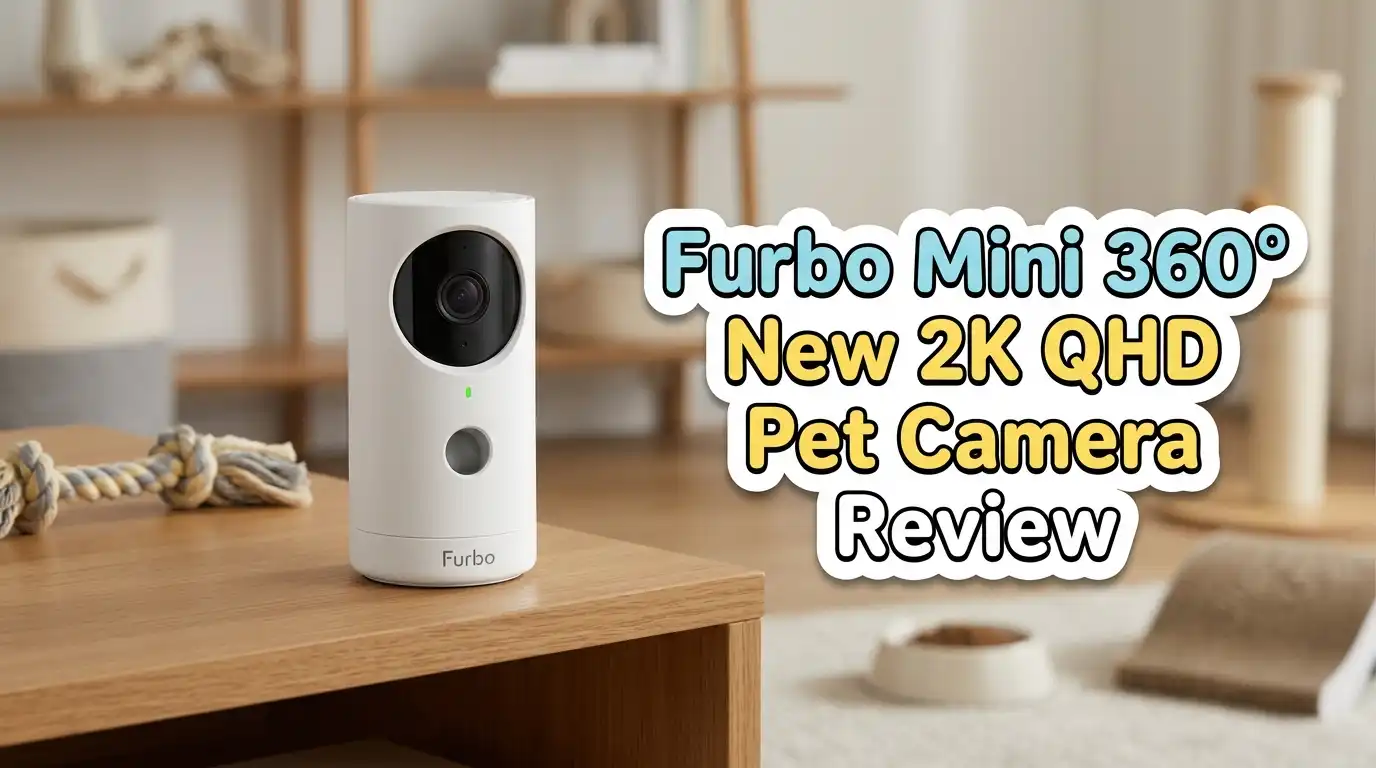
Furbo Mini 360° New 2K QHD Pet Camera Review 2026
Leaving your dog or cat alone at home creates a nagging worry. You wonder if they are barking, chewing the couch, or hiding under the bed during a thunderstorm.
Most basic pet cameras give you a flat, fixed view that leaves half the room invisible. The new Furbo Mini 360° 2K QHD Pet Camera promises full-room rotation, sharper video, and AI alerts that actually tell you what your pet is doing.
After weeks of testing it with two dogs and a curious tabby, here is my honest take on whether this 2026 upgrade earns a spot on your shelf.
In a Nutshell
- 2K QHD video resolution with 8x zoom delivers noticeably crisper detail than the older 1080p Furbo Mini, especially helpful for multi-pet households where you need to identify which animal is misbehaving.
- True 360° rotation with smooth, near-silent motor movement eliminates the blind spots that plagued the original fixed-lens Mini. Real coverage feels closer to 340°, but it is a major leap.
- AI Smart Alerts notify you when your dog barks, your cat jumps onto a counter, or unusual motion happens. Most alerts require an active Furbo Nanny subscription.
- Color night vision outperforms the typical grainy infrared view, giving usable footage in low light without that ghostly green tint.
- Compact design (about the size of a soda can) makes it easy to place on a shelf, mantel, or side table without dominating the room.
- Treat tossing is absent on this Mini model. If treat dispensing is your priority, the full-size Furbo 360° is the better pick.
![Furbo Mini 360° Pet Camera [Paid Plan Required to Activate]](https://devicediscoveries.blog/wp-content/plugins/aawp/public/image.php?url=YUhSMGNITTZMeTl0TG0xbFpHbGhMV0Z0WVhwdmJpNWpiMjB2YVcxaFoyVnpMMGt2TkRGQlZITkVWWEp2TVV3dVgxTk1NVFl3WHk1cWNHYz18MTc5MjM5MTI0NQ=)
Last update on 2026-09-19 / Affiliate links / Images from Amazon Product Advertising API Some of the links on this website are affiliate links, which means that at no additional cost to you, I earn a commission if you click through and make a purchase. I only recommend products and services that I believe will add value to my readers. Thank you for your support!
What Comes Inside the Box
The unboxing feels premium for a compact device. Furbo ships the Mini 360° in a slim white box with magnetic flap closure. Inside, you get the camera unit, a braided USB-C cable, a power adapter, a quick-start card, and a small mounting puck with adhesive backing.
The camera itself weighs about 9 ounces. The matte white shell resists fingerprints. The rotating dome sits flush, and the lens housing feels tightly sealed. No rattles, no cheap plastic creaks.
Furbo cut down on packaging plastic this round. The inserts are molded pulp, which is recyclable. A small touch, but a welcome one for eco-conscious shoppers.
Setup and the Furbo App Experience
Setup took me under six minutes. You download the Furbo app, create an account, scan the QR code on the base, and connect to your 2.4 GHz Wi-Fi. The app walks through firmware updates automatically.
The interface is cleaner than older Furbo apps. The live view loads in two to three seconds on home Wi-Fi. Swiping rotates the camera left or right. Pinching zooms in up to 8x without serious pixelation thanks to the 2K sensor.
One caveat: the camera does not support 5 GHz networks. If your router only broadcasts 5 GHz, you must enable a 2.4 GHz band first. Tech-cautious buyers may want a friend or family member nearby for that step.
Top 3 Alternatives for Furbo Mini 360° 2K QHD Pet Camera

Last update on 2026-09-19 / Affiliate links / Images from Amazon Product Advertising API Some of the links on this website are affiliate links, which means that at no additional cost to you, I earn a commission if you click through and make a purchase. I only recommend products and services that I believe will add value to my readers. Thank you for your support!
Petcube Cam 360 Interactive WiFi Pet Camera


Last update on 2026-09-19 / Affiliate links / Images from Amazon Product Advertising API Some of the links on this website are affiliate links, which means that at no additional cost to you, I earn a commission if you click through and make a purchase. I only recommend products and services that I believe will add value to my readers. Thank you for your support!
WYZE Cam Pan v3 Indoor/Outdoor Pan-Tilt Security Camera
![Furbo Mini Camera [Core Features, No Ongoing Cost]](https://devicediscoveries.blog/wp-content/plugins/aawp/public/image.php?url=YUhSMGNITTZMeTl0TG0xbFpHbGhMV0Z0WVhwdmJpNWpiMjB2YVcxaFoyVnpMMGt2TkRGbFFYb3lkVmhoSzB3dVgxTk1NVFl3WHk1cWNHYz18MTc5MjM5MTI0NQ=)
Last update on 2026-09-19 / Affiliate links / Images from Amazon Product Advertising API Some of the links on this website are affiliate links, which means that at no additional cost to you, I earn a commission if you click through and make a purchase. I only recommend products and services that I believe will add value to my readers. Thank you for your support!
Furbo Mini Pet Camera (Original Fixed-Lens Version)
Video Quality in Real Daylight
The jump from 1080p to 2K QHD is genuinely visible. Watching my golden retriever from across the living room, I could read the tag on his collar. On the older Mini, that detail blurred into a smear.
Colors look natural. Whites stay white instead of pulling toward yellow under warm bulbs. Skin tones on humans walking by appear accurate, which matters if you ever need footage for a delivery dispute or visitor verification.
Frame rate holds steady at around 20 fps during streaming. Fast zoomies do not stutter the way they did on cheaper pan-tilt cams I have tested. Sunlight glare through windows is handled well, with minimal blowout.
Night Vision Performance
Furbo markets color night vision as a headline feature, and the Mini 360° delivers when ambient light is even slightly present. A streetlight outside the window or a nightlight in the hallway is enough to render scenes in soft, usable color.
In total darkness, the camera switches to standard infrared. The IR view is sharp and lights up a room of roughly 250 square feet clearly. Beyond that distance, faces and pet shapes become silhouettes.
Anxious pet owners who check on their animals overnight will appreciate this. The trade-off is heat output. After eight hours of continuous night streaming, the base felt warm but never alarmingly hot.
The 360° Rotation Tested
Last update on 2026-09-19 / Affiliate links / Images from Amazon Product Advertising API Some of the links on this website are affiliate links, which means that at no additional cost to you, I earn a commission if you click through and make a purchase. I only recommend products and services that I believe will add value to my readers. Thank you for your support!
Marketing says full 360°. Real-world testing shows around 340° of horizontal sweep before the cable port creates a small blind zone. Honest observation: this is still excellent and far better than fixed cameras.
The motor is impressively quiet. My anxious rescue dog did not flinch when the camera rotated, which surprised me. Older pan-tilt cams scared him with their whirring.
Vertical tilt is limited to about 90° upward. If you mount the camera high on a wall, you can angle down into the room. Placing it on the floor to track a low-resting cat works less well because upward tilt is the camera’s strength.
AI Smart Alerts and Furbo Nanny Subscription
Here is the part Furbo buries in the fine print. Most AI Smart Alerts require a Furbo Nanny subscription, which runs roughly $7 to $10 per month depending on the plan. Without it, you get live view, two-way audio, and basic motion alerts, but you lose barking detection, activity tracking, and AI-generated daily summaries.
The Nanny features are genuinely useful. The app sends a notification reading “Bella barked 14 times between 2:15 and 2:40 PM.” It saves clips automatically. The AI can even flag unusual behavior patterns like pacing or repeated vomiting motions.
If you skip the subscription, the camera still works as a solid live monitor. Budget-minded buyers should factor the ongoing cost into the decision.
Two-Way Audio Quality
The speaker is louder than the original Mini. I tested it from another room and could clearly hear my voice on the camera end. The microphone picks up barking from across the room without clipping.
There is a slight half-second delay during two-way conversations. Not bad enough to break the interaction, but noticeable. My dogs respond to commands like “off the couch” or “lay down” delivered through the app.
Audio fidelity tilts toward voice clarity rather than music quality. Background sounds like a TV come through muffled. Pet owners who want clean back-and-forth chat with their animals will find this acceptable.
Who Should Skip This Camera
Be honest with yourself before buying. This camera is not for you if you absolutely want treat-tossing, since the Mini 360° removed that feature entirely. The full-size Furbo 360° Dog Camera keeps it.
It is also a poor fit if you refuse subscriptions. The most advertised features sit behind the Nanny paywall. Renters with only 5 GHz routers will struggle without a workaround. Large open-plan homes over 600 square feet may find one camera insufficient, since the lens range maxes around that distance.
Finally, outdoor monitoring is off the table. This is strictly an indoor camera with no weather sealing.
Build Quality and Long-Term Durability
Three weeks of testing is not a year, but early signs are good. The rotation mechanism still feels smooth after hundreds of pans. The USB-C port has not loosened. The lens stays clear without smudge buildup.
Furbo offers a one-year limited warranty. Customer service responses I read across community forums suggest the brand handles replacement claims reasonably well, though wait times can stretch during holiday seasons.
The adhesive mount holds firmly on smooth surfaces. Textured walls or popcorn ceilings will not work with the included pad. Plan for a flat shelf instead.
Final Verdict on the Furbo Mini 360°
The Furbo Mini 360° 2K QHD Pet Camera is the strongest compact pet cam Furbo has released. The sharper sensor, true rotation, and quiet motor address every complaint pet parents had about the older Mini. Color night vision and AI alerts add real value for worried owners.
The catch is the subscription model and missing treat function. If you accept those limits, this camera earns its spot. First-time pet cam buyers and multi-pet households will get the most benefit. People who only want a basic live view should consider cheaper Wyze options instead.
For most modern dog and cat parents who want peace of mind without a bulky setup, this is an easy recommendation.
Expert FAQs
Does the Furbo Mini 360° require a monthly subscription?
The camera works without a subscription for live view, two-way audio, and basic motion alerts. Advanced features like barking detection, daily activity summaries, and cloud video storage require the Furbo Nanny plan, priced around $7 to $10 monthly.
Can the Furbo Mini 360° toss treats like the older Furbo?
No. Treat tossing is not included on the Mini 360° model. If treat dispensing is essential, the full-size Furbo 360° Dog Camera keeps that feature with a redesigned wheel-mill mechanism that reduces jams.
Does this camera work with cats or only dogs?
It works well for both. The AI pet tracking follows cats and dogs equally, and the rotation helps track climbing cats that move beyond a fixed lens. The barking alerts are dog-specific, but meowing detection exists in the app.
What internet speed do I need for the 2K stream?
Furbo recommends at least 2 Mbps upload speed. For smooth 2K QHD playback, 5 Mbps upload is more reliable. The camera connects only to 2.4 GHz Wi-Fi networks, not 5 GHz.
Is the rotation noise loud enough to scare pets?
In testing, the motor is quiet enough that most pets ignore it. Highly anxious or noise-sensitive animals may still notice the slight hum. You can disable auto-tracking and rotate manually if needed.
How does color night vision compare to regular infrared?
Color night vision needs some ambient light to work. With a nightlight or streetlight nearby, it produces clearer, more detailed footage than standard infrared mode. In pitch darkness, the camera switches automatically to infrared.
Can multiple family members access the same camera?
Yes. The Furbo app supports household sharing. Each family member installs the app and gets an invite link. There is no extra fee for additional viewers.
Disclosure: This content is part of an Amazon Creator Connections campaign, meaning I earn a commission from qualifying purchases. Using these links costs you nothing extra but directly supports my blog and future content.

Hello everyone my name is Alenya and i am a gadget discovering Enthusiast 🐻🐻