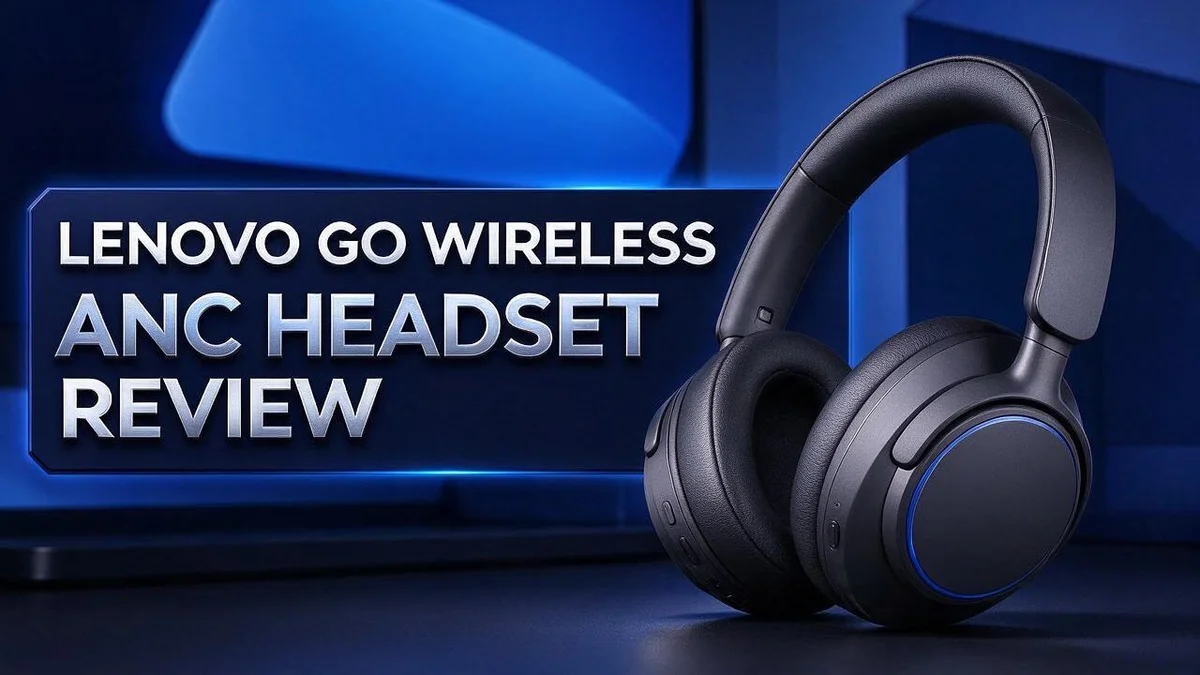
Lenovo Go Wireless ANC Headset Review 2026: Complete Guide
Are you tired of noisy offices and crowded commutes? Then the Lenovo Go Wireless ANC Headset might be the gear you need.
This headset offers active noise cancellation. It blocks out background chatter so you can focus on your work or your music.
It connects in two ways. You can pair it over Bluetooth or use the included receiver that plugs into a USB port for a steady link.
In a Nutshell
- Model number: The L12WL model makes it simple to find the exact headset in stores or online. Shoppers can match the name to avoid confusion with similar listings.
- Wide temperature range: It works from 0°C to 40°C, or 32°F to 104°F. That range suits hot offices, cool rooms, and most home setups.
- Ergonomic shape: The product listing claims an ergonomic design. This matters for people who wear headphones through long workdays or long study sessions.
- Receiver in the box: The headset includes a receiver, so a computer can connect fast without hunting for a separate adapter during busy calls.
- Sony comparison: One user pointed to the Sony WH-1000XM4 as a Bluetooth headset with noise cancelling. It gives a useful reference point for readers who already know that brand.
- Research gaps: The listings show no cons, but no independent test results appeared. Read recent user reviews before deciding if this headset fits your daily needs.
Noise Cancellation Performance


Last update on 2026-11-26 / Affiliate links / Images from Amazon Product Advertising API Some of the links on this website are affiliate links, which means that at no additional cost to you, I earn a commission if you click through and make a purchase. I only recommend products and services that I believe will add value to my readers. Thank you for your support!
Active noise cancellation works by using microphones to pick up steady background sounds. The headset then sends out sound waves that cancel them. This method works best on constant noise. Think of air conditioners, fans, and the low rumble of a bus.
Sudden sounds are harder to block. A ringing phone or a loud coworker may still break through. Set your expectations with this in mind.
Office workers may notice the biggest benefit. Open floor plans fill the air with hum, typing, and side conversations. Reduced background noise helps you stay focused on tasks. Background noise also tires the brain over a long day. Less noise can mean fewer breaks and less fatigue. This benefit is hard to measure, but many people notice it.
Commuters can also use the headset on trains and buses. Engine noise and road rumble are the kinds of sounds ANC is built to reduce. Pairing it with calm music or a podcast can make the ride feel shorter.
Our research did not find independent lab tests. The product listing claims active noise cancellation, but no reviewer data backed it up in our search.
Treat the claim as a starting point, not a final verdict.
You can test the headset yourself. Try it in a quiet room first, then near a fan or a busy hallway. Notice how much the hum fades when ANC turns on. Compare the sound with it on and off.
Clear calls matter too. Ask a colleague for honest feedback after a short Teams test. They can tell you whether background noise drops on their end.
Fit matters for ANC too. Ear cups that sit well around the ear can block more outside sound. Adjust the headband until the seal feels snug but not tight.
Your ears give the final verdict. Noise cancelling can make work and travel feel calmer. Test the headset in your own space before you decide.
Design and Comfort
Comfort often decides whether you keep a headset on all day. A good look matters less than how the headset feels after two hours. This section covers the design details that shape daily wear.
The headband carries most of the load. Pressure from the band can build up over time. Adjust the band slowly until the pressure feels even across the top of your head.
Ear cushions matter just as much as the band. Soft padding can ease pressure around your ears. Thin padding may feel fine for a short call but can tire you out later.
Heat can become a problem during long sessions. Closed ear cups, common on noise cancelling designs, can trap warm air. Take short breaks when your ears start to feel hot or sweaty.
Glasses wearers should pay close attention. The arms of your glasses can push against the cushion and create small gaps. Gaps let sound leak in and weaken the seal around your ears.
Movement matters too. If you turn your head often or walk around the office, you want a snug fit. A loose frame may slide during quick movements and pull your focus away from work.
Button placement also affects daily use. Check whether the controls sit where your fingers naturally rest. Easy reach helps you answer calls without lifting the band off your head.
Portability is another design angle. Ask whether the headset packs flat or needs a case. Commuters may value a compact shape that fits easily into a bag for trains and buses.
Try a simple test at home. Wear the headset for thirty minutes while you work or watch a video. Note any spot that aches, itches, or slips. Those notes give you a clear answer about comfort.
Comfort is personal, so no single design fits everyone. Use these checks to decide whether this headset suits your head, your ears, and your daily schedule.
Connectivity and Setup
Getting started with the Lenovo Go Wireless ANC Headset takes only a few minutes. You can connect it through a wireless receiver or a Bluetooth link. Each option suits a different desk setup.
The receiver works best for a fixed workspace. Plug it into a free USB port and let your computer detect it. Keep the receiver in clear view of the headset, since walls and metal objects can weaken the signal.
Bluetooth suits people who switch between a laptop and a phone. Pair the headset once through your device settings. After that, you can reconnect it with a quick tap.
Charging is another quick check. Use the USB C cable to top up the battery before a long workday. A full charge helps you avoid battery drops in the middle of an important call.
Switching devices takes a little practice. Turn off Bluetooth on one device before you expect the headset to join another. This habit stops the headset from linking to the wrong screen during a meeting.
Check your audio settings after pairing. Choose the headset as both the playback device and the microphone. Many people skip this step, and their colleagues end up hearing the laptop mic instead.
Run a short test call before your first meeting. Ask a friend to rate the voice quality. Note any echo or crackle, then adjust the position of the mic.
Walk around the room during the test call. Watch for the point where the audio starts to break up. Keep your computer inside that safe zone during meetings.
Keep your drivers and firmware current, too. Updates can improve connection stability. Our research did not confirm specific update steps, so check the official Lenovo support pages for the latest guidance.
Top 3 Alternatives
If you want other options besides the Lenovo Go Wireless ANC Headset, these three earbuds are worth a look. Each one offers strong sound and useful features.
Sony WF-1000XM5

Last update on 2026-11-26 / Affiliate links / Images from Amazon Product Advertising API Some of the links on this website are affiliate links, which means that at no additional cost to you, I earn a commission if you click through and make a purchase. I only recommend products and services that I believe will add value to my readers. Thank you for your support!
The Sony WF-1000XM5 is a top pick for noise cancelling fans. It has a compact design that fits most ears well.
The sound feels clear and detailed, with deep bass that stays balanced. Battery life is solid, and the case charges quickly.
Bose QuietComfort Earbuds

Last update on 2026-09-19 / Affiliate links / Images from Amazon Product Advertising API Some of the links on this website are affiliate links, which means that at no additional cost to you, I earn a commission if you click through and make a purchase. I only recommend products and services that I believe will add value to my readers. Thank you for your support!
The Bose QuietComfort Earbuds focus on comfort. They sit lightly in the ear, so you can wear them for long trips or workdays.
The noise canceling blocks out airplane hum and office chatter. The fit feels secure during walks and workouts.
Apple AirPods Pro

Last update on 2026-09-19 / Affiliate links / Images from Amazon Product Advertising API Some of the links on this website are affiliate links, which means that at no additional cost to you, I earn a commission if you click through and make a purchase. I only recommend products and services that I believe will add value to my readers. Thank you for your support!
The Apple AirPods Pro work best for people who use an iPhone, iPad, or Mac. They pair fast and switch between devices with ease.
The adaptive audio mode adjusts noise control to your surroundings. Transparency mode lets you hear people nearby without removing the buds.
Microphone and Teams Call Quality
The microphone shapes how others hear you on every call. A clear voice keeps meetings moving and saves time for everyone.
The listing says this headset is Teams certified. That label suggests the device works smoothly with Microsoft Teams, which many offices use every day.
Still, no independent tests of mic clarity turned up in our search. Use the certification as a helpful sign, not a final promise.
A direct USB C connection can help in busy places. Bluetooth may pick up more interference from other wireless devices nearby.
Your speaking habits matter as much as the hardware. Keep the mic close to your mouth and speak in a normal voice.
Keyboard clicks and paper rustling can travel into the call. Mute yourself when you type notes or shift in your chair.
Teams has its own audio settings for the microphone. Open the device menu and select the Lenovo headset as both speaker and mic.
Group calls can create crosstalk. Pause briefly after others speak so your words do not overlap with theirs.
Test the mic in a different room, too. Rooms with hard walls can make your voice sound sharper or more echoey.
Ask a coworker for honest feedback during a short check. Ask whether your voice sounds clear, thin, muffled, or too quiet.
Volume balance also affects call quality. If the headset is too loud, others may hear echo or feedback. Keep your level moderate.
Some calls run long, so comfort and clarity go together. A steady mic lets you speak without raising your voice all day. Clear sound on your end helps teammates focus on the topic, and good calls build trust.
Operating Conditions and Durability
The listed operating range is 0°C to 40°C (32°F to 104°F). Keep the headset inside that window for steady performance.
Cold rooms and hot cars can push the headset past its limits. A car parked in summer sun can heat up fast. Bring the headset inside when the temperature feels extreme.
Storage matters too. Keep the headset somewhere cool and dry when you are not using it. A desk drawer near a sunny window may get too warm.
Humidity and moisture need attention. Sweat, rain, and spilled drinks can reach the ports and seams. Wipe the ear cups with a dry cloth after long sessions.
Dust can build up over time. It may collect in the mesh and near the microphone opening. Use a soft brush or a dry cloth once a week.
Cleaning needs a gentle touch. Avoid spraying liquid directly on the headset. Work carefully around the buttons and the cable port.
The USB C cable deserves attention. Repeated bending near the connector can loosen it over time. Coil the cable loosely and avoid sharp kinks.
Travel adds risk. A bag full of keys or a laptop can press on the headband. Use a padded pouch to protect the ear cups and arms.
Drops and knocks can crack plastic parts or loosen joints. Set the headset down gently instead of tossing it on a desk.
The research did not list a durability rating or a warranty length. Check the retailer listing or Lenovo support page for those details.
Battery life also changes with age. Rechargeable batteries lose capacity over the years. Plan for a possible replacement if you use the headset every day for several years.
Good care keeps the headset working longer. Simple habits like cool storage, gentle handling, and regular wipe downs make a clear difference.
Pros and Cons
Pros
- Wireless design frees you from tangled cables.
- Active noise cancellation blocks out background sound.
- The listing says the headset is Teams certified.
- Ergonomic design supports comfortable all day wear.
- A receiver and Bluetooth give you flexible connection options.
Cons
- Only black appears as a color option.
- No long term user reviews turned up in our search.
- No direct comparisons with rival headsets exist yet.
Who Should Buy It
This headset suits remote workers and hybrid teams best. If your day runs through Microsoft Teams, this model deserves a close look. The listing says it carries Teams certification, which many home workers and office staff look for first.
Open office workers may also benefit. Hot desks and shared rooms can get loud fast. Focus comes easier when the room gets noisy, so a quieter bubble can help you concentrate.
Frequent desk movers can use one headset everywhere. Some people shift between a home desk, a shared table, and a café on the same day. A single headset keeps the setup simple and the bag light.
Support agents and sales staff spend hours on calls. These roles need a headset that stays comfortable through long shifts. The design aims at comfort, so wear it through a full shift to see how it feels.
Home workers who share space with family can benefit too. Kids, pets, and doorbells can interrupt a call at any moment. A headset that keeps you in the conversation helps everyone on the other end.
Students who join online classes can also use it. They can take part from home or from a library. A wireless setup also leaves their hands free for notes.
Music lovers should set realistic expectations. This model focuses on calls and noise control. A user mentioned the Sony WH-1000XM4 as a Bluetooth headset with noise cancellation, so compare a few options if sound quality matters most.
Your daily routine makes the final call. Think about where you work, how long you talk each day, and what you need from sound. Read this guide with your own schedule in mind, and the choice becomes much clearer.
Final Verdict
Is the Lenovo Go Wireless ANC Headset worth your time? Yes, for many people it is. It brings active noise cancellation, Teams certification, and a clean wireless setup into one simple package.
Think of this headset as a dependable daily partner. It fits best when calls matter and focus matters more. Clear sound and quiet surroundings make a real difference when you speak with clients or teammates.
Still, the research leaves a few open questions. Before you commit, ask yourself these simple questions.
Start with fit. Try the headset on for a while if you can. Check whether the clamp feels light on your head and whether the ear cups stay comfortable during a long meeting.
Next, think about your devices. A receiver and Bluetooth cover many setups. Pair it once and test it. This quick step shows whether the connection feels stable in your space.
Consider your calls too. If you join video meetings every day, Teams certification adds peace of mind. If your work leans on music or movies, you may want to compare other models first.
Some shoppers compare this model with the Sony WH-1000XM4. Try both if you can. Sit with each one for a full call and listen closely to how the noise cancellation handles your daily background sounds.
Our overall verdict: the Lenovo Go Wireless ANC Headset earns a solid recommendation for Teams users who want quiet calls without tangled cables. Shoppers who want proof of long term strength may prefer to wait for more reviews.
Final thoughts: this headset suits people who value clear calls above all else. Pick it when focus and steady connections matter most. Give it a fair test for a week before you decide.
Frequently Asked Questions
Can I use this headset in hot or cold places?
Yes, the headset handles a wide range of temperatures. The research lists an operating range of 0°C to 40°C (32°F to 104°F). That covers most offices, homes, and cafés. Still, leaving it in a parked car on a hot day or a freezing morning is a bad idea. Keep it in your bag when you travel between extreme places.
Is it a good pick for music and gaming?
The research focused on calls and daily office use. It did not test music or gaming performance, so the results stay unclear. Think of this headset as a call first device. If you plan to use it mainly for entertainment, check reviews from people who used it for that purpose.
Does it work with apps other than Microsoft Teams?
The listing highlights Teams certification, which is the main strength here. Other apps may work through Bluetooth or the receiver. The research did not confirm this, though. Check the product page for a full list of supported platforms before you rely on it.
What should I check first on the listing?
Look for the model number L12WL in the product name. This number helps you match the exact headset. Similar models can look alike on store pages, so the code keeps you from picking the wrong one. A quick check now can save you from a return later.

Hello everyone my name is Alenya and i am a gadget discovering Enthusiast 🐻🐻