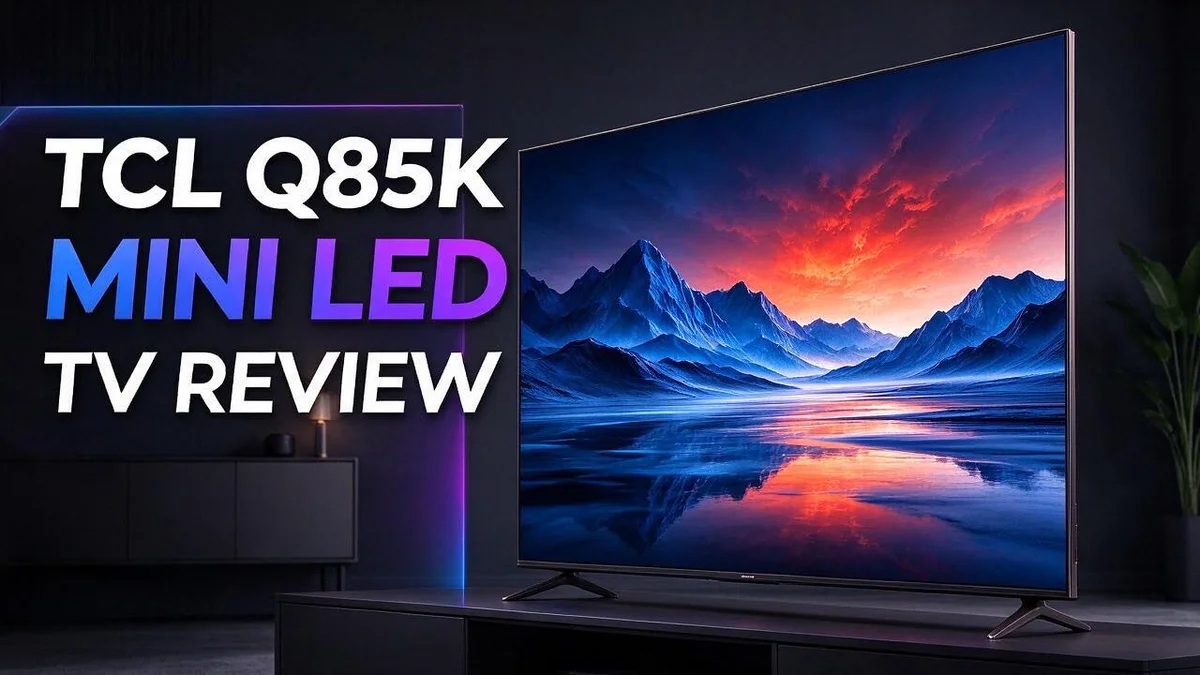
TCL Q85K Mini LED TV Review: Don’t Buy Until You See This
Big screens can change how a living room feels. A large TV turns movie nights and sports games into something special. The TCL Q85K aims to bring that cinema feeling home.
Picture quality matters most. Mini LED technology helps bright scenes pop while dark scenes keep their depth. Smooth motion also makes fast action easier to follow.
Setup should feel simple, too. Google TV gives you quick access to your favorite streaming apps. Dolby Atmos sound adds depth, so dialogue and effects feel closer to the action.
In a Nutshell
- Smooth motion for fast scenes: The panel supports refresh rates from 120Hz to 144Hz. Sports fans and gamers may notice smoother movement during quick action.
- Easy access to streaming apps: Google TV puts your favorite apps in one place. You can find shows faster with a simple search.
- Sound that fills the room: Dolby Atmos support adds depth to movies. Onkyo audio helps voices and sound effects stand out.
- Sharp 4K HDR detail: The 4K resolution shows fine textures and clear text. HDR adds extra punch to bright highlights and deep shadows.
- Real user interest: Members of r/hometheater ask whether the 85 inch 845 series is a good buy. No clear verdict appears yet, so read fresh reviews before you decide.
- Who this set suits: Viewers who want a large screen with smooth motion and strong sound will likely enjoy it.
Mini LED Picture Quality and Brightness


Last update on 2026-11-06 / Affiliate links / Images from Amazon Product Advertising API Some of the links on this website are affiliate links, which means that at no additional cost to you, I earn a commission if you click through and make a purchase. I only recommend products and services that I believe will add value to my readers. Thank you for your support!
Picture quality matters most on a big screen. Every flaw grows larger as the image grows. Brightness plays a major role in how sharp and lively the picture feels.
Mini LED panels use thousands of tiny LEDs behind the screen. These lights work in groups called zones. Each zone can brighten or dim on its own.
Daytime viewing tests brightness in a real way. Sunlight from windows can wash out a weaker panel. A bright screen keeps the image readable.
Brightness also affects color. When the panel pushes more light, reds, greens, and blues look richer. Good brightness also keeps skin tones warm.
HDR content shows the biggest gains. Highlights like sunlight on water, sparks, and neon signs look more vivid. Viewers notice the extra punch right away.
Reflections need attention too. Windows and lamps can bounce light onto the glass. Placing the TV away from direct light helps a lot.
Dark scenes bring a different challenge. Zone dimming can cause blooming. This shows as a faint glow around bright objects on black backgrounds.
Starry skies and space scenes make blooming easier to spot. Watch a film with night scenes before you decide. The result will tell you a lot.
Picture modes shape the final look too. Movie or dark modes suit evening viewing. Bright or vivid modes often suit daytime sports.
Try adjusting brightness while the TV plays a familiar movie. Small changes can make the image look more natural. Take your time with the settings.
Bright lighting helps in open living rooms. Viewers sitting far from the screen still see strong detail. A big panel fills the wall with color.
Overall, the brightness and zone control give this set a bold image. Most rooms will enjoy a clear and lively picture. This pairing suits busy family rooms and open spaces well.
Dolby Atmos and Onkyo Sound Performance
Sound matters just as much as the picture on a big screen. Thin built-in speakers often struggle during loud action scenes. Good audio keeps the mood alive from start to finish.
The listing for the 85QM6K names Onkyo audio as a key feature. Onkyo is a well-known name in home sound, so many viewers expect a clear midrange and smooth tone.
Dolby Atmos works best with the right content. Streaming apps often label Atmos titles, so look for that label before movie night. Standard stereo shows will not use the full effect.
Atmos also adds sound from above. Rain, helicopters, and crowd scenes can feel more real this way. The effect works best when furniture does not block the front speakers.
Dialogue clarity is a simple test. Whispered lines should stay easy to hear. Crowd noise and background music should not drown out the actors.
Placement changes the result. Sound from a large panel can feel thin when the TV sits flush against a wall. Give the speakers some space, and the room will feel fuller.
Bass is limited in slim cabinets. Many people add a soundbar for deeper rumble during action films. An HDMI eARC connection sends Atmos audio to the soundbar with a single cable.
Sound modes also shape the result. Movie mode suits films, while standard mode can work better for news and sports. Small equalizer tweaks can soften harsh highs.
Late night viewing needs its own care. Many TVs offer a dialogue boost setting, which keeps voices clear at lower volume. This helps without waking the rest of the house.
The research does not include lab tests for sound output. This view therefore focuses on everyday listening. Viewers who love immersive sound should play a favorite movie and listen closely. Strong audio can make a big screen feel even bigger.
Google TV Smart Platform and Ease of Use
Google TV handles most daily tasks on this set. The home screen feels simple and clear. Shows and apps appear in neat rows, so new picks stand out fast.
The remote makes searching much easier. Voice search lets you speak a title instead of typing letters one by one. This saves time on busy evenings.
Google Assistant adds another helpful layer. You can ask the TV to dim the lights or check the weather when your home uses compatible devices.
Multiple user profiles help families share one screen. Each person gets personal recommendations, so the home screen stays relevant for everyone.
Parental controls sit in the settings menu. Parents can set age limits and lock certain titles with a PIN code.
Setup moves quickly with a smartphone. Your phone can sign in to accounts, so you skip typing long passwords with the remote.
Software updates keep the system fresh. Regular updates add new features and fix bugs over time, so the set keeps improving.
Most people learn the menus within one evening. Some settings sit deeper in the menu, so take a few minutes to explore them.
Voice commands also help with settings. You can say a command to switch inputs or adjust volume without hunting through menus.
Search results pull from many apps at once. This means you see where a movie streams before you pick a service.
Remote button shortcuts speed up common tasks. Quick access keys often open streaming apps or the home screen right away.
Watchlist features deserve attention too. Titles you save can appear in one list, which cuts down on endless scrolling.
Taking time to customize the home screen pays off. Move the rows you use most near the top for quicker viewing every night.
Privacy settings need a quick review. Check viewing data options during setup and adjust them to match your comfort level.
Overall, Google TV makes daily use feel easy. It suits tech fans and first time smart TV owners alike.
Top 3 Alternatives
If the TCL Q85K does not fit your needs, these three TVs offer strong options. Each one brings something different to your living room. Read on to find the best match.
Hisense U8K

Last update on 2026-11-04 / Affiliate links / Images from Amazon Product Advertising API Some of the links on this website are affiliate links, which means that at no additional cost to you, I earn a commission if you click through and make a purchase. I only recommend products and services that I believe will add value to my readers. Thank you for your support!
Looking for a bright screen with deep contrast? The Hisense U8K uses a mini LED backlight with many local dimming zones. This helps dark scenes look rich while bright highlights stay sharp.
Gamers also get smooth motion and quick response times. Movie nights and sports games both look lively on this set.
Samsung QN90D

Last update on 2026-11-06 / Affiliate links / Images from Amazon Product Advertising API Some of the links on this website are affiliate links, which means that at no additional cost to you, I earn a commission if you click through and make a purchase. I only recommend products and services that I believe will add value to my readers. Thank you for your support!
The Samsung QN90D uses Neo QLED technology with mini LED lighting. Its Neural Quantum Processor sharpens fine detail and boosts color.
The screen handles glare well, so it suits bright rooms with lots of windows. Shows and films look vivid from most seating spots.
Sony Bravia 7
No products found.
The Sony Bravia 7 focuses on natural colors and smooth motion. Its XR processor analyzes each scene to improve contrast and depth.
Google TV comes built in, so browsing and streaming feel simple. It fits well in a family room where people watch many different types of content.
Each of these TVs performs well in its own way. Pick the one that matches your room, your viewing habits, and your favorite shows.
Refresh Rate and Gaming Performance
A refresh rate shows how many times per second the screen updates. Higher numbers usually mean smoother motion. The listing for the 85QM6K, a close relative of this set, shows a range of 120Hz to 144Hz.
Fast sports and action scenes benefit most. A ball moving across a field looks clearer when the panel keeps up. Quick camera pans also look less blurry and less shaky.
Gamers can get the biggest benefit from this kind of panel. Faster updates can make movement feel more immediate in shooters and racing games. Many players notice the difference within a few minutes of play.
Motion clarity depends on more than refresh rate alone. Processing features also shape how smooth a picture looks. Motion smoothing can give movies a soap opera look, so test it yourself before you keep it on.
Input lag matters for competitive play. Lower lag means button presses appear on screen faster. The research does not list a lag figure, so check the TV’s settings menu and independent reviews before you decide.
Game mode is the easiest switch to flip. Turning it on usually cuts processing delay. Many people keep it on for gaming and switch back for films.
Connection type plays a role too. Make sure your console or PC uses a cable that supports the full frame rate. An older cable can cap the picture at a lower speed and waste the panel’s potential.
Frame rate from the game also sets the limit. A game that runs at 60 frames per second will not fill a 144Hz panel. Match the output settings on your console or PC to get the smoothest result.
Overall, the refresh rate gives this set a strong base for fast content. Gamers and sports fans should enjoy smooth motion. Pick the right settings, and the panel can shine across every type of game and match.
Design, Size, and Setup
Measure the space before the box arrives. An 85 inch panel is wide and heavy. Check the wall, the stand area, and the doorways you need to pass through.
The base must hold the weight. Choose a stand or cabinet built for a set this size. A flat, level surface keeps the screen steady.
Slim bezels give the set a clean look. The thin edges frame the picture without pulling attention away from what you watch. This style suits open living rooms well.
Many people pick a wall mount for a tidy finish. A mount sits close to the wall and frees up floor space. Use a bracket rated for the set’s weight and screen size.
Viewing distance matters more than most people expect. Many viewers sit about 6 to 9 feet away from an 85 inch screen. Sitting at that range lets the whole picture fill your view without strain.
Ports often sit on the back or side panel. Plan cable routing before you mount the set. Leave a little slack behind the panel so cables do not pull on the connectors.
Give the back panel some breathing room. Leave open space behind and around the set. Warm air escapes more easily, and the set stays cool during long movie nights.
Aim the screen at the main seating area. Once the panel sits in place, check that it faces your sofa or chair directly. A slight tilt can change how bright and clear the picture looks from your seat.
Lifting a panel this large takes two people. Ask a friend to help you carry it safely. Set it down on a soft cloth to protect the screen from scratches.
Good planning makes the whole process smoother. Clear space, a strong mount, and neat cable routing help the TV look great from the very first day.
Pros and Cons
Pros
- Bright 4K picture with HDR for vivid colors
- Mini LED backlight helps deliver deeper contrast
- Dolby Atmos adds depth to movies and shows
- Onkyo audio gives a fuller sound from the built in speakers
- Wide screen makes every scene feel immersive
Cons
- Listings may use different model numbers, so check the exact model before you buy
- Reddit users have not reached a clear verdict on the 845 series
- Mini LED panels can show some blooming around bright objects in dark scenes
- Built in speakers may lack the punch of a separate sound system
Who Should Buy It
This set suits people who want a big screen for a shared room. Families and roommates often gather around one display. A screen this size makes group nights feel like a small theater.
Everyone can enjoy the picture from the couch. Nobody needs to lean in or squint.
Streaming fans may also find it a good match. Google TV puts many apps on one home screen. People who jump between services can switch quickly. That convenience matters most for anyone who watches something new every night.
Buyers with a dedicated media room should look closely. Dim lighting helps the picture shine. Deep contrast looks best when the room stays dark during movies.
Those who love a cinema feel will likely enjoy that difference.
Casual viewers may not need this much screen. Someone who mostly watches news or short clips might feel happier with a smaller set. A compact TV can also suit a bedroom or kitchen.
Size should match the way you actually watch. It should not match what looks impressive in a store.
Renters who move often should plan ahead. A panel this large takes extra care during each move. Keep the original box if possible, since it protects the screen during transport.
Parents with young children should think about safety first. A heavy panel needs a secure anchor. This matters most in rooms where kids play or climb.
Secure any mount to wall studs. Keep cords out of reach.
Ask yourself a few simple questions before you commit. Where will you sit most of the time? What will you watch most often? Do you want one screen for every activity in the house?
Honest answers make the decision much easier. They also help you avoid regret later.
Final Verdict
Our final verdict leans positive for the right buyer. This large Mini LED set brings a bright 4K picture, fast refresh rates, and Google TV into one package.
Still, confirm the exact model first. The sources cover the 85QM6K and a Reddit discussion about an 85 inch 845 series. They do not cover the Q85K directly, so check the model number on the box and the spec sheet.
Fast refresh rates suit sports and games. Panels running at 120 to 144Hz can keep fast moving action looking smooth. Sports fans and gamers may notice this most during quick camera pans.
Check your gaming setup before you buy. Confirm that your console or PC connects through the HDMI ports you plan to use. Also confirm that the set supports the refresh rate you want.
Try the remote and menus if you can. Store demos let you test how fast menus respond. Slow menus can frustrate daily use, even when the picture looks great.
Read the warranty and return policy closely. Large sets carry more risk during shipping and setup. A clear return window gives you time to test the picture in your own room.
Watch for software updates. New firmware can improve picture settings over time. Check for updates soon after setup so the set runs at its best.
Compare it with other 85 inch models. The research did not name top competitors. Read recent reviews from trusted tech sites and set them side by side with this TV. Look at motion handling, brightness, and app support.
Who should buy this TV? Buyers who want a big screen for sports, gaming, and movie nights should consider this set. Shoppers who need a compact display or a smaller room should look elsewhere.
Final thought: this TV suits big screen fans. Confirm the model, check your gaming needs, and read the warranty. With those steps done, you can move forward with confidence.
Frequently Asked Questions
Can this TV handle a bright room?
Mini LED panels can look bright, so they often hold up well in daylight. Glare from windows can still wash out dark scenes. Place the screen away from direct sunlight for the best contrast.
Does an 85 inch screen fit a typical living room?
Most rooms need extra space for a screen this size. Measure your wall and TV stand before you order. Sit at a distance where you can see the whole picture without turning your head much.
Can I pair this TV with a soundbar?
Yes, a soundbar can add more bass and depth than built in speakers. Connect it through an HDMI ARC or optical port if your set has one. Check the port labels on the back first.
How should I clean a large Mini LED screen?
Use a soft, dry microfiber cloth to remove dust. Avoid harsh sprays and paper towels, because they can scratch the surface. Gently wipe in one direction with light pressure.
Hello everyone my name is Alenya and i am a gadget discovering Enthusiast 🐻🐻