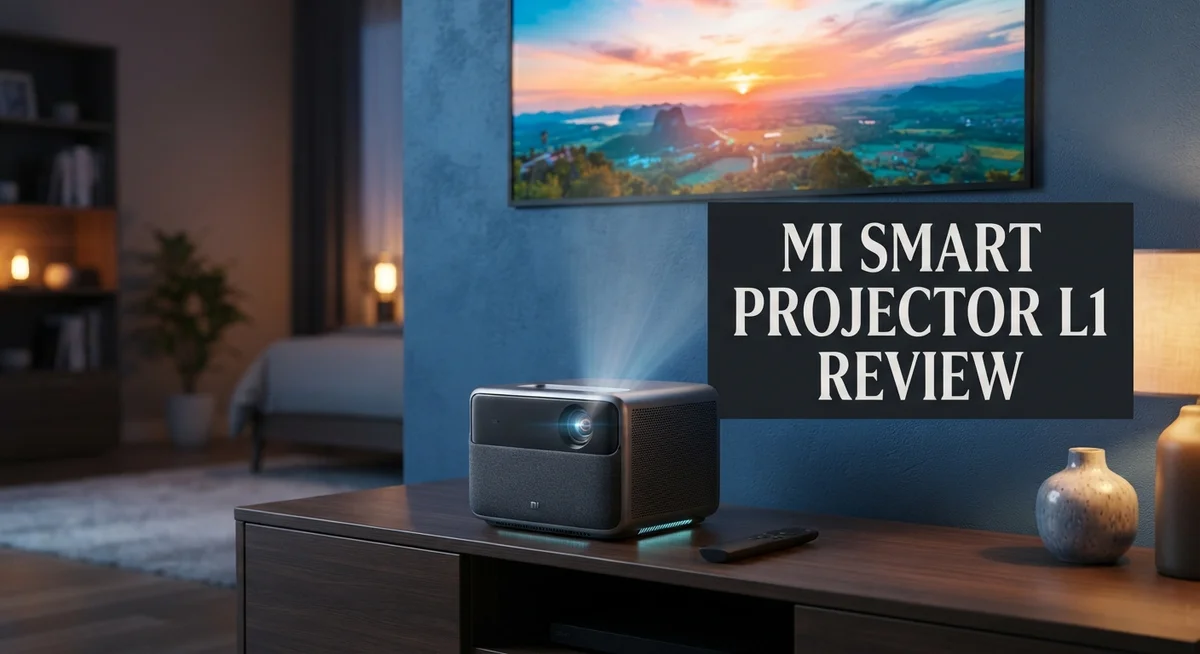
Xiaomi Mi Smart Projector L1 Review: Live Up To The Hype?
Want a big screen movie night at home? The Mi Smart Projector L1 might be your answer. It brings Full HD resolution and smart features into one compact device.
This projector supports up to 3840×2160 input, giving you crisp visuals. With a 120 inch max projection size, your living room turns into a mini theater.
Google TV comes built in, so you get instant access to your favorite apps. No extra streaming device needed.
In a Nutshell
- Best for dark rooms: The projector works great in low light. Brightness stays limited for bright daytime use.
- Long lasting LED: You get up to 30,000 hours of LED life. That means years of movie nights without bulb changes.
- Lightweight and portable: At just 1.2 kg, this projector is easy to move. Set it up in different rooms without hassle.
- Contrast that adds depth: A 2000:1 contrast ratio gives you decent depth in scenes. Dark and bright areas stand out clearly.
- Obstacle avoidance tech: The projector detects obstacles automatically. This helps place it accurately without manual adjustments.
- Screen size limits: You can project up to 120 inches. Competitors like the Mi Smart Projector 2 Pro offer bigger screens.
- Simple connectivity: Bluetooth support lets you pair speakers or headphones easily. This adds flexibility for audio setup.
Key Features and Specifications

Last update on 2026-07-29 / Affiliate links / Images from Amazon Product Advertising API Some of the links on this website are affiliate links, which means that at no additional cost to you, I earn a commission if you click through and make a purchase. I only recommend products and services that I believe will add value to my readers. Thank you for your support!
The Mi Smart Projector L1 packs solid features into a compact design. Let’s break down what makes this projector tick.
Display quality matters first. This projector delivers Full HD resolution at 1920×1080 natively. It accepts input signals up to 4K (3840×2160), so your content looks sharp and detailed. The brightness sits at 224 ANSI lumens, which works best in darker environments. You won’t struggle with nighttime movie marathons or gaming sessions in dim rooms.
The contrast ratio reaches 2000:1, giving your images depth and punch. Dark scenes feel genuinely dark. Bright moments pop off the screen. This balance keeps visuals engaging without washing them out.
Size flexibility is another strength. You can project images up to 120 inches diagonally. That’s plenty for living rooms and bedrooms. The projector weighs only 1.2 kg, so moving it between rooms takes seconds. Setup becomes effortless thanks to automatic keystone correction and autofocus features. The projector detects obstacles and adjusts itself automatically.
Sound comes built in. You don’t need external speakers for basic audio. The internal speakers deliver respectable sound quality for casual viewing. Bluetooth connectivity lets you pair wireless headphones or upgrade with external speakers when you want more punch.
Google TV integration is a major convenience factor. Apps load directly on the projector. You access Netflix, YouTube, Prime Video, and countless other services without extra devices. No HDMI cables or streaming sticks needed.
LED longevity impresses here. The light source lasts up to 30,000 hours. That’s roughly 10 years of casual daily use. You won’t replace the lamp frequently, which saves hassle over time.
One limitation worth noting: the 224 lumens brightness restricts daytime use. Bright rooms wash out the image. You’ll want blackout curtains for afternoon viewing. The 120 inch maximum also falls short compared to some competitors that reach 200 inches or more.
Overall, the Mi Smart Projector L1 combines practical features with portability. It excels for dark room entertainment and casual home use.
Design, Build Quality, and Portability
The Mi Smart Projector L1 impresses with its compact and lightweight construction. Weighing just 1.2 kg, this projector feels portable enough to carry between rooms or take to a friend’s house.
The build quality reflects solid engineering. Xiaomi used durable materials that withstand regular handling. The projector’s body feels sturdy, not flimsy. You won’t worry about it breaking during transport or casual use.
Design simplicity works in its favor. The unit has a clean, minimalist look that fits modern living spaces. It doesn’t scream “tech gadget” or take up excessive shelf space. The compact footprint means you can place it on a small table, bookshelf, or even hold it in your hands during setup.
Portability stands out as a real strength here. Unlike larger projectors that require permanent installation, the L1 moves easily. Students can carry it to dorm rooms. Families can move it from the living room to the bedroom. Outdoor enthusiasts can even bring it to backyards for movie nights under the stars.
The cooling system runs quietly. You won’t hear loud fans disrupting your viewing experience. Heat dissipation works efficiently despite the compact size, so the projector stays cool during extended use sessions.
Cable management is straightforward. The projector connects via Bluetooth for wireless audio pairing. HDMI and USB ports are accessible without awkward positioning. Setup takes minutes, not hours.
One practical detail: the lens cap attaches securely. This protects the optics during transport and storage. You won’t lose it easily or worry about dust accumulation.
The projector’s lightweight nature does mean it requires proper support. You’ll need a stable surface or tripod to prevent accidental tipping. The compact design trades some stability for mobility, which is a fair tradeoff for users who value flexibility.
Overall, the Mi Smart Projector L1 delivers excellent portability. It’s ideal for people who want a projector that doesn’t stay glued to one spot. The build quality justifies confidence in durability. Whether you’re moving it weekly or occasionally, this projector handles the job without complaint.
Image Quality and Brightness Performance
The Mi Smart Projector L1 delivers solid image quality for casual viewing in darker spaces. Its native resolution of 1920×1080 gives you crisp text and clear visuals when watching movies or presentations.
The real strength lies in its contrast performance. At 2000:1, the projector renders blacks with good depth and makes colors pop on screen. You’ll notice darker scenes feel immersive rather than washed out. This contrast ratio punches above what you’d expect at this entry level.
However, brightness becomes the limiting factor here. With 224 ANSI lumens, this projector shines in low light environments. Dim living rooms and home theaters are its sweet spot. Daytime use or bright rooms present challenges. You’ll need to close curtains or dim the lights to see content clearly.
The projector supports 4K input through its connectivity options, though it displays content at 1080p natively. This means you can connect 4K devices without issues. The image scales down smoothly without major quality loss.
Color accuracy holds up reasonably well for the segment. Reds and blues display with natural tones. Skin tones appear balanced during movie scenes. You won’t get cinema grade color science, but everyday content looks pleasant.
The autofocus feature keeps images sharp automatically. You don’t need to manually adjust focus when moving the projector. This convenience matters for portable setups.
Projection size flexibility adds practical value. You can display anything from smaller presentations at 50 inches up to 120 inches for movie marathons. Larger projections do show some softness at the edges, which is normal for this brightness class.
For dark room entertainment, the L1 punches above expectations. The combination of decent contrast and Full HD resolution creates an enjoyable viewing experience. Just remember that brightness remains its constraint. If you primarily watch in well lit spaces, you’ll find the image struggles to compete. But in dedicated home theater setups or evening viewing, this projector delivers reliable image quality without disappointment.
Top 3 Alternatives
Anker Nebula Capsule

Last update on 2026-07-24 / Affiliate links / Images from Amazon Product Advertising API Some of the links on this website are affiliate links, which means that at no additional cost to you, I earn a commission if you click through and make a purchase. I only recommend products and services that I believe will add value to my readers. Thank you for your support!
ASUS P3 Projector

Last update on 2026-07-29 / Affiliate links / Images from Amazon Product Advertising API Some of the links on this website are affiliate links, which means that at no additional cost to you, I earn a commission if you click through and make a purchase. I only recommend products and services that I believe will add value to my readers. Thank you for your support!
Epson EF-12 Projector

Last update on 2026-07-28 / Affiliate links / Images from Amazon Product Advertising API Some of the links on this website are affiliate links, which means that at no additional cost to you, I earn a commission if you click through and make a purchase. I only recommend products and services that I believe will add value to my readers. Thank you for your support!
Smart Features and Operating System
The Mi Smart Projector L1 runs Google TV as its operating system. This gives you instant access to streaming apps like Netflix, YouTube, and Disney Plus.
Google TV’s interface feels intuitive and familiar. You navigate menus using the included remote or voice commands. The system responds to Google Assistant queries, so you can search for content hands-free.
Performance does show some slowness during app launches and menu transitions. Switching between apps takes noticeably longer than on high-end projectors. Heavy multitasking can cause occasional stuttering. For casual streaming and basic functions, the OS handles tasks adequately.
Connectivity options keep things simple and practical. Bluetooth links your phone, tablets, or wireless headphones instantly. WiFi support enables seamless app streaming and updates. The projector supports both 2.4GHz and 5GHz networks for better stability.
Smart features shine through automation capabilities. The autofocus system keeps your image sharp without manual adjustment. Automatic keystone correction fixes tilted projections instantly. Obstacle avoidance detects objects in the projection path and alerts you. These features reduce setup time significantly.
Screen mirroring works smoothly from Android and iOS devices. You can share photos, videos, or presentations directly from your phone. The wireless casting eliminates cable clutter from your entertainment space.
The remote control offers both physical buttons and voice input. You can speak commands naturally without memorizing specific phrases. The learning curve stays minimal since Google TV feels familiar to most users.
Software updates arrive regularly through WiFi. Xiaomi pushes security patches and feature improvements automatically. The system maintains compatibility with newer apps and services.
One consideration: the OS lacks some premium features found in higher-tier projectors. Advanced color calibration options remain limited. Professional streaming services have fewer customization settings available.
Overall, the smart features emphasize convenience and ease of use. The operating system prioritizes simplicity over advanced controls. For users wanting straightforward streaming and basic smart functions, the L1 delivers solid performance. The Google TV integration makes content discovery quick and enjoyable.
Audio Quality and Sound Performance
The Mi Smart Projector L1 comes equipped with built in speakers that deliver surprising audio performance for a compact device. The sound output handles both dialogue and music with reasonable clarity. You won’t experience distortion at moderate volume levels, which speaks to decent speaker engineering.
The audio system produces stereo sound that spreads across the listening space. This creates a more immersive experience than single speaker projectors offer. The speakers mount internally, so you get audio projection from the device itself without extra equipment.
Bass response remains modest, which is typical for projectors in this class. The L1 prioritizes clarity over deep low end frequencies. For movie watching and streaming content, the audio performs adequately without requiring external speakers. TV shows and casual entertainment sound natural through the built in system.
Volume levels reach sufficient loudness for most room sizes. You can adjust output through the remote or the Google TV menu. The audio doesn’t overpower the room, but it carries enough presence for comfortable listening distances.
One practical advantage: the projector connects to external audio systems through Bluetooth. This opens options for users who want enhanced sound quality. You can pair wireless speakers or soundbars to supplement the built in audio. This flexibility matters if you plan serious movie marathons or gaming sessions.
The audio tracks sync well with the projected image. Lip sync issues don’t occur during normal playback. This consistency matters for watching films and video content where timing impacts enjoyment.
Compared to larger projectors with bigger speaker arrays, the L1 makes sensible compromises. The compact form factor limits speaker size, so audio quality reflects those physical constraints. The speakers handle their job without pretension or overreach.
For casual viewing in bedrooms or small living spaces, the audio performs its role effectively. Background music and streaming services sound pleasant through the system. If you need premium audio performance, external speakers remain your best option. The built in solution works well for standard entertainment needs without adding complexity.
Pros and Cons
Pros
- Automatic focus and keystone correction keep images sharp and properly aligned without manual adjustment
- Built-in Google TV provides instant access to streaming apps and content libraries
- Compact 1.2 kg design makes the projector easy to move between rooms
- Strong contrast ratio of 2000:1 delivers deep blacks and vivid details in dark viewing spaces
- Stereo speakers produce surprisingly clean audio for a projector this size
Cons
- 224 ANSI lumens brightness struggles during daytime viewing or in well-lit rooms
- Google TV interface experiences noticeable lag when launching apps and navigating menus
- Maximum projection size caps at 120 inches, smaller than many competing models in this category
Who Should Buy It
The Mi Smart Projector L1 works best for specific types of users. If you spend most of your time in dark rooms or evening viewing, this projector delivers solid performance. The 224 ANSI lumens brightness suits home theater setups where you can control the lighting.
Students and young professionals benefit from this projector’s compact 1.2 kg weight. You can easily move it between your bedroom, dorm room, or study space. The automatic focus and keystone correction mean you don’t need technical knowledge to set it up properly.
Content streamers love the built-in Google TV integration. You get instant access to Netflix, YouTube, and other apps without buying additional devices. The screen mirroring feature works smoothly from both Android and iOS phones, making it simple to share presentations or photos.
Casual gamers and movie enthusiasts appreciate the 2000:1 contrast ratio. Dark scenes display deep blacks and fine details. However, fast-action games may show slight lag from the Google TV processor, so competitive gaming isn’t ideal.
Home office users find value in the portability and ease of use. You can project presentations during the day in dimmed conference rooms. The stereo speakers provide adequate audio for video calls and training sessions without needing external speakers.
The projector suits people who don’t need massive screen sizes. The 120-inch maximum projection is sufficient for typical living rooms and bedrooms. Larger spaces require looking at competing models with higher lumens output.
Night shift workers and entertainment seekers get the most enjoyment from this device. You can watch movies, shows, and sports in low-light conditions without eye strain. The automatic features eliminate frustration with manual adjustments.
Avoid this projector if you need daytime outdoor use or bright room performance. The lower brightness output won’t compete with sunlight or strong indoor lighting. Professional presentations in well-lit conference rooms demand brighter alternatives.
Budget conscious buyers who prioritize ease of use over advanced features find this projector matches their needs perfectly. The combination of automatic corrections, built-in streaming, and simple operation removes complexity from the purchase decision.
Final Verdict
The Mi Smart Projector L1 stands as a solid pick for anyone who wants a simple home theater setup. It handles core projector tasks well without overwhelming users with complex settings.
This device shines brightest for casual, indoor entertainment. Dark room movie nights, series binges, and relaxed gaming sessions all fit its strengths perfectly.
Google TV integration makes content access easy. You get a familiar interface without needing extra streaming devices connected separately.
The autofocus and keystone correction features remove common projector headaches. Setup takes minutes instead of the usual trial and error process.
However, this projector has clear boundaries. It won’t replace a proper home cinema setup for serious movie buffs who demand large screen sizes.
Bright rooms remain a challenge for this device. If your viewing space gets lots of natural light, image quality will suffer noticeably.
Think about your typical viewing conditions before deciding. Dark or dim rooms bring out the best performance this projector can offer.
Compare your needs against what this device delivers. Someone wanting a massive 200 inch display should look elsewhere in the lineup.
For everyday users who value simplicity, this projector delivers dependable results. It won’t dazzle tech enthusiasts, but it satisfies practical entertainment needs.
The build quality feels solid despite its lightweight design. Moving it between rooms or even homes stays hassle free.
Sound and picture work together nicely for an integrated experience. You won’t need external speakers unless you specifically want richer bass.
Overall, this projector fits a specific lifestyle. Renters, students, and casual viewers will likely find genuine satisfaction here.
Those seeking professional grade brightness or expansive screen sizes should consider alternatives. But for straightforward home entertainment, this device delivers exactly what it promises.
The Mi Smart Projector L1 earns its place among practical, no-fuss home entertainment options. It knows its audience and serves that audience well without unnecessary complications.
Frequently Asked Questions
Does the Mi Smart Projector L1 work in bright rooms?
The short answer is no. This projector delivers 224 ANSI lumens, which works best in dark or dimly lit spaces. Bright rooms and daytime use will wash out your image quality. Reserve this device for evening viewing or rooms you can darken. If you need a projector for well-lit areas, you should look at models with higher brightness ratings.
How long does the LED last on this projector?
The LED lamp lasts up to 30,000 hours. That means you can watch roughly 10 hours per day for 8 years before needing a replacement. Most casual users will enjoy many years of reliable performance from this projector without worrying about lamp degradation.
Can I use this projector for gaming?
Yes, but with limits. The 2000:1 contrast ratio delivers deep blacks and sharp details, which gamers appreciate. However, Google TV can feel sluggish when launching games. If you play fast paced titles, you might notice slight lag in app loading. For casual gaming and slower paced content, this projector performs adequately.
What’s the maximum screen size this projector can display?
The maximum projection size reaches 120 inches. Many competing models project larger screens, so this caps your viewing options. If you want a massive home theater experience, this projector may feel limiting. For typical living rooms and bedrooms, 120 inches provides plenty of screen real estate.
Does this projector have autofocus?
Yes. The autofocus feature adjusts automatically, and automatic keystone correction straightens tilted images. Obstacle avoidance also helps prevent the projector from focusing on objects in front of the lens. These features remove common frustrations that come with projector setup.

Hello everyone my name is Alenya and i am a gadget discovering Enthusiast 🐻🐻