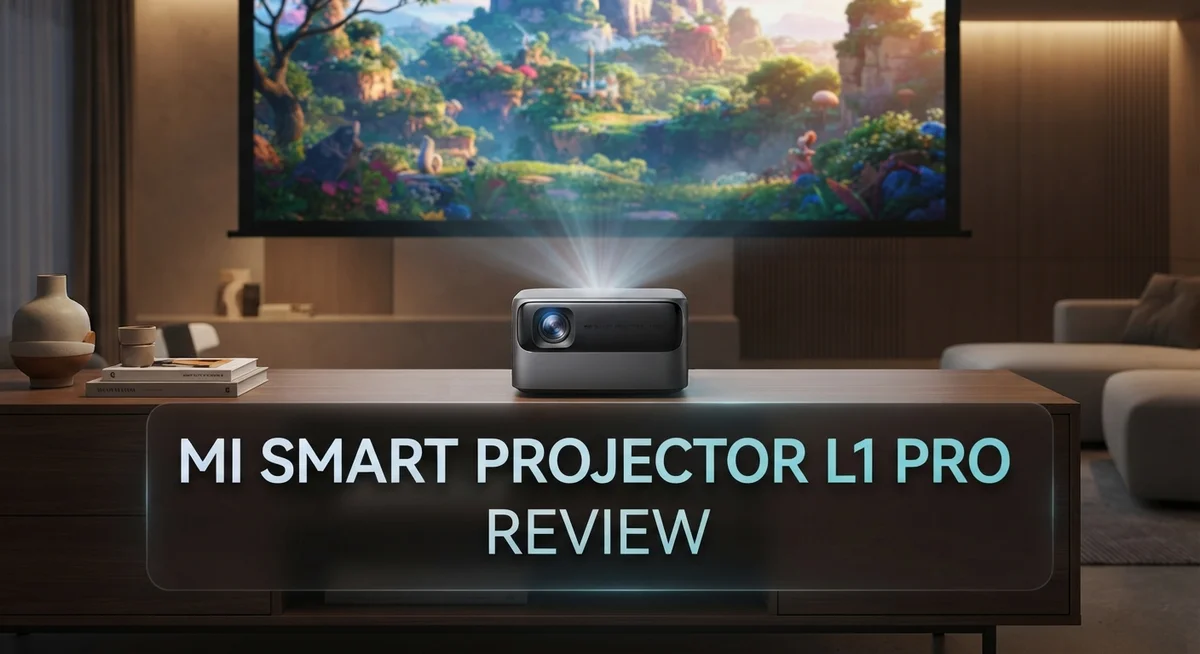
Xiaomi Mi Smart Projector L1 Pro Review: Is It Worth Buying?
Want a home theater feel without a huge setup? The Mi Smart Projector L1 Pro might be your answer.
This projector brings Full HD clarity to your living room. It also supports 4K content for sharper visuals.
With 400 to 500 ANSI lumens, it works best in dark or dim rooms. You get decent contrast for movie nights and binge sessions.
Smart features make this projector stand out. It has auto-focus and automatic keystone correction. You skip the manual adjustments and start watching faster.
In a Nutshell
- Display quality stays sharp with Full HD resolution. You get crisp images for movies and shows. 4K support also lets you enjoy higher quality content when available.
- Smart features shine here. Auto-focus and automatic keystone correction save you setup time. You just place it and watch.
- Google TV integration brings your favorite apps to one screen. Streaming feels simple and organized. However, the interface can feel sluggish at times.
- 3D support adds a fun bonus. You can enjoy immersive content when you want something different.
- Room lighting matters a lot here. This projector performs best in dark or dim rooms. Bright spaces reduce picture quality.
- Screen size tops out around 120 inches. That is smaller than some rivals like the Mi Smart Projector 2 Pro, which reaches 200 inches.
Key Features and Specifications
The Mi Smart Projector L1 Pro packs several features that make it stand out for home entertainment. Let’s explore what this projector actually delivers.
Brightness and Image Quality
This projector produces 400 to 500 ANSI lumens of brightness. That means it performs best in darker spaces where ambient light stays minimal. The native resolution sits at 1920×1080 Full HD, which keeps images sharp and clear. It also supports 4K content, though it won’t display true 4K resolution. The 2000:1 contrast ratio ensures blacks appear deep and details stay visible.
Smart Features Built In
Google TV comes integrated into this projector. You get access to streaming apps, YouTube, and entertainment services without needing extra devices. Bluetooth connectivity lets you pair wireless speakers or headphones easily. The projector also handles 3D content, adding another dimension to your viewing experience when you have compatible movies or shows.
Automatic Adjustments
Two features make setup simple. Smart auto-focus kicks in automatically, so you don’t need to fiddle with manual focus. Automatic keystone correction handles angled projections. If your projector sits at an angle to the screen, this feature straightens the image automatically. Both functions save time and frustration during installation.
Power and Performance
The projector uses 120W of power during operation. This moderate consumption keeps energy usage reasonable for regular viewing sessions. The maximum projection size reaches about 120 inches, which works well for medium to large rooms.
What You Should Know
The Google TV interface can feel sluggish at times. Navigation between apps sometimes takes longer than expected. Brightness becomes a limitation if your room has windows or bright lighting. For rooms with significant ambient light, you may notice the image loses punch and clarity.
This projector delivers solid performance for dark room viewing with its smart features and automatic adjustments making setup straightforward.

Last update on 2026-09-19 / Affiliate links / Images from Amazon Product Advertising API Some of the links on this website are affiliate links, which means that at no additional cost to you, I earn a commission if you click through and make a purchase. I only recommend products and services that I believe will add value to my readers. Thank you for your support!
Brightness and Image Quality
The Mi Smart Projector L1 Pro delivers Full HD resolution at 1920×1080 pixels. This native resolution keeps images crisp and clear during movie nights. The projector also supports 4K content, though it will scale down to Full HD for display.
Brightness sits at 400 to 500 ANSI lumens. This output works well in dark rooms and dim spaces. You will notice the projector struggles in bright environments with ambient light. Windows, ceiling lights, and daylight will wash out the image. For best results, use this projector in a controlled lighting setup.
The 2000:1 contrast ratio helps separate dark and bright areas on screen. You get decent shadow detail and color separation. Movies and shows look engaging without appearing flat or dull.
Smart auto-focus makes setup quick and easy. The projector automatically adjusts focus when you turn it on. You don’t need to fiddle with manual focus rings. Automatic keystone correction handles angled projections too. Tilt the projector up or down, and the image stays rectangular without distortion.
Image quality depends heavily on your room environment. In dark spaces, colors pop and blacks appear deep. The projector handles motion well during action scenes. Panning shots stay smooth without stuttering or lag.
Brightness becomes the limiting factor in lit rooms. If your space gets natural sunlight or has multiple light sources, the image will fade. You will need to draw curtains or dim the lights to see content clearly.
The 120W power consumption keeps energy costs reasonable during use. The projector runs quietly without loud fan noise during operation.
3D support adds an extra entertainment option. You can watch 3D movies and shows with compatible glasses. This feature works well for immersive gaming or 3D content libraries.
Overall, the L1 Pro shines in dark room setups. It delivers sharp Full HD images with good contrast. The automatic adjustments make it user friendly. Just remember that ambient light will reduce image quality significantly. Plan your room setup accordingly for the best viewing experience.
Smart Features and Operating System
The L1 Pro runs on Google TV, which gives you instant access to popular streaming apps. You get Netflix, YouTube, Disney Plus, and many others built right into the projector. No need for extra devices or complicated setup steps.
However, the Google TV interface can feel slow at times. Scrolling through menus and launching apps takes longer than you might expect. This happens because the projector has limited processing power compared to dedicated streaming devices.
The projector includes automatic keystone correction. This feature straightens your image even if you angle the projector up or down. Setup becomes much faster because you don’t need to position it perfectly.
Smart auto-focus is another helpful feature. The projector adjusts focus automatically when you turn it on. You won’t spend time manually tweaking the lens to get a clear picture.
Bluetooth connectivity lets you pair wireless speakers or headphones easily. This opens up options for better audio if you want to upgrade from the built-in sound. The wireless connection works smoothly without lag.
The projector supports 3D content if you have 3D movies or shows. This adds an immersive viewing option for entertainment that supports it. Keep in mind that 3D content is less common than it used to be.
Google TV includes a voice search feature. You can speak commands to find shows, movies, or apps without typing. This makes navigation faster and more convenient for everyday use.
The operating system updates automatically. You get new features and security patches without doing anything manually. This keeps your projector current with the latest improvements.
One thing to note: the Google TV performance depends on your internet connection. A slow or unstable WiFi signal can make the interface feel even more sluggish. A strong, stable connection helps everything run smoother.
Overall, the smart features make this projector easy to use for streaming and entertainment. The automatic adjustments save setup time. Just remember that the interface won’t feel as snappy as higher-end projectors.
Top 3 Alternatives
Anker Nebula Capsule

Last update on 2026-09-07 / Affiliate links / Images from Amazon Product Advertising API Some of the links on this website are affiliate links, which means that at no additional cost to you, I earn a commission if you click through and make a purchase. I only recommend products and services that I believe will add value to my readers. Thank you for your support!
ASUS ZenBeam Latte


Last update on 2026-09-19 / Affiliate links / Images from Amazon Product Advertising API Some of the links on this website are affiliate links, which means that at no additional cost to you, I earn a commission if you click through and make a purchase. I only recommend products and services that I believe will add value to my readers. Thank you for your support!
Epson EpiqVision Mini

Last update on 2026-09-19 / Affiliate links / Images from Amazon Product Advertising API Some of the links on this website are affiliate links, which means that at no additional cost to you, I earn a commission if you click through and make a purchase. I only recommend products and services that I believe will add value to my readers. Thank you for your support!
Setup, Autofocus and Keystone Correction
Getting the Mi Smart Projector L1 Pro up and running takes just a few minutes. The projector handles most of the heavy lifting for you, so you won’t spend hours fiddling with settings.
Auto-focus works automatically when you power on the device. Point the projector at your screen or wall, and the lens adjusts itself to create a sharp image. You don’t need to manually twist focus rings or hunt for the perfect clarity. This feature saves time and removes guesswork from the setup process.
Keystone correction fixes image distortion without any extra steps. If your projector sits at an angle instead of perfectly straight, the image might look like a trapezoid rather than a rectangle. The L1 Pro detects this tilt and adjusts the image shape electronically. You get a properly squared image every time, even if your mounting position isn’t perfect.
The combination of these two features makes setup genuinely simple. Most users can have their projector displaying content within minutes of unboxing. You connect power, select your input source, and let the projector do the rest. No complicated calibration menus or technical knowledge required.
One thing to remember: automatic adjustments work best in consistent lighting. If you frequently change your room’s brightness or move the projector around, the auto-focus might need a few seconds to readjust. This is normal behavior and happens quickly.
The keystone correction has limits too. It works well for moderate angles, but extreme tilts may cause slight image quality loss. For best results, try to position your projector as level as possible with your screen.
These smart features shine in casual home theater setups. If you want a projector that requires minimal fussing, the L1 Pro delivers. Setup feels effortless compared to older projector models that demanded manual focus adjustments and keystone tweaking. You get to enjoy your content faster and spend less time on technical adjustments.
Projection Size and Viewing Distance
The Mi Smart Projector L1 Pro delivers a maximum projection size of 120 inches, which works well for most living rooms and bedrooms. You can adjust the image size based on your space and viewing preferences. The projector gives you flexibility in how large or small you want your display to be.
Viewing distance matters when you set up this projector. For a 100 inch screen, you should sit about 10 to 12 feet away for comfortable viewing. This distance lets your eyes take in the entire image without excessive head movement. The exact distance depends on your room layout and personal comfort.
The throw ratio of the L1 Pro determines how far the projector must sit from your wall. A shorter throw ratio means you can place the device closer to the screen. This projector works best when mounted on a shelf or ceiling at a reasonable distance from your projection surface. You have options for placement depending on your room setup.
Smaller rooms present a challenge with the 120 inch maximum size. If your space is compact, you may not reach the full projection capability. The projector can display smaller images too, so tight spaces are still workable. You just won’t achieve the largest possible screen.
Compared to competitors, the L1 Pro’s 120 inch limit sits on the smaller side. Other models in this category reach up to 200 inches. However, most home users find 120 inches more than adequate for casual viewing. The size suits standard living room dimensions perfectly.
The automatic keystone correction helps optimize your image regardless of projector angle. Even if you can’t position the device perfectly straight, the image stays rectangular and clear. This feature removes the need for manual angle adjustments.
For dark rooms, the 120 inch projection size shines. Your room lighting affects how large an image looks visually. Brighter rooms may make the screen feel smaller due to reduced contrast. Dark environments showcase the full potential of this projection size.
The L1 Pro works best in spaces where you can maintain 10 to 15 feet of viewing distance. This range keeps the image sharp and comfortable to watch for extended periods. Measure your room before purchasing to ensure the projector fits your setup.
Pros and Cons
Pros
- Delivers solid brightness levels that work great in darker rooms and evening viewing
- Google TV comes built in, so you get streaming apps and voice search right away
- Auto-focus and keystone correction handle setup automatically without manual tweaking
- Supports 3D content if you want to watch 3D movies or shows
- Bluetooth connectivity lets you connect wireless speakers or headphones easily
Cons
- Google TV interface runs slow sometimes, especially if your internet connection is weak
- Brightness feels limited when you have ambient light or bright windows in the room
- Maximum projection size tops out at 120 inches, which is smaller than many competing models
- Keystone correction has limits and works best when lighting stays consistent
Who Should Buy It
The Mi Smart Projector L1 Pro works best for specific types of users. If you enjoy movies in dark rooms, this projector delivers solid performance. The 400 to 500 ANSI lumens brightness makes evening viewing enjoyable without ambient light interference.
Content creators and streamers benefit from the built in Google TV. You get instant access to Netflix, YouTube, and other apps without extra devices. Voice search through Google Assistant helps you find shows faster.
Casual home theater fans will appreciate the automatic setup features. The smart auto focus and keystone correction mean you spend less time adjusting and more time watching. These features work well in living rooms where lighting stays consistent.
Gamers and 3D enthusiasts find value here too. The projector supports 3D content, so you can watch compatible movies or shows with proper 3D glasses. Bluetooth connectivity lets you pair wireless speakers for better sound quality.
Small space owners should think carefully before buying. The 120 inch maximum projection size limits your options in compact rooms. If your living room is tight, you may struggle to reach full screen size without sitting too close.
Users with bright, naturally lit rooms should look elsewhere. The projector struggles when sunlight streams through windows or overhead lights stay on. You’ll need heavy curtains or blackout shades to get the best picture quality.
First time projector buyers appreciate the simplicity. Setup takes minutes instead of hours. You don’t need technical knowledge to get images on your wall.
Business professionals might find limited use here. Google TV focuses on entertainment rather than productivity apps. The 1920×1080 native resolution works for presentations, but competitors offer sharper text and graphics.
Families wanting occasional movie nights fit this projector perfectly. Kids enjoy the 3D support and easy app access. The automatic adjustments mean everyone can operate it without fiddling with settings.
Skip this model if you need brightness for daytime viewing or if your room gets lots of natural light. Also pass if you want maximum projection sizes over 120 inches or need advanced features for professional use.
Final Verdict
The Xiaomi Smart Projector L1 Pro stands out as a smart choice for home entertainment. It brings together solid features in one neat package. This projector suits many everyday viewing needs.
Google TV integration makes streaming simple. You get instant access to your favorite apps. Voice search adds extra convenience too.
The auto-focus and keystone correction save you time. You won’t struggle with manual adjustments. Setup becomes quick and stress free.
Dark room performance impresses most users. The brightness levels work well for evening movie nights. This projector shines brightest when natural light stays low.
Some limitations do exist though. The interface can feel sluggish at times. Weak internet connections make this issue worse.
Bright rooms pose another challenge. Ambient light reduces picture quality noticeably. Users with sunny living rooms may want alternatives.
The 120 inch screen limit matters too. Competitors offer larger projection sizes. This could matter if you want a bigger cinema feel.
Despite these drawbacks, the L1 Pro delivers real value for specific users. Families who enjoy occasional movie nights will love it. First time projector owners find it easy to use.
Content creators and casual streamers benefit greatly. The built in smart features simplify daily use. Gamers and 3D fans also get solid options here.
However, this model isn’t for everyone. Business users may find features limited. People needing daytime brightness should consider other models instead.
Think about your room setup before buying. Check your lighting conditions carefully. Consider your space size too.
If you match the right profile, this projector rewards you well. It combines smart technology with straightforward operation. The overall package feels thoughtful and practical.
For casual home theater use, the Mi Smart Projector L1 Pro earns its place. It handles common projector needs efficiently. Just keep its limitations in mind before purchasing.
This projector works best as a secondary entertainment device. It shines in the right environment. Choose wisely based on your specific viewing habits and room conditions.
Frequently Asked Questions
Does the L1 Pro work in bright rooms?
The L1 Pro struggles in bright spaces. It delivers 400-500 ANSI lumens, which works well in dark rooms but falls short when sunlight enters. If your room has large windows or bright ambient light, you’ll see a washed-out image. Consider blackout curtains or choose a different projector if daytime viewing matters to you.
Can I use this projector without Google TV?
Yes, you have options. Google TV comes built-in, but you can bypass it easily. Connect external devices via HDMI, Bluetooth, or casting features. Many users add streaming sticks or connect laptops instead. The Google TV interface does run slow sometimes, so external devices often provide a smoother experience anyway.
What’s the maximum screen size I can get?
The L1 Pro maxes out at 120 inches. This size suits most living rooms and small home theaters. Larger spaces or projection enthusiasts may find this limiting. Competitors offer bigger projection sizes, so measure your wall space before deciding. The 1920×1080 Full HD resolution stays sharp at this size.
Does auto-focus really work without manual setup?
Yes, it works reliably. The smart auto-focus adjusts the image automatically when you turn on the projector. Automatic keystone correction also fixes angled projections without your input. These features save time and frustration. First-time projector users especially appreciate this simplicity. You still get 3D support if you want to watch 3D content too.
Should I buy the L1 Pro or the Mi Smart Projector 2 Pro?
Compare your needs carefully. The 2 Pro offers larger 200-inch projection, AirPlay support, and dual 10W speakers. The L1 Pro keeps things simpler and more compact. Choose the L1 Pro for small spaces and dark rooms. Pick the 2 Pro if you need bigger projection or multiple speaker options.

Hello everyone my name is Alenya and i am a gadget discovering Enthusiast 🐻🐻