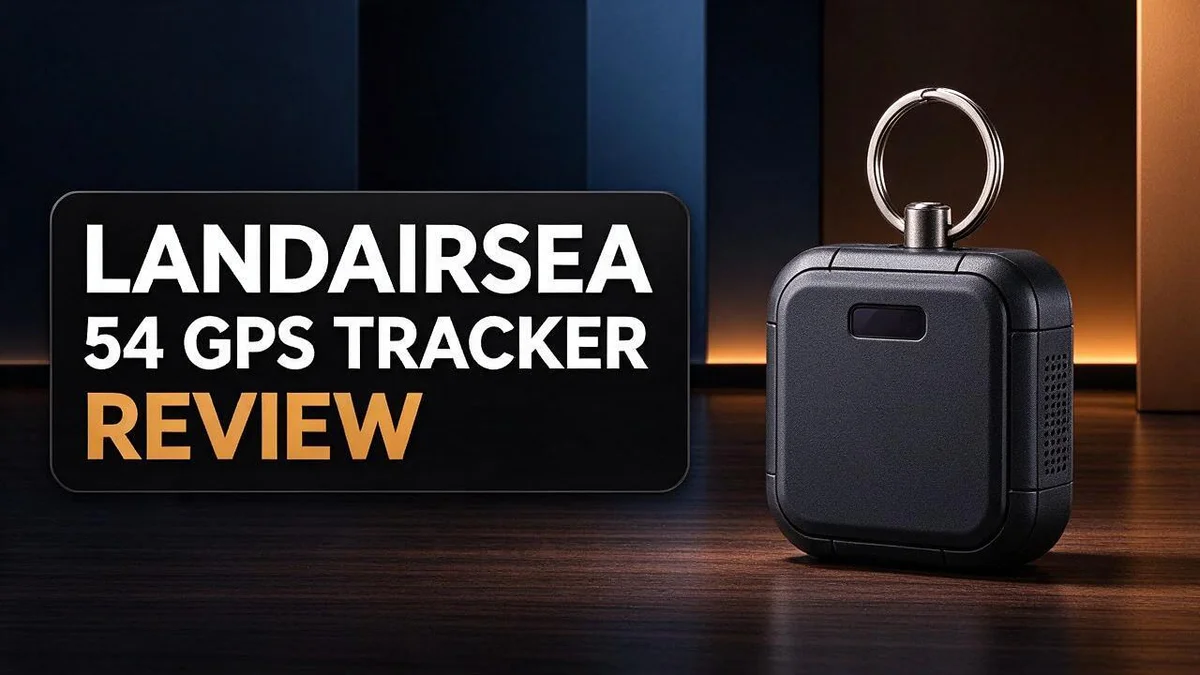
LandAirSea 54 GPS Tracker Review: Should You Buy It?
Losing track of a vehicle, a trailer, or a loved one is stressful. A reliable GPS tracker gives you peace of mind every single day. The LandAirSea 54 GPS Tracker promises exactly that with a compact build and smart features.
Setup takes only minutes, so you can start tracking right away. Its small body hides easily, which helps when discretion matters most. Inside, you will find a large battery that lasts a long time between charges.
The tracker offers global tracking with an international SIM. You can view route history and set geofence, speed, and battery alerts. Its powerful magnet holds firmly to metal surfaces, and the lifetime warranty adds extra confidence.
Is it the right choice for you? This review covers performance, strengths, and who should buy it. We also compare it with top rivals.
In a Nutshell
-
Rugged and discreet: The compact design carries an IP67 waterproof rating. It handles rain, mud, and splashes, so it stays out of sight and keeps working.
-
Strong magnetic mount: The built-in magnet holds firmly to metal surfaces. You can place it under a vehicle or inside a trailer with ease.
-
Lasting battery: The large battery keeps the device running for a long time. You will not need to recharge it often, which helps during long trips.
-
Smart alerts and route history: Geofence, speed, and battery alerts keep you informed. You can also review past routes on the map to spot patterns.
-
Peace of mind: The lifetime warranty covers replacements. If a unit fails, the company sends a new one to you.
-
Main drawback: It needs an ongoing data plan subscription. Some buyers prefer devices without recurring plans, so they may look at options like the Optimus 3.0 GPS Tracker, which many reviewers praise for its battery life.
Key Features and Setup

Last update on 2026-09-19 / Affiliate links / Images from Amazon Product Advertising API Some of the links on this website are affiliate links, which means that at no additional cost to you, I earn a commission if you click through and make a purchase. I only recommend products and services that I believe will add value to my readers. Thank you for your support!
Placement shapes how well this tracker works. Many owners hide it under a seat, inside a cargo box, or behind a trailer panel. That spot matters more than you might expect.
The magnet makes it simple to move the unit around. Still, plastic parts and thick walls can weaken the signal. So test the location before you leave it alone.
Take a short test drive first. Park the vehicle, then check the location on your phone. Drive for a few minutes and confirm that updates arrive as expected.
Setup also depends on your plan. Choose your data plan before you activate the device. That way, you avoid surprises during your first week.
Gather a few tools before you begin. A small bracket, a cleaning cloth, and your phone nearby will help. Clean the mounting surface first so the magnet grips well.
Boats and trailers face rough conditions. Check the mount after tough trips, even with a rugged design.
Think about your daily routine too. A tracker that suits a weekend camper may not suit a daily commuter. Consider how often you need updates.
Compare the top options. Logistimatics Mobile-200 suits people who want covert use with 5G and 4G LTE support. Optimus 3.0 stands out for its long battery life, so it fits those who park for days.
Discreet use also brings responsibility. Tell family members about any tracker you place on shared vehicles. Check local rules before you hide a device on someone else’s property.
Reviewing location history works best each week. Look for patterns in routes and stops. These patterns can reveal useful habits.
The LandAirSea 54 sits between these choices. It balances size, discretion, and ease of use. Match the tracker to your main goal, and you will get the most from it.
Design and Build Quality
Build quality decides whether a tracker lasts through daily use. The LandAirSea 54 feels simple to handle and easy to hide. Here is what matters most.
Start with the surface you choose. The magnet grips best on clean, flat steel. Paint, dirt, or rust can weaken the hold, so wipe the spot first.
Test the hold before you leave. Give the unit a gentle tug after you attach it. A firm grip now prevents a lost signal later.
Check the mount often. Rough roads and trailer bounce can shift a unit over time. A quick look every few weeks keeps it secure and in place.
Watch the temperature. Hot dashboards and freezing nights stress any electronic device. Park in shade when possible to protect the unit and its battery.
Handle it gently during setup. Pressing hard on the casing can strain the seals over time. Slide the unit into place with light, steady pressure instead.
Keep the outside clean. Mud, sand, and salt can build up on the housing. A soft cloth and fresh water remove most of it without any harm.
Think about where it will ride. Boats and trailers face spray, vibration, and long hours in the open. Choose a spot that stays shielded from direct impact.
Check the case after rough trips. Look for scratches, loose edges, or dirt near the seals. Small damage often shows up before bigger problems start.
Plan for battery care. A large battery lasts long, yet it still needs regular charging. Note how often you recharge so you know what to expect.
Save your order details. If a problem appears, clear records make any claim faster. Keep your account login and order number somewhere safe.
Good build creates lasting trust. A solid tracker stays hidden, holds firm, and works when you need it most. Treat it with care, and it should serve you well for years.
Real-Time Tracking Accuracy and Coverage
Live tracking depends on a strong cellular signal. The LandAirSea 54 sends its location through a mobile network. The map on your phone is only as fresh as that connection.
Global tracking sounds simple, but coverage varies from place to place. Remote farmland, mountain passes, and dense forests can weaken the signal. Crowded city blocks with tall buildings can cause short gaps too.
Travel across borders is where the international SIM helps. The device can keep reporting as it moves between countries. Roaming networks may still differ from your home carrier in speed and reliability.
Underground parking, metal sheds, and steel shipping containers can block signals completely. Parking in an open area often gives the clearest updates. Think about where the vehicle sits overnight, since that spot affects the trail.
Check the trail after each trip. Gaps in the route usually point to weak coverage rather than a faulty unit. Compare the recorded path with your real drive to spot patterns over time.
Before you depend on the tracker, run a simple coverage test. Drive your usual routes and watch the map on your phone. Note any spots where the dot stops moving or lags behind. Repeat the test at different times of day, since network traffic can change.
The research does not publish exact accuracy figures or update rates. Treat the map as a close guide rather than a precise survey. For most owners, a clear view of the general area is enough to feel secure.
Rural and urban use call for different expectations. Rural owners should look at network coverage first. City owners should focus on how the device handles tall buildings and busy streets.
Ask questions before you buy. Find out which networks your area supports and how long updates take to appear. A short conversation with the seller can prevent frustration later.
Top 3 Alternatives
Not every buyer wants the same features, so these three options offer different strengths. Each one fits a different need.
Apple AirTag


Last update on 2026-11-03 / Affiliate links / Images from Amazon Product Advertising API Some of the links on this website are affiliate links, which means that at no additional cost to you, I earn a commission if you click through and make a purchase. I only recommend products and services that I believe will add value to my readers. Thank you for your support!
Apple AirTag works well for people who own an iPhone. It slips into a keychain, backpack, or wallet with ease. The tag connects to the Find My app, so you can check its last known location on a map. Setup takes just a few minutes. Many owners like how nearby Apple devices help narrow down a search.
Tile Mate

Last update on 2026-11-03 / Affiliate links / Images from Amazon Product Advertising API Some of the links on this website are affiliate links, which means that at no additional cost to you, I earn a commission if you click through and make a purchase. I only recommend products and services that I believe will add value to my readers. Thank you for your support!
Tile Mate offers a simple way to find everyday items. It works with the Tile app on both Android and iOS devices. You can ring the tag from your phone when it sits nearby. Tile also lets users help each other. When another person with the app passes your lost item, its location can update for you.
Tractive GPS

Last update on 2026-09-19 / Affiliate links / Images from Amazon Product Advertising API Some of the links on this website are affiliate links, which means that at no additional cost to you, I earn a commission if you click through and make a purchase. I only recommend products and services that I believe will add value to my readers. Thank you for your support!
Tractive GPS fits pet owners who need tracking over long distances. It uses GPS and cellular signals to show where your dog or cat roams. You can set safe zones and receive alerts when your pet leaves them. Live updates help you act fast. Many families choose it for hiking trips, yard escapes, or daily walks.
Battery Endurance
A tracker only helps when it stays powered. The LandAirSea 54 carries a large battery, so it can run for long stretches between charges. Your actual runtime still depends on how you use it.
Location updates drain power the most. Frequent pings use more energy than occasional ones. Think about when you truly need live views and when a quick check will do.
Movement keeps the device active. A vehicle that sits still for days will usually last far longer than one that drives every day. Daily trips mean more reporting and faster drain.
Battery alerts give you early warning. The LandAirSea 54 can send alerts when charge runs low. Turn these on so you have time to recharge before the tracker goes silent.
Build a simple charging routine. Charge the unit fully before long trips. Note how many days it lasts during a normal week. Over time, you will know exactly when the next charge is due.
Compare runtime with rival trackers. The Optimus 3.0 GPS Tracker ranks at the top for long battery life. The LandAirSea 54 focuses more on a discreet build and simple setup. If runtime matters most, test both options during your own routine.
Plan for battery wear over time. Every battery loses some capacity as years pass. Expect runtime to shrink slowly. If the battery fades fast, contact support, since the lifetime warranty may offer replacement options.
Storage needs a charge check too. Vehicles that sit unused for weeks can still drain the tracker. Charge the unit before storage and check the level again before you drive off.
Pick the right habits for your needs. Some people need constant updates for a work fleet. Others only want peace of mind for a weekend boat. Match your tracking habits to your daily use, and you will avoid surprises.
Small habits make a big difference. Good charging keeps the tracker ready when you need it most.
Ongoing Data Plan and Costs
Think of the data plan as the engine behind every location update. Without an active plan, the LandAirSea 54 cannot send its position, no matter how strong the battery or magnet is.
Because the plan recurs, it becomes part of your regular routine. Owners can easily forget about it until the tracker goes silent.
Read the plan terms before you commit. Look for the renewal date, the cancellation steps, and what happens when the plan expires.
Some plans renew on their own, so check that setting in your account.
Set a reminder a few days before renewal. This simple habit prevents gaps in your tracking history.
Keep your payment details current so renewals go through without trouble.
Coverage also ties to the plan. Check that it covers the countries you visit most often.
Consider how the plan fits your use. A parked vehicle may not need constant reporting.
A boat or trailer used every weekend might rely on steady updates. Match the plan to your actual habits.
Pause or change options matter too. Ask whether you can suspend service during the off season, so the tracker stays ready for the next trip.
A rival tracker like the Logistimatics Mobile 200 also runs on 5G and 4G LTE networks, so compare network support when you review plans.
Test the plan right after activation. Open the app and confirm the latest location shows up within a few minutes.
Keep a simple record of your renewals. Note the start and end dates in a notes app. Over time, this record shows how the plan fits your habits.
A clear plan keeps your tracking history complete. Review the terms now, and your LandAirSea 54 will stay online when you need it most.
Pros and Cons
Pros
- Setup takes only minutes.
- The compact body hides easily in a vehicle or cargo.
- IP67 water resistance handles rain and splashes.
- The strong built-in magnet grips firmly on metal surfaces.
- Lifetime warranty replacements keep the device covered over time.
Cons
- A recurring plan may not suit every buyer.
- Shoppers who avoid ongoing subscriptions will need another option.
- The magnet works best on clean metal surfaces.
Who Should Buy It
Parents of new drivers often feel uneasy when a teen takes the car alone. The LandAirSea 54 shows where the vehicle travels. Speed alerts also help start useful talks about safe driving.
Small business owners with a few vans or work trucks gain clear visibility. Managers can check routes without calling every driver. That saves time on busy days.
Owners of trailers, boats, and motorcycles also benefit. These assets often sit unattended for long periods. A quick location check brings real comfort.
Caregivers can use the unit with consent. Some families track an older relative who may get lost or need help. Always share the purpose openly with that person first.
Frequent travelers and RV owners may also find it helpful. Long road trips create many unknown stops and turns. Route history lets them review each journey later.
Buyers who need hidden placement should compare rivals first. The Logistimatics Mobile 200 also targets covert use.
Shoppers who dislike complex gadgets will appreciate the quick start. Setup takes only minutes, so no tech skills are needed.
Families with several cars can watch each vehicle from one place. This helps busy households stay organized during school runs and weekend trips.
Fleet managers with a larger group should test the unit first. Try one vehicle before ordering many units.
Buyers should also think about future needs, such as adding more vehicles. Plan for that growth before you buy.
Occasional users who only need a location check now and then may find it more than they need. Such users may prefer simpler options. Readers can then choose a model that matches their routine.
Start with one clear goal, then choose the features that support it. The right fit depends on how often you track and why.
Final Verdict
The LandAirSea 54 earns a strong spot on any shortlist. It combines a discreet design with clear tracking tools. Still, the best choice depends on your daily needs.
Pick this unit for simple monitoring. Most people finish setup in minutes. You can start watching your vehicle or cargo right away.
Covert use sits at the top of many wish lists. If hidden placement matters most, compare the Logistimatics Mobile-200 first. Its magnetic design and 5G and 4G LTE support suit those who need broad coverage.
Ask yourself how often you need updates. Daily checks call for live location and alerts. Occasional checks may need only a few key notifications.
Consider the route history feature. It helps you review past trips without extra effort. You can spot patterns over several weeks and decide where to focus your attention.
Think about the places you drive. Remote roads, dense cities, and rural areas all affect signal quality. Test the unit in your typical zones before you rely on it fully.
Plan your next steps carefully. Start with one device and learn how it fits your routine. Then expand your setup once you feel confident.
Keep the device in good shape and check its condition every few months. A quick look at the magnet and housing helps you catch wear early. Small habits keep your tracking reliable over the years.
Read reviews from owners who use the unit in conditions like yours. Their stories often reveal details that spec sheets miss. Use that feedback to set realistic expectations.
Finally, trust your own testing. A short trial period tells you more than any summary can. Your experience will guide the final decision.
Frequently Asked Questions
Can I use the LandAirSea 54 outside my home country?
Yes, the unit includes an international SIM. It works across borders, so you can follow a vehicle on a trip abroad. Check your plan terms before you travel.
Will I get a warning if the battery runs low?
Yes, the device sends battery alerts. You can also set geofencing and speed alerts. These help you act early if a vehicle leaves a set zone or drives too fast.
How does it compare with the Logistimatics Mobile-200?
The Mobile-200 also uses a magnet and supports covert use. It runs on 5G and 4G LTE networks. The LandAirSea 54 suits buyers who want a compact design and a simple setup.
Which tracker is better for a long battery life?
The Optimus 3.0 GPS Tracker ranks as the best choice for long battery life. The LandAirSea 54 also has a large battery. If battery time matters most, compare both units side by side.
Can I check where a vehicle has been?
Yes, the route history feature shows past trips. This helps you find where a vehicle stopped or which roads it used. It also helps when you need to confirm a trip was completed.

Hello everyone my name is Alenya and i am a gadget discovering Enthusiast 🐻🐻