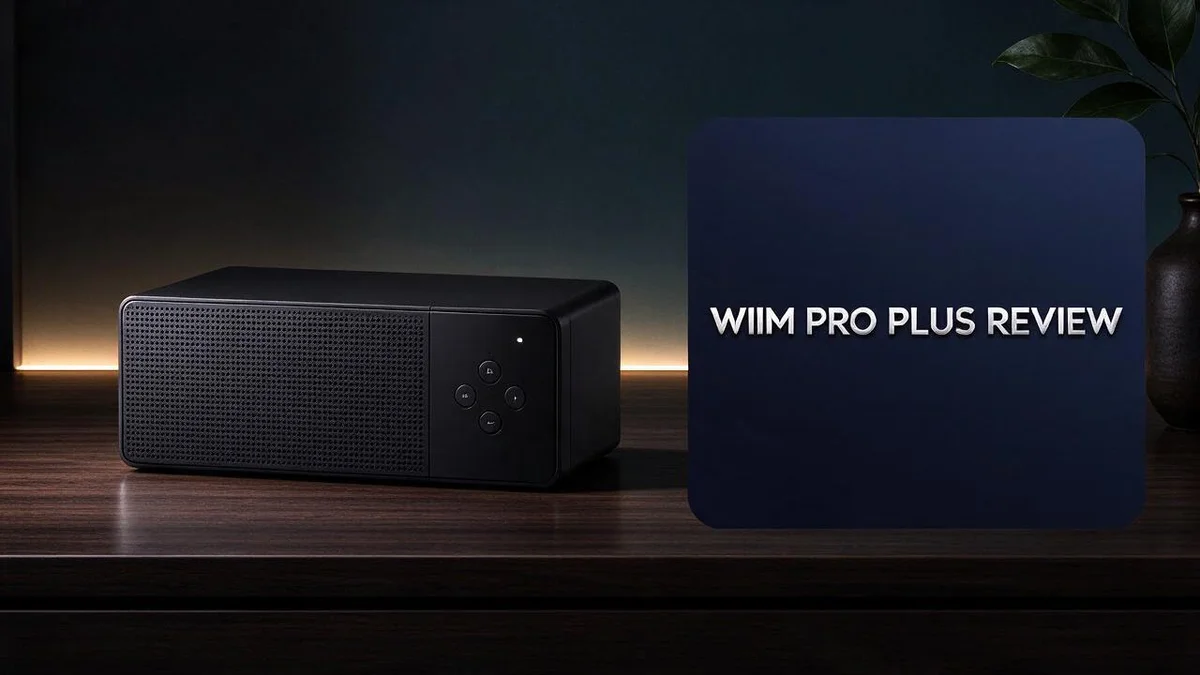
WiiM Pro Plus Review 2026: A Comprehensive Guide
Looking for a music streamer that does it all? The WiiM Pro Plus may be the device you need. It brings an upgraded AKM DAC, high resolution streaming, and smooth multiroom audio into one compact box.
You can stream from Spotify Connect, Tidal Connect, Qobuz, Deezer, and Amazon Music. AirPlay 2 and Chromecast work too. Voice control, optical and coax outputs, and Bluetooth 5.1 add even more flexibility to your setup.
Still, it has a few weak spots. WiFi connections can feel spotty, and the sound leans cold for some listeners. In this review, we look at what works, what doesn’t, and who should consider this streamer for their home.
In a Nutshell
- Apple fans get a smooth fit: AirPlay 2 and full HomeKit support make it easy to control the streamer from Apple devices. Most people in Apple homes will find setup simple.
- Room tuning comes built in: RoomFit helps shape the sound for the space where the box sits. This feature helps when you move the device between rooms.
- More services to choose from: Pandora and TuneIn join the lineup. Chromecast support also lets you cast music from many apps to the device.
- Sound control gets a boost: An EQ lets you adjust the tone to your taste. The analog input also connects older turntables or other gear.
- Watch the connection and tone: The wireless link can be spotty, and many listeners say the sound leans cold. One reviewer even called it “not perfect.”
- Ultra may suit some buyers: One review says the WiiM Ultra has the edge in almost every department, but it does lack the AirPlay feature. Shoppers who value other features should compare both models before they decide.
Key Features and Hardware Specs

Last update on 2026-11-06 / Affiliate links / Images from Amazon Product Advertising API Some of the links on this website are affiliate links, which means that at no additional cost to you, I earn a commission if you click through and make a purchase. I only recommend products and services that I believe will add value to my readers. Thank you for your support!
Let’s look at what sits inside this small box. The WiiM Pro Plus packs many ports and features into a compact body.
The analog input stands out. You can connect a CD player, a TV, or another line level source. This turns the streamer into a central hub for your gear.
Chromecast support adds another way to send music. You can cast from phones, tablets, and many compatible apps. There is no need to open a separate app every time.
The digital outputs open up different options too. You can send a clean signal to an external amplifier or a separate DAC. Many listeners use this path with a favorite amp they already own.
Hardware like this rewards a planned setup. Think about where your speakers sit and which sources you use most. Then choose the inputs and outputs that fit your daily habits.
The upgraded converter also helps when you own a large library of high quality files. Your collection gets a capable partner in the box.
Not every buyer needs every port. Someone who only streams from apps may never use the analog input. Someone with older equipment may use it every day.
Think of the Pro Plus as a flexible core. It accepts sources from the past and the present. It can also feed the systems you add later.
Casting and app streaming can share the same speakers. Friends can send a song from their phone while you use the app. This makes the box handy for guests.
Ports matter most when they match your routine. Check your devices before you buy. A quick list of your sources makes the decision clear.
Look at the back panel before you commit. Every port shows a way to grow your system later. Good hardware leaves room for new gear.
Overall, the spec sheet reads like a full toolkit. Each input and output gives you a new way to build your audio setup.
Sound Quality and DAC Performance
Sound quality often decides whether a streamer earns a spot in your room. The Pro Plus puts its focus on the digital to analog converter, which handles most of the heavy lifting.
A converter turns digital files into sound. Every song you stream is stored as numbers. The converter reads those numbers and turns them into an electrical signal. A better converter can keep more detail from the original recording.
Clean output shows in quiet passages. Soft piano notes and light vocals often reveal the difference first. Listeners may hear more air around instruments and a cleaner background. Lossless files from services like Qobuz show these gains best. Results still depend on your speakers and room, so test with familiar tracks.
Spec numbers only tell part of the story. A Reddit user mentioned a small streamer that supports up to 768kHz and 32 bit audio, and claims it outperforms the Pro Plus on specs. Still, most homes never play files that need that headroom. Many streaming services send compressed files, so the extra headroom may go unused.
The tone leans cold for some listeners. Many reviewers say the sound feels cool and a bit sharp. A few small tweaks in the EQ may warm things up. Try lowering the treble a little to soften vocals.
Reviewers still see room for improvement. One reviewer called the unit not perfect, which fits the mixed feedback on sound. Some buyers may want a second listen before deciding. If possible, try it with your own speakers first.
Your speakers matter as much as the box. A great converter cannot fix thin speakers or a bare room. Pair the Pro Plus with speakers that suit your taste. Good matching gives you the best results from your setup.
Listen with your own ears. The Pro Plus offers a capable DAC and useful tuning tools. Take time to test it with favorite albums. Your ears will tell you if the sound fits your home.
Streaming Services and Wireless Connectivity
Streaming services shape how you find and play music every day. The Pro Plus supports many popular apps, so you can keep the playlists you already love.
Spotify Connect and Tidal Connect let you choose the speaker from inside each app. Open the app, tap the device menu, and pick the box. Simple steps like these make setup feel easy, even for new users.
Qobuz and Tidal focus on high resolution catalogs. If you care about detailed files, check which service offers them before you sign up.
Deezer, Amazon Music, Pandora, and TuneIn add even more choice. Many people already use one of these apps on their phone. The box fits right into a routine they know.
Think about who listens most. A family may want Spotify for shared playlists. A music fan may prefer Qobuz or Tidal for deeper catalogs. Matching the app to the listener keeps everyone happy.
Your network matters a lot. A steady wireless link keeps songs from stuttering or pausing. Place the box near your router, and avoid thick walls between the two.
Multiroom sessions need a stable connection in every room. Test each speaker before a long listening session. This helps you spot weak spots early.
Bluetooth 5.1 offers a quick option for guests. A visitor can pair a phone and play a song in seconds. Bluetooth works well for short sessions, but network streaming usually gives you more control.
Pick the right method for each moment. Use network streaming for full access and multiroom sessions. Use Bluetooth for quick playlists at a party or a casual dinner.
The best streaming setup depends on your habits. Spend a week testing each app and each connection. You will soon know which path feels natural in your home.
Top 3 Alternatives
Looking for a different network streamer? These three options offer strong sound and flexible streaming. Each one suits a slightly different listening setup.
Bluesound Node

Last update on 2026-10-14 / Affiliate links / Images from Amazon Product Advertising API Some of the links on this website are affiliate links, which means that at no additional cost to you, I earn a commission if you click through and make a purchase. I only recommend products and services that I believe will add value to my readers. Thank you for your support!
The Bluesound Node is a popular choice for music lovers who want simple streaming. It works with the BluOS app, which gives you access to services like Tidal, Qobuz, and Spotify Connect. You can also group several speakers for multiroom listening in different rooms. It connects to your home network and sends clean sound to your amplifier or powered speakers.
Cambridge Audio CXN

Last update on 2026-11-06 / Affiliate links / Images from Amazon Product Advertising API Some of the links on this website are affiliate links, which means that at no additional cost to you, I earn a commission if you click through and make a purchase. I only recommend products and services that I believe will add value to my readers. Thank you for your support!
The Cambridge Audio CXN fits well into a traditional hi-fi system. It supports AirPlay 2, Chromecast built-in, and Roon Ready, so you can stream from many apps. Its design focuses on clear, detailed sound that pairs nicely with amplifiers you already own. It is a good pick if you value a classic audio look and steady performance.
Eversolo DMP-A6

Last update on 2026-10-14 / Affiliate links / Images from Amazon Product Advertising API Some of the links on this website are affiliate links, which means that at no additional cost to you, I earn a commission if you click through and make a purchase. I only recommend products and services that I believe will add value to my readers. Thank you for your support!
The Eversolo DMP-A6 is built for listeners who want more control. It has a large touchscreen and runs its own software, so you can browse your music library directly on the device. It supports many streaming services and offers balanced outputs for high-quality audio. It suits people who enjoy tinkering with settings and want a streamer that does a lot on its own.
Multiroom Setup and App Experience
Multiroom playback becomes simple after a quick setup. The app lets you group units and play one song across the house.
Start by naming each device after its room. Names like Kitchen or Office make grouping faster later.
Group only the rooms you use together. A party may need the kitchen and patio. A work session may need only the office.
The app also keeps volume separate for each room. You can set a calm level in the bedroom while the living room stays louder.
Check sync after you group rooms. Play a short track and listen for any gap between speakers. Regroup the rooms if the timing feels off.
Keep the app updated so new features arrive. Look for update prompts before a big event.
Home control adds another layer. The unit is fully HomeKit compliant, so you can add it to the Apple Home app. Then you can manage playback from your iPhone.
Voice control works in a similar way. Ask your assistant to pause the kitchen speaker or raise the patio volume.
Label your speakers clearly for guests. Friends can choose a room without asking for help. This keeps the host free to enjoy the party.
Speaker placement shapes the grouped experience too. Put each unit where it sounds balanced and easy to reach.
Use separate groups for daily routines. Create one group for mornings and another for evenings. Switching takes only a tap, so the mood changes fast.
Shared spaces need extra care. Background music works best at a low level in open areas.
Plan the group before guests arrive. Test each room once. A short check avoids surprises during the event.
Leave the grouping open if you change rooms often. A simple reset lets you rebuild the setup in minutes.
Pros and Cons
Pros
– Broad feature set packs streaming, multiroom, and voice control into one box.
– The app feels simple for everyday use.
– AirPlay 2 gives Apple users another easy way to play music.
– Analog input and EQ let you shape the sound.
– The upgraded AKM DAC handles detailed audio with clear output.
Cons
– Some users may see the connection drop during longer listening sessions.
– One reviewer reported feeling dizzy after using the unit.
– Some reviewers feel the WiiM Ultra edges it out in most areas.
Who Should Buy It
The WiiM Pro Plus fits best for people with an existing stereo. It acts as a bridge between your phone and your speakers. Older receivers and amplifiers gain streaming without a full replacement.
Home theater fans can also benefit from the digital outputs. Optical and coax connections let you send sound to a soundbar or AV receiver. This setup lets your TV sound run through a system you already own.
Vinyl fans may enjoy a mixed setup. A record player can connect through the analog input. Many turntables need a phono preamp first.
Listeners who want warmer sound should test it first. Some buyers find the tone a bit cold. Try a few favorite tracks before you commit to a setup.
Pure spec chasers may look at other options. One Reddit user points to a small streamer that handles up to 768kHz with 32 bit depth. That claim comes from a single user, so compare the details yourself.
Renters and frequent movers can take it along. It connects to any amplifier or powered speaker with an input. Setup stays quick in a new space.
Shoppers who want less clutter may appreciate this design. Fewer boxes mean fewer cables on the shelf. That simple setup suits many living rooms.
People who want a flawless experience may want to test it first. Reviewers call it not perfect. Try it for several days before you decide.
Home office workers may use it for background music. Calm playlists can run all day in a study or kitchen.
Listeners who mostly use one room may not need every feature. A simpler streamer may suit that space better. Extra tools would sit unused in that case.
Write down your listening habits before you buy. That short list will guide your choice.
This unit suits people who want many features and a friendly app. It fits best when the sound and network meet your needs.
Final Verdict
The WiiM Pro Plus is a strong pick for busy music fans. It brings many streaming services, multiroom play, and voice control into one small unit. It also keeps setup short for most people.
Its biggest strength is range. You can stream from phone apps, connect older gear, and add voice control with ease. This mix makes it a solid base for a growing system.
The main risk is your home network. A weak signal can cause dropouts, so test the unit in its planned spot first. Moving it closer to your router often fixes the problem.
Think about how you listen before you buy. If your day runs on phone apps and smart speakers, this fits well. If you want a full stereo build, plan your cables and inputs now.
Choosing between this model and the WiiM Ultra comes down to daily needs. Ask which features you use most each week. Let that answer guide your choice more than any headline spec.
Households with several music accounts will appreciate having them all in one app. Nobody needs to switch devices to hear their favorite playlist. Everyone can pick what they play next.
Room size matters as well. A small bedroom setup will feel very different from a large open living area. Plan your speaker choice around the space you have.
Upgrades can come later. You can add speakers, a turntable, or a subwoofer over time. The unit grows with your system.
Many shoppers end up happy with the choice after a week of daily use.
Our verdict is simple: this unit suits people who want one box that does a lot. Check your wireless signal, weigh your must-have features, and test the sound with music you already love. With those steps done, you can buy with confidence.
Frequently Asked Questions
Does it work with Google Cast apps?
Yes, it supports Chromecast. Google fans can cast music straight from their phone. This gives you another simple way to start a song. You can also use the app if you prefer.
Which music services can I use?
It works with Spotify Connect, Tidal Connect, Qobuz, Deezer, Amazon Music, Pandora, and TuneIn. If you already have an account, you can keep your playlists. Each service works from the same app, so you can switch between them in seconds.
Can it play music without a wireless network?
Yes, it uses Bluetooth 5.1 to link with nearby devices. This option helps when you need a quick backup. A steady home network still gives the best results. It keeps your streams smooth and your setup easy to manage.
Is it compatible with Apple Home?
Yes, it is fully HomeKit compliant. You can add it to the Home app and manage it with your other smart devices. This works well if your home already runs on Apple products. Setup takes only a few minutes once the unit joins your network.
Does it support high resolution music files?
Yes, it can stream high resolution audio. Tidal and Qobuz tracks let you hear the most detail. Your speakers and cables also shape the final sound. Good source files and a clean connection help you get the best from the unit.

Hello everyone my name is Alenya and i am a gadget discovering Enthusiast 🐻🐻