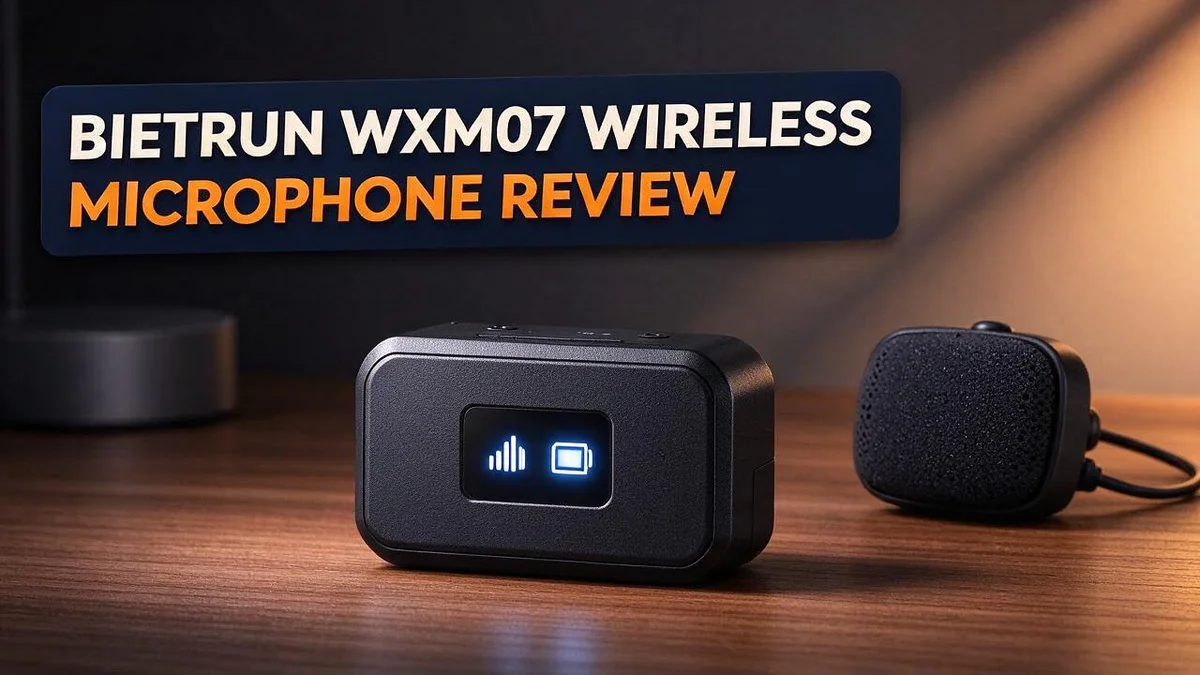
Bietrun WXM07 Wireless Microphone Review: Worth the Splurge?
Clear audio can make or break a video. Viewers will leave fast if they cannot hear you well. That is why many creators look for a simple wireless mic.
The Bietrun WXM07 is a UHF wireless lavalier mic kit with a receiver. It works with iPhone, iPad, Android phones, and DSLR cameras. Many people use it for gym video recording and YouTube content.
Want to know if it fits your setup? This review covers the key features, the everyday strengths, and the issues some users report. You will also see where it works best.
Sound quality matters most when you film on the move. Some users mention background noise during OBS streams, so you should test it first. Read on to decide if this mic suits your next project.
In a Nutshell
- Works with phones and cameras: The mic supports iPhone, iPad, Android phones, and DSLR cameras, so you can use it across several devices.
- Suited to active filming: Many people use it for gym video recording and YouTube clips where the speaker moves around a lot.
- Range claims differ: Listings show conflicting distances, so check the range against your room or outdoor shoot before you depend on it.
- Multi mic kit option: Some listings describe an 8 channel system with 8 rechargeable mics, which can help with group shoots or several presenters.
- Background noise may appear: Some users report steady background noise during OBS live streams, so test your setup before going live.
- Channel setup needs care: A general Bietrun guide suggests the first connected device may broadcast to every receiver. This has not been confirmed for this model, so test it first.
Audio Quality and Noise Reduction

Last update on 2026-11-06 / Affiliate links / Images from Amazon Product Advertising API Some of the links on this website are affiliate links, which means that at no additional cost to you, I earn a commission if you click through and make a purchase. I only recommend products and services that I believe will add value to my readers. Thank you for your support!
Good sound starts with mic placement. Clip the mic about six inches below the chin, and keep the capsule facing the mouth. This simple step often matters more than any other setting.
Clothing can cause trouble too. Rubbing fabric creates crackling noise that the mic picks up fast. Tuck loose collars and move the cable so it does not brush against your shirt.
Room shape also changes the sound. Hard walls, glass, and tile bounce your voice back into the mic. Soft items like rugs, curtains, and couch cushions absorb those reflections and make speech feel clearer.
Wind is a major enemy outdoors. Even a light breeze can cause a rough rumble on the recording. If you film outside, cover the capsule with a foam windscreen, or pick a quiet spot away from traffic and fans.
Input level matters as well. Set the gain so your voice peaks around the middle of the meter. Too high a level creates harsh distortion, while too low a level brings up hiss when you raise the volume in editing.
Always run a short test before you record. Wear headphones, speak at your normal volume, then move around as you would during the shoot. Listen for clicks, muffled tones, or fading sound at the edges of your movement.
Headphones also help you catch problems early. Monitoring live audio shows you exactly what viewers will hear. If the sound breaks up when you walk away from the receiver, move the receiver closer or adjust your position.
Channel interference deserves a check too. Some general Bietrun guides suggest the first connected device can take over the signal, though this has not been confirmed for this model. Turn off other nearby wireless gear, then confirm each mic pairs with the correct receiver.
Clean audio takes patience, but it pays off. A few small habits can cut background noise and keep your voice clear. Test, adjust, and listen again before every session.
Wireless Range and Signal Stability
Signal stability decides whether your audio stays clean. A strong link keeps your voice clear from start to finish.
Wireless signals travel best in a straight line. Walls, doors, and thick furniture can weaken them fast.
Place the receiver where it can see the transmitter. Keep it on top of the camera or on a desk in plain view.
Your body can block the signal too. Clip the transmitter on the front of your chest, not on your back.
Test your walking distance before a real shoot. Walk slowly away from the receiver while someone watches the audio levels.
Pay attention to dropouts. A short crackle or sudden silence means the link is struggling.
Metal objects and large appliances may also cause interference. Move the receiver away from fridges, microwaves, and metal shelves.
Crowded places add trouble. Many phones and home routers share the same airwaves, so the signal can wobble.
Keep the transmitter charged before every session. A steady battery helps the device hold a consistent connection.
Mark your safe zone on the floor. Tape a small X where the signal stays strong, so you can return to it easily.
Outdoor shoots need extra care. Open fields seem ideal, yet tall grass, trees, and distant buildings still affect the link.
Moving subjects test the connection most. Gym sessions often involve running, turning, and bending, which can shift the transmitter.
Keep a backup plan ready. Record a short test clip with a second audio source when the shoot matters most.
Recheck the link every time you change locations. A spot that worked in the kitchen may fail in the garage.
Stable range means fewer retakes. You save time, avoid frustration, and keep your footage looking polished.
Good range comes from planning, not luck. Walk the space, test the signal, and adjust your setup before you hit record.
Channel Setup and Multi-Device Use
Channel setup decides which mic talks to which receiver. Get this step right before you film anything.
Start by powering on the transmitter and receiver one at a time. Watch the indicator lights so you know both units are active.
Next, check the channel number on each unit. Use a different channel for each mic during a group shoot. This keeps voices from mixing together.
The research reports no manual channel switching on this model. Some general Bietrun guides say the first device that connects may send audio to every receiver. This has not been confirmed for the WXM07, so test it yourself.
For multiple devices, plan your setup before shoot day. Label each transmitter with tape or a marker. Label each receiver the same way so you always know who is who.
Try this simple test with two people. Have each person speak while the other stays quiet. Listen on each receiver to confirm the right voice comes through.
Pairing a phone and a camera at once can cause trouble. Connect one main device first. Add the second device only after the first one works well.
If you own the full kit, charge all eight mics before a big project. Mixed battery levels can cause one unit to cut out during a take. Charge the whole set the night before.
Record a short clip on each device. Play it back and compare the sound. This step shows you which setup works best for your project.
Keep a simple notes sheet with each channel number and device name. Update it after every change. A written record saves time when you troubleshoot on set.
When you finish, switch off the transmitters first and the receiver last. This habit protects your settings for the next session. Good planning makes a multiple device setup feel simple and calm.
Top 3 Alternatives
Rode Wireless GO II


Last update on 2026-11-06 / Affiliate links / Images from Amazon Product Advertising API Some of the links on this website are affiliate links, which means that at no additional cost to you, I earn a commission if you click through and make a purchase. I only recommend products and services that I believe will add value to my readers. Thank you for your support!
Looking for a clip on mic that just works? The Rode Wireless GO II is a strong choice for creators. It includes two transmitters and one receiver, so you can record two people at once. Its internal recording backup saves your audio if the signal drops. Vloggers and filmmakers often like its small size and simple controls.
DJI Mic 2

Last update on 2026-11-06 / Affiliate links / Images from Amazon Product Advertising API Some of the links on this website are affiliate links, which means that at no additional cost to you, I earn a commission if you click through and make a purchase. I only recommend products and services that I believe will add value to my readers. Thank you for your support!
The DJI Mic 2 focuses on clean sound and long range. Its noise reduction helps cut background sounds in busy places. The charging case keeps your mics charged and ready to go. It works well for travel videos, events, and solo creators.
Hollyland Lark M2

Last update on 2026-11-06 / Affiliate links / Images from Amazon Product Advertising API Some of the links on this website are affiliate links, which means that at no additional cost to you, I earn a commission if you click through and make a purchase. I only recommend products and services that I believe will add value to my readers. Thank you for your support!
The Hollyland Lark M2 is a compact option for busy shooters. It fits easily in a small pocket or camera bag. Its audio stays clear, and it suits talking head videos and tutorials. Setup takes only a few minutes, so you can start recording fast.
Each mic suits a different shooting style. Compare range, size, and recording features before you decide. The right pick depends on how you film.
Compatibility with Phones and Cameras
Compatibility is one of the first things to check before you buy a wireless mic. The Bietrun WXM07 is listed for iPhone, iPad, Android phones, and DSLR cameras. That mix covers most everyday creators who film at home, at the gym, or on the go.
Phone users often shoot on the move. A gym workout or a quick tutorial can be recorded on an iPhone or Android device without a separate audio recorder. This makes the mic handy for short, casual clips.
Tablet owners can use it too. The iPad appears on the compatibility list, so a creator who edits or films with a tablet has another option. Still, check your device model before you plan a shoot.
DSLR cameras need a slightly different plan. Most DSLR models use a dedicated audio input, so the camera side matters as much as the phone side. Look at the input jack on your camera first, then confirm that the receiver fits that port.
Android users should also check their phone’s port type. Some newer phones skip the standard headphone jack. In that case, an adapter may be needed to connect the receiver. The sources do not list exact cables or adapters for each device, so read the product manual before you order extra parts.
Live streaming on a phone brings its own demands. Long sessions can drain the phone battery quickly. Close other apps and keep the phone cool, so the recording stays steady from start to finish.
Camera filming works best when you plan the setup in advance. Decide which device will be your main recorder. Then match the mic to that device first, and add a second device only after the main setup works well.
Overall, the device list makes this mic flexible. Phone creators and camera filmers can both find a use for it. Confirm your connection type, and you can start recording with fewer surprises.
Battery Life and Charging
Battery life is one area you can plan for. The sources do not list an exact runtime for this model. You need to measure it yourself before a real project.
Start with a simple runtime test. Charge one transmitter fully and record a short clip every fifteen minutes. Note the moment the sound becomes weak or cuts out.
If the audio turns thin or crackly during a shoot, pause for a moment. Check the battery level before you continue. A quick top up often saves the take.
Write your results in a notes app on your phone. Include the date, the time, and the device you used. After a few sessions, you will see a clear pattern.
Build a charging routine the night before a shoot. Charging on the same evening keeps your schedule calm. You avoid rushing in the morning.
Use a small label or sticker on each mic. Mark it as charged and tested. This habit stops confusion when you manage a full kit.
Watch the status light during charging. Many small wireless units show a light when the battery is full. Wait for that signal before you unplug.
Store spare units in a dry case. Keep them away from direct heat, such as a car dashboard in summer. Heat can wear down batteries over time.
Long gym sessions need extra planning. Schedule short breaks to top up the transmitter from a power bank. Pack the original cable with the kit so you never search for one on shoot day.
Do not forget the receiver. A dead receiver stops the audio as fast as a dead mic, so check its power too.
Test first, charge early, and store units well. Good battery habits protect both your audio and your time. Your voice stays clear from the first word to the last, and your recordings feel smooth.
Pros and Cons
Pros
- Works with iPhone, iPad, and Android phones
- Supports DSLR cameras too
- Uses a noise canceling pin style mic
- Suits gym video recording and YouTube
- Includes a receiver for a simple wireless setup
Cons
- Users report persistent background noise on OBS streams
- Listed range conflicts between sources
- Research does not confirm manual channel changing
- Some setup details come from general guides, not this model
Who Should Buy It
This mic suits a specific group of creators best. Think about how you film, move, and share your work. The right match makes all the difference.
New creators often feel lost in a sea of gear. This mic keeps the setup simple and direct.
Gym goers and fitness coaches are the clearest fit. They move constantly and need voices captured from a short distance.
Mobile vloggers who film while walking can also benefit. A small mic near the chest keeps speech clear.
Content creators who shoot indoor workouts at home also fit the profile. They need steady audio without a complicated rig.
Teachers who record short lessons at home may like it too. They gain clean sound without building a studio.
Families who record birthdays or school projects can use it as well. Quick setup helps when time is short.
Remote workers who host video calls from different rooms may find it handy. Moving between spaces stays easy.
Podcasters who record in quiet rooms may prefer a desk microphone instead. Fixed setups often sound more natural.
Interview style creators with one fixed spot should consider other options. Stationary gear suits that style well.
Beginners who want to learn audio basics should expect a learning curve. Practice helps them understand mic placement.
Creators who want a quick start without deep research will like the simple approach. Shoppers who plan several different uses for one kit may find it useful.
Those who expect studio quality sound should look elsewhere. Lavalier style mics have clear limits in noisy spaces.
Buyers should also ask how often they will record. Frequent users benefit most from a dependable tool.
In short, this mic fits mobile creators with simple needs. If that sounds like you, it deserves a closer look.
Final Verdict
The Bietrun WXM07 works best for people who move while they record. It suits gym goers, fitness coaches, and mobile vloggers who want simple sound without heavy setup. For these creators, it can be a practical choice.
However, the mic is not a perfect fit for every creator. Users report persistent background noise on OBS streams. That issue matters if you plan to go live often. Test the mic in your own space before you rely on it for a long broadcast.
The range details also need a careful look. The sources do not agree on the listed distance, so you should not count on the longest number. Instead, walk a short test loop in your home or gym. Note the exact spot where the sound starts to drop.
Think about your recording style first. If you film in one fixed spot, a desk microphone may give you cleaner results. Podcasters who record in quiet rooms often prefer that option. This mic shines when freedom of movement matters more than studio polish.
Setup is the next big question. Some guides suggest the first device to connect may broadcast to all receivers. That claim comes from a general guide, not from this model’s own documents. Check how your receiver pairs before you record with a second person.
Overall, the WXM07 offers a simple and flexible path into wireless audio. It works with common phones, tablets, and cameras. Its strengths fit active filming and quick home projects. Its weak points matter most for live streams and fixed interviews.
Before you decide, ask yourself three questions. Will you move while filming? Will you stream live? Do you need clean sound in a noisy room? If you answer yes to the first question and no to the others, this mic may serve you well.
Take your time with the choice. Read your own routine honestly and run a short test before any big shoot. That simple step can save you from frustration later.
Frequently Asked Questions
Should I test the mic before a big shoot?
Yes, always run a test. Record a short clip in the same room you plan to use. Play it back with headphones and listen for hiss, rustling, or echo. This quick check shows how the mic sounds in your real space.
Where should I clip the mic for the cleanest sound?
Clip the mic about four inches below your chin. This spot keeps the mic close to your voice. Try a few spots and compare the results before you record.
How do I stop clothing noise from ruining a take?
Clothing rubbing against the clip can create loud scratching sounds. Pick a smooth shirt and tuck the cable under your collar. Keep loose fabric, jewelry, and zippers away from the mic.
Can I use it for a live stream?
You can, but test it first. Stream for five minutes and check the audio meter and the playback. If the background sound stays high, move closer to the mic and reduce fan noise or room echo.

Hello everyone my name is Alenya and i am a gadget discovering Enthusiast 🐻🐻