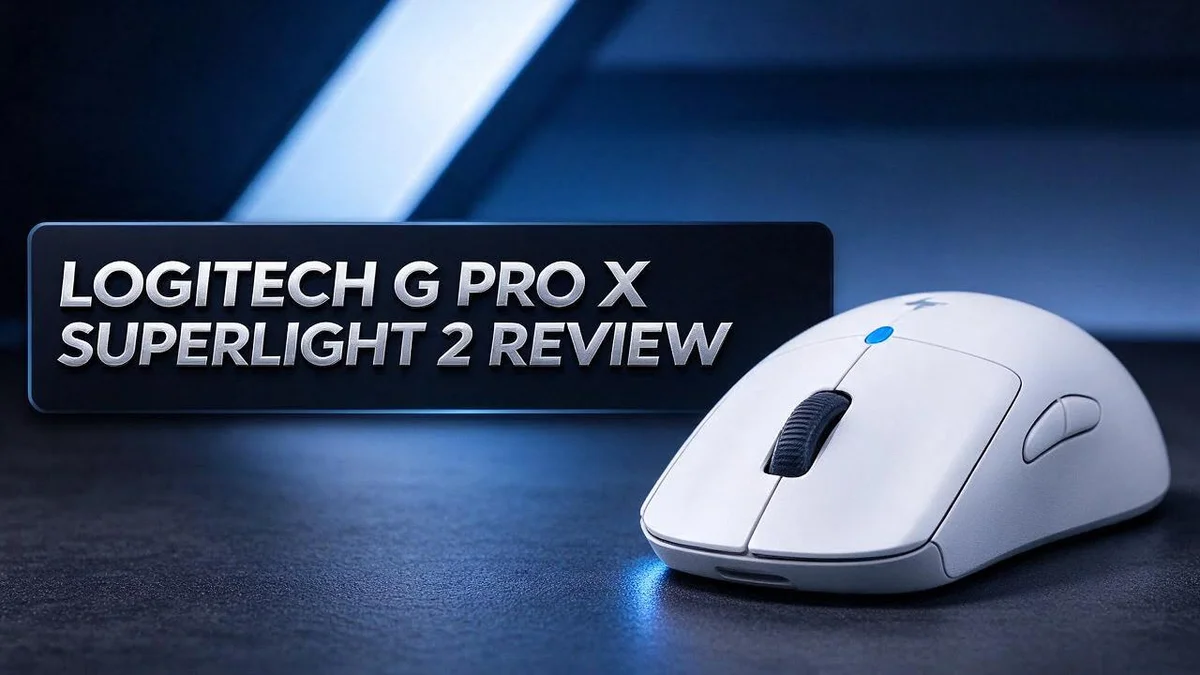
Logitech G Pro X Superlight 2 Review: Worth Buying?
Looking for a mouse that feels fast in every match? The Logitech G Pro X Superlight 2 could be your next pick.
It weighs just 60g and keeps the same ambidextrous shape as the original. Left-handed and right-handed players can both use it with ease.
Inside, you will find a new HERO 2 sensor and LIGHTFORCE hybrid switches. Together, they aim to deliver quick and precise clicks.
The mouse also offers polling rates from 125Hz up to 8000Hz. Battery life reaches up to 95 hours, so you spend less time charging.
In this review, we look at what works well, what feels off, and who should consider this mouse. Let’s see if the upgrades are enough to make you switch from the original.
In a Nutshell
-
Battery life stands out. The mouse lasts up to 95 hours, so gamers can play for days before they need to recharge. Long sessions stay easy to manage.
-
Side buttons got an upgrade. The thumb buttons feel better under the hand. Quick actions feel more direct during fast fights.
-
Higher polling needs more power. Choosing 8K polling draws more power than 1000Hz. Keep this in mind if battery life matters most to you.
-
Build feel is mixed. One user says the mouse feels hollow. That feel may come from the small compact PCB and battery inside.
-
Competition is strong. Rivals include the Razer Viper V3 Pro, the wired Razer DeathAdder V3, and the MCHOSE A7 V2 Ultra. Each one gives players a solid option to compare before they decide.
-
Best for competitive players. Gamers who want a light, fast mouse for ranked play will likely enjoy this model. Casual users may prefer a sturdier feel from a heavier design.
Sensor and Tracking Accuracy

Last update on 2026-09-19 / Affiliate links / Images from Amazon Product Advertising API Some of the links on this website are affiliate links, which means that at no additional cost to you, I earn a commission if you click through and make a purchase. I only recommend products and services that I believe will add value to my readers. Thank you for your support!
When a mouse feels accurate, aiming becomes easier. The sensor plays the biggest role in that feeling.
The HERO 2 sensor focuses on consistency. Every small hand movement should translate into the same response on screen. This matters most during fast flick shots, where a tiny delay or jump can cause a miss.
Tracking accuracy means the cursor follows your hand without drift. Players notice this most during quick turns and short corrections.
Consistent tracking also builds muscle memory. When the mouse responds the same way each time, your aim improves over many sessions.
Lift off behavior matters too. A good sensor stops tracking cleanly when you lift the mouse, so your crosshair stays where you left it.
Polling and sensor work together. Higher polling reports movement more often to your PC. This can make motion feel smoother, especially on high refresh monitors.
Real world results depend on your setup. Your mouse pad surface, sensitivity settings, and monitor refresh rate all shape what you feel. Test your settings before judging the sensor.
Sensor quality also affects how you track fast enemies. Smooth movement helps you keep a target in view during strafes and peeks.
Testing on a flat, clean surface gives the most honest results. Dust and uneven pads can add noise to any sensor.
Accuracy also matters outside of games. Drawing, editing, and browsing feel more natural when the cursor moves predictably.
Overall, the sensor feels dependable for competitive play. Players who value precise and repeatable movement will likely notice the difference. Many gamers rank this above extra features.
Shape, Weight and Build
Grip style decides whether a mouse feels natural. Most players use a palm, claw, or fingertip grip, and each one reacts differently to a light body.
Fingertip grip users usually get the best results from a light mouse. Small hands can flick the cursor with little effort during fast fights.
Palm grip players may need time to adjust. Less mass can make the mouse feel like it floats, so a short adjustment period helps.
Claw grip users often find a balanced middle ground. The fingers stay in easy reach of the buttons.
The overall frame stays low and compact. This low profile sits close to the desk, which many players find comfortable during long sessions.
Inside the shell, a tight layout packs in a small circuit board and battery. That tight packing may explain why some people notice a little flex when they press down.
Comfort matters more than specs for daily play. A mouse can look perfect on paper but still cause hand fatigue.
Try before you commit. Hold the mouse with your usual grip for a few minutes. Move it across a mouse pad in short and long strokes.
Who should pick this model? Players with small to medium hands who favor quick, precise movements will likely feel at home. Users with larger hands should test the shape first.
Long gaming sessions test every edge of a mouse. A shape that feels fine for ten minutes may cause discomfort after three hours. Plan breaks and stretch your hand often.
Desk setup also changes how the shape feels. A wide mouse pad gives your arm room, while a cramped desk pushes your wrist into awkward angles.
Ultimately, the frame should disappear in your hand. When you forget you hold it, the mouse is doing its job well.
Comfort also affects aim. A relaxed hand moves smoothly, while a tense grip can cause small jerks during tracking.
Battery and Wireless Connectivity
Freedom from cables is one of the biggest wins here. A wireless mouse lets your hand move without a wire pulling at the desk. That freedom matters most during long matches.
Battery life depends on how you use it. Your daily play time and sensitivity settings change the result. Heavy players may recharge more often than casual users.
Plan your charging around your schedule. Plug the mouse in during breaks or overnight. A short top up before a session keeps you ready to play. Set a weekly reminder if you tend to forget. Keep a spare cable nearby for charging.
Wireless signal stability matters too. A clean connection keeps every click and movement on time. Place the USB receiver close to your mouse. Use a short extension cable if the port sits behind your tower.
Keep the receiver away from interference. Metal objects, thick walls, and crowded desks can weaken the signal. Move the dongle to a front port if you notice stutters.
Your desk setup changes how the mouse performs. Big metal desks or crowded cable trays can get in the way. Clear space around the receiver gives you the best chance of a stable link.
Wired options are a handy backup. Check your mouse manual to see how to switch modes. Having a cable ready can save a match if the battery runs low.
Setup is quick and simple. Install the software, pair the receiver, and you are ready to play.
Travel and LAN events become easier. Wireless gear fits into a small bag with ease. Pack the receiver in the mouse case so nothing gets lost. A small pouch keeps the dongle safe on trips.
Overall, the wireless setup suits players who want freedom and steady battery life. Good habits keep the mouse ready for every match.
Top 3 Alternatives
Razer Viper V3 Pro


Last update on 2026-11-26 / Affiliate links / Images from Amazon Product Advertising API Some of the links on this website are affiliate links, which means that at no additional cost to you, I earn a commission if you click through and make a purchase. I only recommend products and services that I believe will add value to my readers. Thank you for your support!
The Razer Viper V3 Pro is a light mouse built for fast play. Its low weight lets your hand move with ease.
Many players love its smooth glide and quick response. The shape fits most palms well. It is a strong pick for competitive gamers who want speed and control.
SteelSeries Aerox 5 Wireless

Last update on 2026-11-26 / Affiliate links / Images from Amazon Product Advertising API Some of the links on this website are affiliate links, which means that at no additional cost to you, I earn a commission if you click through and make a purchase. I only recommend products and services that I believe will add value to my readers. Thank you for your support!
The SteelSeries Aerox 5 Wireless has a fun and fresh look. Its open frame keeps the mouse light and airy in your hand.
You get a reliable wireless connection for daily play and long sessions. The buttons feel clear and crisp when you click. This mouse suits gamers who want a bit more style and comfort.
Glorious Model O Wireless

Last update on 2026-11-26 / Affiliate links / Images from Amazon Product Advertising API Some of the links on this website are affiliate links, which means that at no additional cost to you, I earn a commission if you click through and make a purchase. I only recommend products and services that I believe will add value to my readers. Thank you for your support!
The Glorious Model O Wireless is known for its honeycomb design. This shape keeps the mouse very light during quick turns.
Many users enjoy its fast movement on desks and mouse pads. It also comes in several colors, so you can match your setup. It is a good choice for players who want a light and simple mouse.
Switches and Side Buttons
The switches sit under the left and right buttons. They control how each click feels and how fast it registers. Logitech uses LIGHTFORCE hybrid switches here, which mix optical and mechanical parts.
Each click feels quick and direct. A short press sends the signal right away. This helps when you need fast reactions in close fights.
The side buttons also received a notable upgrade. Comparison reviews say they feel better than the older model. Thumb users will notice this first during daily play.
Side buttons sit where your thumb rests naturally. That placement makes them easy to reach without shifting your grip. Quick access helps with actions like reloading, switching gear, or opening menus.
Click feel is very personal. Some players want a light press, while others prefer firm feedback. Try a few clicks before you decide if this mouse suits you.
One reviewer described the clicks as feeling hollow. That opinion shows how much click feel varies from person to person. Some players may never notice it at all.
Map your side buttons with care. Pick actions you use often in your favorite game. Keep the same layout across titles so your thumb always knows where to go.
Switch quality affects accuracy too. Crisp clicks help you confirm each shot without looking down. Clear feedback keeps your focus on the screen.
Side buttons also help during long sessions. Easy reach keeps your attention on the game instead of your hand. Smooth access makes quick actions feel natural.
The Razer Viper V3 Pro is a strong rival with its own switch design. Compare clicks in person if you can. Your own hands will tell you the most.
Test them in a few real matches to see how they feel. Pay attention to the first few minutes. Early impressions often show what you will like most later.
Overall, the switches and side buttons deliver a clear upgrade. They feel responsive and easy to use. Your play style will decide whether this part of the mouse fits your needs.
Polling Rate and Power Trade-offs
The polling rate tells your computer how often the mouse sends its position data. The Superlight 2 offers a wide range, from 125Hz all the way up to 8000Hz. That gives you plenty of room to adjust.
Higher numbers mean more updates every second. Each update arrives faster, so cursor movement can feel more direct. Many players notice this change most during quick flick shots.
Higher polling uses more power. The 8K setting draws more power than 1000Hz. That extra demand can shorten the time between charges, so think before you switch.
Ultra high rates also send more data through your USB port. Older systems or crowded USB hubs may struggle to keep up. Your computer does more work at these settings.
Most players find 1000Hz to be a sweet spot. It offers quick response with lower power use. Going higher only helps if your system and monitor can keep pace.
Try a simple test. Move the cursor in a slow circle at 1000Hz, then repeat at 8000Hz. Watch for smoother motion instead of chasing big numbers on the settings screen.
Pick the rate that fits your setup. Players who want longer runtime can stay near 1000Hz. Players with strong computers may choose a higher setting for extra responsiveness.
A higher rate will not fix poor aim. Skill and practice still matter most. The mouse only delivers what your hand and eyes send.
Pros and Cons
Pros
- The new HERO 2 sensor gives the mouse a fresh tracking upgrade.
- The mouse weighs 60g, which is lighter than the original.
- The ambidextrous shape means left and right handed players both fit it.
- Original owners get a lighter feel without a new shape to learn.
- Rivals like the Razer Viper V3 Pro make it easy to compare options.
Cons
- Some users say the mouse feels hollow in the hand.
- The small compact PCB and battery may cause that hollow feel.
- Players who want a solid build may find this a dealbreaker.
Who Should Buy It
The Superlight 2 suits players who love fine control. Many gamers tweak every setting until the mouse feels right. This model gives them room to experiment. Casual players may not notice the difference at all.
Fingertip grip users often enjoy this mouse most. They can flick and slide with small hand movements. Palm grip users should test the shape first. A quick trial with a friend’s mouse can show whether the fit feels natural over a full evening.
Competitive shooter fans sit in the sweet spot. Fast aim matters in these games. Clean tracking and quick clicks help during tight fights. Players who switch between several titles also benefit. One mouse can handle different genres without a learning curve.
Frequent travelers may appreciate how easily it slips into a bag. Students who game between classes can also toss it into a backpack. A mouse that moves with you makes daily life simpler.
Some shoppers should look elsewhere. People who want a dense, heavy feel may prefer another model. Those who never want to think about charging may like a wired pick such as the Razer DeathAdder V3. Fans who want to explore other brands can also compare the MCHOSE A7 V2 Ultra.
Think about your daily habits first. Ask how often you play, which games you love, and how your hand rests on a mouse. Your answers will point you to the right choice. A little honest thinking now saves regret later.
Final Verdict
Our final verdict is clear. The Logitech G Pro X Superlight 2 suits players who want a light and nimble mouse. It refines the original rather than reinventing it.
Choose it if you own the first model. You get a lighter body and a new sensor. You also skip learning a new shape.
Think twice if you want a dense feel. The hollow feel some users report is the main risk. Hold one in a store if you can.
Measure your hand before you buy. Note your palm length and grip style. The ambidextrous shape helps both hands, but fit still varies from person to person.
Consider a wired option if charging bothers you. The Razer DeathAdder V3 removes the battery question. It may suit players who want to plug in and play.
Match the mouse to your favorite games. Fast shooters reward quick and precise movement. Slower games may not show the difference as clearly.
Ask yourself what matters most. Some players care about weight above all. Others care more about build quality. Your answer should guide your choice.
Think about your setup too. A crowded desk or a small mouse pad can change how a light mouse feels. Measure your space before you order.
Try it before you commit. Use it for a full week of normal play. Notice whether your wrist stays relaxed and your aim feels steady.
Keep your return options open. Check the retailer policy before you order. A clear return window gives you room to test the feel at home.
In short, the G Pro X Superlight 2 earns a strong recommendation for focused players. Use the checks above, and you will know quickly if it belongs on your desk. Remember that gear is only part of the game. Practice, sensitivity settings, and good rest matter just as much.
Frequently Asked Questions
Does the battery last long enough for daily play?
The mouse runs for up to 95 hours on one charge. Many players can go several days between charges, depending on how often they play. Charging is rarely a problem for most gaming sessions.
Is the Superlight 2 a good choice for office work?
Yes, it works well for office tasks too. The HERO 2 sensor tracks smoothly on desks and mouse pads. Its light body also makes long days of clicking and scrolling feel easier on your wrist.
Will a lighter mouse help during long gaming nights?
A lighter mouse can reduce hand strain over long sessions. Players often notice less fatigue after several hours. Comfort still depends on your grip, so test how it feels in your hand.
Should I upgrade from an older wireless mouse?
If your current mouse feels slow or worn out, this upgrade can feel clear right away. The new sensor and better side buttons give you more control. You will likely notice the difference in your first few matches.

Hello everyone my name is Alenya and i am a gadget discovering Enthusiast 🐻🐻