Acer Aspire 16 AI Review: Features, Performance, and Value
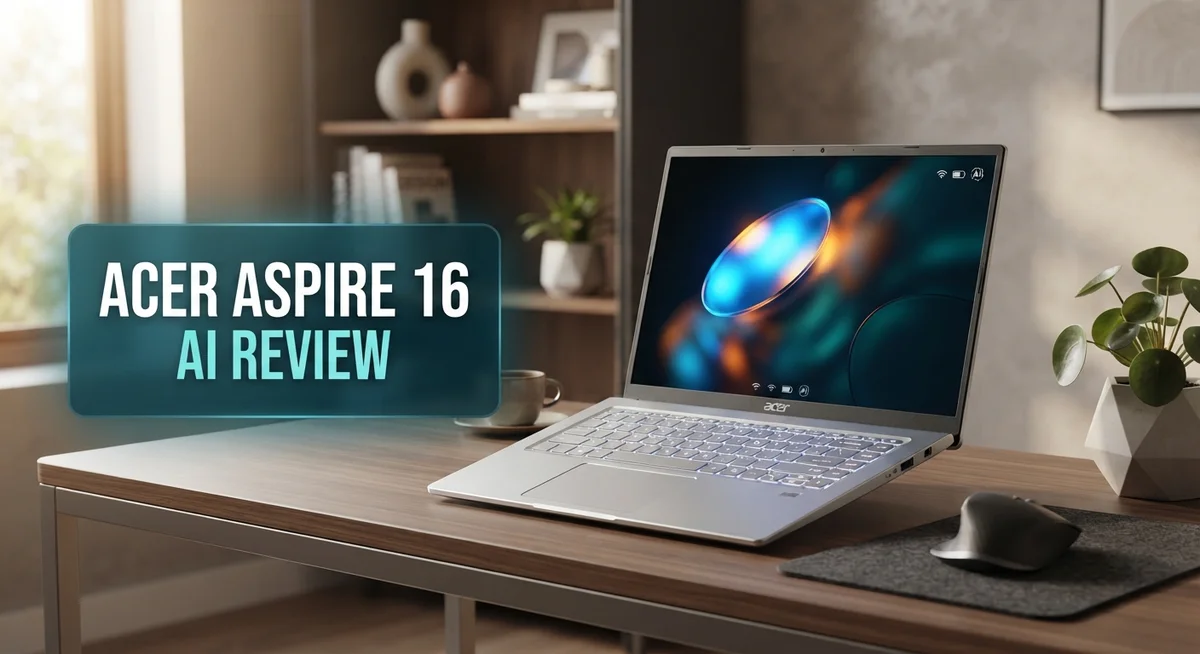
The Acer Aspire 16 AI brings big screen laptops into the AI era. It packs a 16 inch WUXGA touch display with a smooth 120Hz refresh rate. You get sharp visuals for work, streaming, and everyday browsing.
This laptop offers a choice between Snapdragon X and Intel Core Ultra processors. Both options bring strong performance to daily tasks. The Snapdragon variant even includes a 45 TOPS NPU for AI powered features.
Battery life stands out as a major highlight. Users can expect 20 plus hours on light tasks. That means less time near a charger and more time getting things done.
In a Nutshell
- Big screen, sharp visuals: The 16 inch WUXGA display runs at 120Hz. Everything looks smooth and clear, whether you scroll or stream.
- AI power built in: With a 45 TOPS NPU, this laptop handles Copilot+ features with ease. Tasks feel quick and responsive.
- All day battery: You get 20+ hours of light use battery life. This machine keeps going long after other laptops die.
- Flexible design: The 180° lie flat hinge lets you adjust the screen fully. It adds real flexibility for different use cases.
- Some tradeoffs exist: The keyboard feels cramped due to the numpad. Graphics performance stays modest for heavy gaming or editing.
- Solid for everyday tasks: This laptop suits browsing, studying, and office work well. It is not built for intense creative workloads.
Key Features and Specifications
The Acer Aspire 16 AI packs serious hardware into a machine designed for everyday computing and AI tasks. You get two processor options to choose from: the Snapdragon X X1-26-100 or Intel Core Ultra X9. Both deliver strong performance for work, school, and creative projects.
Memory and storage keep pace with modern demands. The laptop comes with up to 32GB of LPDDR5X RAM, which handles multitasking smoothly. Your files live on a 512GB PCIe Gen 4 SSD that boots fast and loads applications instantly.
Graphics capabilities vary by model. Some versions include Intel Arc graphics, while others feature NVIDIA GeForce RTX options. This means you can handle photo editing, video work, and light gaming depending on which configuration you pick.
The 16 inch WUXGA display refreshes at 120Hz, making scrolling and cursor movement feel fluid. Touch support adds another layer of interaction. The screen sits on a 180° lie-flat hinge, so you can flip it completely back or tent it however you like.
Connectivity stays current with Wi-Fi 7 for fast wireless speeds and Bluetooth 5.3 for reliable device pairing. USB4 ports provide lightning-quick data transfer and external display support. HDMI 2.1 connects to older displays and projectors without hassle.
The aluminum chassis feels premium and resists dents during daily use. Despite the large 16 inch screen, the laptop remains portable enough for backpacks and bags.
The 45 TOPS NPU (neural processing unit) handles AI features built into Windows. This means Copilot+ functions run smoothly without slowing down your regular work. Photo enhancement, voice commands, and smart suggestions all benefit from this dedicated AI chip.
One thing to note: the keyboard sits tight due to the integrated numpad. If you type a lot, you might want to test it first. The integrated graphics also won’t match dedicated gaming cards, so intense gaming isn’t the focus here. This laptop shines for students, professionals, and anyone who needs a large screen with reliable all-day power.

Last update on 2026-10-14 / Affiliate links / Images from Amazon Product Advertising API Some of the links on this website are affiliate links, which means that at no additional cost to you, I earn a commission if you click through and make a purchase. I only recommend products and services that I believe will add value to my readers. Thank you for your support!
Design and Build Quality
The Acer Aspire 16 AI combines practical engineering with modern aesthetics. The aluminum chassis delivers a solid feel that resists everyday wear. You’ll notice the build quality stays consistent across the entire frame, from the lid to the keyboard deck.
The 180° lie flat hinge is a standout feature. This design lets you open the screen completely flat on a table. You can adjust the display to almost any angle you need for work, presentations, or casual viewing.
Weight and portability matter for a 16 inch laptop. Acer kept this machine reasonably light despite its large screen. You can carry it in a backpack without excessive strain. The slim profile adds to the portability factor, making it easier to fit into bags and tight spaces.
The keyboard layout presents a tradeoff. The integrated numpad takes up space on the right side. This creates a cramped typing area compared to other 16 inch laptops. If you type heavily, you may notice the keys feel tighter than expected. The numpad works well for data entry, but general typing takes some adjustment.
Build materials reflect the price positioning. The aluminum exterior looks sleek and modern. It also provides better durability than plastic alternatives. The hinge mechanism feels sturdy after repeated opening and closing.
The display bezels stay relatively thin. This maximizes screen real estate without making the laptop bulky. The 16 inch WUXGA panel sits flush with the chassis, creating a cohesive appearance.
Thermal design plays a quiet role in the build. The laptop manages heat efficiently, so the chassis stays cool during normal use. You won’t feel hot spots on your lap or desk.
Overall, the design balances form and function well. The aluminum construction gives you confidence in durability. The lie flat hinge adds genuine value for flexible positioning. The keyboard compromise is the main design drawback, but it doesn’t ruin the experience for most users. The Aspire 16 AI feels like a machine built to last through years of everyday use.
Performance and Processing Power
The Acer Aspire 16 AI delivers solid processing muscle for everyday computing and AI workloads. You get a choice between the Snapdragon X X1-26-100 and Intel Core Ultra X9 processors, so you can pick based on your needs.
The Snapdragon X option shines for efficiency and battery life. This processor pairs with a 45 TOPS NPU (neural processing unit) that handles Copilot+ features without breaking a sweat. The NPU accelerates AI tasks built into Windows, making features like live captions and smart search feel responsive.
If you prefer Intel power, the Core Ultra X9 brings stronger raw performance for heavier workloads. Both options support up to 32GB of LPDDR5X RAM, which keeps multitasking smooth. The 512GB PCIe Gen 4 SSD loads apps and files quickly.
Graphics performance depends on your configuration. Intel Arc and NVIDIA GeForce RTX options are available. For casual gaming, video editing, and creative work, the RTX variant performs better. The integrated graphics handle everyday tasks fine, but don’t expect gaming framerates at high settings.
Real world performance feels snappy for browsing, document editing, and streaming. The 120Hz display pairs well with the processor to make scrolling feel buttery smooth. You won’t experience lag when jumping between browser tabs or running office applications.
One important note: the modest graphics performance means this laptop isn’t ideal for demanding 3D games or professional rendering. Heavy video editing might slow down compared to workstations with dedicated GPUs.
The thermal design keeps the system quiet during normal use. Fans spin up only when you push the processor hard. This means you get silent operation for everyday tasks, which is great for offices and libraries.
Battery life remains exceptional because the processor is energy efficient. Light use stretches beyond 20 hours on a single charge. This efficiency makes the Aspire 16 AI a genuine all day companion.
Overall, the processing power matches what you need for a general purpose 16 inch laptop. It handles work, study, and entertainment without complaints.
Top 3 Alternatives
Dell XPS 16

Last update on 2026-10-14 / Affiliate links / Images from Amazon Product Advertising API Some of the links on this website are affiliate links, which means that at no additional cost to you, I earn a commission if you click through and make a purchase. I only recommend products and services that I believe will add value to my readers. Thank you for your support!
ASUS VivoBook Pro

Last update on 2026-10-14 / Affiliate links / Images from Amazon Product Advertising API Some of the links on this website are affiliate links, which means that at no additional cost to you, I earn a commission if you click through and make a purchase. I only recommend products and services that I believe will add value to my readers. Thank you for your support!
HP Pavilion 16

Last update on 2026-10-14 / Affiliate links / Images from Amazon Product Advertising API Some of the links on this website are affiliate links, which means that at no additional cost to you, I earn a commission if you click through and make a purchase. I only recommend products and services that I believe will add value to my readers. Thank you for your support!
Display and Visual Experience
The 16 inch WUXGA display on the Aspire 16 AI delivers a sharp visual experience that handles daily tasks with ease. The 120Hz refresh rate makes scrolling through documents, websites, and social media feel smooth and responsive. Your cursor glides across the screen without stuttering, which makes extended work sessions feel less tiring on the eyes.
Color accuracy sits at a solid level for everyday use. You’ll notice vibrant hues when watching videos or editing photos casually. The display doesn’t match professional-grade screens, but it performs well for content consumption and general productivity.
Brightness levels reach adequate levels for indoor work and outdoor use. Direct sunlight can wash out the display a bit, but you can still see what’s on screen with some adjustment. The anti glare coating helps reduce reflections during long viewing sessions.
The touch screen adds practical value to your workflow. You can tap, swipe, and pinch to zoom without reaching for the trackpad. This feature works especially well for navigating Windows and using Copilot+ features built into the system.
Screen real estate matters on a 16 inch panel. The extra width gives you room to multitask effectively. You can open two windows side by side without feeling cramped for space. The resolution keeps text sharp and readable at normal viewing distances.
Bezels around the display stay relatively thin. This design choice maximizes screen space while keeping the overall laptop compact. The frame doesn’t distract from your content, and the aluminum surround feels sturdy during daily handling.
The 180 degree lie flat hinge enables flexible viewing angles. You can tilt the screen back for comfortable viewing from different positions. This flexibility works well for presentations, collaborative work, or simply finding your preferred angle.
The display performs best for browsing, streaming, and office applications. If you do professional color work or advanced photo editing, you may want to consider other options. For typical users, this screen strikes a good balance between performance and practicality for a machine at this size.
Battery Life and Portability
The Acer Aspire 16 AI stands out for its exceptional battery endurance. You get 20+ hours of runtime during light use like browsing and document work. This means you can easily get through a full workday and then some without hunting for a power outlet.
The Snapdragon X processor plays a big role in this battery strength. Its efficiency architecture sips power while keeping your system responsive. If you choose the Intel Core Ultra X9 variant instead, expect slightly shorter battery life due to higher power draw, though it still delivers solid endurance for a 16 inch machine.
Real world usage patterns matter here. Heavy video editing or gaming will drain the battery faster than typical office tasks. For most people doing everyday computing, you’ll rarely need to charge mid day. The fast charging capability helps too when you do need a quick top up.
Portability on a 16 inch screen is always a consideration. The aluminum chassis keeps weight reasonable for the display size. You can comfortably carry this laptop in a backpack or messenger bag. The slim bezels help keep overall dimensions compact. The 180 degree lie flat hinge doesn’t add bulk either.
The larger screen does mean this isn’t quite as pocket friendly as smaller 13 or 14 inch models. However, for people who want more screen real estate without sacrificing mobility, the size works well. The weight sits in a sweet spot between portability and usability.
Battery life and portability work together here. You can leave your charger at home for most days without worry. This freedom matters when you’re moving between meetings, working at coffee shops, or traveling. The combination of efficiency, battery capacity, and reasonable weight makes the Aspire 16 AI genuinely mobile.
Whether you’re a student, remote worker, or business traveler, this laptop handles the demands of life on the go. The battery endurance removes anxiety about finding power outlets. The manageable weight means carrying it around feels natural, not burdensome.
Pros and Cons
Pros
- The Snapdragon X processor delivers exceptional efficiency with a 45 TOPS NPU for AI tasks while keeping battery life above 20 hours on light use
- 120Hz WUXGA touch display stays sharp and responsive for everyday work, streaming, and creative tasks
- Large 16 inch screen gives you excellent workspace without feeling cramped for multitasking
- Aluminum build with 180° lie flat hinge offers flexible viewing and solid durability
- Wi Fi 7 and USB4 connectivity keep you fast and future ready
Cons
- The keyboard feels cramped with the numpad squeezed into a tight layout, making extended typing sessions less comfortable
- Integrated graphics performance lags behind premium competitors, so demanding 3D games and heavy video rendering aren’t ideal
- Raw processing power sits below what you get in higher end 16 inch laptops, though it handles everyday computing well
- Graphics options depend on your configuration, and the modest GPU means professional color work requires careful consideration
Who Should Buy It
The Acer Aspire 16 AI works best for people who need a large screen without sacrificing battery life. Students benefit from the 16 inch display and all day endurance during back to back classes and study sessions.
Remote workers find real value here too. The spacious workspace lets you keep multiple windows open side by side. The 120Hz display reduces eye strain during long work hours. Wi Fi 7 and USB4 keep your connections fast and stable.
Business travelers should consider this laptop seriously. The 20+ hour battery life means you can work through an entire day without hunting for outlets. The aluminum build feels solid enough for frequent travel. The 180 degree hinge adapts to any desk setup or airplane tray table.
Content creators working with documents, spreadsheets, and presentations will appreciate the extra screen real estate. The touch display adds another way to interact with your work. The Snapdragon X processor handles everyday creative tasks smoothly.
However, this laptop isn’t ideal for certain users. Professional designers need better color accuracy than this model offers. Serious gamers should look elsewhere since integrated graphics won’t handle demanding 3D titles. Video editors working with heavy rendering projects will hit performance limits.
The cramped keyboard matters if you type all day. Your wrists might feel uncomfortable during extended sessions. The numpad squeeze makes finding keys harder than on standard layouts.
Budget conscious buyers get solid performance here. The Snapdragon X processor delivers strong speed for its category. You get AI capabilities through the 45 TOPS NPU without overpaying. The processor efficiency means lower power consumption and longer battery stretches.
Ultimately, buy this laptop if you want a large screen, excellent battery life, and reliable daily performance. Skip it if you need professional graphics work, intense gaming, or a comfortable keyboard for all day typing. The Aspire 16 AI shines as a practical workhorse for students, remote workers, and travelers who value screen space and endurance above everything else.
Final Verdict
The Acer Aspire 16 AI earns its place as a smart everyday laptop. It blends a spacious screen with strong battery performance. This combination makes it a dependable machine for daily tasks.
Copilot+ PC certification adds a nice touch. The NPU driven AI features run smoothly in the background. This helps with tasks like live captions, image generation, and smart search without slowing down the system.
That said, this laptop is not built for everyone. Gamers and video editors should look elsewhere. The integrated graphics simply cannot handle heavy rendering or modern gaming at high settings.
Casual users win big here. If your daily routine includes browsing, writing, video calls, and streaming, this laptop delivers reliable performance. It handles multitasking well without draining the battery fast.
Typing comfort remains the biggest tradeoff. Anyone who spends hours writing reports or coding may find the cramped keyboard frustrating over time. This is worth testing in person before committing.
When stacked against premium 16 inch laptops, the Aspire trades some polish for practicality. It does not try to compete with flagship devices on raw power. Instead, it focuses on giving users a bigger screen and longer battery life without unnecessary bulk.
For students juggling classes and assignments, this laptop fits well into a backpack routine. For professionals who need a second device for travel, it offers peace of mind through its battery life alone.
The final call comes down to your priorities. Choose this laptop if screen size and battery longevity matter more than top tier graphics or a premium typing experience.
Skip it if your work depends on heavy creative software or competitive gaming performance.
Overall, the Acer Aspire 16 AI proves that a large screen laptop does not have to sacrifice portability or endurance. It stands as a practical option for anyone who values screen space and all day battery life over raw power.
Frequently Asked Questions
Does the Acer Aspire 16 AI handle video calls and streaming smoothly?
Yes, absolutely. The Snapdragon X processor and Intel Core Ultra X9 option both excel at everyday tasks like video conferencing and streaming content. Wi-Fi 7 connectivity keeps your connection stable and fast.
You won’t experience lag during Zoom calls or Netflix playback. The 120Hz display makes video playback feel extra smooth and responsive.
Can I use this laptop for light photo editing and document work?
This laptop handles both tasks well. The 16″ display gives you plenty of room to see your work clearly.
For basic photo editing in apps like Photoshop Elements, the integrated graphics perform adequately. Heavy video rendering or complex 3D work may slow down, but everyday creative tasks run smoothly. Document editing and spreadsheet work feel natural on this screen size.
Is the battery life really as good as people say?
Yes. You can expect 20+ hours of light use on a single charge. This means browsing, email, and document work without needing to hunt for an outlet.
Heavy workloads drain the battery faster, but even then, you get solid all-day performance. The Snapdragon X platform is particularly efficient with power management.
What makes this a Copilot+ PC?
The laptop includes the Snapdragon X’s 45 TOPS NPU (neural processing unit). This powers AI features built into Windows and supported apps.
You get faster on-device AI processing without sending data to the cloud. It’s useful for productivity tasks and creative work that use AI acceleration.
Who should skip this laptop?
Anyone who types for hours daily might struggle with the cramped keyboard layout. The numpad squeezed into the keyboard space creates tight spacing.
If you need serious gaming or professional 3D rendering, premium competitors offer better graphics performance. Otherwise, this laptop covers most everyday needs.

Hello everyone my name is Alenya and i am a gadget discovering Enthusiast 🐻🐻