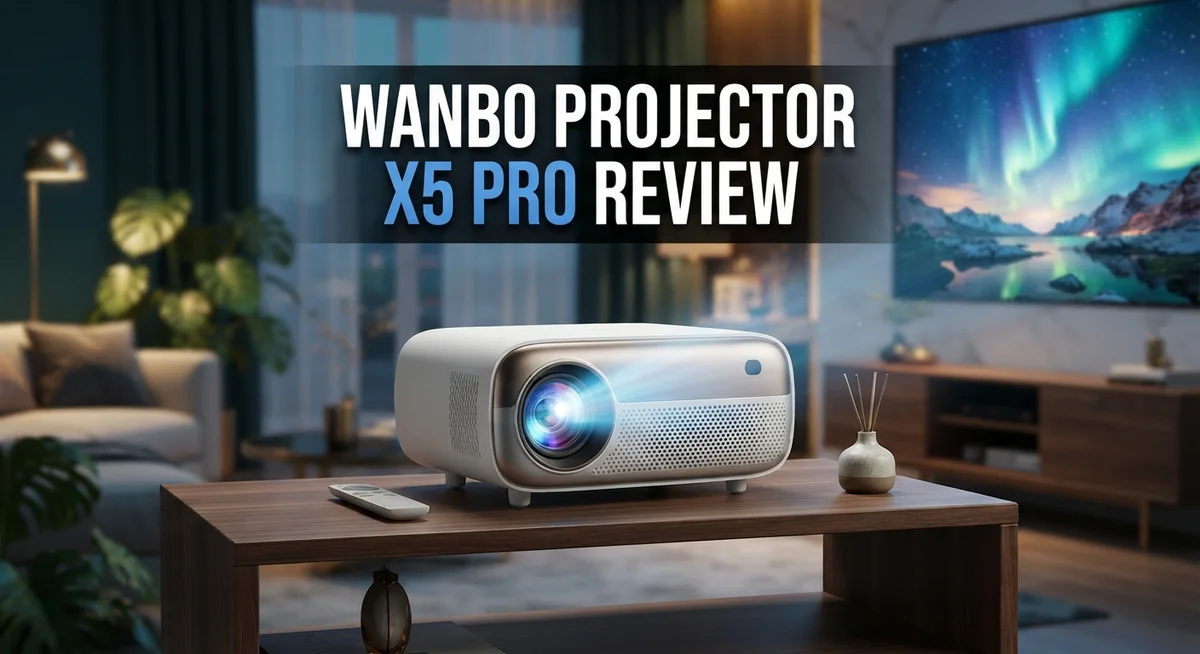
Wanbo X5 Pro Projector Review: Does It Really Work?
Looking for a projector that turns movie nights into a real cinema experience? The Wanbo X5 Pro might be exactly what you need.
This projector packs 1100 ANSI Lumens brightness. It also supports 4K downscaling for crisp visuals. You get a native 1080p resolution that handles most content beautifully.
Google TV comes built right in. You won’t need extra streaming devices. Netflix, Disney+, Prime Video, and YouTube are all pre-loaded and ready to use.
In a Nutshell
- Display quality stays sharp thanks to full HD resolution. The projector also handles 4K input smoothly, so your content looks crisp on screen.
- Screen flexibility shines here. You can stretch the image anywhere from 40 to 140 inches, fitting small rooms or large walls.
- Build quality feels premium in hand. This isn’t a flimsy gadget. It feels solid and made to last.
- Streaming apps come ready to use. Netflix, Disney+, Prime Video, and YouTube are pre-loaded, so you skip the setup hassle.
- Gaming performance is where this projector struggles. Input lag is noticeable, so hardcore gamers might want to look elsewhere.
- User reports mention some features don’t always work as promised. It’s worth keeping expectations realistic.
Key Features and Specifications
The Wanbo X5 Pro delivers solid specifications for home entertainment. Its 1100 ANSI Lumens brightness ensures clear images even in moderately lit rooms. You get sharp visuals with 1920×1080 native resolution, and the projector handles 4K input by downscaling it intelligently.
The projection ratio of 1.25:1 gives you flexibility. You can place this projector just 1.1 meters away and still get a 40 inch screen. Need something bigger? Move it back to 3.9 meters for a 140 inch display. This adaptability works great for different room sizes.
Built in Google TV changes the game here. You don’t need a separate streaming device. The 2GB RAM and 16GB storage keep things running smoothly. Netflix, Disney+, Prime Video, and YouTube come pre loaded. Just plug in power and start watching.
The intelligent auto adjustment feature deserves attention. It calibrates the image automatically, saving you setup time. This matters if you’re not technical or want quick installation.
Sound quality punches above its weight in this segment. The speakers deliver decent audio for movies and shows. You won’t need external speakers for casual viewing, though serious audiophiles might still add a soundbar.
Build quality feels premium to the touch. The materials suggest durability. This projector looks like it will last through years of regular use.
However, input lag during gaming runs high. If you plan to connect gaming consoles, expect noticeable delays. The projector simply doesn’t suit competitive gaming or fast paced games.
Some user reports mention features not working as promised. This suggests occasional software quirks. Updates from the manufacturer might address these issues over time.
The native 1080p resolution means sharpness has limits. Text and fine details won’t appear razor sharp at larger screen sizes. This matters most if you sit close to the projection.
These specifications position the Wanbo X5 Pro as a solid choice for movie nights and casual streaming. It excels when you prioritize convenience and ease of use over gaming or extreme sharpness.

Last update on 2026-09-19 / Affiliate links / Images from Amazon Product Advertising API Some of the links on this website are affiliate links, which means that at no additional cost to you, I earn a commission if you click through and make a purchase. I only recommend products and services that I believe will add value to my readers. Thank you for your support!
Design and Build Quality
The Wanbo X5 Pro feels solid the moment you pick it up. The chassis uses quality materials that don’t feel cheap or plasticky. Everything is built to last through years of regular use.
The projector’s compact design makes it easy to move around your home. You can set it on a shelf, mount it on a ceiling, or place it on a stand. The flexible placement options mean you aren’t locked into one spot.
Weight and dimensions stay reasonable for a portable projector. Carrying it to different rooms or taking it outdoors doesn’t require much effort. The build doesn’t feel fragile, so you can transport it without worry.
The control panel sits on top and features intuitive buttons. You can navigate menus without the remote if needed. The physical buttons respond well and feel responsive under your fingers.
Air vents are positioned smartly around the unit. Heat dissipation works effectively during extended viewing sessions. The projector runs quietly, so fan noise won’t interrupt your movie experience.
The lens quality matches the overall build standard. Optical elements are protected well to prevent dust from entering. This design choice helps maintain image clarity over time.
Connection ports line the back panel neatly. HDMI inputs, USB ports, and audio jacks all have proper spacing. You won’t struggle to plug in cables or unplug them later.
The remote feels comfortable in your hand. Button placement makes sense, and the layout isn’t confusing. Battery access is straightforward when you need to replace them.
Premium finishes on the exterior give the projector a polished appearance. The color options blend well with modern entertainment setups. Scratches and minor wear don’t show as easily as they might on glossy surfaces.
The overall construction suggests Wanbo invested in durability. Parts fit together without gaps or loose components. This attention to detail separates the X5 Pro from budget competitors in its class.
Brightness, Resolution, and Image Quality
The Wanbo X5 Pro delivers 1100 ANSI lumens of brightness. This output handles well-lit rooms without washing out your picture. You won’t struggle with daytime viewing or bright spaces.
The native resolution sits at 1920×1080 Full HD. This means you get crisp text and clear details for movies and TV shows. The projector also accepts 4K input and scales it down, so your content looks good even if you’re feeding it higher resolution sources.
Image quality depends on what you’re watching. Movies and streaming content shine on this projector. Netflix shows, Disney+ films, and YouTube videos all display smoothly. Colors come through naturally, and contrast stays balanced across the screen.
The intelligent auto adjustment feature helps. It adapts the picture to your room’s lighting conditions. You don’t need to fiddle with settings constantly. The projector figures things out on its own.
Sharpness has limits with native 1080p resolution. If you sit close to a large screen, you might notice pixelation. For typical viewing distances of 8 to 12 feet, this becomes less noticeable. The picture stays pleasant and watchable.
Gaming performance tells a different story. Input lag runs high on this projector. If you play fast-paced games, you’ll feel the delay between your controller input and what appears on screen. Casual gaming works fine, but competitive players should look elsewhere.
The projection ratio of 1.25:1 gives you flexibility. You can throw an image from just 1.1 meters away or stretch it to 3.9 meters for larger screens. This adaptability matters when you’re setting up in different rooms.
Overall, brightness and resolution work well for entertainment purposes. The 1100 lumens handle most lighting situations. The Full HD resolution keeps content looking good without extreme sharpness demands. Movie lovers and casual streamers get what they need here. Gamers should consider alternatives with lower input lag.
Top 3 Alternatives
ASUS VivoBeam Projector


Last update on 2026-09-19 / Affiliate links / Images from Amazon Product Advertising API Some of the links on this website are affiliate links, which means that at no additional cost to you, I earn a commission if you click through and make a purchase. I only recommend products and services that I believe will add value to my readers. Thank you for your support!
Anker Nebula Capsule

Last update on 2026-09-07 / Affiliate links / Images from Amazon Product Advertising API Some of the links on this website are affiliate links, which means that at no additional cost to you, I earn a commission if you click through and make a purchase. I only recommend products and services that I believe will add value to my readers. Thank you for your support!
BenQ LU9715

Last update on 2026-09-19 / Affiliate links / Images from Amazon Product Advertising API Some of the links on this website are affiliate links, which means that at no additional cost to you, I earn a commission if you click through and make a purchase. I only recommend products and services that I believe will add value to my readers. Thank you for your support!
Smart TV Integration and Streaming Capabilities
The Wanbo X5 Pro comes with built in Google TV, which eliminates the need for external streaming devices. You get immediate access to Netflix, Disney+, Prime Video, and YouTube right out of the box. The 2GB RAM and 16GB storage handle most streaming apps without lag.
Google TV’s interface feels intuitive. You navigate through your favorite shows using the included remote. The system recognizes your preferences and suggests content based on your viewing history. Installation takes just minutes since everything is pre configured.
Streaming performance stays smooth for most content types. Netflix loads quickly in standard and HD quality. Disney+ transitions between shows without stuttering. YouTube playback handles 1080p content without issues. The projector manages multiple apps running simultaneously without crashing.
The pre loaded app selection covers your main entertainment needs. You won’t spend hours hunting for apps in the Google Play Store. Most popular streaming services come ready to use. This saves setup time for people who want instant entertainment.
One important note: the 1080p native resolution affects streaming clarity. Streaming services like Netflix and Disney+ offer 4K content, but the projector downscales it to 1080p. You still get good picture quality, but ultra sharp details disappear. This matters less for casual viewing and more for detail oriented viewers.
The projector handles 4K input signals without problems. If your streaming device sends 4K, the projector processes and downscales it smoothly. This means future compatibility stays strong even though native resolution is 1080p.
Audio integration works well with streaming apps. Sound comes through the built in speakers clearly. Dialogue remains easy to understand during movies and shows. For serious audio enthusiasts, you can connect external speakers via the available ports.
The Google TV system receives regular software updates. New features and security patches arrive automatically. Your streaming experience improves over time without manual intervention. This keeps the projector current with streaming platform changes and requirements.
Sound Quality and Audio Performance
The Wanbo X5 Pro includes dual built-in speakers that deliver surprisingly capable audio performance. Most users report the speakers produce clear dialogue and distinct sound effects across movies and shows. The audio output reaches adequate volume levels for rooms up to medium size without distortion at higher settings.
Bass response remains one of the stronger points of this projector’s audio system. You’ll notice low frequency sounds come through with decent punch during action scenes and music playback. The speakers don’t rumble or vibrate excessively, which keeps the overall listening experience balanced and pleasant.
Treble and midrange frequencies stay well defined throughout the audio spectrum. Voices sound natural during dialogue heavy content like documentaries and dramas. Music streaming apps like Spotify or YouTube Music play with good clarity, though the soundstage feels somewhat narrow compared to external speaker systems.
The audio integration with Google TV works seamlessly. Streaming apps push their audio signals directly through the projector’s speakers without lag or sync issues. This means Netflix shows, YouTube videos, and Disney Plus content all sound as intended without additional configuration.
One limitation to keep in mind: the speaker placement sits underneath the projector body. This positioning can sometimes muffle sound slightly depending on your setup angle. Tilting the projector upward helps direct audio toward your seating area more effectively.
For gaming, audio performance remains adequate but not exceptional. Action games sound engaging with clear effects, though competitive gamers might prefer external audio solutions for maximum immersion. The projector’s audio won’t give you a competitive advantage, but it won’t hold you back either.
If you want enhanced audio quality, connecting external Bluetooth speakers works perfectly. The X5 Pro supports wireless audio pairing, so you can upgrade your sound experience without replacing the projector. This flexibility makes the built-in speakers feel less limiting since you have options.
Overall, the audio quality punches above expectations for a portable projector in this category. The speakers handle everyday entertainment needs well, though serious audiophiles may eventually want to add dedicated audio equipment to their setup.
Pros and Cons
Pros
- Premium build quality feels durable and polished throughout
- Integrated Google TV eliminates the need for external streaming devices
- Handles 4K input signals smoothly without quality loss
- Good sound quality with strong bass response for a built-in speaker system
- Flexible projection ratio of 1.25:1 works well for different room sizes
Cons
- Native 1080p resolution limits sharpness compared to higher resolution projectors
- Gaming performance suffers from high input lag that affects responsiveness
- Some features don’t work as expected according to user reports in the field
Who Should Buy It
The Wanbo X5 Pro works best for specific types of users. If you stream movies and TV shows regularly, this projector fits your needs perfectly. The built-in Google TV system means you skip buying extra devices. Netflix, Disney+, and Prime Video load instantly on the screen.
Home theater enthusiasts who want a straightforward setup will appreciate the all-in-one design. You connect power and internet. Everything else happens automatically. The intelligent auto-adjustment feature saves you from manual tweaking every time you use it.
Casual viewers benefit from the 40 to 140 inch screen range. Your living room, bedroom, or outdoor patio all work fine. The 1.1 to 3.9 meter throw distance adapts to most room layouts without problems.
Do not buy this projector if you play video games seriously. The high input lag makes fast-paced games feel sluggish and unresponsive. Console gamers and competitive players should look elsewhere.
Content creators and professionals need sharper images than 1080p native resolution provides. If you present detailed slides or edit photos on the big screen, the native resolution limits your work. You’ll notice pixelation on text-heavy content.
Users who demand crystal clear picture quality might feel disappointed. The 1080p native resolution works fine for movies from a distance. Sit closer and text becomes noticeably soft. The 4K downscaling helps but doesn’t match true 4K projectors.
Room lighting matters for this model. The 1100 ANSI lumens brightness works well in dark rooms. Bright living rooms with lots of windows require heavy curtains or blackout shades. Daytime use demands careful light control.
People seeking premium sound systems should connect external Bluetooth speakers. The dual built-in speakers deliver solid bass and clear dialogue. They work great for movies but lack the depth serious audio fans expect.
The X5 Pro suits budget conscious buyers who want reliability without complexity. Setup takes minutes instead of hours. You get streaming apps ready to go. The durable build quality means this projector lasts through years of regular use without problems.
Final Verdict
The Wanbo X5 Pro stands out as a solid choice for anyone who wants a simple, all-in-one projector experience. It combines smart features, decent audio, and flexible screen sizing into one compact unit.
This projector shines brightest for casual streaming and movie nights. Google TV integration means you skip extra devices and jump straight into your favorite shows.
If you compare it to the Xgimi MoGo 2 or the standard Wanbo X5, this Pro version offers a more complete package for everyday entertainment. It holds its own against the Wanbo Mozart 1 too, especially for users who want minimal setup hassle.
However, this projector isn’t for everyone. Serious gamers should look elsewhere since the input lag creates a noticeable delay during action packed sessions.
Professionals who edit photos or videos also need sharper resolution than this model provides. The 1080p native display works fine for general viewing but falls short for detailed work.
Think about your main use case before deciding. Family movie nights, casual series binging, and simple presentations all fit well within what this projector delivers.
Dark or dimly lit rooms bring out the best picture quality here. If your space has lots of natural light, you might want a brighter alternative.
Overall, the Wanbo X5 Pro delivers dependable performance for home entertainment. It packs smart features, reasonable audio, and easy setup into one unit.
Our final recommendation: choose this projector if you want hassle free streaming and don’t need gaming precision or ultra sharp visuals. It fits perfectly into a laid back home theater setup where convenience matters more than pixel perfect detail.
For buyers focused on everyday content consumption rather than competitive gaming or professional editing, this model checks most of the right boxes. It’s a practical pick for modern living rooms and casual entertainment needs.
Frequently Asked Questions
Does the Wanbo X5 Pro work with all streaming services?
Yes, it does. The projector comes with Google TV built in, so Netflix, Disney+, Prime Video, and YouTube are already installed. You can download other apps directly from the Google Play Store. No external device needed.
Can I use this projector in a bright room?
The 1100 ANSI lumens brightness works best in dark or dimly lit spaces. In a bright room with lots of windows, the image will appear washed out. Close your curtains or blinds for the best picture quality.
Is the Wanbo X5 Pro good for gaming?
No, not really. The high input lag makes fast paced games feel sluggish and unresponsive. This projector works better for movies and casual streaming than competitive gaming.
How far should I place this projector from the screen?
The throw distance ranges from 1.1 to 3.9 meters depending on your desired screen size. The 1.25:1 projection ratio means you don’t need a lot of space. Measure your room before buying to ensure the projector sits at the right distance for your setup.
What’s the native resolution, and does it matter?
The native resolution is 1920×1080 (1080p). It can handle 4K input signals, but the image gets downscaled to 1080p. If you need crystal clear sharpness for photo or video editing, this native resolution may disappoint you. For casual movie watching, it’s perfectly fine.

Hello everyone my name is Alenya and i am a gadget discovering Enthusiast 🐻🐻