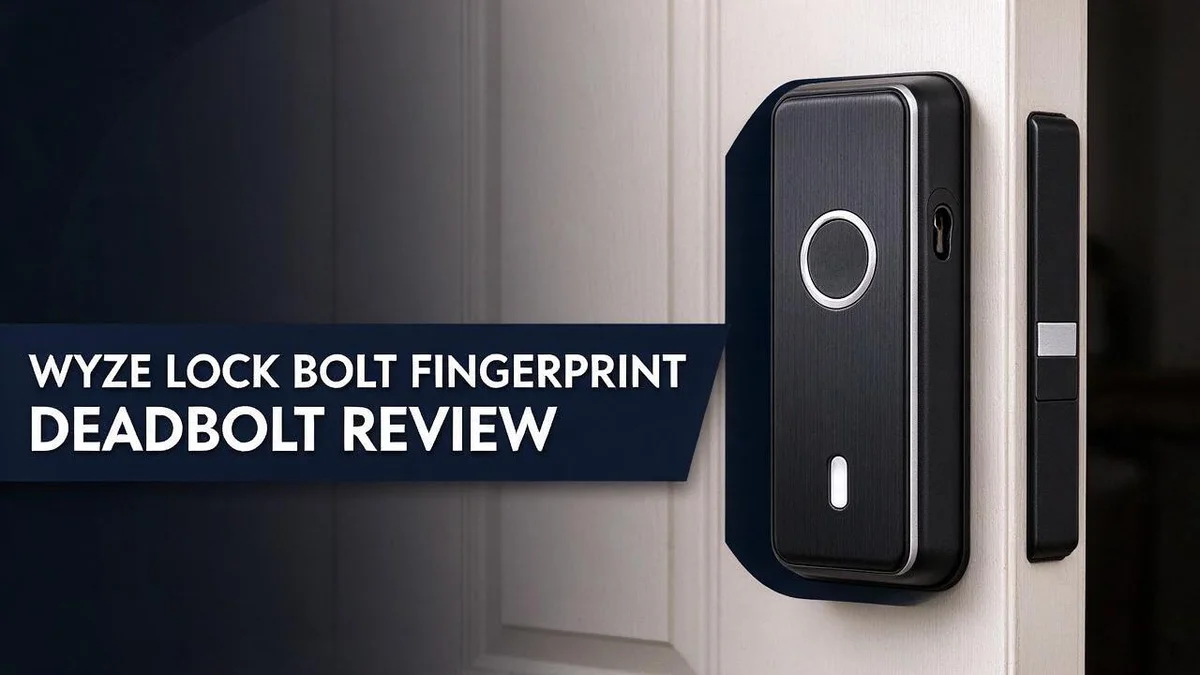
Wyze Lock Bolt Fingerprint Deadbolt Review: Is It Still Worth It in 2026?
Tired of fumbling with keys at the front door? A fingerprint deadbolt can change your daily routine. The Wyze Lock Bolt gives you a fast and simple way to get inside.
Your finger does the work in about half a second. The built-in biometric scanner unlocks the door in 0.5 seconds. Fingerprints stay stored locally on the lock, not in the cloud, so your data stays closer to home.
Looking for more control? The newer v2 model adds WiFi remote lock and unlock through the Wyze app. The original model uses Bluetooth only. In this review, we explain what the lock does well, where it falls short, and who it suits best.
In a Nutshell
-
Privacy stays close to home: Your fingerprints live on the lock itself. They never move to the cloud, so your data stays with you.
-
Guests get in without a key: Access sharing runs through the Wyze app. Family members and visitors can enter with their own access, and you can manage it from your phone.
-
The door locks on its own: Automatic locking keeps your home secure. You do not need to double check the deadbolt before bed or before you leave for work.
-
Battery life lasts a long time: Fewer battery changes mean less hassle. This makes it a good pick for busy households that want a set and forget lock.
-
The look fits modern doors: The sleeker design blends well with contemporary entryways. It gives your front door a clean, fresh look.
-
Connectivity is the main decision: The original model uses Bluetooth only. If you want remote control, compare it with the Schlage Encode Smart WiFi, Lockly Secure Pro, Yale Assure Lock 2 Keypad, and Sifely five in one Lock.
Fingerprint Unlocking Speed and Accuracy


Last update on 2026-10-30 / Affiliate links / Images from Amazon Product Advertising API Some of the links on this website are affiliate links, which means that at no additional cost to you, I earn a commission if you click through and make a purchase. I only recommend products and services that I believe will add value to my readers. Thank you for your support!
Speed matters most during busy mornings. Your hand moves to the lock, and the door opens before you think about it. Quick unlocks feel natural once you practice a few times.
Accuracy depends on how you place your finger. Press the same finger flat across the sensor for a steady read. Try different angles during setup so the lock recognizes you in many positions.
Real world speed depends on your routine. Rest your finger on the sensor as you walk up to the door. This small habit saves time when your hands are full of groceries.
Dry fingers can cause missed reads. Cold weather, dust, or lotion may affect the scan. Wipe your finger clean and try again before you assume the lock failed.
Enrolling more than one finger gives you a backup. Add a thumb and an index finger from each hand. This way, a cut or a sore spot will not lock you out.
Good habits keep the lock working well. Clean the sensor gently with a soft cloth. Keep your hands free of heavy oils. Test the lock from the outside after each change to make sure it reads your print. A quick test after each setup change keeps surprises away. Good planning makes a big difference in daily use.
Speed and accuracy work together. A fast lock means little if it fails often. Spend a few minutes on setup, and most daily visits will feel smooth and quick. Guests with new prints may need a few tries, so stay patient with them at the door. Families with children benefit too, since kids often arrive with full hands.
Local Fingerprint Storage and Privacy
Your fingerprint data stays on the device. Many smart locks send information to remote servers. This lock keeps its fingerprint records inside the unit itself. Nothing needs to travel across the internet for the scan to work.
Why does this matter? A breach at a cloud provider cannot expose prints that never reached the cloud. Local storage also helps during an internet outage. Your lock still recognizes your finger when your router goes down.
Think about who holds access. Every fingerprint you add belongs to a real person. Keep a short written list of enrolled users. Review that list every few months.
Remove prints from people who no longer need entry. This includes a former roommate, a relative who moved away, or a service worker whose job ended. Clean records keep your home private.
The v2 model adds a different layer. Remote lock and unlock commands travel over your network, so local storage alone does not cover every risk. Choose a strong password for your Wyze account.
Turn on extra login protection if the app offers it. Check the list of shared users inside the app each month. Remove guest access as soon as a visit ends.
Teach everyone in your home how the system works. Explain who can enroll a new print and who cannot. Clear rules protect your privacy more than any single setting.
Small habits make a big difference. Enroll only the fingers you trust. Test each enrolled print at the door before you rely on it. Good habits protect your data over time.
Design and Build Quality
The build feels practical from the start. The outside panel holds the fingerprint sensor, so you touch one clear spot to open the door. Most electronics sit inside, which keeps the outside tidy.
Installation shapes the final result. A solid lock still needs a clean fit. Measure your door thickness and bore hole before you install the unit.
The deadbolt does the heavy lifting. A strong bolt resists pressure better than a thin latch. Check that the bolt slides smoothly into the strike plate every time you lock up.
Weather tests every surface. Rain, sun, and humidity wear down metal and plastic over time. Choose a finish that handles your climate well, especially on a door that faces the elements.
Keypad layout affects daily use. A flat, clean surface makes the scanner easy to reach. Children, older adults, and guests can all find the sensor without stretching or guessing.
Tamper resistance starts with hardware. Solid screws and a firm faceplate make forced entry harder. Keep the mounting screws tight and check them once in a while.
Door type sets the rules. Wood, steel, and glass doors each need different mounting parts. Confirm compatibility before you commit to a model.
Test the feel before you trust it. Operate the lock several times with the door open and closed. Listen for grinding or rattling, since these sounds often signal loose parts.
Small details add up. Rounded edges feel comfortable under the hand, and a tidy faceplate hides gaps. Good design lasts longer than a trend. Solid hardware, clean lines, and a careful install keep the lock working well for years.
Top 3 Alternatives
Schlage Encode Smart

Last update on 2026-09-19 / Affiliate links / Images from Amazon Product Advertising API Some of the links on this website are affiliate links, which means that at no additional cost to you, I earn a commission if you click through and make a purchase. I only recommend products and services that I believe will add value to my readers. Thank you for your support!
The Schlage Encode Smart suits people who want keyless entry without a complicated setup. It uses a keypad and smartphone app control. Most households can install it in an afternoon with basic tools. It also looks clean on modern doors.
Yale Assure Lock 2

Last update on 2026-09-19 / Affiliate links / Images from Amazon Product Advertising API Some of the links on this website are affiliate links, which means that at no additional cost to you, I earn a commission if you click through and make a purchase. I only recommend products and services that I believe will add value to my readers. Thank you for your support!
The Yale Assure Lock 2 offers a solid build and a simple keypad. Homeowners can share temporary access codes with family, guests, or cleaners. Each code can be set to expire on a chosen date. This feature helps when you need to control who enters and when.
Ultraloq U-Bolt Pro

Last update on 2026-10-14 / Affiliate links / Images from Amazon Product Advertising API Some of the links on this website are affiliate links, which means that at no additional cost to you, I earn a commission if you click through and make a purchase. I only recommend products and services that I believe will add value to my readers. Thank you for your support!
The Ultraloq U-Bolt Pro focuses on flexible access. It works with a companion app and offers several ways to unlock the door. Renters often like it because it is easy to remove and reinstall. Its built-in keypad keeps entry fast even without a phone.
Access Sharing and Remote Control
Access sharing makes the Wyze Lock Bolt useful for busy households. You can share access through the Wyze app with family or trusted friends. Each person gets their own entry method, so you know who comes and goes.
Remote control works differently on each model. The original lock uses Bluetooth only, so you must stand near the door to operate it. The v2 model adds remote lock and unlock over WiFi. That means you can check your front door from almost anywhere.
Think about everyday moments. A teenager gets home before you do. A dog walker needs entry on Tuesday only. You can grant that access in the app, then turn it off later. No spare key needs to leave your hands.
Guests often need short visits. Share access only for those dates. Check the app after each visit to confirm the list looks right. Good sharing keeps your home open and safe.
Remote control also helps when plans change. Did you leave the house and wonder if the door locked? Open the app and check. If it stayed unlocked, you can lock it from your phone. This small step gives quick peace of mind.
Here is a simple plan: Start with one or two trusted people. Test their access before you rely on it. Review your shared list every few months. Update it when someone moves away or no longer visits.
Remote features also depend on your home network. A weak signal may slow down a command. Keep your router close to the door when possible. Test the connection once a week so surprises stay rare.
Battery Life and Power Management
Battery life matters more than most people expect. A lock that runs out of power leaves you outside. Good planning prevents that problem.
The lock gets its energy from batteries, so regular checks help. Open the Wyze app and look at the battery level. Make this a habit each month.
Daily use shapes how fast power drops. Every unlock, lock, and fingerprint scan uses energy. A busy front door will drain batteries faster than a rarely used back entrance. Guests who unlock the door often can also add to the drain.
Connectivity also plays a role. A model that stays linked to your home network works harder than one that only uses short Bluetooth signals. Keep this in mind when you decide how much remote access you need.
Keep spare batteries on hand. Store a fresh set in a dry drawer near the door. You can swap them in minutes when alerts appear.
Low battery warnings give you time. Pay attention to app notifications. Replace batteries soon after the first warning so the lock never stops working.
Cold weather can also shorten battery life. Chilly temperatures reduce how much power batteries hold. Plan extra checks during winter months.
Use good quality alkaline batteries. Avoid mixing old and new cells. Mixed batteries can drain unevenly and cause problems. Write the install date on each battery pack.
Simple habits can stretch battery life. Turn off extra features you never use. Keep the keypad and sensor clean, because repeated failed attempts waste energy. A little planning keeps your home open to the right people and the lock ready when you need it.
Installation and Door Compatibility
Check your door before you buy anything. Measure the door thickness first. Most standard doors fall within a common range, but older homes can differ. Write down the numbers before you shop.
Look at the door handing. Decide if the door swings in or out, and whether the hinges sit on the left or right. This choice affects where the inside panel goes. Plan the orientation before drilling any holes.
Measure the backset next. The backset is the distance from the door edge to the center of the existing bore hole. Most installs use a standard setting, so confirm yours matches the lock package.
Check the bore hole size too. A clean hole around two and an eighth inches fits most deadbolt kits. Hole size matters because a wrong cut leaves gaps or loose parts.
Make sure the door closes square. A door that sags or rubs the frame will strain the bolt. Fix hinges or adjust the frame before you install the lock.
Gather the right tools early. Most homeowners need a screwdriver, a drill, a measuring tape, and a pencil. Keep the instruction sheet nearby. Following each step keeps the project simple.
Some people feel nervous about drilling into a door. That is normal. If the door looks warped or the frame feels weak, a locksmith can check the fit quickly.
Test the bolt before closing the door. Extend and retract the bolt several times. Smooth movement means the alignment is right. Stiff movement signals that the strike plate needs a small adjustment.
Finish with a final check. Close the door and watch the bolt slide into the frame. Lock and unlock it from both sides. A quick test now prevents frustration later.
Pros and Cons
Pros
- Unlocks in about half a second, so entry feels quick.
- Fingerprints stay stored on the lock itself, not in the cloud.
- Auto lock keeps the door secured without extra steps.
- A sleek look fits well on modern front doors.
- You can leave your keys behind for everyday trips.
Cons
- The original model relies on Bluetooth only, which limits range.
- Remote lock and unlock needs the newer v2 model.
- Fingerprint reading can struggle with dry, dirty, or damaged fingers.
- Fewer keypad options exist compared with some rival locks.
Who Should Buy It
This lock fits best for busy households with several people coming and going each day. Everyone can get quick access without passing around a single house key.
Teenagers who often forget their keys can use their own fingerprint instead. Parents also like that kids can get inside without waiting on the porch after school.
Shared houses with roommates on different schedules can benefit too. Each person enrolls a finger, so nobody needs a copied key. Grandparents, pet sitters, and cleaners can also receive app access during their visits.
Busy professionals who leave early can skip the search for keys each morning. Anyone carrying groceries or laundry will appreciate not digging through a bag for keys.
Renters who cannot make big changes may still find it useful. Read your lease first, because drilling into a door may not be allowed.
Older adults who struggle with small keys may find this easier to use. Tech fans who enjoy app controls will likely enjoy setting up the system.
Frequent travelers who want to check on their home should choose the newer v2 model. Remote control helps when a family member arrives before you do.
People who need several unlock methods should look at other options. The Yale Assure Lock 2 Keypad and Schlage Encode Smart WiFi offer keypad entry. Those choices suit households that want a code as a backup. Lockly Secure Pro also deserves a look during your search.
Overall, this lock suits people who want fast entry and simple daily use. Shoppers who need many unlock options should compare the rivals first.
Final Verdict
The Wyze Lock Bolt Fingerprint Deadbolt earns a solid place on the shortlist for many homes. It delivers quick entry and simple daily use.
The model you pick matters most. The original version suits people who stay close to home. The v2 version suits people who want control from anywhere.
Think about your phone habits. If you often forget to charge your phone, a lock that relies on an app may frustrate you. Fingerprints still work even when your phone sits charging on the counter.
Compare it with rivals before you commit. The Schlage Encode Smart WiFi offers more connection options. The Yale Assure Lock 2 Keypad fits people who prefer codes over fingerprints.
Test your fingers first. Try the scanner with your own hands during setup. If it misreads often, a keypad model may serve you better.
Our overall verdict is positive. The Bolt handles everyday locking with speed and ease. Its strengths outweigh its limits for most single door homes that do not need complex access rules.
Choose the Bolt if you want a fast keyless door. Its fingerprint scanner keeps access simple and personal. Skip it if you need broad connectivity or many unlock methods.
Check the model before checkout. Confirm whether you need remote control from your phone. That single choice shapes your whole experience with this lock.
Think about your long term plans too. If you may move soon, a simple lock is easier to remove and reinstall. Keep your installation notes so you can repeat the process later.
Our final pick stays positive for most homes. It brings speed, comfort, and useful security in one clean package. You can trust it for daily entry.
Frequently Asked Questions
Can the Wyze Lock Bolt work without internet?
Yes. The original model uses Bluetooth only, so you can lock and unlock it when you are nearby. Remote control needs the newer v2 model.
How fast is the fingerprint unlock?
The scanner opens the door in about 0.5 seconds. A quick touch is enough. This helps when your hands are full of groceries or bags.
Where are my fingerprints saved?
Your fingerprints stay on the lock itself. They are not stored in the cloud. This keeps your personal data close to your front door.
How do I share access with others?
You share access through the Wyze app. Once you add someone, they can use their own fingerprint to enter. You stay in control of who gets in.
What if the lock does not recognize my finger?
Try again with a clean, dry finger. Keep a spare key nearby as a backup so you never get locked out. A quick retry at setup often solves the problem.

Hello everyone my name is Alenya and i am a gadget discovering Enthusiast 🐻🐻