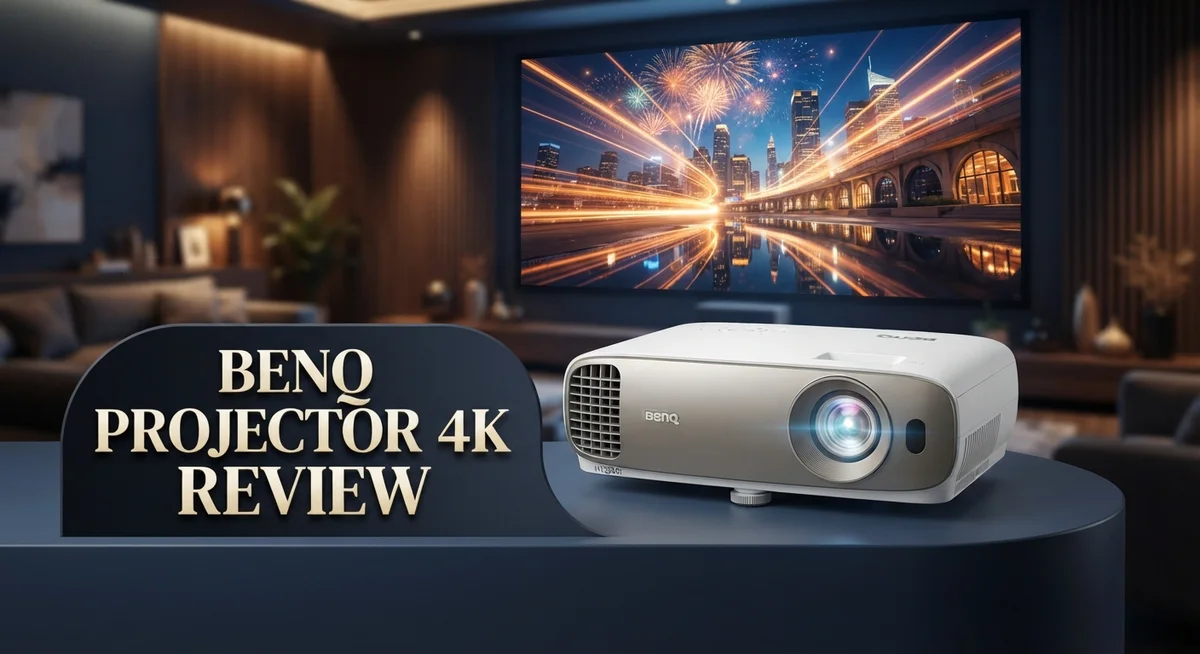
BenQ 4K Projector Review: Top Tier or Trash?
Are you searching for a 4K projector that truly delivers on picture quality? The BenQ W4100i might be the answer you need.
This projector brings 4K resolution together with DLP technology. That combo means you get sharp images and colors that last for years.
With 3,200 lumens of brightness, this device performs well even in lit rooms. You do not need to darken your space to enjoy a great picture.
In a Nutshell
- Bright performance shines through, even in rooms full of natural light.
- Color accuracy stays sharp, making movies and shows look true to life.
- Contrast levels hold up well, giving depth to darker scenes.
- The zoom range feels a bit limited for larger or oddly shaped rooms.
- BenQ backs this model with solid customer support, a big plus if issues pop up.
- Its DLP technology keeps colors looking fresh for years, unlike some LCD rivals.
- It holds its own against 5,000 lumen competitors and short throw 4K HDR options.
- Gamers will appreciate the smooth performance, matching many gaming focused projectors.
Key Features and Specifications
The BenQ W4100i packs impressive specifications that set it apart in the 4K projector space. This model uses DLP technology, which delivers reliable color performance over extended use. Unlike LCD alternatives, DLP projectors maintain color accuracy without the fade many users experience.
Resolution sits at native 4K, giving you crisp details whether you’re watching films or playing games. The 3,200 lumens brightness rating means this projector handles lit environments well. You won’t need a completely dark room to enjoy clear, vibrant images. This feature matters if your home theater shares space with windows or ambient lighting.
HDR Pro technology enhances contrast and color depth across supported content. HDR material shows richer blacks and brighter highlights simultaneously. Scenes gain more dimension, making your viewing experience feel more immersive. The projector recognizes HDR signals and adjusts automatically.
Built in Android TV eliminates the need for external streaming devices. You get direct access to Netflix, YouTube, and other apps right from the projector. This simplifies setup and reduces cable clutter behind your equipment.
The optical zoom range presents a limitation worth noting. If your room has unusual dimensions or you need flexibility in projector placement, this constraint could affect your setup options. Most users find adequate workarounds through ceiling mounting or repositioning.
Contrast performance delivers solid black levels for a DLP projector. Darker movie scenes maintain detail without looking washed out. This matters during night scenes or action sequences with heavy shadows.
Color reproduction stays accurate across different content types. Skin tones look natural, and film colors match the director’s intent. Professional calibration options exist for users seeking maximum precision.
The projector handles various input types and resolutions smoothly. Switching between sources feels quick and responsive. Fans appreciate the straightforward menu system that doesn’t require technical expertise to navigate.
Build quality feels substantial. The projector sits stably on surfaces and mounts securely. BenQ’s reputation for reliable hardware extends to this model, with responsive customer support backing your purchase.

Last update on 2026-09-19 / Affiliate links / Images from Amazon Product Advertising API Some of the links on this website are affiliate links, which means that at no additional cost to you, I earn a commission if you click through and make a purchase. I only recommend products and services that I believe will add value to my readers. Thank you for your support!
Image Quality and Color Accuracy
The BenQ W4100i delivers exceptional color accuracy that brings movies and shows to life with stunning realism. Colors stay true to the source material, whether you’re watching nature documentaries or action films. This consistency matters because inaccurate colors ruin the viewing experience.
DLP technology plays a key role here. Unlike LCD projectors, DLP chips resist color drift over time. Your images stay vibrant and accurate for years without the gradual color shift that plagues some competing models.
The projector handles HDR Pro technology with impressive skill. HDR content displays with enhanced contrast and richer color depth. Bright highlights pop without washing out, and dark scenes maintain detail. This creates a more immersive viewing experience across all content types.
Brightness levels reach 3,200 lumens, which matters for color accuracy in lit rooms. Many projectors struggle with color reproduction when ambient light is present. The BenQ maintains its color fidelity even when you’re not sitting in complete darkness. This flexibility lets you enjoy quality images during daytime hours.
Contrast performance supports the overall color presentation. The projector delivers solid black levels for a DLP device. When blacks look truly black rather than gray, colors appear more saturated and realistic. This depth enhances the visual impact of every scene.
The projector processes various input types smoothly without color degradation. Whether you’re streaming from Android TV or connecting external devices, color accuracy remains consistent. This reliability matters when you’re switching between different content sources.
One thing to note: color accuracy depends on proper calibration. Out of the box, the BenQ performs well. However, fine tuning the settings in your specific room can push accuracy even higher. The projector gives you enough adjustment options to optimize performance for your space.
The bottom line is that the BenQ W4100i excels at reproducing colors accurately across different lighting conditions and content types. Its DLP technology ensures this performance stays strong over time. For anyone prioritizing realistic color reproduction in their home theater, this projector delivers solid results.
Brightness and Performance in Different Lighting
The BenQ W4100i shines in rooms with varying light levels thanks to its 3,200 lumens brightness output. This power means you get a clear, visible image even when ambient light enters your space.
In bright rooms, the projector maintains strong image visibility. The high lumen count pushes through natural sunlight and indoor lighting without washing out colors. You’ll notice details stay sharp on screen, and the picture remains engaging even during daytime viewing sessions.
Darker rooms show off the projector’s true potential. The contrast improves significantly when ambient light drops. Black levels deepen, and you experience the full impact of HDR Pro technology. Movies and games reveal layers of detail that brighter rooms might not showcase as clearly.
The DLP technology plays a key role in performance consistency. This tech ensures brightness remains stable across different content types and lighting scenarios. Whether you’re watching a dark thriller or a bright action scene, the projector adapts well without losing color accuracy.
One important note: brightness and color accuracy work together. At 3,200 lumens, this projector balances visibility with color fidelity. You don’t sacrifice one for the other. In lit rooms, colors stay accurate because the brightness level supports proper color rendering. In dark rooms, the same brightness ensures contrast levels shine without oversaturation.
The projector handles quick transitions between light and dark scenes smoothly. If you switch from a sunlit room to a dark home theater space, the image adjusts without lag or color shifts. This responsiveness matters for real world viewing where lighting changes throughout the day.
For rooms that receive moderate sunlight, the BenQ W4100i performs exceptionally well. It won’t require blackout curtains for daytime entertainment. This flexibility makes it practical for living rooms, family spaces, and dedicated theaters alike. The brightness output gives you genuine options about how you set up your viewing environment.
Top 3 Alternatives
Epson LS12000 Projector


Last update on 2026-09-19 / Affiliate links / Images from Amazon Product Advertising API Some of the links on this website are affiliate links, which means that at no additional cost to you, I earn a commission if you click through and make a purchase. I only recommend products and services that I believe will add value to my readers. Thank you for your support!
Sony VPL-FHZ75 Projector

Last update on 2026-09-19 / Affiliate links / Images from Amazon Product Advertising API Some of the links on this website are affiliate links, which means that at no additional cost to you, I earn a commission if you click through and make a purchase. I only recommend products and services that I believe will add value to my readers. Thank you for your support!
Optoma UHZ66 Projector

Last update on 2026-09-19 / Affiliate links / Images from Amazon Product Advertising API Some of the links on this website are affiliate links, which means that at no additional cost to you, I earn a commission if you click through and make a purchase. I only recommend products and services that I believe will add value to my readers. Thank you for your support!
Design, Setup, and Installation
The BenQ W4100i features a compact design that fits well in most entertainment spaces. Its form factor makes placement flexible, whether you mount it on a ceiling or position it on a shelf. The projector weighs less than many competitors, so installation becomes straightforward for most users.
Setup starts with choosing your mounting location. The projector works best when positioned 8 to 12 feet from your screen, depending on your room size. You’ll want to measure your space first to ensure proper alignment. The short throw capability helps in smaller rooms where distance matters.
Installation takes about 30 minutes for most people. The process involves mounting the projector, connecting your power cable, and linking your video source. The built in Android TV means you skip the extra step of adding a streaming device. Simply plug in power and connect to WiFi.
The zoom range requires attention during setup. You have limited adjustment flexibility once installed, so getting the initial position right matters. Aim for a spot where the lens can frame your screen without too much shifting. Take time to level the projector before tightening all mounting brackets.
Lens focus and keystone adjustment come next. The manual focus ring lets you sharpen the image until text and details appear crisp. The keystone feature corrects angled projection if your ceiling mount sits slightly off center. These controls give you fine tuning options without complex menus.
Cable management stays simple with the rear connection panel. All ports sit in one accessible area, making wire routing easy. You won’t need many cables since WiFi handles most streaming content. For gaming consoles or Blu ray players, HDMI connections work smoothly.
The projector includes a remote control that feels comfortable in hand. Menu navigation uses standard Android TV layouts that most people recognize. You can adjust brightness, contrast, and color settings through the on screen menu. Default settings work well for most content, though calibration improves performance further.
First time users appreciate how straightforward the entire process feels. No special tools or technical knowledge is required.
Smart Features and Connectivity
The BenQ W4100i includes built-in Android TV that lets you stream content directly without extra devices. You get access to popular apps like Netflix, YouTube, and other streaming services right from the projector itself.
Connectivity options give you flexibility for different setups. The projector features HDMI ports for connecting gaming consoles, Blu-ray players, and streaming devices. USB connections allow you to play media files from external drives or thumb drives.
Wireless connectivity makes streaming smoother than ever. The projector supports WiFi, so you can send content from your smartphone or laptop without cables. This feature works great for presentations and casual viewing alike.
The Android TV interface feels responsive and easy to navigate. You scroll through apps and content using the included remote control. The menu system stays simple, so even first-time users find what they need quickly.
Audio connectivity matters too. The projector includes a 3.5mm audio jack for external speakers. This lets you boost sound quality beyond the built-in speakers if you want better audio performance.
Network features add another layer of convenience. You can download apps directly to the projector through the Android TV store. Updates happen automatically, so your projector stays current with new features and security improvements.
The remote control handles both projector functions and Android TV navigation. You don’t need multiple remotes cluttering your entertainment space. One device controls everything from brightness to app selection.
Screen mirroring capabilities let you display content from your phone or tablet instantly. This works seamlessly with both Android and iOS devices. Perfect for sharing photos, videos, or presentations without fumbling with cables.
Smart features integrate smoothly into your existing entertainment setup. The projector recognizes HDMI sources automatically and switches between them without fuss. This saves time and keeps your viewing experience uninterrupted.
Overall, the connectivity and smart features make the BenQ W4100i feel like a modern entertainment hub. You get streaming, gaming, and presentation capabilities all built in. Everything connects easily, whether you prefer wired or wireless options.
Pros and Cons
Pros
- Delivers excellent image quality in rooms with varying light levels thanks to 3,200 lumens of brightness
- Produces accurate and vibrant colors that stay consistent over time with DLP technology
- Android TV built in means you can stream content directly without extra devices
- Customer service and support from BenQ earn solid marks from users
- Compact design fits easily into most entertainment spaces
Cons
- Zoom range is limited, which requires careful planning during setup and installation
- Limited throw distance options compared to some competing 4K projectors on the market
- Premium positioning means you’ll find other 4K options available at similar levels
Who Should Buy It
The BenQ 4K projector works best for specific types of users. If you want excellent image quality in bright rooms, this projector delivers. Most home theater setups struggle with ambient light, but the 3,200 lumens brightness handles this challenge well.
Movie enthusiasts who care about color accuracy should consider this model. The DLP technology ensures colors stay true and consistent over many years of use. You won’t see color shift or degradation like some competing projectors experience.
Streaming fans benefit from the built in Android TV. You can watch Netflix, YouTube, and other apps directly without connecting extra devices. The responsive interface makes navigating content simple and fast.
People who value customer support will appreciate BenQ’s reputation. Their service team responds quickly to questions and issues. This matters if you need help after purchase or during setup.
Short throw spaces work well with this projector. The compact design fits easily into most entertainment rooms without taking up much floor space. You can mount it on a shelf or wall without major installation hassle.
Gamers should look elsewhere though. This projector focuses on picture quality rather than gaming performance. If you play fast action games, you might notice lag or motion blur that bothers you.
Users with very limited throw distances should explore other options. The zoom range doesn’t stretch as far as some competing models. If your room has unusual dimensions, measure twice before buying.
People on strict space budgets might find better alternatives. Other 4K projectors at similar levels offer different features that could suit your needs better. Compare what matters most to you before deciding.
Business presentations also work with this model. The brightness and color accuracy make slides and video content look professional. Meeting rooms with windows benefit from the strong light output.
Ultimately, this projector suits home theater fans who want quality in bright rooms and don’t need gaming performance. The Android TV integration and reliable support seal the deal for most buyers in this category.
Final Verdict
The BenQ 4K projector earns its spot as a strong pick for home theater fans. It blends sharp image quality with smart features in one solid package.
HDR Pro technology deserves a mention here. It adds depth to bright and dark scenes alike, making movies feel more lifelike on screen.
Contrast levels stay decent throughout different content types. Dark scenes hold detail well, and this adds to the overall viewing experience.
Compared to a rival 5,000 lumen 4K projector at a similar level, this BenQ model holds its own. It may not match that raw brightness number, but color accuracy and consistency give it an edge for many viewers.
Brand trust matters when you invest in a projector. BenQ has built a reputation for quality products backed by real support, and that reputation carries weight here.
The DLP technology inside this projector isn’t just about color today. It also protects color performance for years to come, so your investment holds up over time.
If picture quality tops your list, this projector delivers on that promise. It handles color, brightness, and contrast in a way that satisfies most home theater needs.
Home theater setups benefit most from what this projector offers. Living rooms, dedicated media rooms, and casual movie nights all fit well with its strengths.
That said, this model isn’t for everyone. Gamers and users with tight throw distance needs should look at other options first, as covered earlier.
For most other buyers, though, this BenQ projector checks the right boxes. It combines picture quality, smart features, and brand reliability into one solid unit.
Our final take: this projector suits movie lovers and streaming fans best. It rewards patience during setup with a picture that looks great night after night.
If you want a projector that puts image quality first, this one deserves serious thought. Check current options to see if it fits your specific setup and space.
Frequently Asked Questions
Does the BenQ 4K projector work in bright rooms?
Yes, it performs well in lit spaces. The 3,200 lumens brightness output means you can watch content even when ambient light is present. This makes it useful for living rooms where you can’t completely darken the space. Most home theater projectors struggle in daylight, but this one handles it better than many alternatives.
What streaming options does it have built in?
Android TV comes integrated into the projector. You can stream Netflix, YouTube, and other apps directly without connecting external devices. This simplifies your setup since you won’t need a separate streaming box. Just connect to your WiFi and start watching immediately.
How accurate are the colors?
Color reproduction ranks as one of the main strengths here. The DLP technology keeps colors consistent over many years of use, so you won’t see color shift like some projectors experience. If you watch movies and care about seeing them as the filmmaker intended, this projector delivers reliable accuracy throughout different content types.
Is this good for gaming?
This model focuses on picture quality rather than gaming performance. Gamers should explore other options that prioritize response time and refresh rates. The projector works best for movies, TV shows, and streaming content instead.
What about the zoom and throw distance?
The zoom range is limited, so you’ll need to plan your setup carefully during installation. This requires more thought than some competing 4K projectors. Measure your room distance before purchasing to ensure proper placement.

Hello everyone my name is Alenya and i am a gadget discovering Enthusiast 🐻🐻