Wyze Security Camera Review 2026: Features, Performance, and Comparison
Are you looking for a smart way to watch your home? The Wyze security camera line gives you simple tools to stay connected. It fits homes, apartments, and small offices with ease.
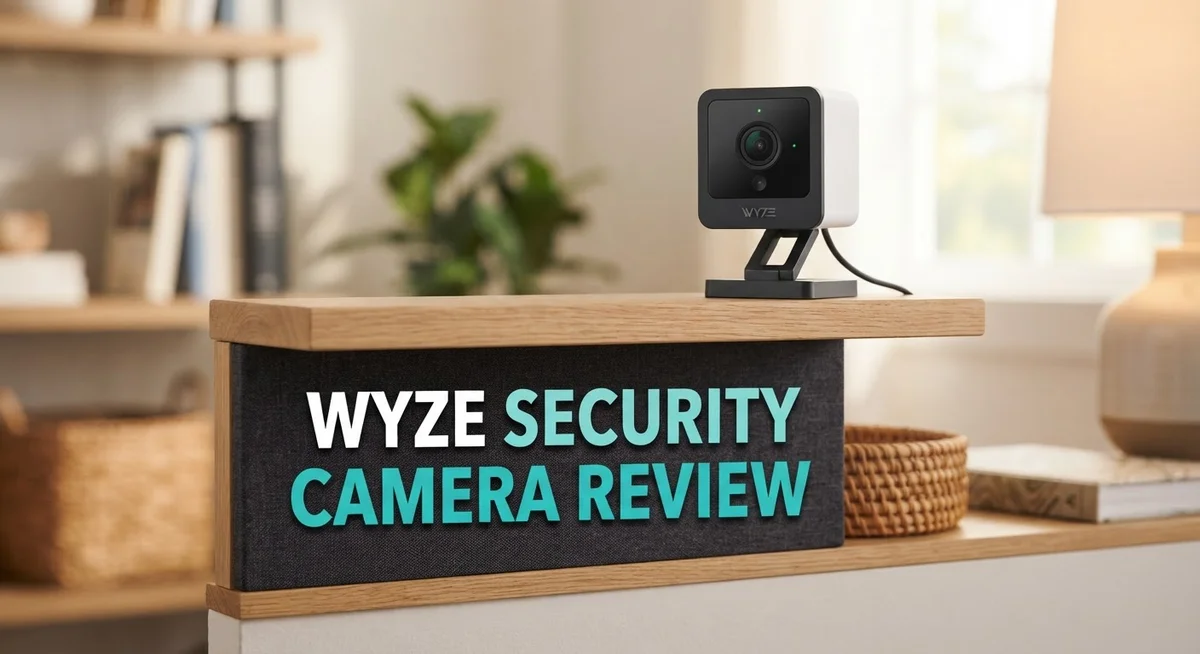
These cameras pack real features into a small body. You get person detection, two way audio, and even a built in siren. The Wyze Cam v4 adds color night vision with 2.5K QHD clarity.
The Wyze Cam v3 brings sharp 1080p video and a wide 121° field of view. Its night vision uses eight infrared LEDs to keep dark rooms clear. Both models support MicroSD cards for onboard storage.
In a Nutshell
- Video quality stands out. The Wyze Cam v4 delivers 2.5K QHD footage. It also offers color night vision, so you see clear details even in the dark.
- Smart detection works well. Person detection helps you get alerts that matter. You will not waste time on false alarms from moving leaves or shadows.
- Two way audio adds convenience. You can talk to visitors or pets through the app. The built in siren also helps scare off unwanted guests.
- Reliability needs attention. Some users report connectivity drops. The app can also show occasional software glitches.
- Battery backup is missing. These cameras rely on constant power. A power outage means your camera stops working.
- Integration options stay limited. Wyze does not connect with as many smart home platforms as Arlo or Ring. Keep this in mind if you use other smart devices.
Video Quality and Night Vision
Video quality makes a real difference when you choose a security camera. The Wyze Cam v4 captures footage in 2.5K QHD resolution. This means you get sharper, more detailed images compared to standard 1080p cameras. You will see faces and license plates with better clarity.
The Wyze Cam v3 records in 1080p Full HD. It uses a CMOS Starlight sensor. This sensor performs well in low light situations. The 121° field of view covers more ground. You capture wider angles of your yard or entryway.
Night vision separates good cameras from great ones. Wyze cameras shine here with color night vision capability. The v4 and v3 both use infrared LEDs to see in complete darkness. The v3 has 8 infrared LEDs (4x940nm + 4x850nm). These work together to light up your space without washing out colors.
Color night vision matters because black and white footage loses important details. You can identify clothing colors, vehicle colors, and other distinguishing features. This helps if you need to report an incident to authorities. Traditional infrared night vision only shows grayscale images.
The cameras include 2800 lumens of LED brightness. This is strong enough for most residential settings. You get clear footage whether someone walks across your porch at midnight or your driveway at dawn.
One thing to note: night vision quality depends on distance and obstacles. Trees, bushes, or walls block the infrared light. Reflective surfaces like windows can interfere with the image. Test your camera placement before finalizing installation.
The Wyze app lets you adjust night vision settings. You can turn the LEDs on or off manually. You can also set them to auto mode. Auto mode activates LEDs only when the camera detects low light.
Wyze cameras deliver solid video performance for basic security needs. The combination of resolution, field of view, and color night vision covers most home monitoring situations. You get reliable footage during day and night hours.


Last update on 2026-10-14 / Affiliate links / Images from Amazon Product Advertising API Some of the links on this website are affiliate links, which means that at no additional cost to you, I earn a commission if you click through and make a purchase. I only recommend products and services that I believe will add value to my readers. Thank you for your support!
Smart Detection and Alerts
Wyze cameras shine when it comes to spotting what matters. The person detection feature works hard to filter out false alarms. Instead of getting alerts for every leaf or shadow, you receive notifications only when a real person appears on screen.
Push notifications arrive instantly on your phone. You can open the app and see live footage within seconds. This speed matters when you need to respond fast.
The two-way audio feature adds another layer of control. You can speak through the camera to warn off intruders or greet delivery drivers. The built-in siren also helps deter unwanted visitors. When activated, it produces a loud sound that gets attention.
Motion detection remains a core strength across the Wyze lineup. The cameras track movement patterns and learn your home’s normal activity. Over time, the system becomes smarter about what to flag.
One important note: Smart detection relies on steady internet and cloud processing. If your WiFi drops, alerts may delay or fail to arrive. Some users report inconsistent performance during peak hours.
The app interface keeps alerts organized and easy to review. You can scroll through past events, watch clips, and adjust sensitivity settings. Customization options let you set detection zones in specific areas of your yard or porch.
Night detection works alongside daytime person detection. The cameras identify people even in low light using infrared and LED illumination. This matters for driveways and backyard monitoring after dark.
Wyze also offers event history storage on the app. You can review what the camera saw over the past days or weeks. This history helps you spot patterns or investigate incidents.
The detection system performs best when cameras stay connected and powered. Weak WiFi signals can reduce alert speed and accuracy. Obstacles between the camera and your router also impact performance.
Overall, smart detection on Wyze cameras delivers practical value for home security. You get real alerts without constant false notifications. The combination of person detection, motion tracking, and two-way communication creates a functional security experience.
Installation and Setup
Getting your Wyze camera up and running takes just a few minutes. The process is straightforward and requires no special tools or technical knowledge.
Start by unboxing your camera and checking all included items. You’ll find the camera unit, a power adapter, a USB cable, and a mounting bracket. Read the quick start guide to familiarize yourself with the basic parts.
Next, download the Wyze app on your smartphone. Create or log into your Wyze account. The app guides you through each step, so you won’t feel lost. Add your camera by scanning the QR code on the device or entering the setup code manually.
Position your camera before powering it on. Choose a spot with a clear view of the area you want to monitor. Indoor cameras work best mounted high on a wall or shelf. Outdoor models need protection from direct rain and extreme heat. The included bracket makes wall mounting simple.
Connect the power adapter and plug it in. Your camera will boot up within 30 seconds. The LED light will flash, showing it’s ready to connect to your WiFi network.
In the app, select your WiFi network and enter your password. The camera connects automatically. This usually takes under two minutes. Once connected, you’ll see a live feed on your screen.
Configure your camera settings next. Enable motion detection if you want alerts. Adjust the detection sensitivity based on your space. Set up person detection to filter out false alarms from pets or moving branches.
For cameras with night vision, test the feature after dark. The Wyze Cam v4 shows color footage at night thanks to its LED lights. The v3 model uses infrared for black and white night vision.
If you plan to record continuously, insert a microSD card into the slot. The camera supports cards up to 2TB. Format the card in the app before using it.
That’s it. Your camera is now protecting your home. Check the app daily to confirm everything works as expected. Most users complete the entire setup in under 10 minutes.
Top 3 Alternatives
Ring Indoor Cam

Last update on 2026-10-14 / Affiliate links / Images from Amazon Product Advertising API Some of the links on this website are affiliate links, which means that at no additional cost to you, I earn a commission if you click through and make a purchase. I only recommend products and services that I believe will add value to my readers. Thank you for your support!
The Ring Indoor Cam works well for people who want simple home monitoring. This camera connects to your Wi-Fi and sends live video to your phone. You can watch your home from anywhere, anytime.
The camera records in 1080p HD quality. It has two-way audio, so you can talk to people in your home through the app. Night vision helps you see in the dark. Motion alerts notify you when something moves.
Setup takes just a few minutes. The app is easy to use, even for beginners. You can save video clips and share them with family members.
Arlo Essential Indoor

Last update on 2026-10-14 / Affiliate links / Images from Amazon Product Advertising API Some of the links on this website are affiliate links, which means that at no additional cost to you, I earn a commission if you click through and make a purchase. I only recommend products and services that I believe will add value to my readers. Thank you for your support!
Arlo Essential Indoor offers wireless convenience without complicated wiring. This camera mounts on any wall or shelf. Battery power means you don’t need outlets nearby.
The camera records in 1080p video with clear night vision. Motion and sound detection work together to catch important moments. You get notifications on your phone instantly.
Two-way talk lets you communicate through the camera. The app organizes your videos and makes searching simple. You can watch live feeds anytime from anywhere.
Reolink PoE Camera

Last update on 2026-10-14 / Affiliate links / Images from Amazon Product Advertising API Some of the links on this website are affiliate links, which means that at no additional cost to you, I earn a commission if you click through and make a purchase. I only recommend products and services that I believe will add value to my readers. Thank you for your support!
Reolink PoE Camera uses Power over Ethernet technology. One cable delivers both power and internet connection. This setup reduces clutter and simplifies installation.
The camera delivers clear 1080p or higher resolution video. Wired connection means reliable streaming with no Wi-Fi drops. Night vision captures details even in complete darkness.
Motion detection sends alerts to your phone. You can record continuously or only when motion happens. The camera works outside and inside your home. Reolink cameras store video locally, giving you control over your footage without cloud dependence.
Cloud Storage and Recording Options
Wyze cameras offer flexible recording options that let you choose how to store your footage. The main choice comes down to cloud storage versus local storage on a microSD card.
Local storage with a microSD card gives you direct control. You insert the card into your camera and get continuous 24/7 recording without relying on internet upload speeds. This approach works well if your WiFi connection drops or if you want footage that stays completely private on your device. The Wyze Cam v4 supports microSD recording, so you can keep days or weeks of video depending on card size and resolution.
Cloud storage through Wyze’s service adds convenience. Your footage uploads automatically to Wyze’s servers, which means you can access recordings from anywhere using your phone. You don’t need to physically retrieve a memory card from your camera. Cloud storage also protects your footage if someone steals or damages your camera.
Wyze offers both free and paid cloud plans. The free tier includes event video clips triggered by motion or person detection. Paid plans unlock longer rolling storage windows, so older footage stays available longer before the system deletes it. This matters because you might need to review something that happened days ago.
Many users combine both methods for extra security. They keep a microSD card in the camera for local backup while also using cloud storage for remote access. If one system fails, you still have footage from the other.
One thing to remember: cloud storage depends on your internet connection. If your WiFi struggles, uploads might lag or fail. Local microSD storage works independently, so it’s more reliable if connectivity issues plague your setup.
The two-way audio feature pairs well with cloud storage. You can receive alerts on your phone and talk through the camera immediately, even when you’re away from home. This real time interaction works best when your cloud connection stays stable.
Your choice depends on your priorities. Need reliable backup without internet concerns? Go local. Want easy remote access? Cloud storage fits better. Most users find that combining both gives them the best of everything.
Reliability and Connectivity
Wyze security cameras rely on WiFi connectivity to function properly. Your internet connection directly affects how well these cameras perform. A stable WiFi signal ensures smooth video streaming and real-time alerts to your phone.
Connection stability matters most for continuous operation. Wyze cameras work best when placed within reasonable range of your router. Weak WiFi signals can cause video delays or dropped connections. If your camera loses power, it stops recording immediately since there’s no battery backup. This is an important limitation to consider during power outages.
The reliability of Wyze cameras has mixed feedback from users. Some owners report consistent performance over months of use. Others experience occasional connectivity drops that require manual reconnection. These issues typically resolve after restarting the camera or your WiFi network.
Software updates occasionally cause temporary problems. Wyze releases regular updates to improve features and security. Sometimes these updates introduce bugs that affect connectivity. The company usually fixes issues within days through follow-up updates. Keeping your camera’s firmware current helps prevent many reliability problems.
Cloud connectivity depends on both your internet speed and Wyze’s servers. If either connection fails, you lose remote access to your camera. Local recording via microSD card continues working during internet outages. This is why many users keep both storage options active.
Two-way audio and motion detection both require active internet connections. If your WiFi drops, these features stop working until connection restores. Person detection specifically relies on cloud processing, so it needs consistent connectivity.
Placement of your camera affects reliability significantly. Avoid putting cameras in areas with thick walls or metal obstacles. These materials block WiFi signals and cause frequent disconnections. Position your camera where it has a clear line of sight to your router.
Most users find Wyze cameras reliable for basic home security needs. The main frustration comes from occasional connectivity hiccups rather than complete failures. Proper setup and placement reduce these issues substantially. Having a backup power source for your router helps maintain continuous monitoring during brief outages.
Pros and Cons
Pros
- Color night vision lets you see details even in complete darkness without switching to black and white mode
- Person detection sends you accurate alerts so you don’t get false notifications from moving branches or pets
- Two way audio means you can talk through the camera and hear responses in real time
- Continuous recording to a microSD card gives you footage without relying on cloud servers
- Built in siren and motion detection work together to deter intruders immediately
Cons
- Connection drops and WiFi failures happen regularly according to user reports, interrupting your monitoring
- Software updates sometimes break existing features or cause the app to crash unexpectedly
- No battery backup means the camera stops working the moment power cuts out
- Limited third party integrations compared to competitors like Ring or Arlo, so you can’t easily connect it to other smart home systems
Who Should Buy It
Wyze security cameras work best for specific types of homeowners. If you want a straightforward home security system without complex setup, Wyze fits your needs. You get basic monitoring with minimal effort.
Renters find Wyze cameras ideal. The cameras mount easily and don’t require permanent installation. You can take them with you when you move. No landlord permission issues arise since they’re non-invasive.
People who prioritize local storage should choose Wyze. You insert a microSD card and record footage directly to it. Your videos stay on the device, not on someone else’s servers. This appeals to privacy-conscious users.
Tech beginners appreciate Wyze’s simple app interface. The controls are straightforward. You don’t need advanced knowledge to operate motion detection or two-way audio. Setup takes minutes, not hours.
Homeowners seeking person detection alerts will benefit from Wyze. The camera distinguishes between people and other movement. You receive notifications only when humans appear, reducing false alarms from pets or wind-blown objects.
Buyers who want flexibility should consider Wyze. You can use cloud storage, local storage, or both methods together. This combination approach gives you backup options if one system fails.
Users comfortable with occasional software updates fit Wyze’s model. The company releases regular improvements. Some updates may cause temporary issues, but they generally enhance features over time.
Wyze cameras suit people with stable WiFi networks. The cameras need reliable internet to function properly. If your connection drops frequently, Wyze reliability suffers. Strong WiFi coverage throughout your home matters significantly.
Those seeking budget-conscious security monitoring find value in Wyze. The entry price remains low compared to professional systems. You get essential features without expensive equipment.
Wyze cameras are NOT ideal for users needing premium features. Advanced motion tracking, sophisticated AI, or extensive cloud integrations don’t exist here. If you want cutting-edge technology, look elsewhere.
People requiring professional-grade reliability should avoid Wyze. Some users report connection failures and recurring problems. Wyze works for basic home security, not mission-critical applications.
Ultimately, Wyze appeals to practical homeowners who want simple, straightforward monitoring without expensive subscriptions or complex installations.
Final Verdict
Wyze security cameras offer solid value for everyday home monitoring. They combine simple setup with useful smart features. This makes them a strong pick for casual users.
The Wyze Cam v4 stands out with its sharp video quality and color night vision. The Wyze Cam v3 remains a reliable choice for basic surveillance needs. Both models cover the essentials well.
Compared to Lorex, Wyze cameras may lack some premium image clarity. Ring offers smoother cloud integration for multi-device setups. Arlo provides more flexible wireless installation options.
Still, Wyze holds its own with practical features like person detection and two way audio. These tools help you stay connected to your home without complexity.
Setup remains straightforward for most users. You can get a camera running in minutes. This makes Wyze a good fit for first time buyers exploring smart security.
Scalability is another strong point. Adding multiple cameras to your system stays simple. The app keeps everything organized in one place.
Keep in mind that ongoing firmware updates shape the user experience. Checking for the latest version before use can prevent common glitches.
Privacy conscious users should note that Wyze relies on cloud and app connectivity for most features. Reading the privacy policy first helps set clear expectations.
For basic home protection, Wyze delivers real value. It won’t replace a full professional security system. But it covers everyday monitoring needs effectively.
Our final take: Wyze works best as a starter smart camera. It suits people who want visual coverage and simple alerts without a steep learning curve.
If you need heavy duty integrations or enterprise level reliability, look elsewhere. But for standard home use, Wyze remains a smart, practical choice.
Overall, this brand proves that useful security features don’t need to be complicated. It keeps things simple while still delivering on core promises.
Frequently Asked Questions
Do Wyze cameras work outdoors in bad weather?
Yes, Wyze Cam v4 handles outdoor use. It has an IP67 rating, which means it resists dust and water spray. Rain and snow won’t damage the unit. However, extreme cold can slow down the WiFi connection. Heavy fog may reduce night vision clarity since the camera relies on LED illumination. Make sure your WiFi signal reaches the outdoor location reliably.
Can I record without paying for cloud storage?
Absolutely. You can record continuously to a microSD card inserted into the camera. This gives you local storage without monthly fees. The footage stays on the card, and you access it through the app. This setup works well if your WiFi connection remains stable. Just check the card capacity regularly and replace it when full.
What’s the difference between Wyze Cam v3 and v4?
The v4 shoots in 2.5K resolution, while the v3 records in 1080p. The v4 also features color night vision, so you see details in color even in low light. The v3 uses infrared only, which gives you black and white footage at night. Both cameras include person detection and two way audio. The v4 is the newer model with sharper video overall.
Will Wyze cameras work if my internet goes down?
Local recording continues if your WiFi drops. Footage saves to the microSD card without interruption. However, you won’t receive push notifications or access live view through the app. Remote monitoring stops until your connection returns. For homes with frequent outages, this is an important limitation to consider.
Are Wyze cameras compatible with smart home systems?
Wyze integrates with some platforms like Amazon Alexa and Google Home. You can view the camera on your smart display or use voice commands. Integration options remain limited compared to Ring or Arlo. Check compatibility with your specific system before purchasing.

Hello everyone my name is Alenya and i am a gadget discovering Enthusiast 🐻🐻