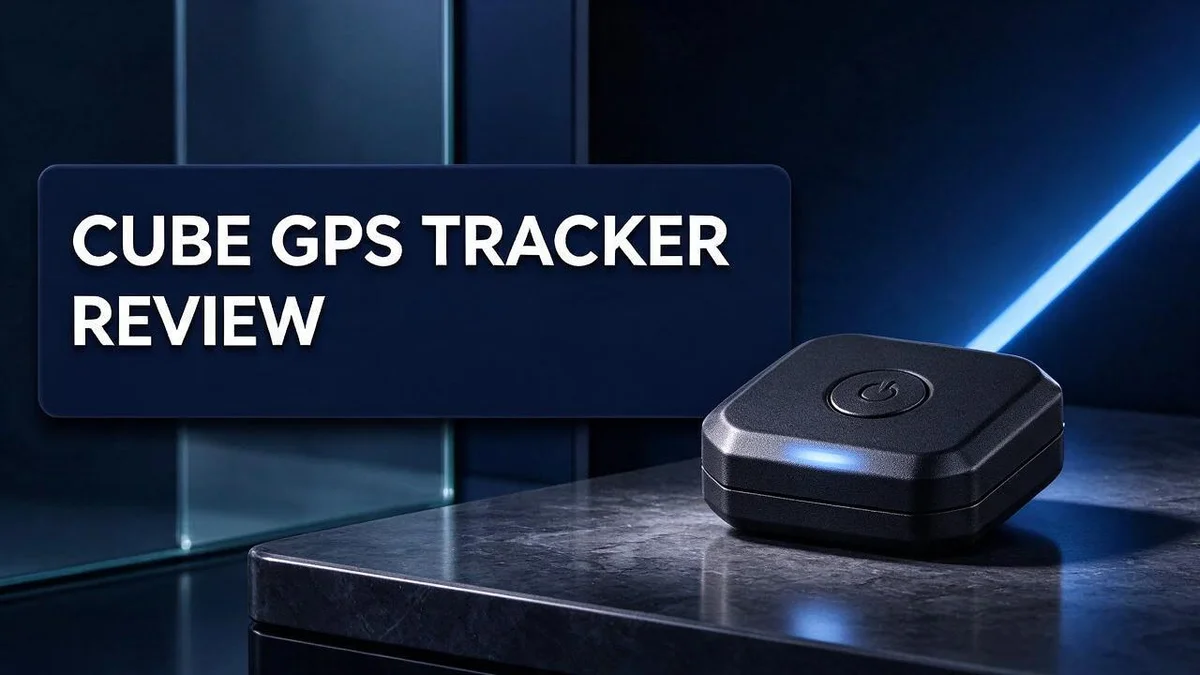
Cube GPS Tracker Review 2026: Value for Money?
Have you ever wondered where your bag, bike, or car is right now? Losing track of valuable things can cause real stress. A GPS tracker can bring you peace of mind.
The Cube GPS Tracker is designed to show you where your belongings are. It shares location, speed, and history over cellular data. Keep in mind that location reporting requires an active data subscription.
Many users praise the accuracy and easy daily use. One reviewer described the location results as spot on. The bundle also includes real time tracking, instant alerts, and 24/7 monitoring.
In this review, you will see how the Pro and Compact models compare. You will also learn about battery life, setup, and who this tracker suits best.
In a Nutshell
- Data plan needed: A paid subscription must be active before the tracker can report any location, speed, or history. Without it, the device cannot send updates to your phone.
- Control inside the app: You buy the service bundle in the Cube Tracker app. You can start or stop the service whenever you like, which helps you manage when you need tracking.
- Long battery life: The Pro model can last up to one year on a single charge. One user saw the battery drop only 3% over three weeks.
- Alerts and monitoring: The bundle includes real time tracking, instant alerts, and 24/7 monitoring. You learn about movement quickly, so you can act fast.
- Setup may take patience: One Reddit user reported long setup trouble even with an active subscription. Plan some extra time before you rely on it for important items.
- Best for: People who want steady monitoring for valuable items and feel comfortable with an ongoing data commitment.
Key Features and Setup

Last update on 2026-09-19 / Affiliate links / Images from Amazon Product Advertising API Some of the links on this website are affiliate links, which means that at no additional cost to you, I earn a commission if you click through and make a purchase. I only recommend products and services that I believe will add value to my readers. Thank you for your support!
Setting up the Cube GPS Tracker starts with the Cube Tracker app. Install it on your phone first. Then create your account and follow each prompt on the screen.
Charge the tracker before you attach it to anything. A full charge gives you a clean start. It also helps you confirm that the device powers on correctly.
Mounting is the next step. The Pro model uses a strong magnetic mount. You can attach it to a metal surface inside a vehicle or on a metal bracket.
Placement matters more than many people expect. Choose a spot that hides the device but still lets the signal reach outside. Avoid thick metal covers around the case.
The Compact model suits everyday tracking. It fits easily inside a backpack, a wallet pocket, or a small case. Its smaller size makes it simple to carry.
Control data use with the start and stop option. The service can be paused in the app when you do not need updates. Pausing helps you manage data use.
Label each tracker inside the app. Clear names show you which device belongs to which bag or bike. Names make the map easier to read at a glance.
Test the tracker before you rely on it. Walk a short distance with the device and check the map view. Confirm that location updates appear as expected.
Keep your app updated. Check the app store from time to time. Newer versions can fix bugs that affect location updates.
Write down your device details and keep the box. This helps you recover settings if you switch phones or reinstall the app later.
Quick setup checklist: Charge the device, install the app, create your account, mount the tracker, and run a short test walk.
Give yourself an extra fifteen minutes for the first setup. Slow and steady work prevents mistakes. Once these steps are done, the tracker is ready for daily use.
Tracking Accuracy and Alerts
Accuracy matters most when you need to find something fast. Nobody wants to guess when a bag goes missing. Users describe the location as spot on, which builds confidence for many owners.
Still, the tracker depends on a cellular connection to send each update. Weak signal in basements, parking garages, or rural roads can slow things down. The dot on your map may show a recent spot instead of your exact spot.
Test before you trust it. Walk a short known route and compare the map with your real position. Repeat the test at home, at work, and on a busy street.
Alerts help you act fast. However, an alert arrives only when the tracker sends data. So the timing depends on the connection.
Think about who receives those messages. If you share the account with a family member, that person may get alerts too. Agree on who responds first, so nobody chases the same bike twice.
Round the clock monitoring sounds reassuring. Yet constant updates can also create noise. Many people turn on alerts for high value trips and quiet them during routine days.
Pick alerts for moments that matter most. A bike leaving a set area may deserve a quick response. A bag sitting at home probably does not.
A long battery does not replace a strong connection. Both factors shape how fresh each location feels.
Notification settings also deserve a look. Check that your phone allows app alerts and sound. A muted phone can hide an important message, even when the tracker works well.
Keep a short log of late or missed alerts. Share that log with app support if problems continue. Clear patterns help support find the cause faster.
In short, expect good accuracy with some delay. Use simple tests, sensible alert choices, and a clear response plan. This approach helps you get the most from every update.
Battery Life and Magnetic Mounting
Battery life is one of the strongest points of the Cube GPS Tracker. One user saw the battery drop only 3% over three weeks. That result gives you a clear sense of daily use.
Your results will depend on how you use it. Frequent location checks and alerts ask more from the battery. Keep an eye on the charge level in the app so you never get surprised.
Cold weather can drain any battery faster than usual. If you track items outdoors in winter, plan to check the charge more often.
Magnetic mounting works best on clean metal. Wipe the surface and the mount before you attach the tracker. Dust, oil, and grime can weaken the grip.
Think about where the tracker will sit. A spot tucked away from road spray often stays cleaner. Less dirt means a steadier hold over time.
After the first drive, look at the mount again. Take a short trip over bumps and turns. Then confirm the tracker still sits firmly in place.
Recheck the mount every few weeks. Vibration and weather can loosen even strong magnets over time. Make it a habit, like checking tire pressure.
Good battery life and a firm mount work together. A tracker that stays attached and keeps power gives you steady updates. Small checks now prevent gaps later.
Battery and mount checks also fit into a simple routine. Pick one day each month. Look at the charge, the mount, and the app status.
Write the date of each check in your notes. Over time, you will spot patterns. You might see faster drain on longer trips or after cold nights.
If the mount feels loose, remove the tracker and start again. Clean both surfaces, then press firmly for a few seconds.
Consistency matters more than perfection. A quick check each month keeps your tracker ready for the moment you need it most.
Top 3 Alternatives
Apple AirTag


Last update on 2026-11-03 / Affiliate links / Images from Amazon Product Advertising API Some of the links on this website are affiliate links, which means that at no additional cost to you, I earn a commission if you click through and make a purchase. I only recommend products and services that I believe will add value to my readers. Thank you for your support!
Apple AirTag is a small tracker that works with the Find My app. It helps you find keys, bags, and wallets fast.
It uses nearby Apple devices to report its location. This makes it a good choice for people who already use an iPhone.
Best for: everyday items around town.
Tile Pro

Last update on 2026-11-03 / Affiliate links / Images from Amazon Product Advertising API Some of the links on this website are affiliate links, which means that at no additional cost to you, I earn a commission if you click through and make a purchase. I only recommend products and services that I believe will add value to my readers. Thank you for your support!
Tile Pro is a Bluetooth tracker with a strong range. You can ring it from the Tile app to find lost items nearby.
The app also shows the last place your item connected. It is a simple pick for people who want loud alerts and easy setup.
Best for: shared homes and busy households.
Garmin inReach Mini

Last update on 2026-11-03 / Affiliate links / Images from Amazon Product Advertising API Some of the links on this website are affiliate links, which means that at no additional cost to you, I earn a commission if you click through and make a purchase. I only recommend products and services that I believe will add value to my readers. Thank you for your support!
Garmin inReach Mini is a satellite communicator with tracking features. It works far from cell towers, so it suits hikers and sailors.
You can send text messages and share your location with family. The device also has an SOS button that contacts emergency responders.
Best for: remote trips where phone signal fails.
Subscription and Service Plan
The Cube GPS Tracker needs a paid data plan. Without that plan, the tracker cannot send location updates. Treat the subscription as a core part of the device, not an extra.
The service comes as a bundle inside the Cube Tracker app. It includes SIM data and location services. You set it up right in the app, so your setup and plan stay in one place.
Think of the bundle as two parts. The first part moves data over the cellular network. The second part handles location tracking and your history.
The app lets you start or stop the service at any time. This helps when you store the tracker in a drawer or a closet. Check the renewal date in your account so you never get caught off guard.
Match the plan to your real needs. A parent checking on a child during school days needs different coverage than someone watching a bike in a shed. Ask yourself how often you want updates before you choose.
The Pro model can run for a long time between charges. Even so, it still needs an active data plan to report anything. A long battery does not remove the need for the service.
Read the service terms before you commit. Look for how long the plan lasts, what happens when it ends, and how to cancel. Clear answers protect you from surprises later.
Keep your account login safe. Share access only with people you trust. If you lose your login, you may lose control of the tracker.
Setup trouble can still happen with an active plan. One Reddit user reported problems for a long time. Contact support early instead of waiting weeks for a fix.
Review your plan every few months. Check how you use the tracker and update your settings in the app. Good planning keeps your tracker useful and simple to manage.
Pro vs Compact Models
Choosing between the Pro and Compact models starts with one simple question. Where will the tracker spend most of its time?
The Pro model fits items that sit still for long stretches. Think about a boat in storage, a spare vehicle, or equipment that rarely moves. Its long running time means you rarely need to check the charge. You can set it up and leave it alone for a while.
The stronger mount also helps on rough ground. Gravel roads and heavy vibration can shake a weak hold loose. A firm grip gives you more peace of mind when the item travels over bumpy paths or through busy job sites.
The Compact model suits daily routines. It works well for a backpack, a bike, or a set of keys that moves every day. A smaller body slips into tight spaces that a bulkier device cannot reach. You can carry it without much thought.
Think about how often the item leaves your sight. A bag that goes to work each morning needs frequent location checks. A trailer that stays in one yard for weeks needs far fewer. Match the check rhythm to the model you pick.
Some people use both models at once. A Pro unit can watch a parked vehicle or trailer while a Compact unit follows a daily bag. Each tracker covers a different job. This setup gives you wider coverage without relying on one device for everything.
Ask yourself where the tracker will live. Under a seat, inside a case, or on a bike frame each place adds different wear and different exposure to weather. Look at the spot before you decide. A quick test run in that exact place shows you whether the model fits.
Focus on the job, not the label. Start with the item you want to track. Note how far it travels, how long it sits, and where it rests between trips. Then pick the model that matches those facts. A good match saves you time and keeps your tracking steady over time.
Pros and Cons
Pros
- The battery dropped only 3% in three weeks.
- Many users say the location accuracy is spot on.
- The app feels easy to use right away.
- You get real time tracking and instant alerts.
- 24/7 monitoring comes included in the bundle.
Cons
- Long term tracking means you must renew your plan on time.
- Some users need extra time to get the first connection working.
- Updates depend on cellular coverage, so remote areas may slow reports.
- Only the Pro model offers the longest battery life.
Who Should Buy It
This tracker suits people who want quiet peace of mind. Many owners feel uneasy when a vehicle sits on a busy street overnight. Checking the app brings a calm feeling.
Small business owners often make a strong match. A company van or delivery cart can roam far from the yard. The owner can see where it went and when it stopped.
Families with older relatives can also benefit. A grandparent who drives or walks alone may need a quick check. Family members can view the last known spot without making a call.
Car owners who park on the street should pay close attention. Theft often happens late at night. Fast alerts give you a chance to respond before the vehicle drives far away.
Renters and frequent movers may find it useful too. A tracker moves with you when you change homes. You can keep watch over a vehicle or cargo from any new address.
Hobbyists who travel with gear can gain comfort. Camping crews and road trip fans often bring valuable gear. A quick glance at the app shows whether everything stayed put.
This device may not suit everyone. People who want a tracker with no ongoing plan should look elsewhere. Those who rarely check their phones may miss important alerts. Some shoppers only need a tracker for a short trip. A device designed for ongoing monitoring may feel like too much.
Think about who will watch the app most. That person should feel comfortable checking updates often. Choosing the right user keeps the setup smooth for everyone.
Match the buyer to the purpose, not the trend. A clear goal leads to a happy purchase. Write down the item, the location, and the reason for tracking before you decide.
Ask one simple question before you buy. Will you check the app at least once a day? If yes, this tracker can serve you well.
Final Verdict
The Cube GPS Tracker earns a strong place on the shortlist. It fits people who know exactly what they want to protect. Clear goals make its strengths easy to see.
Treat the subscription as part of the device. Every location update depends on an active plan. Decide now if you can keep that plan running for years.
Test the tracker at home first. Run a short drive and check each report. This simple step shows how the unit behaves before you need it most.
Think about urgency. Ask yourself how fast you need to act after a problem. If you only check in at the end of the day, a simpler option may work.
Your daily habits matter too. The app works best when you open it often. If you rarely use apps, the tracker may sit unused on a shelf.
The service control adds real flexibility. You can start or stop tracking in the app. This lets you pause the service during seasons when you do not need it.
Many buyers judge a tracker by its features alone. Look at the full picture instead. Think about how the device, the app, and the plan work together every day.
Who should buy it? Choose this tracker if you accept an ongoing plan and want clear location data. People who need a device with no ongoing service should look elsewhere.
Pick the model that matches your item. Then decide whether the subscription fits your routine. Make both choices with care, and you will likely feel confident about your decision. Trust your instincts about what feels right.
Bottom line: the Cube GPS Tracker delivers dependable tracking for owners who value peace of mind. It asks for a steady commitment, but the reward is clear visibility over the things that matter most to you.
Frequently Asked Questions
Can I see where the tracker has been?
Yes. The tracker sends location, speed, and history over cellular data. You can review past trips in the app, so you see routes and stops as well as the current spot.
Can I pause tracking when I store the tracker?
Yes. You can start or stop the service in the Cube Tracker app. Pause it during a long storage period, such as a winter off season, and restart it when you need live updates again.
Does the tracker need my phone nearby to work?
No. The tracker reports through its own SIM data, so your phone does not need to stay close to it. You still need the app to view locations and alerts.
What should I check if setup stalls?
Start by confirming that your subscription is active in the app. Then place the tracker in an open area with good signal. Give it time to connect before you try again, since some setups take longer than expected.
Is the tracker useful for a short trip?
Yes. Turn on the service before you leave and stop it when you return. This approach helps you track only the trips that matter and keeps your monitoring focused on high risk days.

Hello everyone my name is Alenya and i am a gadget discovering Enthusiast 🐻🐻