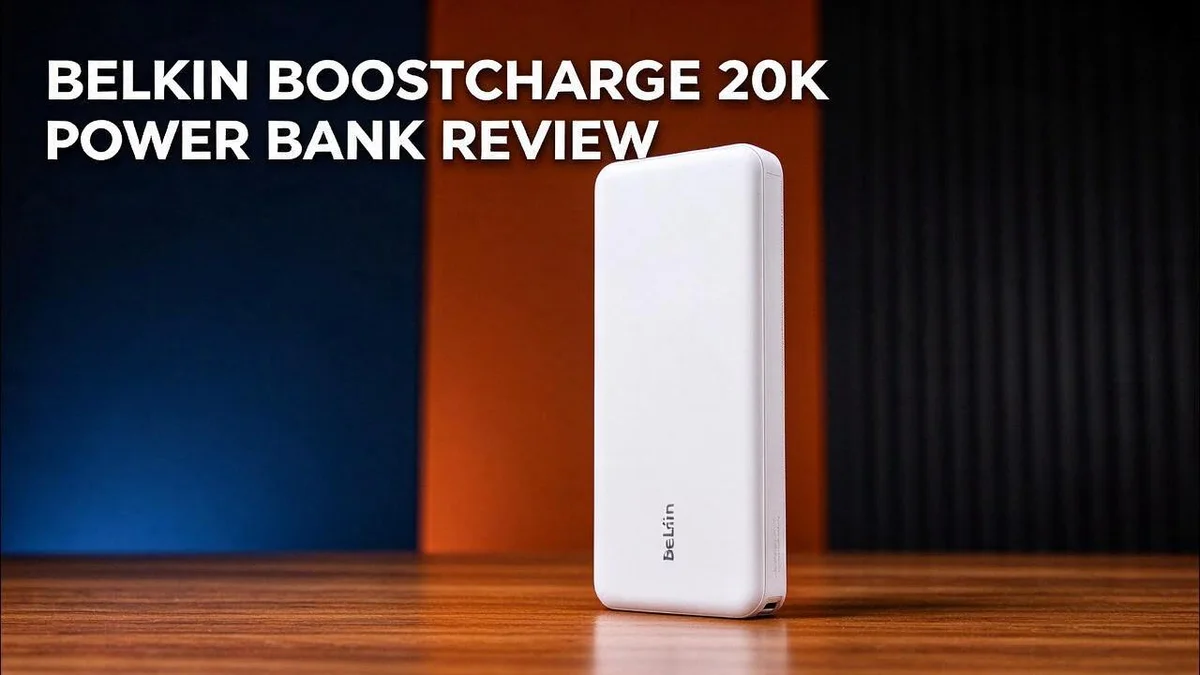
Belkin BoostCharge 20K Power Bank Review: Worth the Price?
Dead batteries can ruin a long day. A reliable power bank keeps your gear alive when outlets are nowhere in sight. The Belkin BoostCharge 20K aims to do exactly that.
With 20,000 mAh of capacity, this power bank charges most phones up to five times. It offers one USB-C port and two USB-A ports. You also get a 6 inch USB-A to USB-C cable in the box.
Reviewers also report a fast charge from 0 to 50% and a top spot in a 2025 stress test.
Still, output depends on the version you choose. Some models deliver 30W, while others top out at 15W. Read on to see which one fits your needs.
In a Nutshell
-
Three ports for shared charging: One USB C port and two USB A ports let you power three gadgets at the same time. This helps when friends or family need a charge too.
-
A cable in the box: A 6 inch USB A to USB C cable comes included in the package. You can start charging your phone right away, with no extra gear needed.
-
Easy power checks: Four indicator lights show how much charge remains. You can glance at them before a trip and know if you need to pack a spare.
-
Two year limited warranty: The manufacturer stands behind this power bank for two years. That coverage gives you extra peace of mind during daily use.
-
Limits for laptop users: This model does not match the BoostCharge Pro 20K for laptop power. If your laptop needs more output, look at that stronger model instead.
-
Speed gaps with newest phones: One 2023 review reports 15W total output. That trails the top speeds of the latest iPhones and Pixels, so check your version first. Some users also prefer Anker for multi port output.
Key Features and Ports


Last update on 2026-11-04 / Affiliate links / Images from Amazon Product Advertising API Some of the links on this website are affiliate links, which means that at no additional cost to you, I earn a commission if you click through and make a purchase. I only recommend products and services that I believe will add value to my readers. Thank you for your support!
Ports matter more than most shoppers expect. The right port decides which devices charge together and how quickly they fill up.
Start with the USB C port for your most important device. Newer phones, tablets, and earbud cases often accept this connector best.
Use the USB A ports for older gear instead. Think of older Bluetooth speakers, action cameras, or a spare watch charger.
Save the faster port for the device that needs power most. This small habit keeps your phone ready when time runs short.
Check the port label before you plug in. Some ports deliver less power than others, so a slow charge may just mean the wrong socket.
Pack a USB C to USB C cable for newer phones. The cable in the box has USB A on one end, so a second cable can save you trouble on the road.
Plan your charging order on busy days. Connect the device with the lowest battery first. The power bank then fills the gap that matters most.
Before you travel, list the devices you plan to charge. Match each one to a port type. This quick check prevents surprises at the airport or campsite.
Keep the power bank in a bag pocket for easy access. Quick access helps you grab it during commutes, flights, or long days out.
Ports also suit shared use at home. Family members can take turns with the power bank without searching for the right connector.
Overall, the port mix offers flexible charging for daily life. Knowing which port to use turns this power bank into a simple tool you can trust.
Charging Performance and Output
Charging speed depends on more than the label. Rated numbers show the best case only. Your results change with each cable and device.
Power splits when devices share. Two gadgets on one bank means each one gets less. The bank shares its output between open ports.
Phones often slow down near the end of a charge. This happens to protect the battery from heat. Plan for a slower top up in the last stretch.
Cable quality can limit speed. A thin or worn cable may cap the wattage. Use a cable rated for the power you need.
Heat also plays a role in charging performance. Warm weather or a thick case can slow the process. Keep the bank out of direct sun while it works.
Your phone sets the final speed. A bank cannot push more power than the phone accepts. Think about your phone’s maximum input before you judge the results.
Overnight charging suits this bank well. You can top off your phone while you sleep. Slow, steady power feels gentler on the battery over time.
Top up before you need it. Charging the bank at home keeps it ready for trips. Waiting until it runs low can leave you stuck.
Some devices draw more power than others. Tablets often pull a heavier load than earbuds. Small gadgets fill up fast and free the port sooner.
Measure the result yourself. Time a charge from empty to full on your phone. Note the number, then compare it with future tests.
Recharging the bank takes time too. A slow wall charger can keep the bank empty for hours. Pair it with a wall adapter that delivers solid power.
Build, Indicators and Portability
The Belkin BoostCharge 20K feels dense and solid in your hand. Its compact body slides into a jacket pocket or a daily tote bag with ease.
Weight is the first thing most people notice. A 20,000 mAh battery carries more mass than a slim pocket pack, so it fits best in a bag.
The shell has clean edges and a flat base. It sits level on a desk, so you can plug in a cable without the bank tipping over.
Why capacity matters for air travel. At 3.7 volts, 20,000 mAh equals about 74 watt hours. That figure sits under the common 100 watt hour limit for carry on bags.
Always check your airline rules before you fly.
The indicator lights sit on the front of the bank. You can check the charge level in a dark hotel room or a moving car without digging through your bag.
Look at the lights before every trip. A quick glance tells you whether the bank needs a charge at home. Small habits like this keep your gear ready.
Pack the bank in a padded pouch or a zipped pocket. Keys and loose coins can scratch the casing over time, and the ports stay cleaner too.
Store it somewhere cool between trips. A shelf indoors works better than a hot car. Steady temperatures help the battery last longer.
The bank suits people who carry one main power source. It fits a backpack, a laptop sleeve, or a travel kit with ease.
Commuters can keep it in a side pocket for the train ride. Students can drop it into a bag between classes without worrying about bulk.
Bulk is the main thing to weigh. The bank adds weight to your load, so think about how much you carry each day.
Overall, this build suits daily use. It handles a busy schedule, and it keeps your devices ready when you leave home.
Top 3 Alternatives
Looking for a strong alternative to the Belkin BoostCharge 20K? These three power banks offer solid capacity and useful features. Each one keeps your phone, tablet, or earbuds ready for daily use.
Anker PowerCore 20K

Last update on 2026-10-14 / Affiliate links / Images from Amazon Product Advertising API Some of the links on this website are affiliate links, which means that at no additional cost to you, I earn a commission if you click through and make a purchase. I only recommend products and services that I believe will add value to my readers. Thank you for your support!
The Anker PowerCore 20K holds a large 20000mAh battery. It gives most smartphones several full charges.
You can charge your devices at home, at work, or on a trip.
Its compact body fits easily in a bag or jacket pocket. Many users like its simple design and reliable performance.
Anker 737 Power Bank

Last update on 2026-09-19 / Affiliate links / Images from Amazon Product Advertising API Some of the links on this website are affiliate links, which means that at no additional cost to you, I earn a commission if you click through and make a purchase. I only recommend products and services that I believe will add value to my readers. Thank you for your support!
The Anker 737 Power Bank focuses on speed. It supports fast output, so your laptop and phone charge quickly. Its ports handle both phones and laptops with ease.
A display shows the remaining battery level at a glance.
This feature helps travelers plan their charging. It works well when you need to top up several devices at once.
RAVPower 20000mAh Power Bank

Last update on 2026-10-14 / Affiliate links / Images from Amazon Product Advertising API Some of the links on this website are affiliate links, which means that at no additional cost to you, I earn a commission if you click through and make a purchase. I only recommend products and services that I believe will add value to my readers. Thank you for your support!
The RAVPower 20000mAh Power Bank offers high capacity and multiple ports. You can charge more than one device at the same time.
Its battery packs enough energy for long days away from an outlet.
Many people appreciate its sturdy build and wide device compatibility. It makes a practical choice for families and frequent flyers.
Value and Price Comparison
Smart shoppers look beyond the label when they compare power banks. Each model offers a different mix of capacity, ports, and output. The right match depends on your daily habits.
The Belkin BoostCharge 20K suits people who need plenty of capacity for daily phone charging. Its three ports cover most everyday gadgets, so one bank can serve the whole household.
The Belkin BoostCharge Pro 20K targets a different buyer. It suits people who charge laptops and need more power on the road.
The Anker Prime 20K with 220W output serves heavy users. It can power laptops, tablets, and phones together. Many shoppers who want strong multi port output lean toward Anker for this reason.
The Anker Nano works well as a secondary option. It fits quick outings where you carry fewer devices.
Baseus PicoGo Air and Belkin UltraCharge also deserve a look. Check their capacity and port layout against your own device list before you decide.
The two year limited warranty adds peace of mind. Compare warranty length across models before you choose.
Start with a clear list of every gadget you charge. Then match the ports and output to that list. A written list makes the decision much simpler.
Think about where you will use the bank most often. Home users and commuters have different needs. Match the bank to your routine, not the other way around.
Think about gadgets you may buy next year. A bank with extra wattage can grow with your needs. Buying one bank that fits current and future devices means fewer replacements.
Read reviews that test each bank in real use. Stress tests and charge time results reveal more than spec sheets alone. Look for tests that match your daily routine.
Pick the model that fits your devices, your routine, and your travel plans best.
Warranty and Support
Belkin stands behind the BoostCharge 20K with a two year limited warranty. That coverage helps if a fault shows up early. Most buyers hope they never need it, but it still matters.
Limited warranties usually cover defects in materials and workmanship. They rarely cover damage from drops, water, or misuse. Read the terms that came with your bank so you know what counts.
Keep your proof of purchase. Save the receipt or order confirmation in your email. Support teams often ask for it before they process a claim. A clear photo of the receipt works well too.
Register your product on the Belkin website if the option appears. Registration can speed up future contact with support. It also keeps your model details in one place.
Check the bank for warning signs early. Look for swelling, a case that cracks, or unusual heat during normal use. Stop using the bank right away if you notice any of these signs. Contact support before you charge it again.
Start with the official Belkin support page. You can find FAQs, troubleshooting guides, and contact options there. Support staff can confirm whether your issue falls under warranty.
Ask the seller about returns too. Many retailers accept returns for a set period after purchase. That window often closes before a warranty claim makes sense. Act fast if the bank arrives damaged.
Warranty claims usually end with a replacement or a repair. Ask support what they offer before you ship anything back. Clear answers save time for everyone involved.
Protect your warranty from the start. Avoid opening the case yourself. Keep the bank dry and away from direct sources of heat. Following these simple steps keeps your claim valid if you ever need it.
Strong support makes any purchase feel safer. A clear warranty and easy help options give you confidence. Think of them as a safety net for your daily charging routine.
Pros and Cons
Pros
– Plenty of power for most phones, often up to five full charges.
– Fast 0 to 50 percent charge time gets you back on the move.
– Ranked as one of the most well rounded performers in a 2025 stress test.
– Two extra ports let you charge more than one gadget at once.
– Handles a busy day of calls, maps, and photos with ease.
Cons
– The 15W output in the 2023 version trails the top speeds of the latest iPhones and Pixels.
– Not the strongest pick for laptops, since the BoostCharge Pro 20K offers more power.
– Some buyers prefer Anker models for multi port output.
Who Should Buy It
The Belkin BoostCharge 20K fits people who want one dependable bank for a busy schedule. It suits commuters, students, and parents who spend long hours away from a wall outlet.
Power cuts at home make this bank useful too. Keep it charged on a shelf, and it can keep a phone running during a storm or outage. A ready bank helps most on the worst nights.
Festival and sports fans often run out of battery before the day ends. Long hours of photos, ticket apps, and ride calls drain phones fast. This bank can keep a phone going until the final song or the last whistle.
Families gain another use. Kids often need tablets and handheld games charged on road trips. Pack one bank in the car bag so every seat stays powered during long drives.
Students make a strong match too. Long study sessions, online classes, and campus travel can drain a phone quickly. A bank in a backpack keeps notes, maps, and messages running all day.
Remote workers who spend time in cafes or parks can benefit as well. A phone can act as a hotspot for a laptop when internet access drops. This bank helps keep that connection alive for longer.
Light travelers also gain from its size. It travels well in a daily bag, so it rarely gets left behind. Carry it on a train, a walk, or a long day of errands.
Some people should look elsewhere. Anyone who needs to power a laptop on a flight may want a stronger model. Heavy gamers who run devices that draw significant power should also check the specs first.
Think about your daily routine before you decide. If your phone often dies before dinner, this bank may be the right fit. Match the bank to your real habits, and the choice feels much easier.
Final Verdict
The Belkin BoostCharge 20K earns a solid place on your shortlist. It suits people who want a simple bank that just works. Its main strengths show up when the day runs long.
Who gets the most from it? Busy people with a phone, earbuds, and a smartwatch will feel at home. The bank works best as a steady backup rather than a laptop power source.
Check the version before you buy. Reviews describe two different outputs. One test shows 30W on USB-C plus 10W on USB-A at the same time. Another reports 15W total. Read the product page closely so you know which model lands in your bag.
Think about the trade off too. You gain a large battery and a clean design. You give up the top charging speeds that newer phones can reach. For many shoppers, that trade feels fair.
The four indicator lights help you check remaining power at a glance. That small detail saves you from guessing during a long commute. It also helps when you share the bank with family members.
Compare a few alternatives before you commit. Models like the Anker Nano and the Baseus PicoGo Air suit people who value compact designs. The Belkin UltraCharge is another name worth checking.
Create a short checklist. Write down your phone model, your charging habits, and how often you need a second charge during a normal week. Then compare each answer with the specs in front of you. This simple step makes the decision clearer.
Here is the short version. If you want one bank that keeps your phone alive through a full day, this model delivers. If you need top speeds for the newest devices or heavy laptop use, compare other models first.
Pick the bank that matches your habits, not the one with the longest spec list. Your daily routine should guide the final choice. Review your gadget list one more time, then decide with confidence.
Frequently Asked Questions
Can this power bank keep my phone charged all day?
Yes, it often does. Reviewers say it can charge most phones up to five times, so one charge can cover a long day of calls, music, and photos. Keep it in your bag so you can top up during a lunch break.
Can it charge a laptop?
It works best for phones, earbuds, and smartwatches. Laptop users usually need more power. The BoostCharge Pro 20K is the better pick for that job, so check your laptop’s wattage first.
Which version should I look for?
Reviews describe two outputs. One version delivers 30W USB-C and 10W USB-A at the same time. Another tops out at 15W total. Read the product details closely so you know which version you receive.
How do I check the remaining charge?
The four indicator lights show the battery level at a glance. Glance at them before you leave home. This habit helps you avoid a dead bank on a busy trip.
Who should choose a different bank?
People who need several high power ports may prefer Anker models. If you want a bank for a laptop, compare the Anker Prime 20K/220W or the BoostCharge Pro 20K first. Compare a few options before you commit.

Hello everyone my name is Alenya and i am a gadget discovering Enthusiast 🐻🐻