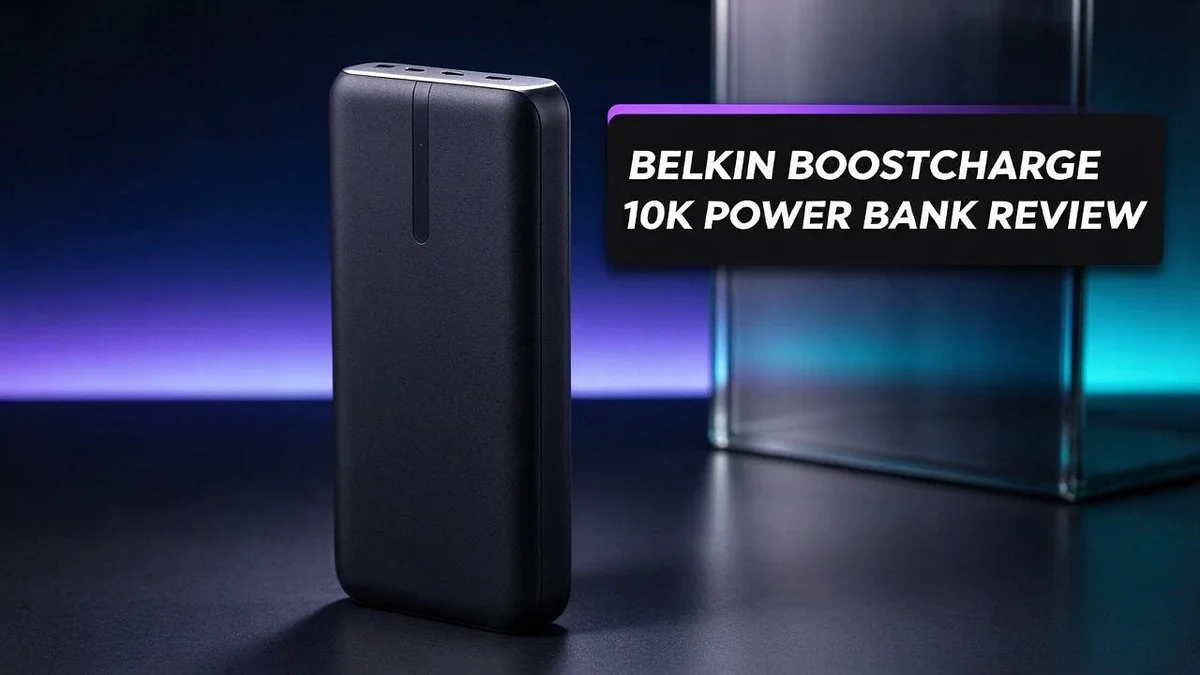
Belkin BoostCharge 10K Power Bank Review: Specs, Performance & Verdict
Tired of your phone dying right when you need it most? A reliable power bank can save the day. The Belkin BoostCharge 10K is one option worth a closer look.
This compact pack holds 10,000 mAh of power. That capacity can give most phones more than one full charge. It also slips easily into a bag or pocket.
Travelers will appreciate the built in cable. You do not need to carry an extra cord. The 20W fast charging also gets your device back in action quickly.
In this review, we cover the key specs, the highlights, and the drawbacks. You will also see how it compares to other popular power banks. Let’s find out if this little power bank earns a spot in your bag.
In a Nutshell
-
Fast charging power: The USB C port pushes out up to 20W. Compatible phones and tablets refill quickly, which saves time on a busy day.
-
Three charging ports: One USB C port and two USB A ports let you charge several gadgets at once. Friends or family traveling with you can share the pack too.
-
Light and easy to carry: The pack weighs about half a pound. It slides into a jacket pocket or a small bag with ease.
-
Clear charge level display: Four indicator lights show how much power remains. You can check the battery level at a glance before heading out.
-
Solid peace of mind: Belkin includes a two year limited warranty. This coverage offers some protection if something goes wrong early on.
-
Points to consider: Some owners report early failures, and a few complain about customer service in the Philippines. Reading recent reviews helps you decide if this pack fits your needs.
Design and Portability


Last update on 2026-10-14 / Affiliate links / Images from Amazon Product Advertising API Some of the links on this website are affiliate links, which means that at no additional cost to you, I earn a commission if you click through and make a purchase. I only recommend products and services that I believe will add value to my readers. Thank you for your support!
Shape plays a big role in daily comfort. The pack measures about 4 inches by 2.5 inches. Its 0.9 inch depth slides into a jacket pocket or a side pocket of a backpack.
Flat designs travel well in crowded bags. A thin pack does not poke at your hip when you walk. It also fits beside a tablet or a paperback in a tote.
Airport rules are worth a quick look. Most airlines ask that power banks travel in carry on bags, not checked luggage. Its rating of about 37 watt hours sits well under the common 100 watt hour limit.
A compact base helps at home too. The pack sits flat on a nightstand or desk. You can plug it in to recharge overnight, then leave it out of the way. That makes it handy for late night phone top ups.
Daily gear matters too. Keep it in an inside pocket to protect it from bumps. Store it apart from keys and coins so the surface stays clean.
Heat can shorten battery life. Avoid leaving the pack in a parked car or in direct sun. Lithium batteries work best at moderate temperatures.
Compact packs can slip from damp hands. Clip it to a bag strap or keep it in a zipped bag during hikes or runs. A secure spot keeps it safe on the go.
Short cords suit small bags. The 6 inch cable listed with this model keeps tangles low in a crowded tote. Keep both items together so nothing gets lost.
Pair it with a small sleeve. A soft sleeve keeps the pack and cable together. It also keeps dust away from the ports.
Plan your charging spot. Choose a spot near an outlet with open space around it. Good airflow helps the pack stay cool while it recharges.
Overall, the size suits daily life. The pack fits pockets, bags, and nightstands with ease. Few gadgets feel this easy to carry every day. Its slim form makes it a practical companion on any trip.
Charging Performance and Power Output
When you plug a phone into the USB C port, the pack and the phone first agree on a safe voltage and current. This handshake is called Power Delivery, and it keeps charging steady.
A 20W output means the pack can push about 20 watts into a device. Watts measure power, so a higher number usually means faster charging. Phones that accept fast charging see the biggest benefit.
Real charging speed depends on the device. Some phones accept only 15W or less, so they charge at their own pace. The pack adapts to that lower limit without any harm.
Laptops are a different story. Many laptops need more than 20W, so this pack suits phones, tablets, and earbuds best. Think of it as a boost rather than a full laptop charger.
Sharing output changes the speed. When you charge two devices at once, the total output gets split between them. The second device may charge more slowly than the first.
Energy also turns into heat during conversion. Some power disappears before it reaches your battery. This happens with almost every power bank, so it is normal.
Your cable matters as much as the pack. A thin or worn cable can limit the flow of power. Choose a sturdy cable that supports Power Delivery for the best results.
The USB A ports handle slower charging. They suit older phones, cameras, and small accessories that do not need fast power. Plug your most important device into the USB C port first.
Many phone wall chargers offer similar wattage. That means the pack can keep pace with home charging in many everyday situations. You may notice little difference when you top up overnight.
Temperature also plays a role during charging. The pack may feel warm while it pushes out power. A little warmth is normal, but very hot spots mean you should pause and let it cool.
Finally, watch the four indicator lights during charging. They show progress, but they do not display exact wattage. Notice how quickly the lights change to judge how fast your battery fills.
Ports and Built-In Cable
The built in cable is often the first feature people notice. You do not need to pack a separate cable for your phone. That saves room in your bag and removes one more item to lose.
Pull the cable out, plug it into your phone, and start charging. The connector sits ready whenever your battery runs low.
The cable is short. The listed USB C to USB A cable measures about 6 inches. That length works well on a nightstand, a tray table, or a car seat. It may not reach a phone tucked deep in a tote or a laptop on a far desk.
Cable length also affects where you place the pack. Choose a spot where the phone rests flat and the cable does not pull tight. The pack also stays steady on a flat surface, so the connection stays firm.
Match the connector to your device. The USB C end fits newer phones, tablets, and many earbud cases. Older devices may use a different plug, so you may need a separate cable or adapter.
The USB A ports need a cable with a USB A end. Check that your cable fits before a trip.
Pack a backup cable for longer trips. Because the built in cable is short, a longer cable helps for laptops or devices far away. Store it in the same pocket so you do not forget it.
Wrap the cable loosely when you store it. Sharp bends near the plug can weaken the wire over time. A gentle loop protects the cable and keeps the connector in good shape.
Dust and lint can build up inside a port. Check the connector before you plug in, and wipe it gently with a dry cloth if needed.
A good cable habit makes the pack more useful. Keep the built in cable neat, store it gently, and carry a spare for reach. With these steps, your power bank stays ready for the day.
Top 3 Alternatives
Looking for a different power bank? These three options make strong alternatives. Each one keeps your phone and tablet ready for the day.
Anker PowerCore 10000

Last update on 2026-10-14 / Affiliate links / Images from Amazon Product Advertising API Some of the links on this website are affiliate links, which means that at no additional cost to you, I earn a commission if you click through and make a purchase. I only recommend products and services that I believe will add value to my readers. Thank you for your support!
The Anker PowerCore 10000 packs a large battery into a slim body. It fits easily in a bag or pocket. It charges most phones about two times on a single charge. Many people choose it for daily commuting and short trips.
Anker 521 Power Bank

Last update on 2026-11-03 / Affiliate links / Images from Amazon Product Advertising API Some of the links on this website are affiliate links, which means that at no additional cost to you, I earn a commission if you click through and make a purchase. I only recommend products and services that I believe will add value to my readers. Thank you for your support!
The Anker 521 Power Bank offers a strong mix of speed and portability. It supports fast charging for compatible devices, so you spend less time waiting. Its sturdy build handles everyday bumps in a backpack. It works well for long travel days and busy workdays.
Mophie Powerstation Plus

Last update on 2026-11-03 / Affiliate links / Images from Amazon Product Advertising API Some of the links on this website are affiliate links, which means that at no additional cost to you, I earn a commission if you click through and make a purchase. I only recommend products and services that I believe will add value to my readers. Thank you for your support!
The Mophie Powerstation Plus brings a sleek look and reliable performance. It suits people who want a clean design for the office or home. Its compact shape keeps your desk tidy. It is a good pick for anyone who cares about style as much as function.
Pick the option that fits your daily routine best. Each choice gives you a dependable way to keep your devices charged on the go.
Warranty and Customer Support
Belkin backs the BoostCharge 10K with a 2 year limited warranty. That gives you two years of protection against manufacturing defects. Keep your receipt handy, because most warranty claims need proof of purchase.
Some buyers have reported early failure with this power bank. A warranty protects you in those cases, so read the terms before you buy. Check what the limited warranty covers and what it leaves out.
Customer support is another area to think about. Some owners have complained about service in the Philippines. Experiences can vary by region, so check local support options before you buy.
Start with the warranty terms. Visit the Belkin website and read the full warranty page. It explains the claim steps, the coverage period, and any conditions that may void protection. Save a copy for your records.
Gather your proof of purchase. Store your receipt or order email in one folder. Take a clear photo of the serial number on the label too. This makes the claim process faster.
Contact support early. If the pack stops charging, reach out right away. Describe the problem with specific details, such as whether the indicator lights blink, stay off, or show an error pattern.
Test the pack before the return window closes. Charge it fully on day one. Run a test with your usual phone and cable. Early testing reveals problems while you still have time to return it.
Ask about replacement options. Some support teams offer a replacement instead of a repair. Ask which option applies to your case. Get the answer in writing to avoid confusion later.
Use online channels when phone lines are busy. Chat tools and email often respond faster. Save screenshots of every message. A written record helps if the claim moves slowly.
Check your country’s consumer rights too. Local laws may add protection beyond the manufacturer warranty. A short search can show what you can claim. Good preparation keeps the process simple.
Pros and Cons
Pros
– It slips easily into a jacket pocket or small bag.
– The light weight suits everyday carry on commutes.
– Three ports let you charge a phone and two more gadgets.
– Fast charging support works well with compatible phones.
– It fits well in a travel kit for day trips.
Cons
– Only one USB C port supports the fastest charging speeds.
– The 10,000 mAh capacity gives about two full phone charges.
– Some owners say the pack lost power sooner than expected.
– Support responses can feel slow in certain regions.
Who Should Buy It
Some shoppers need a simple pack for everyday life. This one suits people who carry a few gadgets and want a dependable backup.
Commuters who carry a phone and wireless earbuds get a lot out of it. The pack slides into a coat pocket on a crowded train and stays out of the way.
Students also make a good match. A dorm room or library bag often needs a pack that charges a phone during long study sessions. The three ports let a student charge a phone and a second gadget at the same time.
Parents can keep it in a school bag too. It can power a child’s tablet or phone on a long bus ride or after sports practice.
Runners and gym goers may like the light weight. Tuck it into a gym bag or a running belt, and it adds very little bulk to the load.
Home emergency kits are another smart fit. Store the pack in a drawer with a flashlight. When storms cut power, a charged phone helps you call family or check local news.
Some people should look elsewhere, though. Anyone who needs to power a laptop at full speed may find the 20W output too slow for the job.
Daily Apple Watch users may prefer the BoostCharge Pro because it includes a built in watch charger. Fans of MagSafe iPhones often like the MagSafe model because it snaps onto the back of the phone.
Ask yourself three quick questions before you decide. Do you charge one or two phones most days? Do you need power while you move? Do you own a laptop that needs fast charging?
Bottom line: if you want a light, simple pack for phones and earbuds, this model fits well. If you need heavy power or a watch charger, compare the other Belkin options first.
Final Verdict
The Belkin BoostCharge 10K is a simple pack that gets the basics right. It offers 10,000 mAh, a built in cable, and three ports. For most people who carry a phone and earbuds, it does the job well.
The built in cable is a clear win for daily use. You never need to dig through a bag for a loose cable. Many people forget cables at home, so this feature saves time.
The 20W USB C output has limits, though. Phones and tablets charge at a good pace. A laptop, however, may charge slowly or need a larger power bank. Plan for that before you buy.
Compare it with other lab tested options first. Anker and INIU packs were tested alongside Belkin, so they make strong rivals. If you want the lightest pack possible, the Flextail Zero weighs only 5.1 oz and is worth a look.
iPhone owners may prefer the MagSafe model. It attaches to the back of the phone. That keeps the setup neat and simple. Keep in mind that it works only with compatible phones.
Think about your daily routine before you commit. Heavy use can expose weak spots faster than light use. Choose a pack that matches how often you will charge on the go.
Battery life tells only part of the story. Real results depend on your phone, the apps you run, and the room temperature. Keep the pack out of hot cars, because heat shortens battery life for any power bank.
Think about your charging habits too. If you charge once a day, a 10K pack covers most needs. If you travel for days without outlets, consider carrying a second light pack instead.
In short, this pack suits people who want simple, pocket sized power. It handles phones and earbuds with ease without adding bulk. If your needs grow, a larger model or a different Belkin pack may serve you better.
Frequently Asked Questions
Can the Belkin BoostCharge 10K charge a laptop?
Not really. The 20W USB C output works well for phones and earbuds. Most laptops need more power than this pack can give, so a larger power bank suits laptop charging better.
How can I tell how much charge is left?
The pack has four indicator lights. Each light shows roughly how much power remains. Glance at the lights before a day trip so you know whether to bring a charging cable.
Can I take this power bank on a plane?
Usually yes. Power banks under 100Wh are generally allowed in carry on bags. This model is about 37Wh, so it sits well under that limit. Always check your airline’s rules before you fly, because policies can change.
What happens if the power bank stops working?
Belkin lists a two year limited warranty. Keep your proof of purchase in a safe place. Contact support as soon as a problem starts, since replies can take a while in some regions.

Hello everyone my name is Alenya and i am a gadget discovering Enthusiast 🐻🐻