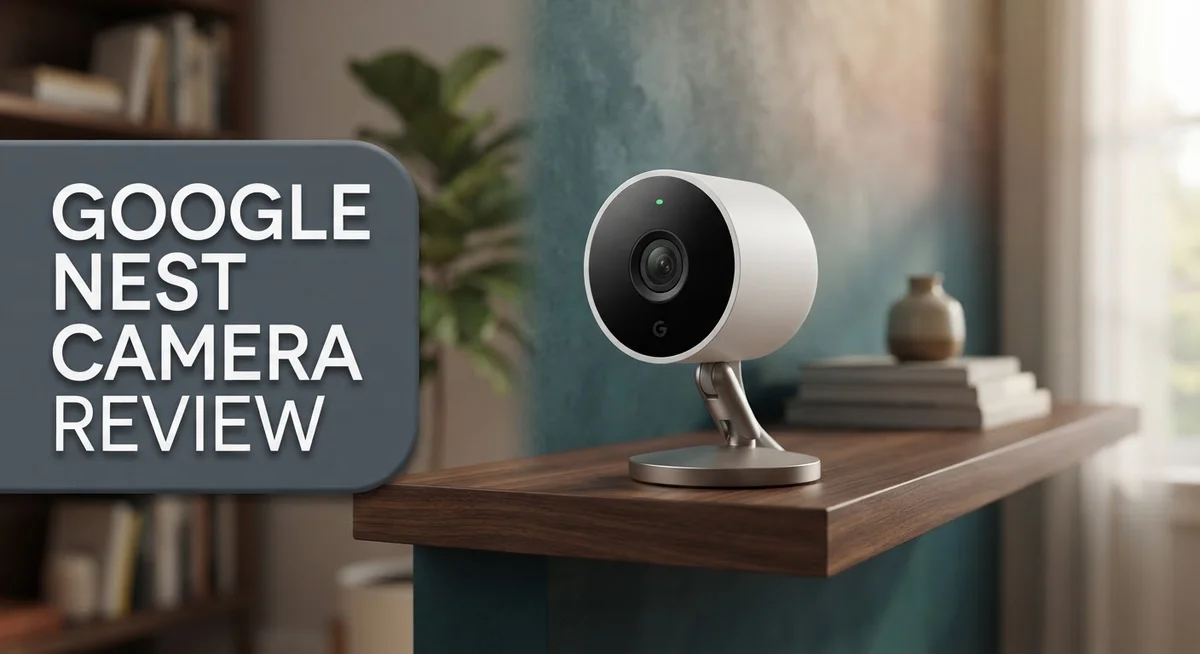
Google Nest Camera Review 2026: Live Up To The Hype?
Looking for a smart way to watch your home? The Google Nest Camera might be on your list. This camera promises clear video and easy smart home integration.
The Nest Camera offers 1080p resolution and a wide 130 to 145 degree field of view. It captures most of your room or yard in one frame.
Infrared night vision helps it see in the dark. It will not show color at night, but it still tracks movement clearly.
In a Nutshell
- Video quality stays sharp and consistent, even during long recording sessions. You get smooth footage without lag or glitches.
- The camera works best for people already using Google Nest devices. It connects easily with other smart home gadgets.
- Cloud storage only is a big limitation. There is no local storage option, so you always need an internet connection to save footage.
- Do not expect professional monitoring services here. This camera relies on self monitoring through the app.
- Alternatives like Arlo offer better video clarity. Blink works well for simple setups. Reolink shines for outdoor use.
- The app experience feels clunky at times. Some users find the subscription setup confusing.
- Overall, this camera fits well into a Nest smart home. But it may not satisfy users wanting standalone flexibility.
Key Features and Specifications
The Google Nest Camera packs several standout features that make it worth considering for your home security setup. Let’s break down what you’re actually getting.
Video Resolution and Field of View
The camera delivers 1080p video quality, which keeps footage clear and sharp. You get a wide viewing angle between 130 and 145 degrees. This means fewer blind spots in the room you’re monitoring. The wide angle helps you see more of what matters without needing multiple cameras.
Night Vision Capability
When darkness falls, the infrared night vision kicks in automatically. The camera switches to black and white mode to capture details in low light. You won’t get color night vision, but the infrared does the job for basic visibility and motion detection.
Smart AI Alerts
This camera uses artificial intelligence to understand what it sees. AI alerts distinguish between people, animals, and vehicles. You get notifications only for relevant activity, not every passing leaf or shadow. This reduces false alarms that waste your time.
Nest Ecosystem Integration
The real strength here is how it plays with other Google Nest devices. If you already own Nest speakers, displays, or thermostats, this camera connects smoothly. You can view footage on any Nest device around your home. The integration feels natural and intuitive for existing Nest users.
Storage and Cloud Dependency
Here’s an important limitation: this camera relies entirely on cloud storage. There’s no local storage option built in. Your footage lives on Google’s servers, which means you need a constant internet connection. If your Wi Fi drops, you lose recording capability.
Professional Monitoring Absent
Unlike some competitors, Google doesn’t offer professional monitoring services. You handle all alerts and responses yourself. This works fine for personal security, but it’s not a replacement for professional systems.
The Nest Camera excels at integration and AI smarts. However, the cloud only approach and lack of professional monitoring matter if those features matter to your needs.


Last update on 2026-09-20 / Affiliate links / Images from Amazon Product Advertising API Some of the links on this website are affiliate links, which means that at no additional cost to you, I earn a commission if you click through and make a purchase. I only recommend products and services that I believe will add value to my readers. Thank you for your support!
Video Quality and Night Vision Performance
The Google Nest Camera captures video at 1080p resolution, which keeps your footage clear and sharp during both day and night. The wide field of view spans 130 to 145 degrees, so you see more of your space without blind spots.
When darkness falls, the infrared night vision activates automatically. The camera switches to black and white mode and uses infrared LEDs to illuminate the scene. This approach works reliably in complete darkness, though it lacks color night vision like some premium competitors offer.
Night vision performance is solid for most home security needs. You’ll see movement and identify general shapes clearly. However, if you need color details at night, this camera won’t deliver that feature. The infrared system performs best within 15 to 20 feet of the camera.
The AI-powered alerts add intelligence to your monitoring. The camera learns to distinguish between people, animals, and vehicles. This means fewer false alerts from passing leaves or shadows. You get notifications only for events that matter.
Video quality remains consistent throughout the day. Bright sunlight doesn’t wash out details, and indoor footage stays clear even in dim lighting. The camera handles motion smoothly without stuttering or lag.
One thing to note: video quality depends heavily on your internet connection. A weak WiFi signal can reduce resolution and cause delays in live view. The camera needs consistent bandwidth to perform at its best.
Compared to competitors like Arlo, the Nest Camera holds its own in everyday situations. Arlo cameras offer slightly sharper detail in some lighting conditions, but the difference isn’t dramatic for most users. Blink cameras cost less but sacrifice some video clarity.
The real advantage of the Nest Camera is integration. If you already use Google Nest devices, this camera fits seamlessly into your setup. You control everything through the Google Home app alongside your other smart devices.
For basic home security and monitoring, the video quality and night vision meet the mark. Just remember that this camera excels when paired with other Nest products and a strong internet connection.
Design, Installation, and Setup
Google Nest Camera arrives ready to mount on your wall or shelf. The physical design is compact and unobtrusive, so it blends into most home environments without drawing attention.
Installation takes just a few minutes. You’ll need a power outlet nearby since this camera requires a constant electrical connection. The mounting bracket includes hardware for drywall and other common surfaces. If you prefer a temporary setup, you can simply place it on a shelf facing your desired area.
The setup process happens entirely through the Google Home app. Download the app, open it, and select “Set up device” to begin. The camera uses Wi Fi to connect to your network, so make sure your signal strength is strong in the installation area. A weak connection can cause video lag and missed alerts.
Pairing with your Google account is straightforward. The app walks you through each step with clear instructions. You’ll name your camera, assign it to a room, and choose your preferred settings. The entire process typically completes in under five minutes.
One important note: this camera requires a stable internet connection to function. If your Wi Fi drops, live view stops working. Cloud storage also depends on continuous connectivity, so consider your network reliability before purchasing.
Integration with other Nest devices happens automatically once setup finishes. If you own Nest speakers, displays, or thermostats, they recognize your new camera right away. This ecosystem compatibility is a real advantage for existing Nest users.
The app interface lets you adjust settings like motion detection sensitivity and notification preferences. You can also create activity zones to reduce false alerts from trees or passing cars. These customization options help fine tune the camera for your specific needs.
Physical placement matters significantly. Position the camera where it captures your main entry points or high traffic areas. Avoid pointing it directly at bright windows, as this causes glare and washes out your footage.
Once operational, the camera requires minimal maintenance. Occasionally wipe the lens clean to keep video quality sharp and clear.
Top 3 Alternatives
Wyze Cam v3

Last update on 2026-09-17 / Affiliate links / Images from Amazon Product Advertising API Some of the links on this website are affiliate links, which means that at no additional cost to you, I earn a commission if you click through and make a purchase. I only recommend products and services that I believe will add value to my readers. Thank you for your support!
The Wyze Cam v3 offers clear night vision with infrared technology. You get a 1080p resolution that captures sharp details in your home. The camera includes a free cloud storage option, which saves you money right away.
This model works well in low light conditions. You can access live feeds through your smartphone anytime. The two-way audio lets you communicate with people in your home remotely. Installation takes just minutes without professional help needed.
Ring Indoor Cam

Last update on 2026-09-17 / Affiliate links / Images from Amazon Product Advertising API Some of the links on this website are affiliate links, which means that at no additional cost to you, I earn a commission if you click through and make a purchase. I only recommend products and services that I believe will add value to my readers. Thank you for your support!
Ring Indoor Cam delivers solid performance for home monitoring. The camera streams in 1080p HD quality. You receive alerts when motion gets detected in your space.
Two-way talk features let you speak through the device. The compact design fits easily on shelves or desks. Ring integrates well with other smart home systems you may own. Night vision works reliably to keep tabs on your space after dark.
Arlo Essential Indoor

Last update on 2026-09-17 / Affiliate links / Images from Amazon Product Advertising API Some of the links on this website are affiliate links, which means that at no additional cost to you, I earn a commission if you click through and make a purchase. I only recommend products and services that I believe will add value to my readers. Thank you for your support!
Arlo Essential Indoor provides reliable indoor surveillance with 1080p video quality. The camera offers night vision capabilities for round-the-clock monitoring. Motion and sound detection alerts notify you instantly when activity happens.
The setup process is straightforward for most users. Two-way audio lets you interact with family members or pets from anywhere. This model works with existing Arlo systems if you already use their products. The compact size means it blends into your home without standing out.
Each option brings different strengths to your home security needs. Consider your specific requirements before choosing between them.
Nest Ecosystem Integration and Smart Home Compatibility
The Google Nest Camera integrates seamlessly into the broader Google Nest ecosystem. This camera works directly with other Nest devices you may already own.
Your Nest doorbell, Nest speakers, and Nest displays all communicate with this camera. When motion triggers an alert, your Nest display can show the live feed automatically. You can ask your Nest speakers to show you the camera view using voice commands.
The Google Home app serves as your central control hub. All your Nest devices appear in one place. You manage permissions, schedules, and automations from a single dashboard.
Smart home automation becomes more powerful with this camera. You can create routines that trigger when the camera detects motion. For example, your lights could turn on when someone approaches your door. Your Nest speaker could announce that motion was detected. These automations work without any manual intervention from you.
The camera pairs instantly with Google Assistant. You ask questions like “Show me the front door” or “Is anyone at my house?” Your Google Assistant responds with live video or recorded clips. This hands-free control makes monitoring your home effortless.
If you own Google Nest Aware Plus, your camera gains additional features. The service unlocks advanced detection capabilities and longer video history. Your camera understands the difference between people, animals, and vehicles.
Compatibility extends beyond just Google products. The Nest Camera works with IFTTT (If This Then That) for broader automation. You can connect it to other smart home platforms through workarounds. However, native integration works best with Google’s own ecosystem.
The learning curve remains minimal because Google designed everything to work together intuitively. New users find that setup and integration happen automatically. The app guides you through connecting your camera to other Nest devices in minutes.
This ecosystem approach means your camera becomes smarter over time. Software updates add new features and improve detection accuracy. Your investment in Google Nest devices compounds as you add more products.
Subscription Model and Storage Options
Google Nest Camera requires a subscription to unlock most of its powerful features. The subscription model works on a monthly basis, giving you access to cloud storage and advanced AI capabilities. Without a subscription, your camera functions as a basic live feed viewer only.
The subscription tiers offer different storage lengths and features. The standard tier stores your video for a set period in Google’s cloud servers. The higher tier adds more extensive history and additional smart home features. You choose the plan that fits your needs.
Cloud storage is the primary storage method for Nest Camera footage. Your videos upload automatically to Google’s servers whenever motion or sound is detected. This approach means you don’t need to install hard drives or manage local storage devices yourself. Access your footage anytime from anywhere through the Google Home app.
One key limitation stands out: Nest Camera has no local storage option. You cannot save videos directly to a USB drive, SD card, or network attached storage. This design choice makes the camera fully dependent on your internet connection and Google’s cloud service. If your internet drops, you lose live viewing and recording capabilities.
The cloud storage approach offers real benefits. Your footage stays safe even if someone steals or damages the camera. You get automatic backups without manual effort. Multiple devices can access the same footage simultaneously through your Google account.
However, this model creates a potential drawback. You must maintain an active subscription to keep your video history. Canceling your subscription means losing access to stored footage after a retention period expires. Some homeowners prefer systems that offer local storage alternatives for complete independence.
Google stores your video data in secure data centers. Encryption protects your footage during upload and storage. Your videos remain private to your account unless you explicitly share them. The company’s privacy policies govern how long data stays accessible.
Consider your internet reliability before committing to this camera. Stable, fast internet ensures smooth operation and quick uploads. Slower connections may cause delays in alerts and video playback. Test your home’s internet speed in the camera’s intended location first.
Pros and Cons
Pros
- Clear 1080p video quality with a wide 130–145° field of view captures most of your space
- Reliable performance that works consistently when your internet connection stays stable
- Infrared night vision lets you see activity in complete darkness
- AI alerts filter out false notifications and focus on real threats
- Seamless integration with Google Nest devices and Google Assistant for smart home automation
Cons
- No local storage option means you depend entirely on cloud storage for all footage
- Internet connection is required at all times, so outages leave you without monitoring
- Professional monitoring service is not available with this camera
- Subscription requirement unlocks most features, adding ongoing costs beyond the initial purchase
Who Should Buy It
Google Nest Camera works best for people who already use Google products at home. If you have Google Home speakers, Nest displays, or a Nest doorbell, this camera fits perfectly into your setup.
This camera suits you if you value seamless integration. The device connects instantly with Google Assistant. You can create smart routines that trigger actions when the camera detects activity. Your lights can turn on, your speaker can alert you, or your display can show the camera feed automatically.
You should buy this camera if you have a stable internet connection at home. The device requires constant online access. Internet outages mean you lose all monitoring. This camera is not ideal for people with unreliable WiFi or frequent connectivity issues.
Nest Camera works well for homeowners who accept cloud storage. You will store all your footage in Google’s data centers. This approach offers security and accessibility from anywhere. However, you must feel comfortable with cloud based video storage. If you prefer keeping videos locally on a device, this camera is not for you.
This camera fits households that want simple setup and reliable performance. Google handles the technical work behind the scenes. You just install it, connect it to WiFi, and start monitoring. No complicated configuration is needed.
You should consider this camera if you want AI powered alerts. The system filters out false notifications. You only get alerts for real threats like people or vehicles. This reduces alert fatigue from passing leaves or rain.
Skip this camera if you need professional monitoring services. Nest Camera does not offer 24/7 professional monitoring. You monitor your own home through the app or displays.
Arlo offers better video quality if that matters most to you. Blink provides a simpler option for basic monitoring. Reolink specializes in outdoor cameras. Compare these alternatives if you want different features or performance levels.
Ultimately, buy Nest Camera if you want a Google ecosystem camera that works reliably with your existing smart home setup.
Final Verdict
The Google Nest Camera stands as a smart choice for specific users. It shines brightest for households already using Google devices at home.
Video quality remains sharp and dependable throughout regular use. The wide field of view helps you monitor larger spaces without extra hardware.
AI alerts add real value to daily monitoring. They cut down false alarms and let you focus on actual events that matter.
That said, this camera comes with clear tradeoffs. It lacks local storage and professional monitoring services, which some users may need.
Internet dependency is another factor to weigh carefully. Power outages or network drops can leave gaps in your surveillance coverage.
If you compare this camera to competitors, the picture becomes clearer. Arlo offers stronger video quality for users who prioritize image clarity above all else.
Blink works better for those who want a simpler, no-frills option. Reolink stands out for outdoor setups needing durability and weather resistance.
Ubiquiti Unifi Protect suits tech savvy users who want deeper customization and local network control.
So who should pick the Nest Camera? Choose it if you already own Google smart home products. Choose it if seamless app integration matters to you.
Skip it if you need offline functionality or professional monitoring backup. Skip it if unreliable internet is a concern in your area.
Overall, this camera performs well within its intended use case. It works best as part of a connected Google ecosystem, not as a standalone security solution.
The final decision depends on your specific needs. Think about your home setup, your internet reliability, and your monitoring preferences before deciding.
For many Google households, this camera fits naturally into daily life. It handles common monitoring tasks without extra complications.
For users wanting broader features like local storage or professional monitoring, other brands might serve better. Match the camera to your lifestyle, not just its feature list, and you will find the right fit for your home security needs.
Frequently Asked Questions
Does the Google Nest Camera work without internet?
No, this camera requires an active internet connection to function. If your internet goes down, you lose all monitoring capability. The camera cannot record or send alerts without online access. This is a key limitation to understand before buying.
Can I store footage locally on the camera?
The Google Nest Camera does not offer local storage. All your video footage goes to Google’s cloud servers. You cannot save clips directly to a USB drive or SD card. This means you depend entirely on cloud storage for your security needs.
What happens if I don’t pay the subscription fee?
Without a subscription, the camera still works for live viewing. However, you won’t get video history, AI alerts, or advanced features. The subscription unlocks the full experience. Most users find it necessary to get real value from the device.
How does this camera compare to Blink or Arlo?
Arlo offers superior video quality if that’s your top priority. Blink works better if you want simplicity and fewer features to manage. Reolink excels for outdoor installations. Ubiquiti Unifi Protect appeals to tech savvy users who want local network control. The Nest Camera shines when you already use Google products at home.
Is professional monitoring available?
No. The Google Nest Camera does not include 24/7 professional monitoring. You monitor the footage yourself through the app. If you need someone to watch your camera and respond to alerts, this camera won’t meet that need. You’d need a different security solution.

Hello everyone my name is Alenya and i am a gadget discovering Enthusiast 🐻🐻