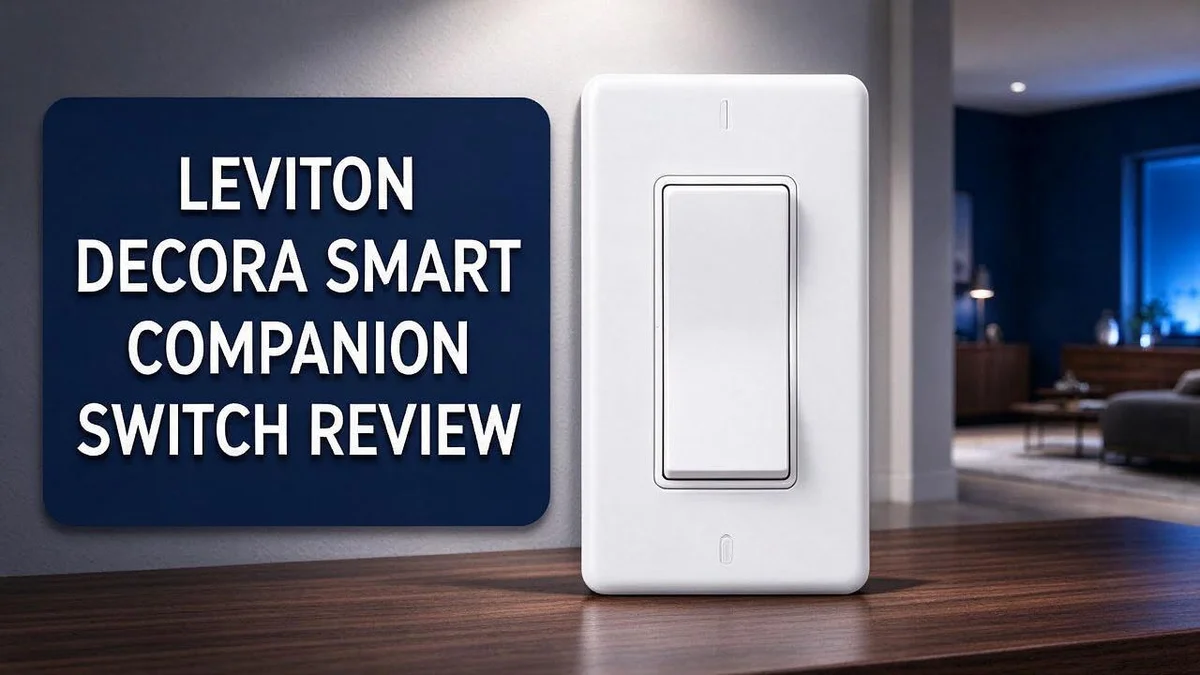
Leviton Decora Smart Companion Switch Review 2026: Complete Guide
Tired of walking across a dark room just to flip a light? A smart switch can make that much easier. The Leviton Decora Smart Companion Switch is built for homes that want more control.
It works in three way setups. You can also expand it to up to nine locations. This gives you flexible control over your lights.
Voice control is a big win. The switch works with Google Home and Alexa. You can also use the app or the switch itself, so everyone in the house can help.
Installation feels easy, even for beginners. Many users describe the setup as simple. In this review, we will look at what this switch does well and where it falls short.
In a Nutshell
- This switch runs on 120VAC power. It fits standard home wiring setups.
- You can control lights in person or through the app. Using both options gives you the most flexibility.
- Expect a slightly thicker profile. It sits deeper in the wall box than a standard switch. Check your box space before you buy.
- Watch for occasional offline issues. Some owners say their smart dimmers drop off the network now and then. A strong wireless network helps prevent this.
- Take care with neutral wires. One forum user reported a reset after splicing neutrals on a Decora Smart dimmer. Read the wiring steps closely before you start.
- Compare it with other options. Popular alternatives include the Lutron Diva Smart Dimmer ELV+ and the non smart Leviton Decora Three Way AC Quiet Rocker Switch. Each choice suits a different home setup.
Installation and Wiring Requirements
No products found.
Before you touch any wires, shut off the power at the breaker. Then use a voltage tester to confirm the circuit is dead. This simple check keeps you safe.
Gather a few simple tools before you start. You need a screwdriver, a voltage tester, wire strippers, and a flashlight. Having everything ready keeps the job moving.
Clear a workspace near the switch. Lay a towel on the floor to catch small screws. This keeps the hardware from getting lost.
Start by looking inside your wall box. Make sure it has enough space for the switch and the extra wires. A crowded box makes the connections hard to manage.
Look for a neutral wire. Many smart switches need a neutral wire to stay powered. If your box has none, plan a different solution before you begin.
Label each wire before you disconnect the old switch. Use small tape flags and a marker. Clear labels save time when you connect the new device.
Take a photo of the current wiring too. It gives you a backup if you forget the layout. Keep the image on your phone.
Know your switch setup type. A single pole setup uses two terminals for the load. A 3 way setup adds traveler wires, so match each wire carefully.
Note which lights share the circuit. Bulbs on the same circuit may flicker during setup. Write down those fixtures so you can test them later.
Check your home network near the switch. A weak signal can cause trouble during setup. Test your phone in that room first.
Fold the wires gently into the box. Pinched wires can strain connections over time. Tuck the neutral and hot wires apart so nothing touches.
Tighten every terminal screw firmly. Loose connections can cause flickering or heat. Give each wire a gentle tug to confirm it holds.
Restore power and test the switch before you attach the wall plate. Run the setup steps in the app while the cover stays off. This lets you fix problems quickly.
Call a licensed electrician if you feel unsure. Safe wiring matters more than saving time. A pro can finish the job with confidence.
Smart Home Compatibility and Voice Control
Voice control is where this switch shines. Once you link it to your assistant app, you can ask for lights by name. Your voice works from the couch, the kitchen, or bed.
Clear names make a big difference. Give each switch a simple room and light name, such as “kitchen ceiling” or “hallway lamp.” Short, unique names help assistants find the right device every time.
Similar names can cause confusion. “Hall light” and “hall lamp” may trip up your assistant. Choose one name for each switch and use it on every device.
Compatibility starts with your ecosystem. Google Home and Alexa both work with this switch. Make sure your speaker or display uses the same account as the switch app before setup.
Routines add real value. You can say “good night” and have several lights dim while other devices settle down. One phrase can trigger multiple actions at once.
A strong home network signal matters too. Weak coverage near the wall box can slow down voice responses. A mesh node or range extender can close that gap.
Shared access keeps everyone in the loop. Family members can join the app so they control the same lights. This works well for households with several adults or teens.
Schedules work alongside voice commands. You can set a light to turn on at sunset, then still change it by voice when plans change. This mix gives you control without extra effort.
Guests can still help themselves. The physical switch works like any normal light switch. Visitors can use the room without learning the app or a voice command.
Keep a short list of phrases taped near the switch. Family members can read them quickly, which makes voice control feel natural from day one.
Test commands from every room. Check each voice command right after installation. Small fixes now save frustration later.
Design, Size and Fit in the Wall Box
The design of this switch looks very familiar. It follows the classic Decora style found in many homes. Most people will recognize it at a glance.
Rocker style matches standard wall plates. Many homeowners can keep their current cover plate. Check the plate opening before you buy anything new.
Measure your switch opening with a ruler. Note the height and width of the old switch. Compare those numbers with the product sheet.
The Decora Smart line lists roughly 2.1 by 1.4 by 4.1 inches.
This size is not confirmed for this exact model. Always check the packaging or manufacturer page first.
Next, look at the mounting screws. They must line up with the threaded holes in your wall box. Most switches use a standard screw spacing. Still, older boxes can shift over time.
Check that the yoke sits flat against the wall. A gap can make the switch look crooked.
Tighten screws evenly. Uneven pressure can bend the frame. Do not overtighten the screws.
Now think about the cover plate. A slim plate hides small gaps well. Wider plates may need extra room. Check whether your plate has enough clearance for the rocker.
Look at the rocker movement too. The paddle should move without rubbing the plate. A tight fit can make the switch feel stiff.
Uneven drywall can leave gaps around the box. Patch those gaps before you mount the plate.
Clean the wall plate edges. Dust and paint bits can keep the plate from sitting flat.
Once the wires are connected, do a quick dry fit. Gently push the switch into the box and check the alignment. A good fit means a flat and even face.
A snug fit protects your switch over time. Loose parts can wiggle and wear down contacts. Taking a few extra minutes now saves trouble later.
Top 3 Alternatives
Lutron Caseta Smart Dimmer

Last update on 2026-09-19 / Affiliate links / Images from Amazon Product Advertising API Some of the links on this website are affiliate links, which means that at no additional cost to you, I earn a commission if you click through and make a purchase. I only recommend products and services that I believe will add value to my readers. Thank you for your support!
The Lutron Caseta Smart Dimmer gives you simple control over your lights. You can use the Lutron app, a remote, or your voice assistant to adjust brightness.
Its wireless design often means you do not need new wiring in most homes. Many people also like the smooth dimming, which works well with LED and CFL bulbs.
TP-Link Kasa Smart Switch


Last update on 2026-10-28 / Affiliate links / Images from Amazon Product Advertising API Some of the links on this website are affiliate links, which means that at no additional cost to you, I earn a commission if you click through and make a purchase. I only recommend products and services that I believe will add value to my readers. Thank you for your support!
The TP-Link Kasa Smart Switch is a strong choice for smart home beginners. It connects to your home network, so you can switch lights on or off from anywhere.
The app lets you create custom schedules and timers. These features help you save energy when you leave home. The switch also works with popular voice assistants like Alexa and Google Assistant.
GE Enbrighten Smart Switch

Last update on 2026-10-28 / Affiliate links / Images from Amazon Product Advertising API Some of the links on this website are affiliate links, which means that at no additional cost to you, I earn a commission if you click through and make a purchase. I only recommend products and services that I believe will add value to my readers. Thank you for your support!
The GE Enbrighten Smart Switch offers a simple option for everyday use. It works with a companion app and supports smart home routines.
You can set away mode to make your home look occupied while you travel. Many users find the setup easy with clear instructions. Its clean design also fits most standard light switch plates.
Reliability and Troubleshooting
Reliability depends on a few simple habits. Some users report that smart dimmers go offline now and then. Most of these cases feel temporary and easy to fix.
Start with the app status. Open your app and check whether the switch shows as online. If it shows offline, turn the breaker off for ten seconds, then turn it back on.
Watch for sudden resets. A forum user reported a reset after neutral splicing on a related Decora Smart dimmer. This is not confirmed for this model, so recheck every wire nut before closing the box.
Give the switch room to breathe. This switch is thicker than a standard switch. Fold the wires neatly so the switch sits flat and does not strain the connections.
Test your bulbs first. Some LED bulbs flicker or buzz on smart switches. Swap in a different bulb to see if the problem follows the bulb or stays with the switch.
Keep firmware current. Updates often fix connection bugs. Install them when the app asks, and keep your phone updated too.
Reset only when needed. A full reset erases the setup, so you must pair the switch again. Try simple fixes first, like rebooting your hub or voice speaker.
Track problems in a simple log. Write down the date, the time, and what happened. Patterns often point to the cause, such as a drop at the same hour each day.
Know when to call support. If the switch keeps failing after these steps, contact Leviton support. Keep your model number and purchase date ready for faster help.
Plan for a clean restart. Keep your home network name, password, and app login written down. This makes a full setup faster if you ever need it.
Stay calm during troubleshooting. Change one thing at a time. This way, you learn which step fixed the issue.
Value for Money
Value often shows up in daily use, not just on a spec sheet. This switch offers more than basic light control. It fits both simple rooms and busy homes.
Flexible wiring is a big plus. The switch works in three way setups. It can also expand to nine locations. That means one light can respond to many switches around your home.
Voice control adds daily convenience. Google Home and Alexa both work with the switch. You can also use the app when you are away from the wall. Those options cut down on trips across the room.
Compare it with other choices. The Lutron Diva Smart Dimmer ELV+ is another option for smart lighting. Meanwhile, the Leviton Decora Three Way AC Quiet Rocker Switch is non smart. It does not offer app or voice control, so it suits people who want no smart features. Each option suits a different style of home.
Other HomeKit compatible Decora style switches also appear on store shelves. Apple users may prefer those if they want a HomeKit setup. Your ecosystem should guide the choice more than any other factor.
Think about your daily habits. Do you use voice commands often? Do you have guests who need simple wall control? Answers to these questions show whether the features matter for you.
The physical switch keeps working like a normal switch. That familiar feel helps everyone in the house, including guests.
Long term use depends on how well the switch fits your lighting plan. Choose features you will use every day, and the switch earns its place in your home.
The Leviton Decora Smart Companion Switch fits households that want flexible control. Match its features to your needs before you decide.
Pros and Cons
Pros
– Setup feels simple for first time users.
– Works from the wall or from your phone.
– Expands to nine switch locations.
– Controls feel intuitive for everyone at home.
– Fits neatly into daily routines without extra steps.
Cons
– Occasional offline moments can frustrate busy households.
– Detailed owner reviews for this exact model are limited.
– Smart features rely on a steady home network.
– Some owners may need extra time to test compatibility.
Who Should Buy It
Not every home needs the same smart lighting plan. This switch suits people who want a practical upgrade for one room or one hallway.
Busy households often benefit most. Family members can still use the wall switch like always. Nobody has to pick up a phone to turn on the lights.
Guests also find it easy. They reach for the switch, flip it, and move on. That simple habit keeps visits relaxed for everyone.
Homes with stairs or long hallways gain the most from two control spots. A three way setup lets you control one light from two places, which helps every day.
Beginners who want a gentle start may like this model too. The setup stays short, and you can grow the system later one room at a time.
Shoppers who need dimming should look elsewhere first. This model works as a switch, so compare the Lutron Diva Smart Dimmer ELV+ if you want brightness control.
Buyers who want no app features can consider the Leviton Decora Three Way AC Quiet Rocker Switch. It keeps the familiar look and skips the smart extras.
Homeowners who like tidy upgrades often feel happy with the result. The switch keeps the room looking clean and familiar, so the change feels calm rather than dramatic.
People with pets or young children may appreciate the simple controls. Wall access stays easy for everyone, even when hands are full.
Renters should ask first. Permission from a landlord comes before any wiring work starts.
Final check before you buy. Look at your wall box and current wiring first. A quick review saves time and keeps the project simple.
Small upgrades add up. Start with the room you use most every day. Then decide whether more switches belong elsewhere in the house, based on how it feels.
Final Verdict
The Leviton Decora Smart Companion Switch earns a solid place in a smart home. It suits some setups better than others. It keeps the classic wall feel while adding remote control. Most people will enjoy it once they know what to expect.
Before you buy, open your wiring box. Look for a neutral wire. That detail tells you how the switch will behave in your space, so a quick check now saves time later.
Think about where you spend your evenings. If you often reach for a light from the couch or bed, the app and voice options will feel natural. If you rarely use your phone, the wall switch alone may do the job well.
Plan for a short learning curve. Your first week may bring a few questions about room names, schedules, and voice commands. These steps are simple, but they do take a little patience.
Consider the switch as one part of a bigger lighting plan. It works best when it supports the way you already move through your home. It does not need to solve every lighting need on its own.
Test the setup in one room first. Start small and watch how the switch performs over several weeks. Real daily use shows more than any product page can.
Keep your expectations balanced. The switch handles everyday on and off tasks with ease. Occasional offline moments can happen, so it may not feel perfect for every household.
Choose a retailer with clear return terms. That gives you room to try the switch in your real home. If it does not match your routine, you can send it back and choose another option.
In short, this switch offers a friendly way to add smart control without a major change to your walls. Match it to your habits, check your wiring, and test it first. You will likely enjoy the result.
Frequently Asked Questions
Does the switch work with voice assistants?
Yes, it works with Google Home and Alexa. Say a command and the light responds. Name each room clearly in your app so your voice commands stay simple.
Is it thicker than a standard switch?
Yes, it has a thicker profile than a regular switch. Check your wall box depth before you buy. A thicker switch may sit a little further out from the wall.
What should I watch for during wiring?
One forum user reported a reset after neutral splicing on a related Decora Smart dimmer. Take photos of your wires before you disconnect anything. Test the switch before you close the wall.
Which switches should I compare?
Look at the Lutron Diva Smart Dimmer ELV+ if you want a dimmer. Consider the Leviton Decora Three Way AC Quiet Rocker Switch if you want no smart features. You can also check other HomeKit compatible Decora style switches before you decide.

Hello everyone my name is Alenya and i am a gadget discovering Enthusiast 🐻🐻